

Your Browsing History
Most customers receive within 4-9 days.

Meet Your Seller



Visit SANOXY Store
FOLLOW
Wireless Ergonomic Gaming Keyboard
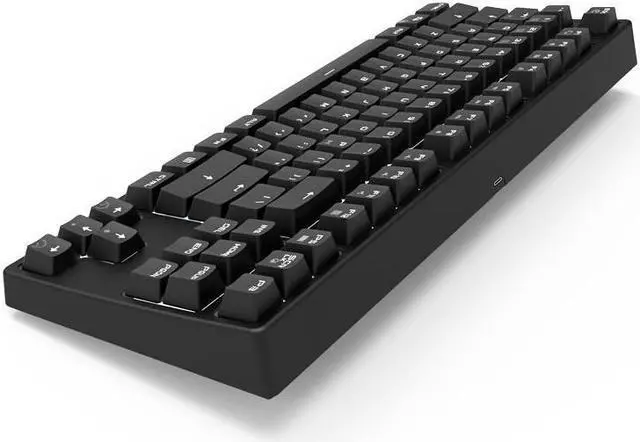
- SANOXY Mechanical Keyboard 87 Keys White LED Backlight Gaming Keyboard, Wired/Wireless BT Keyboard Gaming/Office for iOS Android Windows MacOS and Linux (Blue Switch-Black)
- Supports wireless BT and USB wired dual mode connection.Supports NKRO in wired mode, and 16 keys without conflict in wireless mode. 87 key compact layout, backlit, and with 8 kinds backlit displaying modes for option. Press Fn+ScrLK to switch to. Power saving,
- for MacOS and Windows: This keyboard is Compatible with most operating systems, including Windows XP/Vista/7/8/10, iOS, macOS, Linux, and Android.
Overview
Specs
Reviews

Any questions? Our AI mode will help you find out quickly.
Try me now
Supports 2.4GH z wireless and USB wired dual mode connection. Supports NKRO in wired mode, and 16 keys without conflict in wireless mode. 87 key compact layout, saves more room on your desktop. Pure white backlit, and with 8 kinds backlit displaying modes for option. Press Fn+ScrLK to switch to. Power saving, the backlit automatically turns off after 1min inactivity, keyboard turns into sleep mode after 3mins no operation.
Blue Switch: Tactile and clicky with a bump feel. It is suitable for typing. Blue switch is louder than other mechanical switches when typing. Wireless & Wired Dual Mode White Backlit Mechanical Gaming Keyboard Bluetooth connection method
Reminder: Bluetooth pairing is required for the first use of Bluetooth mode, wired /
Bluetooth mode switching method: FN + P indicator flashes to indicate successful switching.
Pairing method:
1. Make sure that it is currently in
Bluetooth mode (judgment method: Fn + Q, indicator flashes-Bluetooth mode; indicator does not flash-wired mode)
2.
Bluetooth pairing: press and hold Hold down the P key while holding down Fn, release it when the P key flashes, and add (search) a Bluetooth keyboard pairing connection named RK bluebooth keyboard on the computer. After successful pairing, the P key stops flashing
3. Multi-group Bluetooth pairing method, in the first step, Fn + Q / W / E can be used to pair three groups of Bluetooth devices.
Blue Switch: Tactile and clicky with a bump feel. It is suitable for typing. Blue switch is louder than other mechanical switches when typing. Wireless & Wired Dual Mode White Backlit Mechanical Gaming Keyboard Bluetooth connection method
Reminder: Bluetooth pairing is required for the first use of Bluetooth mode, wired /
Bluetooth mode switching method: FN + P indicator flashes to indicate successful switching.
Pairing method:
1. Make sure that it is currently in
Bluetooth mode (judgment method: Fn + Q, indicator flashes-Bluetooth mode; indicator does not flash-wired mode)
2.
Bluetooth pairing: press and hold Hold down the P key while holding down Fn, release it when the P key flashes, and add (search) a Bluetooth keyboard pairing connection named RK bluebooth keyboard on the computer. After successful pairing, the P key stops flashing
3. Multi-group Bluetooth pairing method, in the first step, Fn + Q / W / E can be used to pair three groups of Bluetooth devices.
Warranty & Returns
Warranty, Returns, And Additional Information
Warranty
- Please contact the Seller directly for warranty information. Warranty information may also be found on the Manufacturer's website.
- CONTACT
Return Policies
- Return for refund within: 30 days
- Return for replacement within: 60 days
- This item is covered by SANOXY Return Policy
Manufacturer Contact Info
- For a directory of all our manufacturers, please click below.
- Manufacturers Directory
LOADING...