• $35.99
  • Free 30-day Returns
  • Sold by "Deal Mall"

    Shipped by "Deal Mall"

    Price alert
    Shop it at NeweggBusiness.

    Meet Your Seller

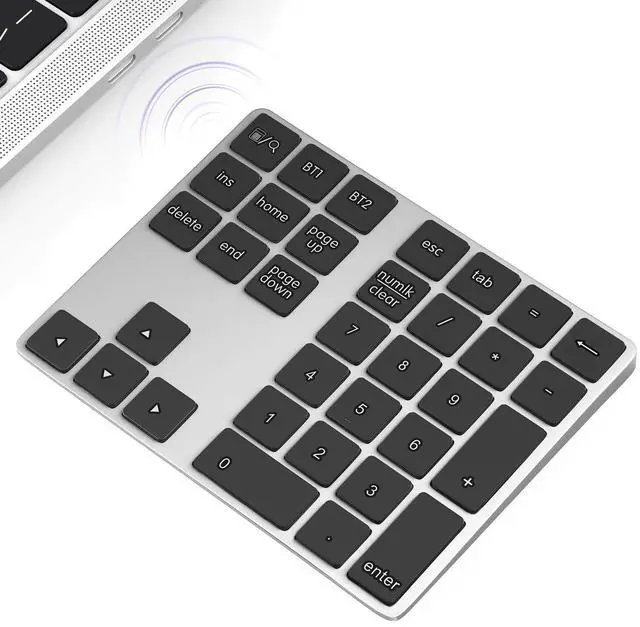
    Bluetooth Number Keypad, Wireless 10 Keys Number Pad for Laptop, 34 Keys Rechargeable Numeric Numpad Key Pad Extensions Keyboard for Chromebook Notebook MacBook

    • 1.Bluetooth Number Pad: Foloda Bluetooth Marco number pad calculator support multi-device connection. You can connect 2 devices at the same time ,but you can only use one. Exchange the Bluetooth device via BT1/BT2.
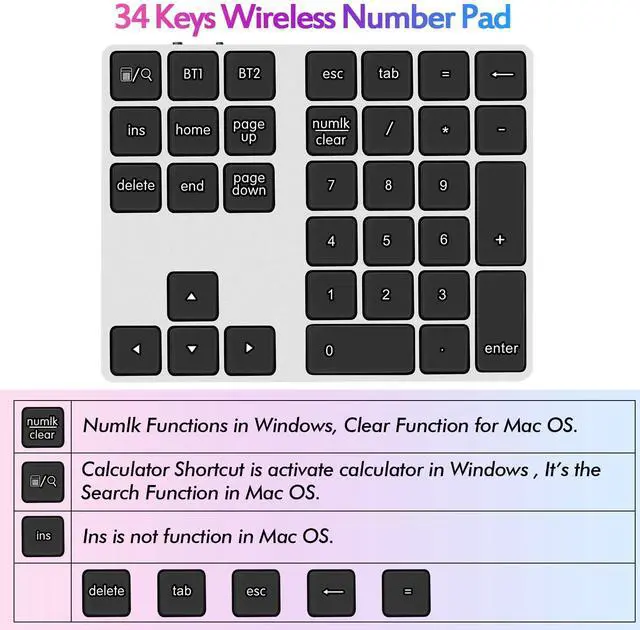
    • 2.Bluetooth Number Pad for Laptop: Foloda mini 10 Keys number keyboard supports shortcut, search, NumLock, ESC, backspace, delete, tab, ins, page up/down. With shortcut keys, you can start computer calculator directly (in Windows). Numlock allows you to move the cursor without a mouse. NOTE: The calculator shortcut activates the calculator in Windows , but the search function in Mac OS. Ins is not functioning in Mac OS. Numlock is clear the calculator in Mac OS.
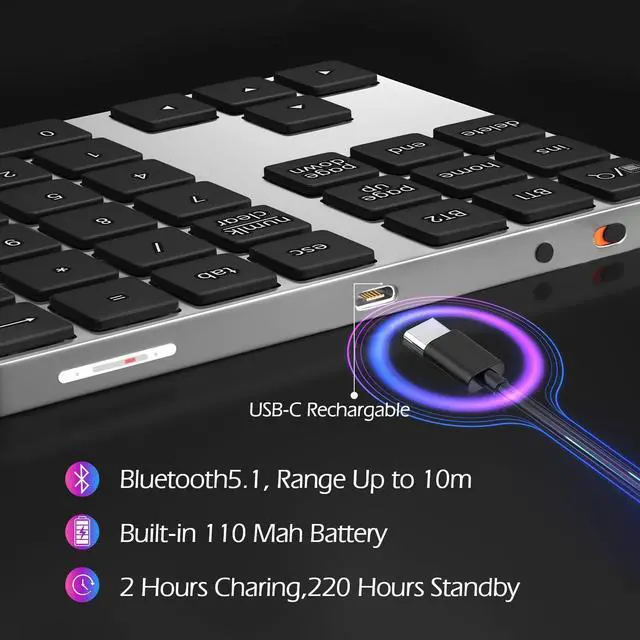
    • 3.Bluetooth Number Keypad : Wireless 10 keys digit keypad support Bluetooth 5.1, dual-device connection ,no delays and dropouts, fast data transmission, range up to 10 meters. Foloda Bluetooth Numpad d is a perfect add-on extension to your laptop and compact keyboard for financial accountants, students, office specialists, and excel sheet data entry.
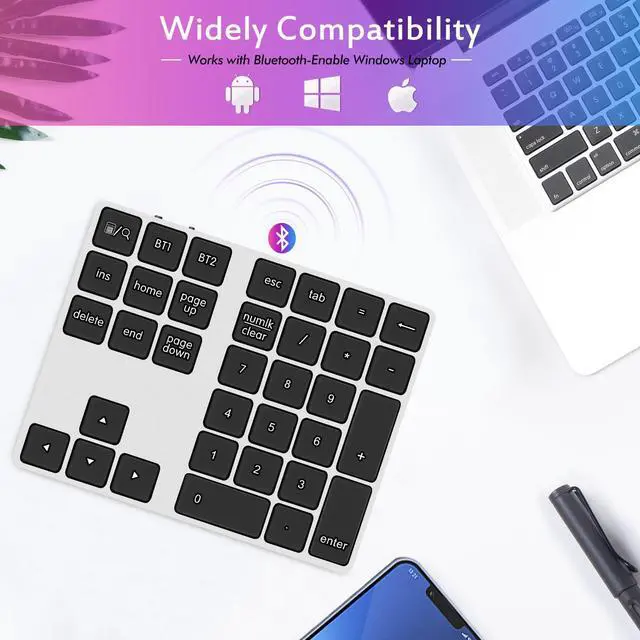
    • 4.Bluetooth Laptop Accessories: Foloda wireless Bluetooth Keypad can work with Windows 11/10/8, Surface, Laptop, Desktop, Notebook, Android Tablet. The external numberpad is an ideal choices for accountants working on Excel, teachers entering grades, office worker for data Input, etc. Note: MAC OS / IOS devices can not use all the functions.
    +
    +
    Overview
    Specs
    Reviews
    avatar

    Any questions? Our AI beta will help you find out quickly.

    Rechargable 34 Keys Bluetooth Number Pad for Laptop (Windows , Mac OS)

    number pad

    Bluetooth Number Pad for Laptop

    Important Tips for Hotkeys:

    1. The Calculator Shortcut is to activate the calculator in Windows. It's Search Function in Mac OS.

    2. The Numelk/clear is Numlock Function in Windows, Clear Function for Mac OS.

    3. For Mac OS, "Ins" is not function.

    Switching Between Devices

    Multi-Pairing Bluetooth Keypad can pair up to 2 different Bluetooth devices, you can switch between your paired devices by selecting appropriate assigned the key "BT1" or "BT2".

    It will take 2-4 seconds.

    Please Turn "Numlock" on again if the number keys can not work after switching.

    Bluetooth Number Keypad for Laptop

    numeric keypad

    Rechargeable Number Pad

    The Number Pad built-in 110m ah Lithium Battery.

    Type-C rechargeable is also friendly for the environment.

    number for laptop

    Bluetooth 5.1 Connection, Up to 10m

    Wireless 10 Keys Digit Keypad supports Bluetooth 5.1, dual-device connection, no Delays and Dropouts, Fast Data Transmission, Range up to 10 Meters.

    numpad

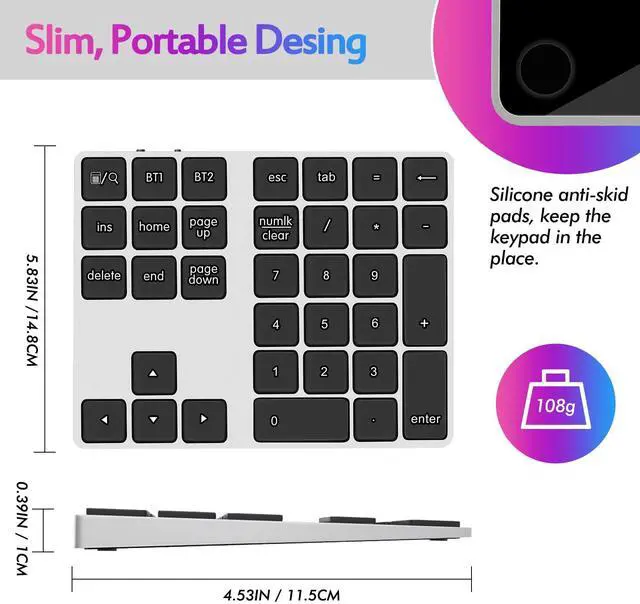
    Ergonomic design

    The Ergonomic design help avoid wrist discomfort.

    The Rubber pad at the bottom is anti-slip to offer a stable input experience.

    Extensions Keyboard Laptop Accessories

    10 key pad

    Lightweith and Portable

    Ten Key Marcopad only 108 g/0.24 lb, 6.1*4.92*1.18 inches; Easily put this Travel Attachment Num Pad into your Laptop Bag, Backpack, Suitcase, or even Pockets without Taking Space.

    wireless numer pad

    Wide adaptability

    The Bluetooth number keypad can work with Windows, Mac OS(Partial functional limitations), and Android.

    number keypad

    Mute

    Quiet keys provide a comfortable working atmosphere.

    Wireless Bluetooth Numeric Keypad for Laptop

    bluetooth number pad

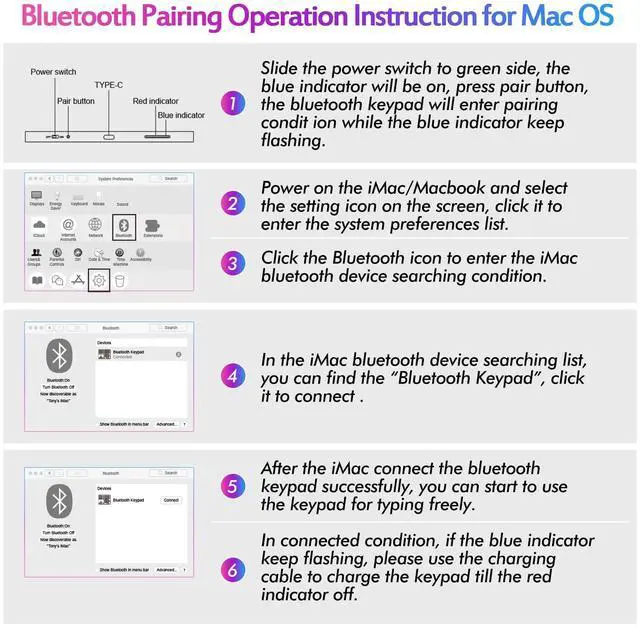
    Bluetooth Pairing Operation Instruction for Mac OS

    Bluetooth Numpad for Laptop

    Wireless Number pad

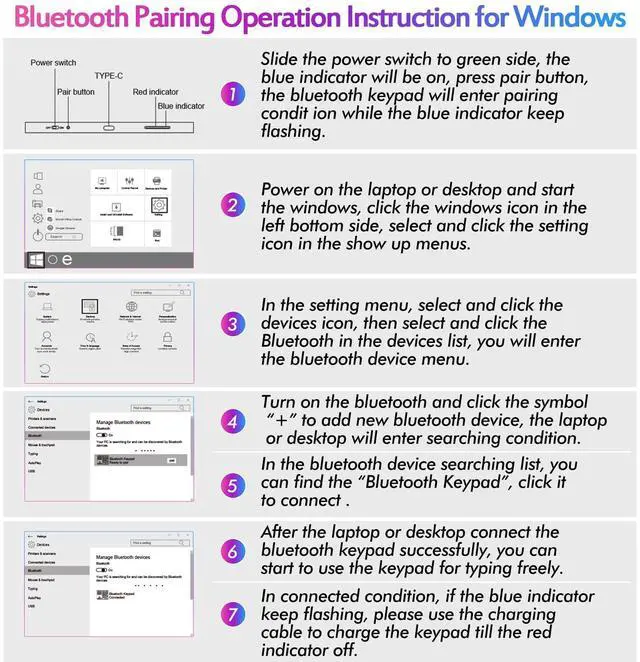
    Bluetooth Pairing Operation Instruction for Windows

    Rechargable 34 Keys Bluetooth Number Pad for Laptop (Windows , Mac OS)

    number pad

    Bluetooth Number Pad for Laptop

    Important Tips for Hotkeys:

    1. The Calculator Shortcut is to activate the calculator in Windows. It's Search Function in Mac OS.

    2. The Numelk/clear is Numlock Function in Windows, Clear Function for Mac OS.

    3. For Mac OS, "Ins" is not function.

    Switching Between Devices

    Multi-Pairing Bluetooth Keypad can pair up to 2 different Bluetooth devices, you can switch between your paired devices by selecting appropriate assigned the key "BT1" or "BT2".

    It will take 2-4 seconds.

    Please Turn "Numlock" on again if the number keys can not work after switching.

    Bluetooth Number Keypad for Laptop

    numeric keypad

    Rechargeable Number Pad

    The Number Pad built-in 110m ah Lithium Battery.

    Type-C rechargeable is also friendly for the environment.

    number for laptop

    Bluetooth 5.1 Connection, Up to 10m

    Wireless 10 Keys Digit Keypad supports Bluetooth 5.1, dual-device connection, no Delays and Dropouts, Fast Data Transmission, Range up to 10 Meters.

    numpad

    Ergonomic design

    The Ergonomic design help avoid wrist discomfort.

    The Rubber pad at the bottom is anti-slip to offer a stable input experience.

    Extensions Keyboard Laptop Accessories

    10 key pad

    Lightweith and Portable

    Ten Key Marcopad only 108 g/0.24 lb, 6.1*4.92*1.18 inches; Easily put this Travel Attachment Num Pad into your Laptop Bag, Backpack, Suitcase, or even Pockets without Taking Space.

    wireless numer pad

    Wide adaptability

    The Bluetooth number keypad can work with Windows, Mac OS(Partial functional limitations), and Android.

    number keypad

    Mute

    Quiet keys provide a comfortable working atmosphere.

    Wireless Bluetooth Numeric Keypad for Laptop

    bluetooth number pad

    Bluetooth Pairing Operation Instruction for Mac OS

    Bluetooth Numpad for Laptop

    Wireless Number pad

    Bluetooth Pairing Operation Instruction for Windows

    Bluetooth Number Keypad, Wireless 10 Keys Number Pad for Laptop, 34 Keys Rechargeable Numeric Numpad Key Pad Extensions Keyboard for Chromebook Notebook MacBook

    Warranty & Returns

    Warranty, Returns, And Additional Information

    Warranty

    • Please contact the Seller directly for warranty information. Warranty information may also be found on the Manufacturer's website.
    • CONTACT

    Return Policies

    Manufacturer Contact Info

    LOADING...