Your Browsing History
- Free 30-day Returns
$179.99
Ships from China.
Meet Your Seller
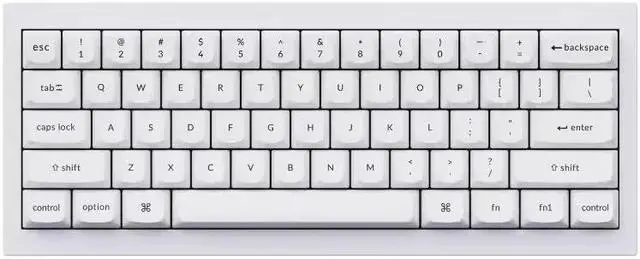
Wired Custom Mechanical Keyboard, QMK/VIA Programmable Macro, Full Aluminum, Hot-Swappable Gateron G Pro Red Switch, 60% Layout Double Gasket Compatible with Mac and Windows - White
- The Q4 is a mini custom all-metal keyboard ideal for a variety of situations and will upgrade your typing experience.
- With full QMK and VIA support, you can easily program and remap each key on the keyboard. The open-source firmware means endless possibilities for keyboard layouts, shortcuts, backlight effects, and more.
- You can hot-swap the Keychron Q4 with almost all of the 3pin and 5pin MX style mechanical switches on the market (including Cherry, Gateron, Kailh, Panda, etc.) without soldering required. while the pre-installed Gateron G Pro mechanical linear red switch providing unrivaled tactile responsiveness with up to 50 million keystroke lifespan.
- The Double Gasket Design is a new innovative structure in the industry. In addition to the gaskets on the plates, we added silicone pads between the top and bottom cases to significantly reduce the sound resonance between the metals and reduce the noise of the impacted metals.
+
+
Overview
Specs
Reviews
Any questions? Our AI beta will help you find out quickly.
Try me now
Keychron Q4 QMK Custom Mechanical Keyboard
The Q4 is a mini custom all-metal keyboard ideal for a variety of situations and will upgrade your typing experience. The entire metal body is crafted with 6063 aluminum that is processed through CNC machined, polished, anodized, sandblasted, and undergoes 24 more manufacturing stages to make this solid metal piece of art that is the Q4.
The Q4 is a mini custom all-metal keyboard ideal for a variety of situations and will upgrade your typing experience.
With full QMK and VIA support, you can easily program and remap each key.
The Double Gasket Design allows extra flexibility and improves the overall typing sound.
A powerful ultra-low-power MCU Arm structure with 128K flash, plus up to 1000 Hz polling rate makes latency non-existent for the game.
Program Q4 with QMK & VIA
QMK/VIA literally means endless possibilities for a fluid workflow. Simply connect the Q4 to your device with a cable, import the Q4 keymap JSON file into the VIA software, drag and drop your favorite keys or macro commands to remap any key you want on macOS, Windows, or Linux operating systems, e. g.: create a macro command of a screenshot on macOS. Check our user guide or user manual for more instructions.
To get started,
please follow the steps: download the appropriate keymap JSON file below, open VIA, turn on "Show Design tab" on "Settings" tab, and drag the JSON file into the Design tab on VIA to get the Q4 keymap working on VIA. Since the VIA code for the Q4 is still awaiting approval from Github, it is not yet automatically recognized, you will need to manually download and enter the Q4 keymap.

The Q4 is a mini custom all-metal keyboard ideal for a variety of situations and will upgrade your typing experience. The entire metal body is crafted with 6063 aluminum that is processed through CNC machined, polished, anodized, sandblasted, and undergoes 24 more manufacturing stages to make this solid metal piece of art that is the Q4.
The Q4 is a mini custom all-metal keyboard ideal for a variety of situations and will upgrade your typing experience.
With full QMK and VIA support, you can easily program and remap each key.
The Double Gasket Design allows extra flexibility and improves the overall typing sound.
A powerful ultra-low-power MCU Arm structure with 128K flash, plus up to 1000 Hz polling rate makes latency non-existent for the game.
Program Q4 with QMK & VIA
QMK/VIA literally means endless possibilities for a fluid workflow. Simply connect the Q4 to your device with a cable, import the Q4 keymap JSON file into the VIA software, drag and drop your favorite keys or macro commands to remap any key you want on macOS, Windows, or Linux operating systems, e. g.: create a macro command of a screenshot on macOS. Check our user guide or user manual for more instructions.
To get started,
please follow the steps: download the appropriate keymap JSON file below, open VIA, turn on "Show Design tab" on "Settings" tab, and drag the JSON file into the Design tab on VIA to get the Q4 keymap working on VIA. Since the VIA code for the Q4 is still awaiting approval from Github, it is not yet automatically recognized, you will need to manually download and enter the Q4 keymap.
Warranty & Returns
Warranty, Returns, And Additional Information
Warranty
- Please contact the Seller directly for warranty information. Warranty information may also be found on the Manufacturer's website.
- CONTACT
Return Policies
- Return for refund within: 30 days
- Return for replacement within: 30 days
- This item is covered by B-IN Electronics Return Policy
Manufacturer Contact Info
- For a directory of all our manufacturers, please click below.
- Manufacturers Directory
LOADING...