

Your Browsing History

Meet Your Seller


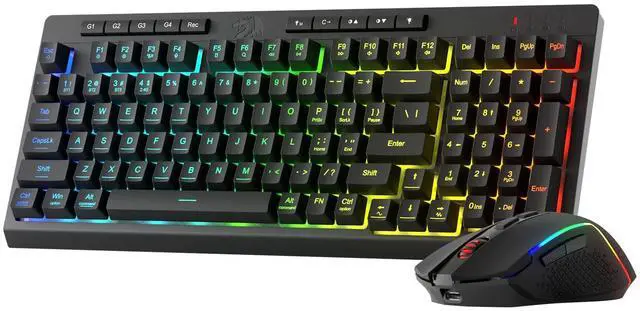

S142 Combo, K515 PRO Membrane Gaming Keyboard, M693 4800 DPI Mouse | 4 On-the-Fly Combos, No Software Needed, 0-Delay Cordless Both Devices, 7-Button Precision, Shared Dongle, On-Board CPI Mice
- 4 Onboard Macro Keys, No Software Needed Record and reassign G1-G4 instantly for in-game combos or shortcuts, with no drivers or installation required to begin. Cordless Placement for Both Devices The 2.4GHz wireless keyboard and mouse allow you to position them anywhere on your desk, free from cable mess or range constraints. 26 Anti-Ghosting Keys, Dedicated Media Controls Press as many as 26 keys at the same time without input conflicts, and manage your music with play, pause, or skip functions directly on the keyboard. One Shared Dongle for Both Devices A single 2.4GHz receiver links the keyboard and mouse together, so you only need one USB port and won't confuse dongles. Pro Software Controls Both Devices Customize lighting effects and macros for the keyboard, and adjust DPI and button assignments for the mouse, keeping your entire setup synchronized
+
+
Overview
Specs
Reviews

Any questions? Our AI mode will help you find out quickly.
Try me now
4 Onboard Macro Keys, No Software Needed Record and reassign G1-G4 instantly for in-game combos or shortcuts, with no drivers or installation required to begin. Cordless Placement for Both Devices The 2.4GHz wireless keyboard and mouse allow you to position them anywhere on your desk, free from cable mess or range constraints. 26 Anti-Ghosting Keys, Dedicated Media Controls Press as many as 26 keys at the same time without input conflicts, and manage your music with play, pause, or skip functions directly on the keyboard. One Shared Dongle for Both Devices A single 2.4GHz receiver links the keyboard and mouse together, so you only need one USB port and won't confuse dongles. Pro Software Controls Both Devices Customize lighting effects and macros for the keyboard, and adjust DPI and button assignments for the mouse, keeping your entire setup synchronized
Warranty & Returns
Warranty, Returns, And Additional Information
Warranty
- Please contact the Seller directly for warranty information. Warranty information may also be found on the Manufacturer's website.
- CONTACT
Return Policies
- Return for refund within: 30 days
- Return for replacement within: 30 days
- This item is covered by JadeEssence Shop Return Policy
Manufacturer Contact Info
- For a directory of all our manufacturers, please click below.
- Manufacturers Directory
LOADING...