

Your Browsing History

Meet Your Seller


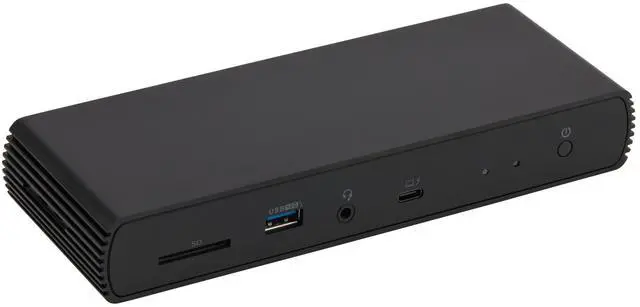

Thunderbolt 4 Pro Docking Station, Dual 4K Monitor Support, 8K Display, 2xTBT4, 1xHDMI2.1, 3xUSB A 3.1, RJ45 Ethernet, Black, 7.86 x 2.95 x 1.23 inches
Limited time offer, ends 09/14 By Jeronrtion
- Professional docking station for extra device connectivity and charging requirements. Note: Utilize the supplied black Thunderbolt 4 cable to link the Thunderbolt 4 port on the docking station's front to your laptop. Provides Thunderbolt and USB4 functionality. Enables dual 4K@60Hz displays through two Thunderbolt 4 USB-C ports. Note: Confirm your laptop's Thunderbolt ports allow dual 4K@60Hz output. Make sure your graphics card is updated with the newest drivers. Check that your monitors are capable of 4K@60Hz display. Employ high-quality Thunderbolt 4 or USB4 cables for linking (not included). Do not connect the HDMI port first to avoid resolution reduction from bandwidth constraints. Supports dynamic PD profile up to 96W for charging devices. Note: Review the laptop manufacturer's power supply details prior to use. Ports might not work correctly if laptop power needs surpass 96W, as the dock will trigger overload protection and lead to disconnection. HDMI 2.1 output supports up to 8K30Hz; Ethernet RJ45 port supports up to 2.5Gbps (around 300 Megabytes per second). Note: Thunderbolt bandwidth is distributed among devices, so display resolution and LAN speed could drop with several high-bandwidth connections. When operating at full capacity, the docking station may reach 122°F/50°C, which is typical for these products. Compact design fits conveniently into a laptop bag or carry-on luggage. Compatible with laptops running Windows 10 OS or later which have a Thunderbolt 4 port
+
+
Overview
Specs
Reviews

Any questions? Our AI mode will help you find out quickly.
Try me now
Professional docking station for extra device connectivity and charging requirements. Note: Utilize the supplied black Thunderbolt 4 cable to link the Thunderbolt 4 port on the docking station's front to your laptop. Provides Thunderbolt and USB4 functionality. Enables dual 4K@60Hz displays through two Thunderbolt 4 USB-C ports. Note: Confirm your laptop's Thunderbolt ports allow dual 4K@60Hz output. Make sure your graphics card is updated with the newest drivers. Check that your monitors are capable of 4K@60Hz display. Employ high-quality Thunderbolt 4 or USB4 cables for linking (not included). Do not connect the HDMI port first to avoid resolution reduction from bandwidth constraints. Supports dynamic PD profile up to 96W for charging devices. Note: Review the laptop manufacturer's power supply details prior to use. Ports might not work correctly if laptop power needs surpass 96W, as the dock will trigger overload protection and lead to disconnection. HDMI 2.1 output supports up to 8K30Hz; Ethernet RJ45 port supports up to 2.5Gbps (around 300 Megabytes per second). Note: Thunderbolt bandwidth is distributed among devices, so display resolution and LAN speed could drop with several high-bandwidth connections. When operating at full capacity, the docking station may reach 122°F/50°C, which is typical for these products. Compact design fits conveniently into a laptop bag or carry-on luggage. Compatible with laptops running Windows 10 OS or later which have a Thunderbolt 4 port, and non-M1/M2 chip MacBooks running macOS 11 (Big Sur) or later. Backwards compatible with Thunderbolt 3 laptops, but with limited functionality (e.g., does not support dual display). Not compatible with Linux or Chrome OS laptops, and M1/M2 chip MacBooks running macOS 10.16 or earlier. What's Included: Thunderbolt 4 dock, Thunderbolt 4 cable, power adapter, and Quick Setup Guide
Warranty & Returns
Warranty, Returns, And Additional Information
Warranty
- Please contact the Seller directly for warranty information. Warranty information may also be found on the Manufacturer's website.
- CONTACT
Return Policies
- Return for refund within: 30 days
- Return for replacement within: 30 days
- This item is covered by Jeronrtion Return Policy
Manufacturer Contact Info
- For a directory of all our manufacturers, please click below.
- Manufacturers Directory
LOADING...