




 here!
I’m your shopping assistant for PC builds, upgrades, and everything tech.
Got questions? Ask away!
Start a conversation
here!
I’m your shopping assistant for PC builds, upgrades, and everything tech.
Got questions? Ask away!
Start a conversationShipped by Newegg
 Hot Seller
 Top Rated







Any questions? Ask CelesteSM will help you find out quickly.
Created For Working On The Go
||Comfortable & Easy on Your Eyes
|Natural Low Blue Light display without affecting color performance
Lenovo Natural Low Blue Light Mode VS Conventional Blue Filter Modemance
|Enjoyable Viewing Experience
|100% sRGB, 1500:1 provide crystal-clear, consistent color
72% NTSC VS 100% sRGB
|Wide Viewing Area
|2240 x 1400 provides 1.5 times more viewing pixels than FHD
|Better View from Any Angle
|Wide-angle viewing IPS screen delivers excellent visuals from all directions
|Portable Ease Everyday
|Feather-light (600 g net weight) and slim design (4.6 mm head thickness) for effortless carrying.
|Sustainable Development
|This monitor has been made with sustainable materials including 85% recycled plastics with post-consumer plastic. And it is packed with sustainable paper pulp that is good for the environment. The monitor also meets the latest environmental standards.
| |o
||Tilt : 0°~90°
||Lift : Up to 11 mm
||o
| Extend Premier Support to Your ThinkVision Monitors|Bring your ThinkVision Monitors under the same trusted Premier Support coverage* ensuring your entire setup is backed by 24/7 expert service and faster resolutions, with priority Advanced Exchange if your monitor needs replacement.
With the same dedicated, award-winning support team, adding Premier Support for Monitors means fewer support gaps, less downtime, and a seamless experience across your devices.
Upgrade your service coverage today and keep your business moving without interruptions. Thats the Premier Difference
*Premier Support for Monitors is available in select markets.
|We want to ensure your holiday shopping this year is hassle-free. That’s why we’re automatically extending our return policies on almost every product! For purchases placed between November 1st, 2026 and December 31, 2026 you will have until January 31, 2027 to return your product.
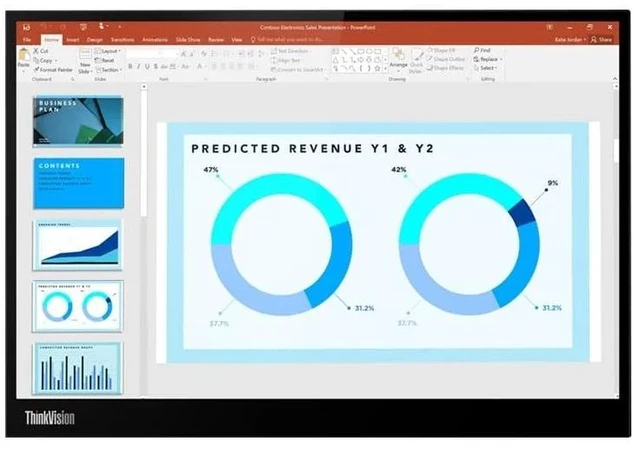
The Lenovo ThinkVision M14d is a 14-inch 2.2K IPS portable monitor for hybrid workers and travelers who want a sharper second screen, with 2240 × 1400 resolution, a 16:10 workspace, and dual USB-C connectivity with power pass-through.
| Attribute | Value |
|---|---|
| Best For | Mobile work setups needing a portable 14-inch USB-C second display |
| Panel And Resolution | 14-inch IPS LCD with a native resolution of 2240 × 1400 and a 16:10 aspect ratio; anti-glare finish |
| Ports And Connectivity | USB Type-C connectivity |
| Portability | Portable design; listed item weight is 3.8 pounds |
| Model Identifiers | Lenovo ThinkVision, model and part number 63AAUAR6UZ |
Q: Lenovo ThinkVision M14d vs. M14: which is better for a sharper travel workspace?
A: Choose the ThinkVision M14d for its 14-inch 2240 × 1400, 16:10 display, which offers more resolution and vertical workspace than the M14’s 1920 × 1080, 16:9 screen. Both are lightweight 14-inch portable monitors, so the M14d is the fit when added workspace and detail are the priority.([psref.lenovo.com](https://psref.lenovo.com/syspool/Sys/PDF/ThinkVision/ThinkVision_M14d/ThinkVision_M14d_Spec.pdf?v=c9cd525e-ed6e-4ad9-a486-006e75e653cf))
Q: Should I get the ThinkVision M14d or M14t Gen 2 for work on the go?
A: Both have a 14-inch 2240 × 1400, 16:10 display with 100% sRGB coverage. Choose the M14d for a lighter setup at approximately 0.6 kg; choose the M14t Gen 2 when 10-point touch and pen input are useful to your workflow.([psref.lenovo.com](https://psref.lenovo.com/syspool/Sys/PDF/ThinkVision/ThinkVision_M14d/ThinkVision_M14d_Spec.pdf?v=c9cd525e-ed6e-4ad9-a486-006e75e653cf))
Q: ThinkVision M14d vs. original M14t: which should I choose for a second screen?
A: Choose the M14d for sharper text and more vertical workspace: it has a 2240 × 1400, 16:10 display, compared with the original M14t’s 1920 × 1080 display. The original M14t is the touch-focused option, with 10-point touch; the M14d suits a productivity setup centered on display space and detail.([psref.lenovo.com](https://psref.lenovo.com/syspool/Sys/PDF/ThinkVision/ThinkVision_M14d/ThinkVision_M14d_Spec.pdf?v=c9cd525e-ed6e-4ad9-a486-006e75e653cf))
Q: Is the ThinkVision M14d a good portable second screen for travel and work?
A: It is suited to mobile productivity if you want a lightweight second display for documents, spreadsheets, and multitasking. It weighs about 1.3 lb and has a 14-inch 2240 × 1400 IPS screen with a 16:10 aspect ratio. It needs a connected computer or compatible device to display content.
Q: Will the ThinkVision M14d work with my laptop over USB-C?
A: It can connect over USB-C when the laptop’s USB-C port supports DisplayPort Alt Mode video output. Check the laptop’s port specifications before buying; a USB-C connector alone does not guarantee video support.
Q: Can I charge my laptop while using the ThinkVision M14d?
A: The M14d supports USB-C power pass-through, so it can power the monitor and pass power to a connected laptop when used with a suitable USB-C power source. The laptop, charger, and connection must support the required power delivery.
Q: Can the ThinkVision M14d work by itself without a computer?
A: No. It is a monitor, not a standalone device: it needs a connected computer or other compatible video source to show content.
Q: Is the ThinkVision M14d worth paying more for than the M14?
A: It may be worth the extra cost if you want the M14d’s 2240 × 1400 resolution and 16:10 screen. If those differences are not important to you, Reddit discussions suggest comparing the actual prices before choosing; users have raised concerns about the M14d’s price premium.
Q: Will the M14d work with a device that only has HDMI?
A: The M14d uses USB-C for video, so check that your device supports USB-C DisplayPort Alt Mode. It has no native HDMI input; a basic USB-C-to-HDMI adapter may not provide a compatible video signal.
Q: Is the M14d a good portable second screen for work?
A: It is suited to mobile productivity if you want a compact second display: it has a 14-inch, 2240 × 1400, 16:10 screen and weighs about 1.3 lb. Reddit users describe using it as an additional monitor, but it still requires a compatible USB-C video connection.


 Lenovo

