



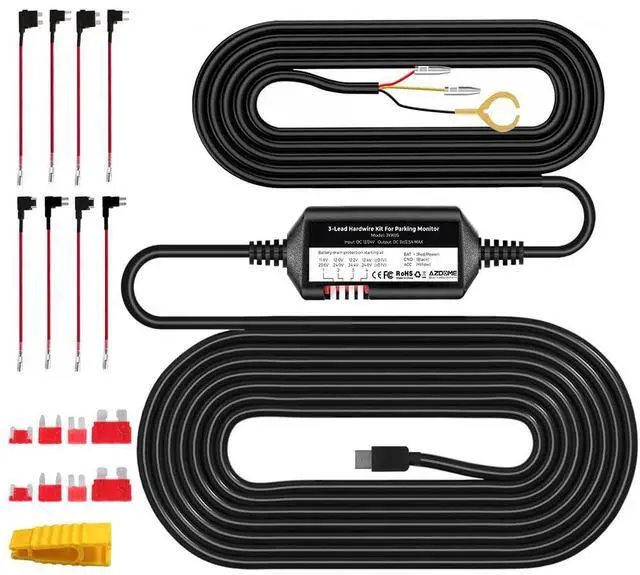
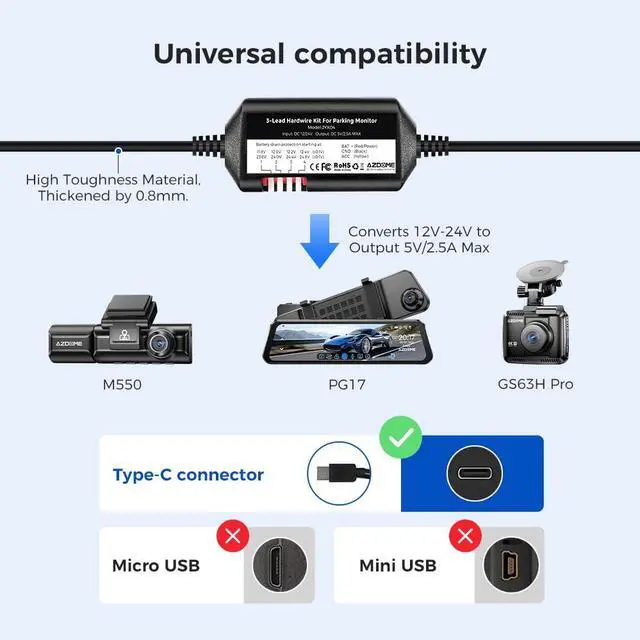



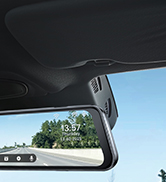
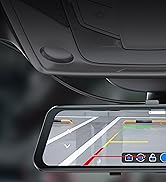




The AZDOME 3-Lead Hardwire Kit is a power management device that provides power to your dashcam from your car's battery via fuse box to keep your dashcam continuously running even after your engine is turned off to utilize the 24-hour Parking Monitor feature. Automatically detects voltage input whether your vehicle is running DC 12V or 24V. It is compatible with most dash cameras available in the market with a Type-C USB power connector.
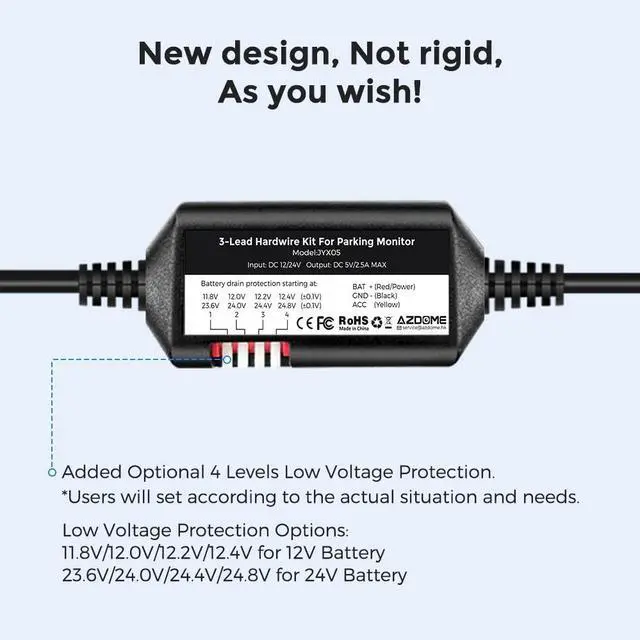
The Hardwire Kit will monitor your voltage status and cut-off the power to the dashcam if the voltage drops below the con?gured value more than 8 seconds. And reserves enough power so you can start your car for the next time. You have four different con?guration choices that you can select when you want the power to be disconnected to the dash cam when the battery’s voltage reaches a certain level.
Make sure to test and identify the minimum necessary battery voltage you will need to start your car for the next time before you set to the lowest setting. We recommend that you start with the highest setting, and then test and press only one voltage option in sequence to ?nd the suitable battery voltage that will give you enough battery power left over to start your car for the next time.
Four Options of Low Voltage Protection:
- For 12V Battery: 11.8V 12.0V 12.2V 12.4V
- For 24V Battery: 23.6V 24.0V 24.4V 24.8V
Note: If you press at the same time to select 2 or more options, or do not select the voltage option, this default voltage cut-off is 11.8VDC for a 12VDC battery and 23.6VDC for a 24VDC battery. 12.2V or 24.4V recommended for most users in general driving conditions.
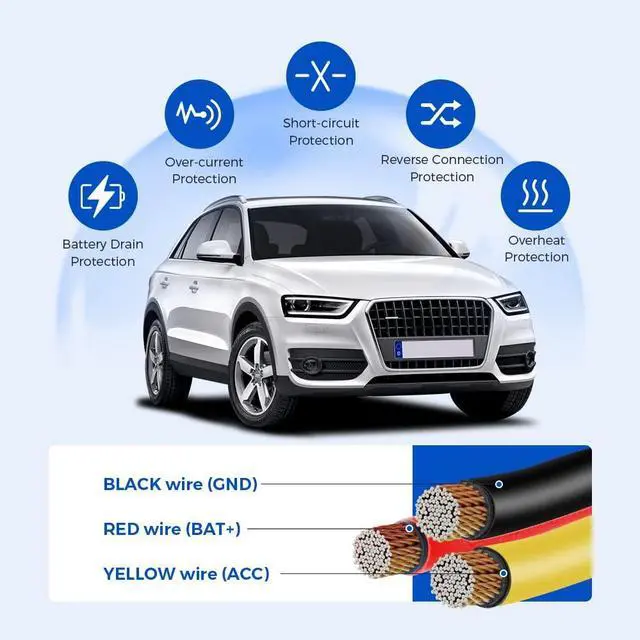
- Reverse connect protection
- Short circuit protection
- Overload protection
- Overtemperature protection (protection circuit over 130?, return to normal when it drops to 90?).
- Total Cable Length: 3.5 Meters (input 0.8 meter, output 2.7 meters)
- Output Connector: Type-C USB plug, DC 5V, 2.5A
- Working temperature: -20? to 90?
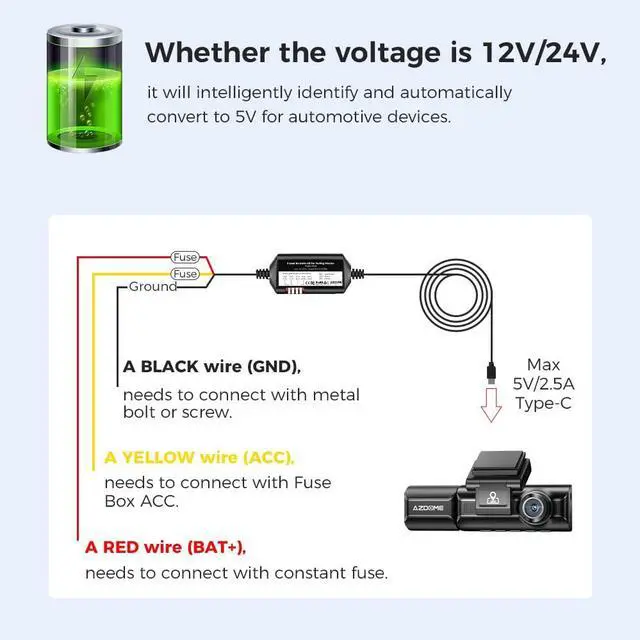
Hard-wire kits, there are 3 wires that need to be connected:
- A RED wire (BAT+), needs to connect with constant fuse, which can provide power to dash cam even when the vehicle is off.
- A YELLOW wire (ACC), needs to connect with Fuse Box ACC, which can make the dash cam auto power on&off when the vehicle is on&off.
- A BLACK wire (GND), needs to connect with metal bolt or screw, which can prevent electric shock.
NOTE:
1. The Parking Mode only works on dash cam that have the function of detecting ACC, this will make your camera record based on your camera’s parking mode setting.
2. Always refer to the vehicle owner’s manual to avoid fuse slots that could pertain to important safety features within your vehicle. For example, avoid fuses that controls airbags, stability control programs, etc.
Fuses that control certain elements such as the radio, garage door opener, sunroof, etc. are usually safe to use.
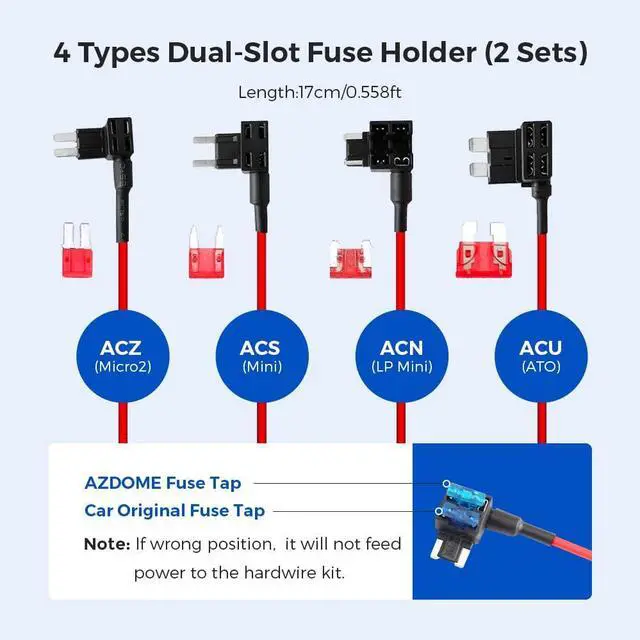
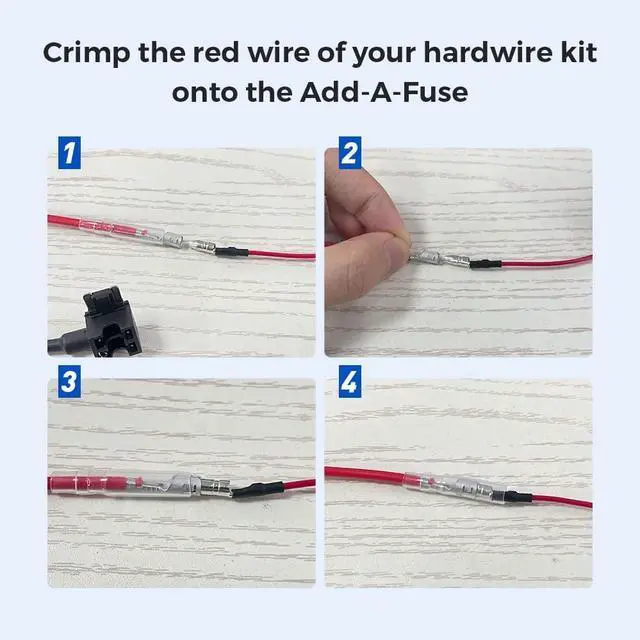
3. Fuse sizes and the type of Fuse Taps vary depending on your vehicle, please check your Fuse Box to see what type of fuse tap your vehicle requires. There are 4 variations of the add-a-fuse that we carry: ACZ(micro2), ACS(mini), ACN(LP-mini) and ACU(ATO) as photos (2 Needed Per Vehicle).
4. It is NOT compatible with some Ford trucks and vehicles with the included fuse taps . If you have Ford F150 2021, Ford F150 Lariat 2011, Ford F350, Ford Edge 2011, Ford Explorer 2013, Ford Expedition 2013, Ford Ranger 2021 trucks/cars, this will not work for you.
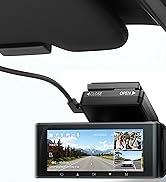
AZDOME M550 dash cam is built in Super Capacitor. No power pack or batteries. It must be powered by connecting to your car in one of three ways direct connect to a fuse, cigarette light adapter or a OBD cable. So if you want to use parking mode you need to purchase hard-wiring kit with 3 wires, the output current need reach 5V/2.5A.
Steps:
- Please connect the red wire to always powered, the yellow wire to ACC, and the black wire to ground.
- If the AZDOME hardwire kit is connected correct, please find the "Park" menu in the dash cam menu, press OK to select connected, tick parking monitoring, and press the menu button to exit and save the settings.
- Once the car turns on ACC, AZDOME M550 dash cam will automatically turn on, and once the car turns off, the camera will enterTime-Lapse Parking Mode / Motion Detection Parking Mod / Collision Detection Parking Mode automatically when hardwire the camera correct.
 M550 |  M550 Max |  M660 |  M01 Max |  GS63H Pro |  PG17 | |
|---|---|---|---|---|---|---|
| Customer Reviews | — | — | — | — | — | — |
| Price | — | — | — | — no data | — | — |
| Camera Type | AZDOME M550-3CH 3.19" IPS Screen 3 Channel Dash Cam (Front + Rear + Cabin) | AZDOME M550 Max 3.19" IPS Screen 3 Channel Dash Cam (Front + Rear + Cabin) | AZDOME M660 3" IPS Screen 4 Channel Dash Cam (Front + Rear + Left + Right) | AZDOME M01 Max 2.4" IPS Screen Dual Channel Dash Cam (Front + Rear) | AZDOME GS63H Pro 2.4" IPS Screen Dual Channel Dash Cam (Front + Rear) | AZDOME PG17 11.8" IPS Touch Screen Mirror Dash Cam(Front + Rear) |
| Front Camera Resolution/Frame Rate | 4K (3840x2160P @30FPS) | 4K (3840x2160P @30FPS) | 4K (3840x2160P @30FPS) | 4K (3840x2160P @30FPS) | 4K (3840x2160P @30FPS) | 4K (3840x2160P @30FPS) |
| Front + Rear Camera Resolution/Frame Rate | 4K (3840x2160P @30FPS) + 2.5K (2560×1440P @30FPS) | 4K (3840x2160P @30FPS) + 2.5K (2560×1440P @30FPS) | 4K (3840x2160P @30FPS) + Full HD (1920×1080P @30FPS) | 4K (3840x2160P @30FPS) + Full HD (1920×1080P @30FPS) | 4K (3840x2160P @30FPS) + Full HD (1920×1080P @30FPS) | 4K (3840x2160P @30FPS) + Full HD (1920×1080P @30FPS) |
| Front + Rear + Cabin Camera Resolution/Frame Rate | 2.5K (2560x1440P @30FPS) + 2.5K (2560x1440P @30FPS) + Full HD (1920×1080P @30FPS) | 4K (3840x2160P @30FPS) + 2.5K (2560x1440P @30FPS) + Full HD (1920×1080P @30FPS) | 4K (3840x2160P @30FPS) + Full HD (1920×1080P @30FPS) + Full HD (1920×1080P @30FPS) | N/A | N/A | N/A |
| Front + Rear + Left + Right Camera Resolution/Frame Rate | N/A | N/A | 2.5K (2560×1440P @30FPS) + Full HD (1920×1080P @30FPS) + Full HD (1920×1080P @30FPS) + Full HD (1920×1080P @30FPS) | N/A | N/A | N/A |
| Wi-Fi(APP Control) | 2.4GHz WiFi | 2.4GHz WiFi | 5.8GHz / 2.4GHz WiFi | 2.4GHz WiFi | WiFi 6 | WiFi 6 |
| GPS(Speed and Coordinates Display) | ? | ? | ? | N/A | ? | ? |
| SD card included | 64GB TF Card Included | 64GB TF Card Included | Built-in 128GB eMMC | 64GB TF Card Included | 64GB TF Card Included | 64GB TF Card Included |
| Max. External Storage Support | 256GB, Class 10, U3 Speed | 256GB, Class 10, U3 Speed | N/A | 256GB, Class 10, U3 Speed | 256GB, Class 10, U3 Speed | 256GB, Class 10, U3 Speed |
| Battery | Built in Super Capacitor (Only has 1 mAh Lithium Metal Battery used to memory time) | Built in Super Capacitor (Only has 1 mAh Lithium Metal Battery used to memory time) | Built in Super Capacitor (Only has 1 mAh Lithium Metal Battery used to memory time) | Built in Super Capacitor (Only has 1 mAh Lithium Metal Battery used to memory time) | Built in Super Capacitor (Only has 1 mAh Lithium Metal Battery used to memory time) | Built in Super Capacitor (Only has 1 mAh Lithium Metal Battery used to memory time) |
The AZDOME 3-Lead Hardwire Kit is a power management device that provides power to your dashcam from your car's battery via fuse box to keep your dashcam continuously running even after your engine is turned off to utilize the 24-hour Parking Monitor feature. Automatically detects voltage input whether your vehicle is running DC 12V or 24V. It is compatible with most dash cameras available in the market with a Type-C USB power connector.
The Hardwire Kit will monitor your voltage status and cut-off the power to the dashcam if the voltage drops below the con?gured value more than 8 seconds. And reserves enough power so you can start your car for the next time. You have four different con?guration choices that you can select when you want the power to be disconnected to the dash cam when the battery’s voltage reaches a certain level.
Make sure to test and identify the minimum necessary battery voltage you will need to start your car for the next time before you set to the lowest setting. We recommend that you start with the highest setting, and then test and press only one voltage option in sequence to ?nd the suitable battery voltage that will give you enough battery power left over to start your car for the next time.
Four Options of Low Voltage Protection:
- For 12V Battery: 11.8V 12.0V 12.2V 12.4V
- For 24V Battery: 23.6V 24.0V 24.4V 24.8V
Note: If you press at the same time to select 2 or more options, or do not select the voltage option, this default voltage cut-off is 11.8VDC for a 12VDC battery and 23.6VDC for a 24VDC battery. 12.2V or 24.4V recommended for most users in general driving conditions.
- Reverse connect protection
- Short circuit protection
- Overload protection
- Overtemperature protection (protection circuit over 130?, return to normal when it drops to 90?).
- Total Cable Length: 3.5 Meters (input 0.8 meter, output 2.7 meters)
- Output Connector: Type-C USB plug, DC 5V, 2.5A
- Working temperature: -20? to 90?
Hard-wire kits, there are 3 wires that need to be connected:
- A RED wire (BAT+), needs to connect with constant fuse, which can provide power to dash cam even when the vehicle is off.
- A YELLOW wire (ACC), needs to connect with Fuse Box ACC, which can make the dash cam auto power on&off when the vehicle is on&off.
- A BLACK wire (GND), needs to connect with metal bolt or screw, which can prevent electric shock.
NOTE:
1. The Parking Mode only works on dash cam that have the function of detecting ACC, this will make your camera record based on your camera’s parking mode setting.
2. Always refer to the vehicle owner’s manual to avoid fuse slots that could pertain to important safety features within your vehicle. For example, avoid fuses that controls airbags, stability control programs, etc.
Fuses that control certain elements such as the radio, garage door opener, sunroof, etc. are usually safe to use.
3. Fuse sizes and the type of Fuse Taps vary depending on your vehicle, please check your Fuse Box to see what type of fuse tap your vehicle requires. There are 4 variations of the add-a-fuse that we carry: ACZ(micro2), ACS(mini), ACN(LP-mini) and ACU(ATO) as photos (2 Needed Per Vehicle).
4. It is NOT compatible with some Ford trucks and vehicles with the included fuse taps . If you have Ford F150 2021, Ford F150 Lariat 2011, Ford F350, Ford Edge 2011, Ford Explorer 2013, Ford Expedition 2013, Ford Ranger 2021 trucks/cars, this will not work for you.
AZDOME M550 dash cam is built in Super Capacitor. No power pack or batteries. It must be powered by connecting to your car in one of three ways direct connect to a fuse, cigarette light adapter or a OBD cable. So if you want to use parking mode you need to purchase hard-wiring kit with 3 wires, the output current need reach 5V/2.5A.
Steps:
- Please connect the red wire to always powered, the yellow wire to ACC, and the black wire to ground.
- If the AZDOME hardwire kit is connected correct, please find the "Park" menu in the dash cam menu, press OK to select connected, tick parking monitoring, and press the menu button to exit and save the settings.
- Once the car turns on ACC, AZDOME M550 dash cam will automatically turn on, and once the car turns off, the camera will enterTime-Lapse Parking Mode / Motion Detection Parking Mod / Collision Detection Parking Mode automatically when hardwire the camera correct.
M550 | M550 Max | M660 | M01 Max | GS63H Pro | PG17 | |
|---|---|---|---|---|---|---|
| Customer Reviews | — | — | — | — | — | — |
| Price | — | — | — | — no data | — | — |
| Camera Type | AZDOME M550-3CH 3.19" IPS Screen 3 Channel Dash Cam (Front + Rear + Cabin) | AZDOME M550 Max 3.19" IPS Screen 3 Channel Dash Cam (Front + Rear + Cabin) | AZDOME M660 3" IPS Screen 4 Channel Dash Cam (Front + Rear + Left + Right) | AZDOME M01 Max 2.4" IPS Screen Dual Channel Dash Cam (Front + Rear) | AZDOME GS63H Pro 2.4" IPS Screen Dual Channel Dash Cam (Front + Rear) | AZDOME PG17 11.8" IPS Touch Screen Mirror Dash Cam(Front + Rear) |
| Front Camera Resolution/Frame Rate | 4K (3840x2160P @30FPS) | 4K (3840x2160P @30FPS) | 4K (3840x2160P @30FPS) | 4K (3840x2160P @30FPS) | 4K (3840x2160P @30FPS) | 4K (3840x2160P @30FPS) |
| Front + Rear Camera Resolution/Frame Rate | 4K (3840x2160P @30FPS) + 2.5K (2560×1440P @30FPS) | 4K (3840x2160P @30FPS) + 2.5K (2560×1440P @30FPS) | 4K (3840x2160P @30FPS) + Full HD (1920×1080P @30FPS) | 4K (3840x2160P @30FPS) + Full HD (1920×1080P @30FPS) | 4K (3840x2160P @30FPS) + Full HD (1920×1080P @30FPS) | 4K (3840x2160P @30FPS) + Full HD (1920×1080P @30FPS) |
| Front + Rear + Cabin Camera Resolution/Frame Rate | 2.5K (2560x1440P @30FPS) + 2.5K (2560x1440P @30FPS) + Full HD (1920×1080P @30FPS) | 4K (3840x2160P @30FPS) + 2.5K (2560x1440P @30FPS) + Full HD (1920×1080P @30FPS) | 4K (3840x2160P @30FPS) + Full HD (1920×1080P @30FPS) + Full HD (1920×1080P @30FPS) | N/A | N/A | N/A |
| Front + Rear + Left + Right Camera Resolution/Frame Rate | N/A | N/A | 2.5K (2560×1440P @30FPS) + Full HD (1920×1080P @30FPS) + Full HD (1920×1080P @30FPS) + Full HD (1920×1080P @30FPS) | N/A | N/A | N/A |
| Wi-Fi(APP Control) | 2.4GHz WiFi | 2.4GHz WiFi | 5.8GHz / 2.4GHz WiFi | 2.4GHz WiFi | WiFi 6 | WiFi 6 |
| GPS(Speed and Coordinates Display) | ? | ? | ? | N/A | ? | ? |
| SD card included | 64GB TF Card Included | 64GB TF Card Included | Built-in 128GB eMMC | 64GB TF Card Included | 64GB TF Card Included | 64GB TF Card Included |
| Max. External Storage Support | 256GB, Class 10, U3 Speed | 256GB, Class 10, U3 Speed | N/A | 256GB, Class 10, U3 Speed | 256GB, Class 10, U3 Speed | 256GB, Class 10, U3 Speed |
| Battery | Built in Super Capacitor (Only has 1 mAh Lithium Metal Battery used to memory time) | Built in Super Capacitor (Only has 1 mAh Lithium Metal Battery used to memory time) | Built in Super Capacitor (Only has 1 mAh Lithium Metal Battery used to memory time) | Built in Super Capacitor (Only has 1 mAh Lithium Metal Battery used to memory time) | Built in Super Capacitor (Only has 1 mAh Lithium Metal Battery used to memory time) | Built in Super Capacitor (Only has 1 mAh Lithium Metal Battery used to memory time) |
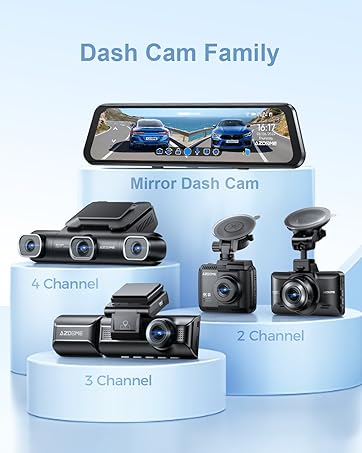
4 Channel 360° Car Guard M660
3 Channel Dash Cam M550
STARVIS 2 Mirror Dash Cam
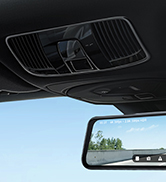
Rear View Mirror Camera
Full Color Night Vision
