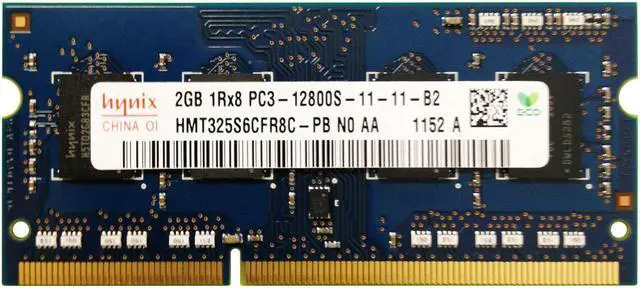
The Hynix HMT325S6CFR8C-PB is 2GB of DDR3-1600 (PC3-12800) laptop memory in a 204-pin SO-DIMM form factor, suitable for replacing or expanding memory in a compatible laptop that uses this specification.
Recommended For
- Owners of an older laptop that specifies 204-pin DDR3 SO-DIMM memory and needs a 2GB replacement module; check the laptop’s supported memory type and voltage before buying.
- Repair shops and refurbishers servicing older DDR3 laptops that need a matching 2GB module for a repair or replacement, rather than a large-capacity upgrade.
- People keeping a compatible legacy laptop for simple, low-memory tasks or offline use, where restoring its existing 2GB configuration matters more than running demanding modern software.
Real-World Use Scenarios
- Replacing a failed memory module in a compatible older DDR3 laptop can help restore normal startup and operation; the laptop’s supported memory type and capacity still need to match.
- Setting up a compatible older laptop for lightweight Linux and simple tasks such as text editing or file management is a plausible use; with only 2GB of memory, expect limits on browser tabs and multitasking.
- Keeping an older, compatible laptop as a basic utility or legacy-computing machine can work for one task at a time, such as opening local documents or running older software; overall speed also depends on the processor and storage.
- Using the module in a repair or testing setup can help check whether a compatible laptop accepts and recognizes replacement memory; it is not a general-purpose upgrade for laptops that require a different memory generation or capacity.




 here!