

Your Browsing History

Meet Your Seller


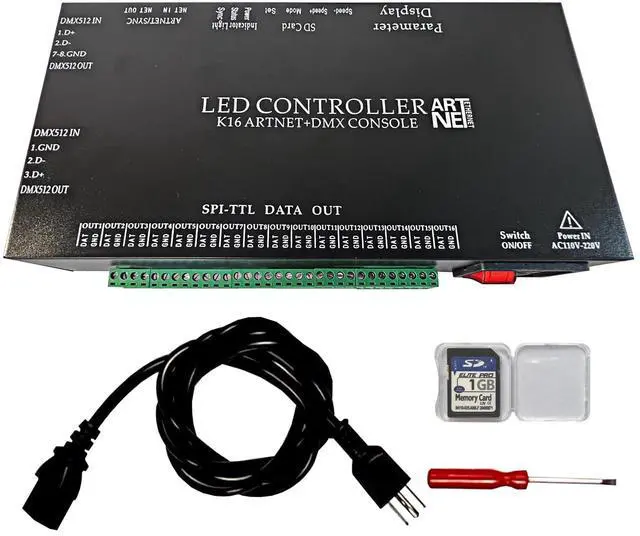


K16 ARTNET+DMX CONSOLE LED CONTROLLER, Professional Lighting Control, Suitable for SPI TTL, Online Offline, Addressable Programmable, Perfect for Concerts, DJ Performances, Weddings, Event, etc
Limited time offer, ends 09/17 By RuNan Global Picks
- Working Performance: (1) DMX and online/offline mode switching is convenient. (2) Offline, insert the SD card to support switching between up to 100 program effects. (3) Online, unplug the SD card. It supports the Art-Net protocol and Madrix software for direct program effect playback. (4) Adopts the international standard TCP/IP network protocol with 100/Gigabit adaptive transmission rate for fast and stable data transfer. Using Cat5e network cable in series, the maximum transmission distance between controllers is 100 meters. Switches or optical fibers can be added for long-distance transmission. (5) Features a four-digit display and four buttons for easy operation. Technical Parameters: (1) Wide voltage input AC110-220V, rated power 4W, 16 ports output. (2) Offline load capacity: 1024 ICs per port, totaling 16384 ICs. (3) Online load capacity: 680 ICs per port, totaling 10880 ICs. (4) Gray level: 32-65536. (5) Supports online software such as Madrix, Resolume6, and Arkaos for live editing and program playback. (7) A dedicated software is designed for offline use with these controllers and is constantly updated. It may be intercepted by antivirus software and needs to be added to the whitelist for normal use. (8) Supports software-independent effect editing, Madrix software editing, video import, text editing, and batch import of effect materials. Making Program Effects: (1) Supports online software such as Madrix, Resolume6, and Arkaos for live editing and program playba
+
+
Overview
Specs
Reviews

Any questions? Our AI mode will help you find out quickly.
Try me now
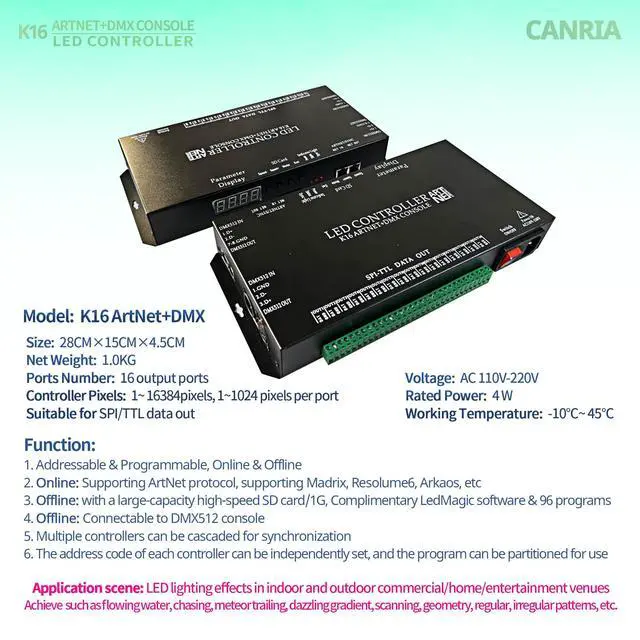
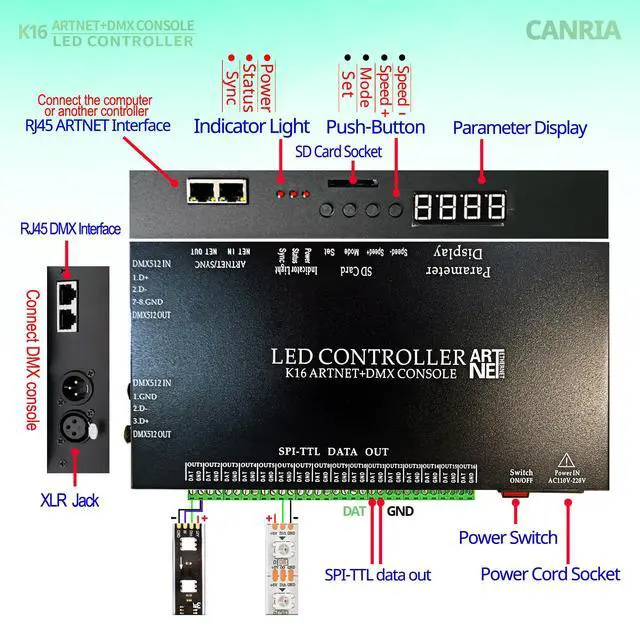
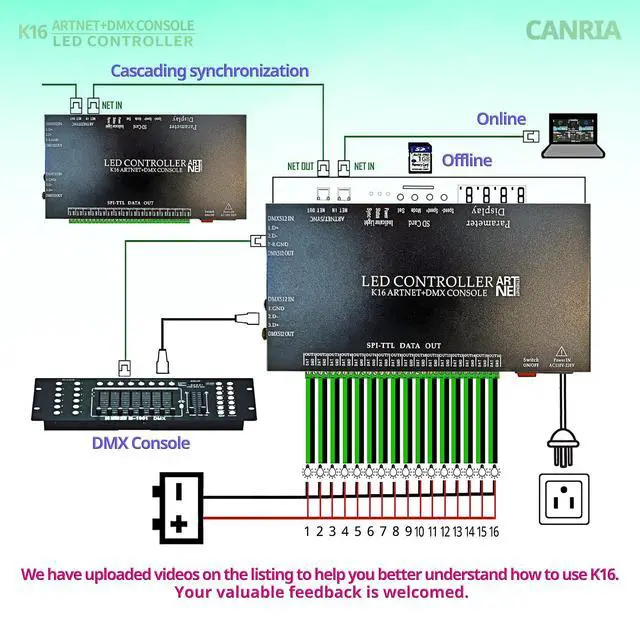
Working Performance: (1) DMX and online/offline mode switching is convenient. (2) Offline, insert the SD card to support switching between up to 100 program effects. (3) Online, unplug the SD card. It supports the Art-Net protocol and Madrix software for direct program effect playback. (4) Adopts the international standard TCP/IP network protocol with 100/Gigabit adaptive transmission rate for fast and stable data transfer. Using Cat5e network cable in series, the maximum transmission distance between controllers is 100 meters. Switches or optical fibers can be added for long-distance transmission. (5) Features a four-digit display and four buttons for easy operation.
Technical Parameters: (1) Wide voltage input AC110-220V, rated power 4W, 16 ports output.
(2) Offline load capacity: 1024 ICs per port, totaling 16384 ICs.
(3) Online load capacity: 680 ICs per port, totaling 10880 ICs.
(4) Gray level: 32-65536. (5) Supports online software such as Madrix, Resolume6, and Arkaos for live editing and program playback. (7) A dedicated software is designed for offline use with these controllers and is constantly updated. It may be intercepted by antivirus software and needs to be added to the whitelist for normal use. (8) Supports software-independent effect editing, Madrix software editing, video import, text editing, and batch import of effect materials.
Making Program Effects: (1) Supports online software such as Madrix, Resolume6, and Arkaos for live editing and program playback. (2) A dedicated software is designed for offline use with these controllers and is constantly updated. It may be intercepted by antivirus software and needs to be added to the whitelist for normal use. Supports software-independent effect editing, Madrix effects import, video import, text editing, and batch import of effect materials.
STEP: Create a new project - Select the controller model "K-16000-ALL" - Import DXF or create layout - Open effect - Record - Preview - Exit preview - Export effect - Save 01. led to the SD card (Generates 1 file containing multiple programs).
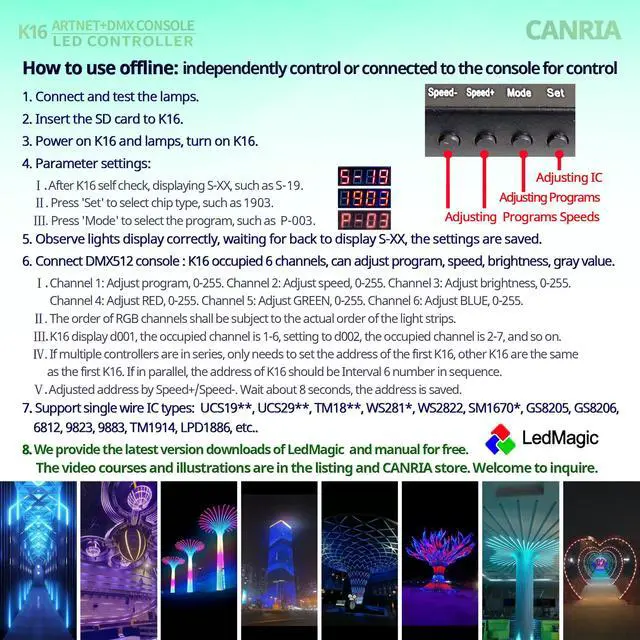
Offline: Independently control or connect to a DMX console for control. (1) Connect and test the lamps. (2) Insert the SD card. (3) Power on the K16 controller and lamps. (4) After K16 self-check, display shows S-XX. (5) Press 'Set' to select chip type 1903. (6) Press 'Mode' to select the program, P-XX. (7) Observe lights display, wait for the display to return to S-XX; settings are saved. (8) If multiple controllers are in series, only set the address for the first K16; other K16 units will be the same as the first. If in parallel, the K16 addresses should have an interval of 6, such as d001, d007. Adjust address using Speed+/Speed-. Wait about 8 seconds for the address to be saved. (9) Supports single-wire ICs like
1903.
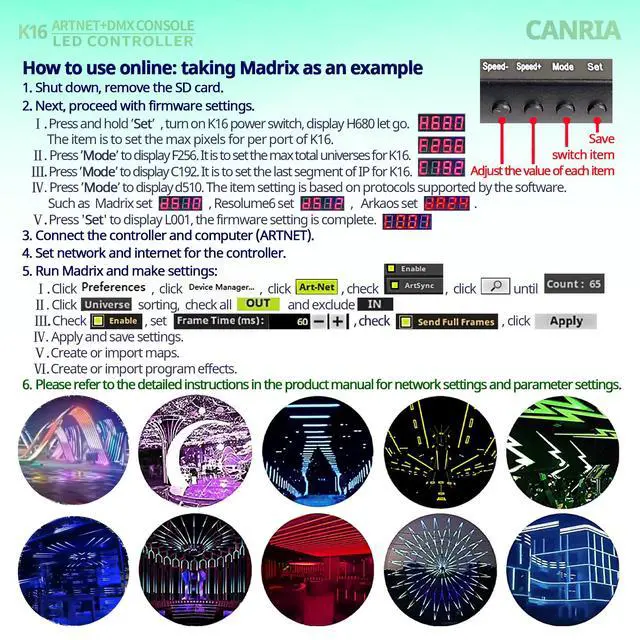
Online: Using Madrix as an example. (1) Shut down and remove the SD card. (2) Press and hold 'Set', then turn on the K16 power switch; display shows H680. This sets the maximum pixels per port for the K16. (3) Press 'Mode' to display F256. This sets the maximum total universes for the K16. (4) Press 'Mode' to display C192. This sets the last segment of the IP for the K16. (5) Press 'Mode' to display d510. This setting is based on protocols supported by the software: for Madrix set d510, for Resolume6 set d512, for Arkaos set dA24. (6) Press 'Set' to display L001; the firmware setting is complete. (7) Connect the controller and computer. (8) Set the network and internet for the controller. (9) Run Madrix and configure settings
Technical Parameters: (1) Wide voltage input AC110-220V, rated power 4W, 16 ports output.
(2) Offline load capacity: 1024 ICs per port, totaling 16384 ICs.
(3) Online load capacity: 680 ICs per port, totaling 10880 ICs.
(4) Gray level: 32-65536. (5) Supports online software such as Madrix, Resolume6, and Arkaos for live editing and program playback. (7) A dedicated software is designed for offline use with these controllers and is constantly updated. It may be intercepted by antivirus software and needs to be added to the whitelist for normal use. (8) Supports software-independent effect editing, Madrix software editing, video import, text editing, and batch import of effect materials.
Making Program Effects: (1) Supports online software such as Madrix, Resolume6, and Arkaos for live editing and program playback. (2) A dedicated software is designed for offline use with these controllers and is constantly updated. It may be intercepted by antivirus software and needs to be added to the whitelist for normal use. Supports software-independent effect editing, Madrix effects import, video import, text editing, and batch import of effect materials.
STEP: Create a new project - Select the controller model "K-16000-ALL" - Import DXF or create layout - Open effect - Record - Preview - Exit preview - Export effect - Save 01. led to the SD card (Generates 1 file containing multiple programs).
Offline: Independently control or connect to a DMX console for control. (1) Connect and test the lamps. (2) Insert the SD card. (3) Power on the K16 controller and lamps. (4) After K16 self-check, display shows S-XX. (5) Press 'Set' to select chip type 1903. (6) Press 'Mode' to select the program, P-XX. (7) Observe lights display, wait for the display to return to S-XX; settings are saved. (8) If multiple controllers are in series, only set the address for the first K16; other K16 units will be the same as the first. If in parallel, the K16 addresses should have an interval of 6, such as d001, d007. Adjust address using Speed+/Speed-. Wait about 8 seconds for the address to be saved. (9) Supports single-wire ICs like
1903.
Online: Using Madrix as an example. (1) Shut down and remove the SD card. (2) Press and hold 'Set', then turn on the K16 power switch; display shows H680. This sets the maximum pixels per port for the K16. (3) Press 'Mode' to display F256. This sets the maximum total universes for the K16. (4) Press 'Mode' to display C192. This sets the last segment of the IP for the K16. (5) Press 'Mode' to display d510. This setting is based on protocols supported by the software: for Madrix set d510, for Resolume6 set d512, for Arkaos set dA24. (6) Press 'Set' to display L001; the firmware setting is complete. (7) Connect the controller and computer. (8) Set the network and internet for the controller. (9) Run Madrix and configure settings
Warranty & Returns
Warranty, Returns, And Additional Information
Warranty
- Please contact the Seller directly for warranty information. Warranty information may also be found on the Manufacturer's website.
- CONTACT
Return Policies
- Return for refund within: 30 days
- Return for replacement within: 30 days
- This item is covered by RuNan Global Picks Return Policy
Manufacturer Contact Info
- For a directory of all our manufacturers, please click below.
- Manufacturers Directory
LOADING...