

Your Browsing History

Meet Your Seller


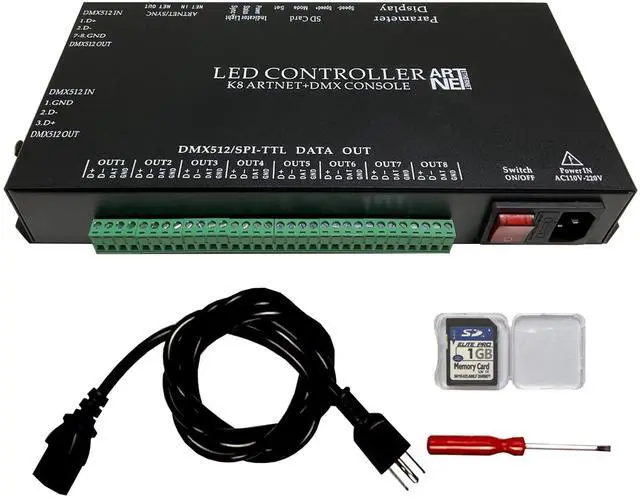
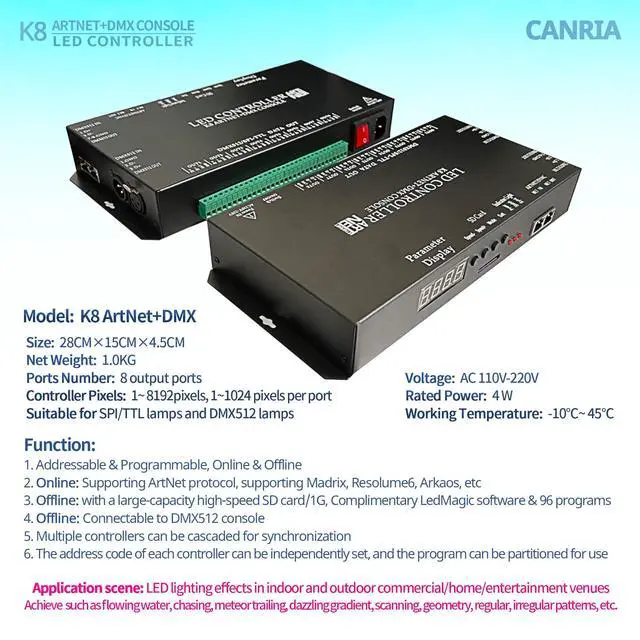


K8 ARTNET+DMX Console LED Controller, Suitable for SPI and DMX512 LED Light, Online Offline, Addressable Programmable, 1G SD Card with 96 Program Modes and Offline Software
Limited time offer, ends 09/17 By RuNan Global Picks
- How to Connect: 1. Connect the GND of the LED lamps to the GND of the controller. 2. Connect the DAT of the SPI lamp to the DAT of the controller. For a DMX512 lamp, connect A to D+ of the controller and B to D- of the controller. 3. For cascading multiple controllers for synchronization, link them using network cables. 4. Series interface: Connect the "ARTNET NET OUT" of the first controller to the "ARTNET NET IN" of the next, and continue in this manner. 5. Parallel interface: Use the "DMX512 IN" (single network port) or the XLR interfaces. How to Use Offline: 1. Insert an SD card. 2. Power on the controller and the LED lamps. 3. The display will show S-XX, indicating the program playback speed. Press "speed -" or "speed +" to adjust. S-00 is the slowest, and S-99 is the fastest. 4. Press "Set" to choose the IC type. It supports SPI and DMX512 single line IC LED lights. 5. Press "Mode" to pick a program. The SD card contains ready-made programs from P-01 to P-96. A-01 is the 96-program circular mode. How to Connect a DMX512 Console: 1. Insert an SD card. 2. Link the controller and the console using the DMX512 network port or XLR interfaces. 3. Power on the devices. 4. The display will show d001. The controller occupies 6 channels: channel 1 adjusts the program, channel 2 adjusts the speed, channel 3 adjusts the brightness, and channels 4, 5, and 6 adjust red, green, and blue respectively. 5. For multiple controllers in series, only set the address for the first controller
+
+
Overview
Specs
Reviews

Any questions? Our AI mode will help you find out quickly.
Try me now
How to
Connect:
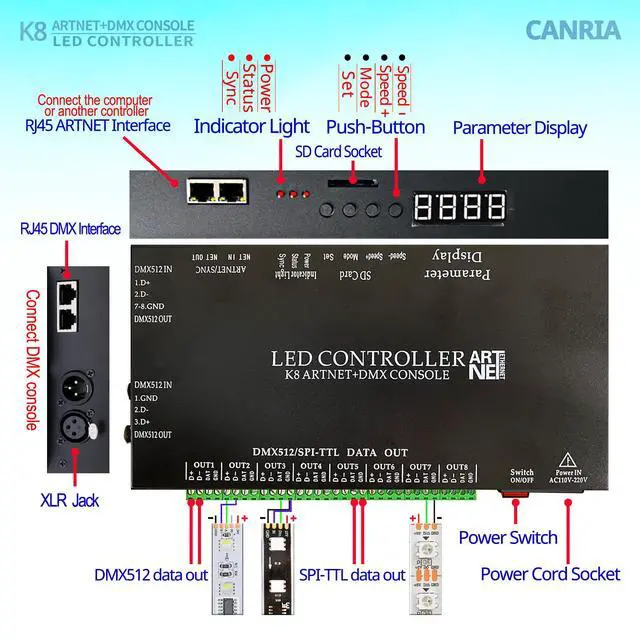
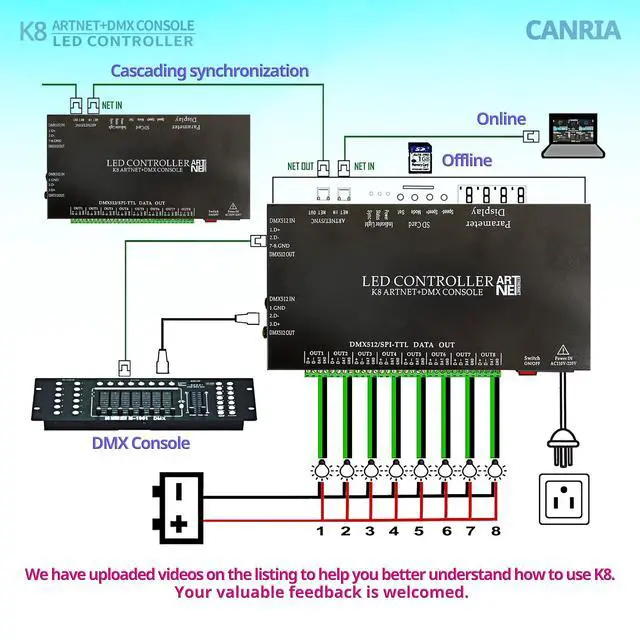
1. Connect the GND of the LED lamps to the GND of the controller.
2. Connect the DAT of the SPI lamp to the DAT of the controller. For a DMX512 lamp, connect A to D+ of the controller and B to D- of the controller.
3. For cascading multiple controllers for synchronization, link them using network cables.
4.
Series interface: Connect the "ARTNET NET OUT" of the first controller to the "ARTNET NET IN" of the next, and continue in this manner.
5.
Parallel interface: Use the "DMX512 IN" (single network port) or the XLR interfaces.
How to Use Offline:
1. Insert an SD card.
2. Power on the controller and the LED lamps.
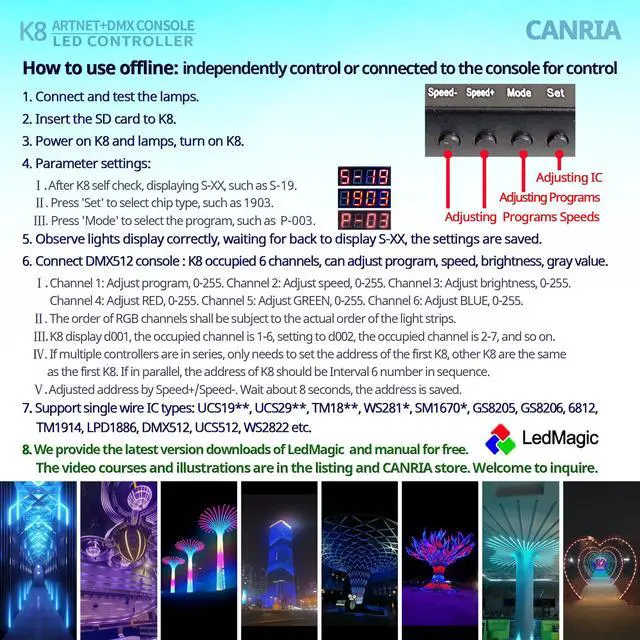
3. The display will show S-XX, indicating the program playback speed. Press "speed -" or "speed +" to adjust. S-00 is the slowest, and S-99 is the fastest.
4. Press "Set" to choose the IC type. It supports SPI and DMX512 single line IC LED lights.
5. Press "Mode" to pick a program. The SD card contains ready-made programs from P-01 to P-96. A-01 is the 96-program circular mode. How to Connect a
DMX512 Console:
1. Insert an SD card.
2. Link the controller and the console using the DMX512 network port or XLR interfaces.
3. Power on the devices.
4. The display will show d001.
The controller occupies 6 channels: channel 1 adjusts the program, channel 2 adjusts the speed, channel 3 adjusts the brightness, and channels 4, 5, and 6 adjust red, green, and blue respectively.
5. For multiple controllers in series, only set the address for the first controller. If in parallel, set the controller addresses sequentially with an interval of 6 numbers.
How to Use Online:
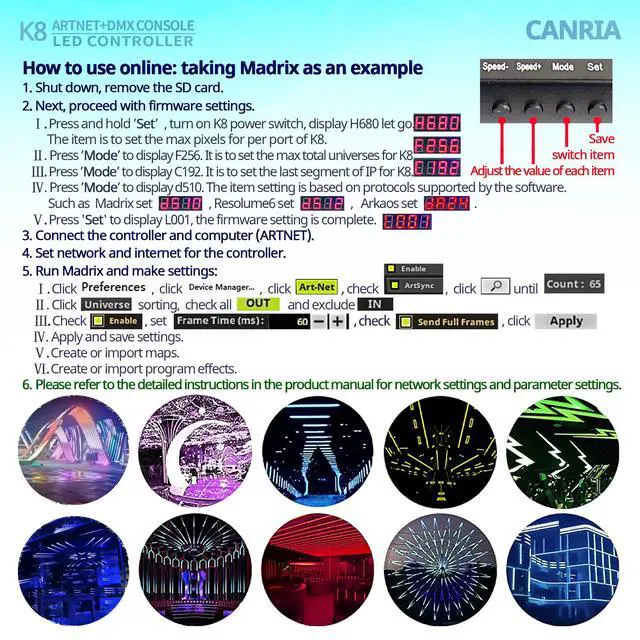
1. Connect the computer to the first controller's ARTNET NET IN interface.
2.
Configure the network: Go to Network and Internet Settings, Advanced network settings, More network adapter options, select (Ethernet controller) Properties, then Internet Protocol Version
4. Choose "Use the following IP address" and input the IP address manually (ensure it does not conflict with other devices on your network).
3. Set the parameters for the controller; you only need to configure the first controller connected to the computer. Set up 4 items.
4.
Application ICs: UCS1903, 1912, 2903, 2909, 2912, TM1803, 1804, 1809, 1812, 1814, 1914, 1934, SM16703, 16716, WS2811, 2812, 2822, GS8205, 8206, DMX512, 9813, 5109, 8109, 2801, etc.
5. For cascading multiple controllers in synchronization, only the first controller needs to be managed.
6. Each controller must have an SD card inserted, containing the same quantity of programs. Programs with corresponding serial numbers have identical pixels and speed
Connect:
1. Connect the GND of the LED lamps to the GND of the controller.
2. Connect the DAT of the SPI lamp to the DAT of the controller. For a DMX512 lamp, connect A to D+ of the controller and B to D- of the controller.
3. For cascading multiple controllers for synchronization, link them using network cables.
4.
Series interface: Connect the "ARTNET NET OUT" of the first controller to the "ARTNET NET IN" of the next, and continue in this manner.
5.
Parallel interface: Use the "DMX512 IN" (single network port) or the XLR interfaces.
How to Use Offline:
1. Insert an SD card.
2. Power on the controller and the LED lamps.
3. The display will show S-XX, indicating the program playback speed. Press "speed -" or "speed +" to adjust. S-00 is the slowest, and S-99 is the fastest.
4. Press "Set" to choose the IC type. It supports SPI and DMX512 single line IC LED lights.
5. Press "Mode" to pick a program. The SD card contains ready-made programs from P-01 to P-96. A-01 is the 96-program circular mode. How to Connect a
DMX512 Console:
1. Insert an SD card.
2. Link the controller and the console using the DMX512 network port or XLR interfaces.
3. Power on the devices.
4. The display will show d001.
The controller occupies 6 channels: channel 1 adjusts the program, channel 2 adjusts the speed, channel 3 adjusts the brightness, and channels 4, 5, and 6 adjust red, green, and blue respectively.
5. For multiple controllers in series, only set the address for the first controller. If in parallel, set the controller addresses sequentially with an interval of 6 numbers.
How to Use Online:
1. Connect the computer to the first controller's ARTNET NET IN interface.
2.
Configure the network: Go to Network and Internet Settings, Advanced network settings, More network adapter options, select (Ethernet controller) Properties, then Internet Protocol Version
4. Choose "Use the following IP address" and input the IP address manually (ensure it does not conflict with other devices on your network).
3. Set the parameters for the controller; you only need to configure the first controller connected to the computer. Set up 4 items.
4.
Application ICs: UCS1903, 1912, 2903, 2909, 2912, TM1803, 1804, 1809, 1812, 1814, 1914, 1934, SM16703, 16716, WS2811, 2812, 2822, GS8205, 8206, DMX512, 9813, 5109, 8109, 2801, etc.
5. For cascading multiple controllers in synchronization, only the first controller needs to be managed.
6. Each controller must have an SD card inserted, containing the same quantity of programs. Programs with corresponding serial numbers have identical pixels and speed
Warranty & Returns
Warranty, Returns, And Additional Information
Warranty
- Please contact the Seller directly for warranty information. Warranty information may also be found on the Manufacturer's website.
- CONTACT
Return Policies
- Return for refund within: 30 days
- Return for replacement within: 30 days
- This item is covered by RuNan Global Picks Return Policy
Manufacturer Contact Info
- For a directory of all our manufacturers, please click below.
- Manufacturers Directory
LOADING...