

Your Browsing History

Meet Your Seller




USB C Headphones Over-Ear Buds Hooks Earbuds Mic for Sports Running | Type-C Wired Earbuds Fit Small Ears Volume Control for iPad/ iPhone 17 16 15 for Samsung S26 S25 S24 Oneplus 15 Pixel 10 8 6
Limited time offer, ends 09/30 By Brightflag Electronics
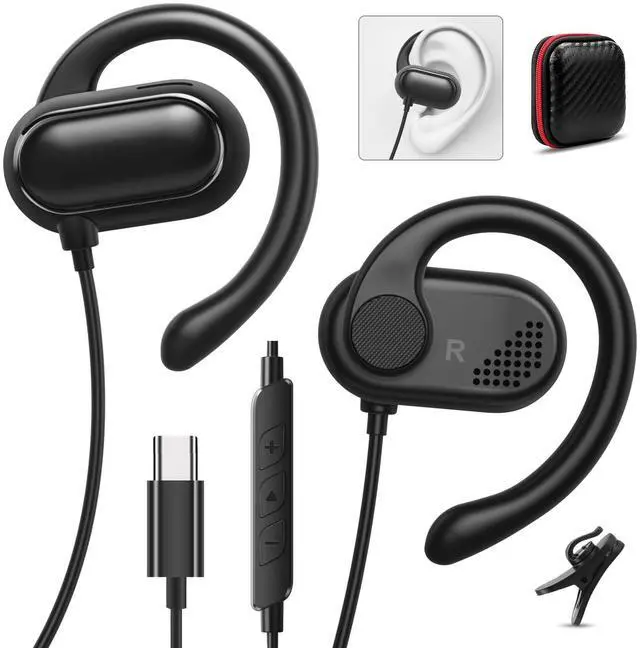
- Unprecedented Comfort and 360° Superior Sound: With dual powerful 16.5mm dynamic drivers, which are three times the size of other earbuds, USB-C over-ear headphones create an audio experience thats more like an intimate concert setting. Adopt the top bio-diaphragm technology, USB-C over-ear headphones offer a rich and consistent listening experience at any volume, from crisp and clear highs to excitingly powerful sound. Rotatable Open-Ear Fit: These USB-C headphones feature a rotatable open-ear design with extremely soft silicone ear-hooks, providing a more stable and comfortable fit with a feeling of nothing during fitness or sports. No pain & no damage to hearing, it's really achieved for your all-day ultimate comfort wearing, perfect for running, workout, cycling, sports, etc. Professional stereo sound makes you immersive and enjoy the music time. Secure and Comfortable Fit: These USB-C wired headphones feature a multi-point support system to evenly distribute their weight across your ear with an anti-drop ear hook, providing a comfortable and secure fit that follows the natural curve of your ear. You can wear these open earbuds with ease during sports, travel, meetings, or while working from home. Trust a stable fit that lasts all day. Widely Compatible: USB-C wired earbuds compatible with iPhone 17e/17 Pro Max/17 Plus/17 Pro/17/16e/16 Pro Max/16 Plus/16 Pro/16/15, for Samsung A53/A54/A55/A35, for Galaxy S26 Ultra/S25/S24/S23/S22/S21/S20, for Galaxy Z Flip Fold 7 6 5 4
+
+
Overview
Specs
Reviews

Any questions? Our AI mode will help you find out quickly.
Try me now
Unprecedented Comfort and 360°
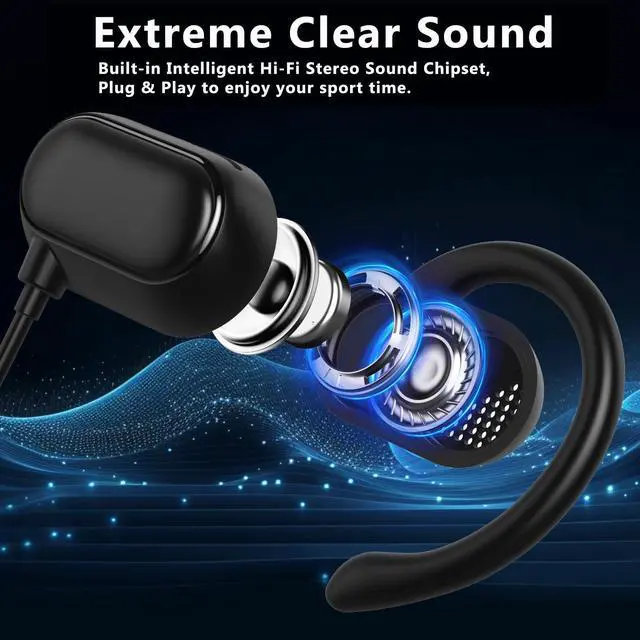
Superior Sound: With dual powerful 16.5 mm dynamic drivers, which are three times the size of other earbuds, USB-C over-ear headphones create an audio experience thats more like an intimate concert setting. Adopt the top bio-diaphragm technology, USB-C over-ear headphones offer a rich and consistent listening experience at any volume, from crisp and clear highs to excitingly powerful sound.
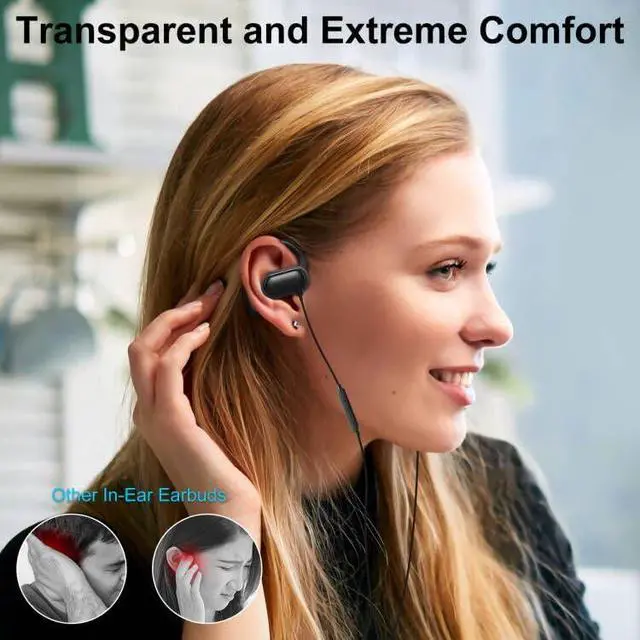
Rotatable Open-Ear Fit: These USB-C headphones feature a rotatable open-ear design with extremely soft silicone ear-hooks, providing a more stable and comfortable fit with a feeling of nothing during fitness or sports. No pain & no damage to hearing, it's really achieved for your all-day ultimate comfort wearing, perfect for running, workout, cycling, sports, etc. Professional stereo sound makes you immersive and enjoy the music time.
Secure and Comfortable Fit: These USB-C wired headphones feature a multi-point support system to evenly distribute their weight across your ear with an anti-drop ear hook, providing a comfortable and secure fit that follows the natural curve of your ear. You can wear these open earbuds with ease during sports, travel, meetings, or while working from home. Trust a stable fit that lasts all day.
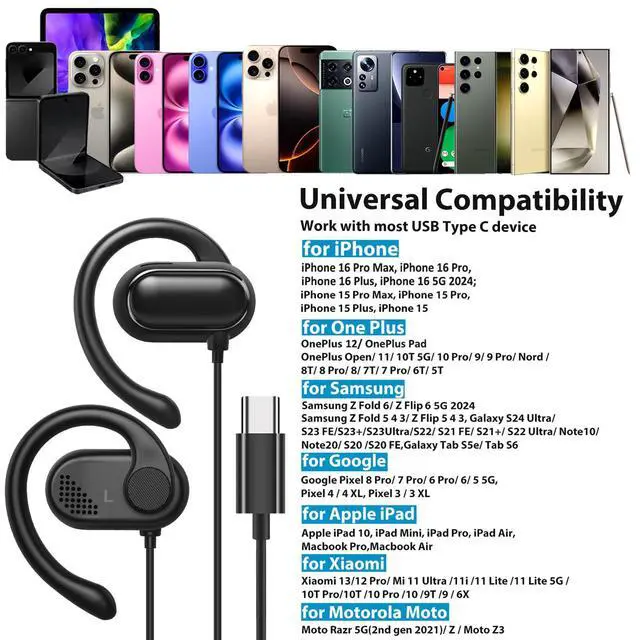
Widely Compatible: USB-C wired earbuds compatible with iPhone 17e/17 Pro Max/17 Plus/17 Pro/17/16e/16 Pro Max/16 Plus/16 Pro/16/15, for Samsung A53/A54/A55/A35, for Galaxy S26 Ultra/S25/S24/S23/S22/S21/S20, for Galaxy Z Flip Fold 7 6 5 4 3 2, for Galaxy Tab S10/S9/S8/S7/S6, for Google Pixel 10a/10 Pro Fold/10 Pro XL/10 Pro/10/9a/9 Pro XL/9 Pro/9/8a/8 Pro/8, for iPad Pro/Mini/Air, for MacBook Pro/Air, for OnePlus 15R/13R/12/Open/11/10 Pro/10t/9 Pro/9/8T/8 Pro/7T Pro/7.
Warm Tips:
Tips-1: for Mac series, go to Settings--Sound--Input (Output) --Select a Device for Sound Input (Output), then choose USB, to make the earbuds work; 2: If the earbuds have no sound when listening to audio on mobile, go to Settings-Developer Options, find "Disable USB audio routing", close
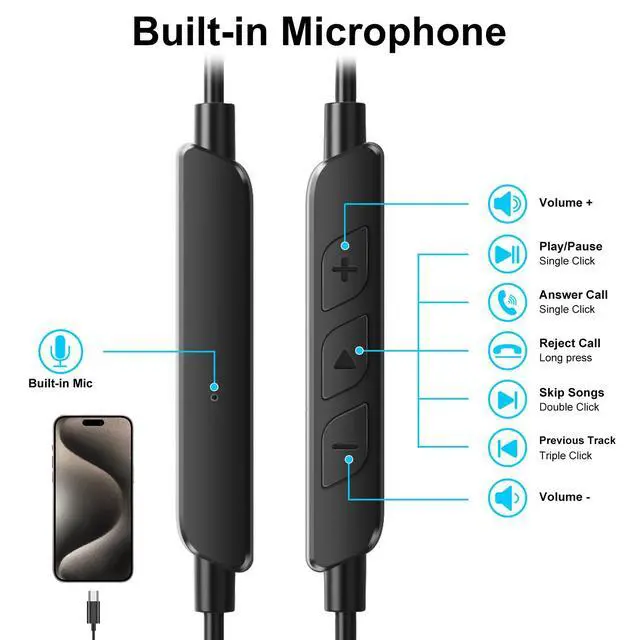
this option; 3: If others cannot hear you during a call, go to the settings, check whether you have turned on the "Microphone" option or not, if not, turn on the "Microphone" setting
Superior Sound: With dual powerful 16.5 mm dynamic drivers, which are three times the size of other earbuds, USB-C over-ear headphones create an audio experience thats more like an intimate concert setting. Adopt the top bio-diaphragm technology, USB-C over-ear headphones offer a rich and consistent listening experience at any volume, from crisp and clear highs to excitingly powerful sound.
Rotatable Open-Ear Fit: These USB-C headphones feature a rotatable open-ear design with extremely soft silicone ear-hooks, providing a more stable and comfortable fit with a feeling of nothing during fitness or sports. No pain & no damage to hearing, it's really achieved for your all-day ultimate comfort wearing, perfect for running, workout, cycling, sports, etc. Professional stereo sound makes you immersive and enjoy the music time.
Secure and Comfortable Fit: These USB-C wired headphones feature a multi-point support system to evenly distribute their weight across your ear with an anti-drop ear hook, providing a comfortable and secure fit that follows the natural curve of your ear. You can wear these open earbuds with ease during sports, travel, meetings, or while working from home. Trust a stable fit that lasts all day.
Widely Compatible: USB-C wired earbuds compatible with iPhone 17e/17 Pro Max/17 Plus/17 Pro/17/16e/16 Pro Max/16 Plus/16 Pro/16/15, for Samsung A53/A54/A55/A35, for Galaxy S26 Ultra/S25/S24/S23/S22/S21/S20, for Galaxy Z Flip Fold 7 6 5 4 3 2, for Galaxy Tab S10/S9/S8/S7/S6, for Google Pixel 10a/10 Pro Fold/10 Pro XL/10 Pro/10/9a/9 Pro XL/9 Pro/9/8a/8 Pro/8, for iPad Pro/Mini/Air, for MacBook Pro/Air, for OnePlus 15R/13R/12/Open/11/10 Pro/10t/9 Pro/9/8T/8 Pro/7T Pro/7.
Warm Tips:
Tips-1: for Mac series, go to Settings--Sound--Input (Output) --Select a Device for Sound Input (Output), then choose USB, to make the earbuds work; 2: If the earbuds have no sound when listening to audio on mobile, go to Settings-Developer Options, find "Disable USB audio routing", close
this option; 3: If others cannot hear you during a call, go to the settings, check whether you have turned on the "Microphone" option or not, if not, turn on the "Microphone" setting
Warranty & Returns
Warranty, Returns, And Additional Information
Warranty
- Please contact the Seller directly for warranty information. Warranty information may also be found on the Manufacturer's website.
- CONTACT
Return Policies
- Return for refund within: 30 days
- Return for replacement within: 30 days
- This item is covered by Brightflag Electronics Return Policy
Manufacturer Contact Info
- For a directory of all our manufacturers, please click below.
- Manufacturers Directory
LOADING...