

Your Browsing History
- Free 30-day Returns
$127.88
Ships from China.

Meet Your Seller

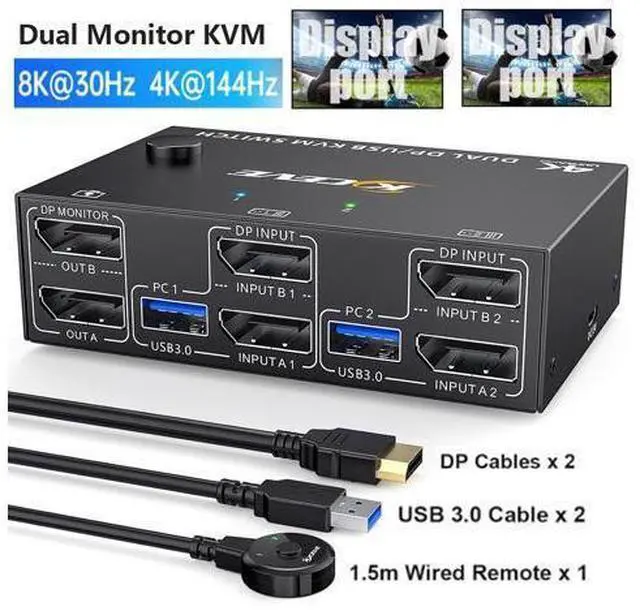


8K@30Hz USB 3.0 Displayport KVM Switch 2 Monitors 2 Computers, DP 1.4 Dual Monitor KVM Switch 2 in 2 Out with 4* USB 3.0 Port for 2 Computers, with 2 DP Cables & USB Cables and Wired Controller
Limited time offer, ends 10/13 By TechMax Depot
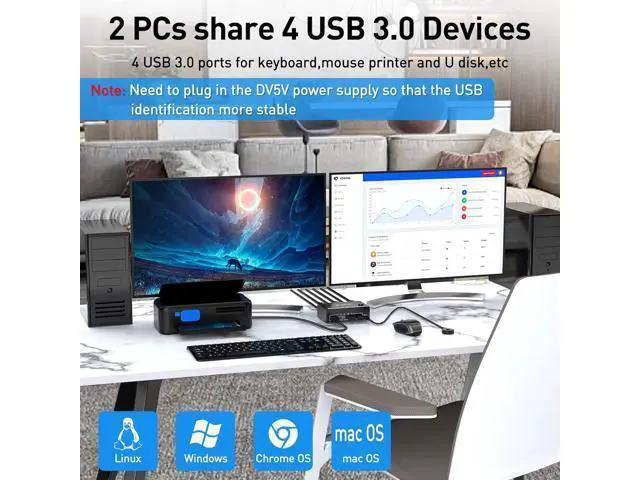
- [Dual Monitor KVM switch] This KVM switch 2 computers 2 monitors help you to control 2 computers or laptops by only one set of wired or wireless keyboard mouse,share 4 USB 3.0 devices and 2 monitors(extended mode or copy display mode).
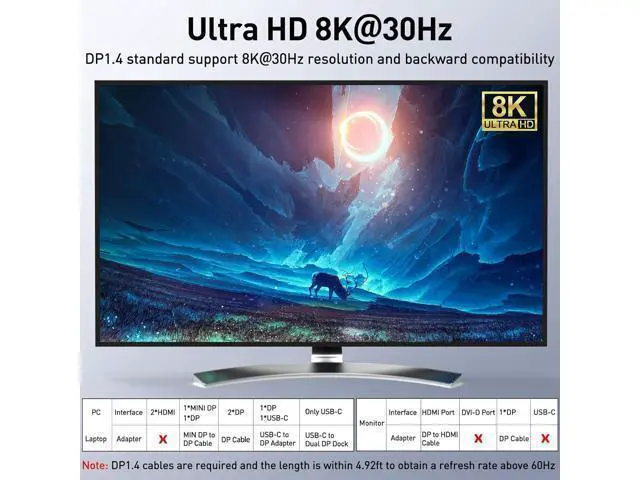
- [Ultra HD 8K@30Hz/4K@144Hz] Support resolution 8K@30Hz/4K@144Hz. KVM switch aslo support input terminal to connect 2 computers with different resolutions, e.g. one is 4K@60Hz, the other is 4K@30Hz, 1440P@60Hz or lower resolution.
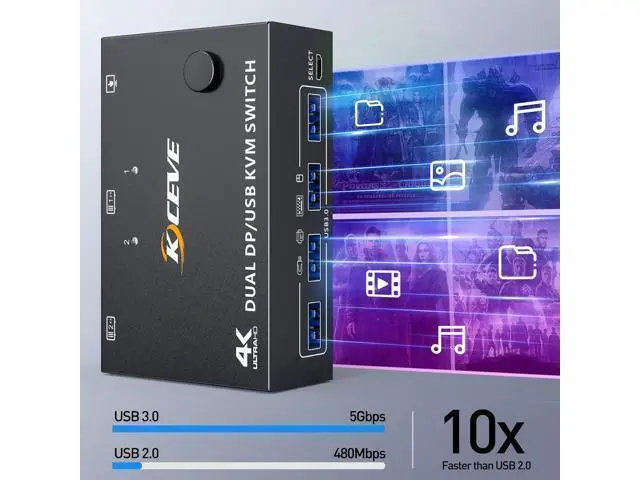
- [with 4 USB 3.0 Ports] with 4 integrated USB 3.0 ports,supports ultra-fast USB 3.0 data transfer, Data transfer speeds up to 5Gbps,which can recognize keyboard,mouse,printer and other USB devices.compatible with USB 2.0/1.1 devices.
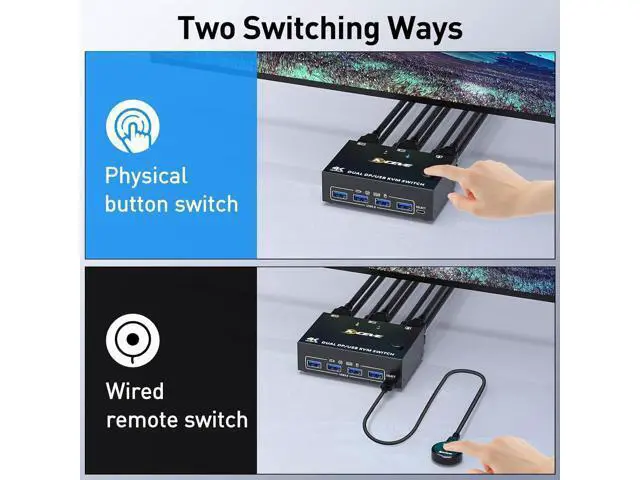
- [Great Compatibility & 2 Switching Mode] Driver-free for Windows, Mac OS. Powered by USB cables,but when using a high-power USB device with this KVM switch(such as HDD, SSD etc),external 5V adapter is required. You can press the button on the panel or use the wired remote to switch the computers.
+
+
Overview
Specs
Reviews

Any questions? Our AI mode will help you find out quickly.
Try me now
2 Ports Dual Monitor Displayport KVM Switch, 2 computers share 2 monitors and 4 USB 3.0 devices.
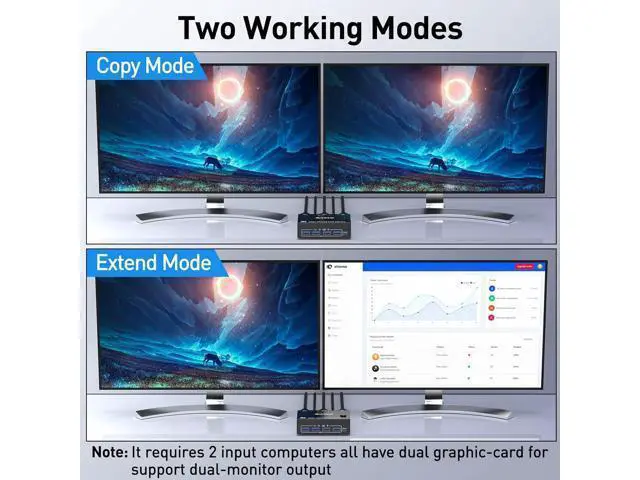
Advantages: 2 computers share one set of wired/wireless keyboard, mouse and 2 monitors. Support max up resolution 8K@30Hz, 4K@144Hz, 2560×1440@144Hz, 1920x1080P@144Hz, downward compatible. support ultra-wide monitors. Dual monitors output support extended and mirror display.
Switching modes: Button switch and wired remote ( 1.5 m), switch between 2 computers just need 2-4 seconds, fast and convenient. Support wired or wireless keyboard and mouse. When use a mechanical gaming keyboard, You need to plug in the DC 5V USB power cable to the KVM to provide sufficient power. Cross support most major OS including Windows, Linux, Mac OS. Dual displayport KVM switch with 4 USB 3.0 ports for USB devices. Support DP 1.4 standard, backwards compatible with DP 1.2 standard. Dual Monitor Displayport 1.4 KVM Switch 2 ports dual-monitor DP KVM Switch (DP +
DP) Note: Dual DP KVM switches require two DP connections per computer, and for computers with discrete and integrated graphics cards require both DP ports to be part of the discrete graphics card. However, most computers, especially laptops, do not have dual DP ports and therefore require a reliable adapter or docking station. So please know the configuration of the computer before ordering.
Input: Support MINI DP to DP Cable, USB-C to DP Adapter, USB-C to Dual DP Dock. Don't support HDMI to DP, DVA/VGA to DP.
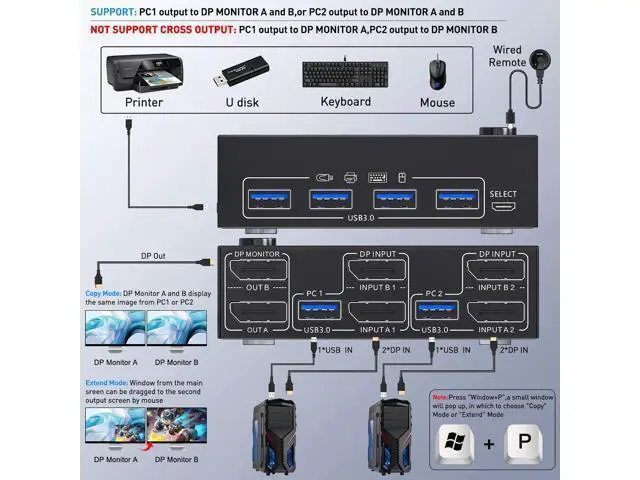
Output: Support DP to HD-MI Cable. Don't support DP to USB-C/DVI/VGA. Each computer must be connected with 2 DP cables and 1 USB cable to keep the keyboard, mouse, and monitor working properly. If there is a USB connection to the computer and KVM, but the mouse and keyboard or other USB devices are not recognized, please connect the DC5V power supply (power cord is included in the package) After connecting the computer to the monitor using the KVM, set the screen output mode (press Windows+P) on the keyboard and select the output mode in the dialog box that is displayed. Otherwise, only 1 of the two connected monitors has an image.
Warm tips: If using the MST multi-screen docking station, the computer CPU requires 11th generation; Docking station resolution work with 4k@30Hz or 1080p@60Hz when dual screen display. MAC1/MAC2 only supports one external screen, no multi-screen output. Connection diagram of Displayport KVM Please follow the connection diagram for correct connection.
Note: Only parallel output is supported, not cross output.
Connection steps: Step
1: Connect 2 x DP cable +1 x USB cable to PC 1 and KVM (USB 1, INPUT A1, INPUT B1), Connect 2 x DP cable +1 x USB cable to PC 2 and KVM (USB 2, INPUT A2, INPUT B2). Step 2.: Connect 2 x DP cable between the KVM (OUT A, OUT B) and the monitors. Step 3.: Connect a keyboard and mouse or other USB devices to the USB output ports on the KVM.
Step 4: Plug the desktop controller into the SELECT port and remotely switch between PC1 and PC2. 8K/4K HD Resolution Support 8K@30Hz, 4K@144Hz, 1440P@144Hz and backward compatible with lower resolutions. Suitable for multiple systems Driver-free for Windows 11/10/8/7/Vista/XP and Mac OS, Linux, plug and play. 4-Port USB 3.0 with 5Gbps Supports 5Gbps data transfer speed, can transfer files in Seconds, 10 times faster than USB 2.0. DC5V power port (optional) When using high-power USB devices, please plug in the power cable to provide sufficient power. (Package includes USB power cord) Wired Remote Control Supports wired remote switching for easy cable management, with digital 1/2 indicator light (green light). Works as a USB 3.0 switch (2 in 4 out) 4 USB 3.0 ports, backward compatible with USB 2.0 and USB 1.1, share USB devices such as keyboard mouse scanner, printer, flash drive, etc. Please be Aware before
Order: This Dual Monitor KVM Switch DisplayPort requires 2* DP+1*USB input for each computer and 2* DP output for 2 monitors. However, most computers especially laptops do not have 2 DisplayPort outputs, If so, please c
Advantages: 2 computers share one set of wired/wireless keyboard, mouse and 2 monitors. Support max up resolution 8K@30Hz, 4K@144Hz, 2560×1440@144Hz, 1920x1080P@144Hz, downward compatible. support ultra-wide monitors. Dual monitors output support extended and mirror display.
Switching modes: Button switch and wired remote ( 1.5 m), switch between 2 computers just need 2-4 seconds, fast and convenient. Support wired or wireless keyboard and mouse. When use a mechanical gaming keyboard, You need to plug in the DC 5V USB power cable to the KVM to provide sufficient power. Cross support most major OS including Windows, Linux, Mac OS. Dual displayport KVM switch with 4 USB 3.0 ports for USB devices. Support DP 1.4 standard, backwards compatible with DP 1.2 standard. Dual Monitor Displayport 1.4 KVM Switch 2 ports dual-monitor DP KVM Switch (DP +
DP) Note: Dual DP KVM switches require two DP connections per computer, and for computers with discrete and integrated graphics cards require both DP ports to be part of the discrete graphics card. However, most computers, especially laptops, do not have dual DP ports and therefore require a reliable adapter or docking station. So please know the configuration of the computer before ordering.
Input: Support MINI DP to DP Cable, USB-C to DP Adapter, USB-C to Dual DP Dock. Don't support HDMI to DP, DVA/VGA to DP.
Output: Support DP to HD-MI Cable. Don't support DP to USB-C/DVI/VGA. Each computer must be connected with 2 DP cables and 1 USB cable to keep the keyboard, mouse, and monitor working properly. If there is a USB connection to the computer and KVM, but the mouse and keyboard or other USB devices are not recognized, please connect the DC5V power supply (power cord is included in the package) After connecting the computer to the monitor using the KVM, set the screen output mode (press Windows+P) on the keyboard and select the output mode in the dialog box that is displayed. Otherwise, only 1 of the two connected monitors has an image.
Warm tips: If using the MST multi-screen docking station, the computer CPU requires 11th generation; Docking station resolution work with 4k@30Hz or 1080p@60Hz when dual screen display. MAC1/MAC2 only supports one external screen, no multi-screen output. Connection diagram of Displayport KVM Please follow the connection diagram for correct connection.
Note: Only parallel output is supported, not cross output.
Connection steps: Step
1: Connect 2 x DP cable +1 x USB cable to PC 1 and KVM (USB 1, INPUT A1, INPUT B1), Connect 2 x DP cable +1 x USB cable to PC 2 and KVM (USB 2, INPUT A2, INPUT B2). Step 2.: Connect 2 x DP cable between the KVM (OUT A, OUT B) and the monitors. Step 3.: Connect a keyboard and mouse or other USB devices to the USB output ports on the KVM.
Step 4: Plug the desktop controller into the SELECT port and remotely switch between PC1 and PC2. 8K/4K HD Resolution Support 8K@30Hz, 4K@144Hz, 1440P@144Hz and backward compatible with lower resolutions. Suitable for multiple systems Driver-free for Windows 11/10/8/7/Vista/XP and Mac OS, Linux, plug and play. 4-Port USB 3.0 with 5Gbps Supports 5Gbps data transfer speed, can transfer files in Seconds, 10 times faster than USB 2.0. DC5V power port (optional) When using high-power USB devices, please plug in the power cable to provide sufficient power. (Package includes USB power cord) Wired Remote Control Supports wired remote switching for easy cable management, with digital 1/2 indicator light (green light). Works as a USB 3.0 switch (2 in 4 out) 4 USB 3.0 ports, backward compatible with USB 2.0 and USB 1.1, share USB devices such as keyboard mouse scanner, printer, flash drive, etc. Please be Aware before
Order: This Dual Monitor KVM Switch DisplayPort requires 2* DP+1*USB input for each computer and 2* DP output for 2 monitors. However, most computers especially laptops do not have 2 DisplayPort outputs, If so, please c
Warranty & Returns
Warranty, Returns, And Additional Information
Warranty
- Please contact the Seller directly for warranty information. Warranty information may also be found on the Manufacturer's website.
- CONTACT
Return Policies
- Return for refund within: 30 days
- Return for replacement within: non-replaceable
- This item is covered by TechMax Depot Return Policy
Manufacturer Contact Info
- For a directory of all our manufacturers, please click below.
- Manufacturers Directory
LOADING...