

Your Browsing History
- Free 30-day Returns
$287.88
Ships from China.

Meet Your Seller




DIXSG USB C KVM Docking Station Switch 3 Monitors 2 Computers with 100W PD Supply Hybrid Displayport and HDMI KVM Triple 4K60Hz or Dual 4K144Hz Extended Display for Laptop and PC Share 15 in 1 Dock
Limited time offer, ends 10/13 By TechMax Depot
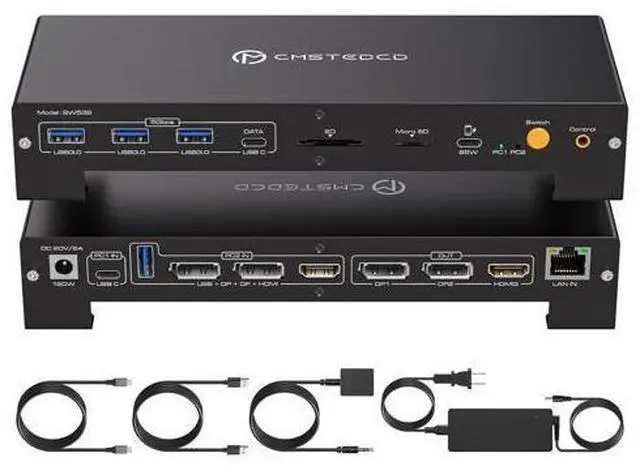
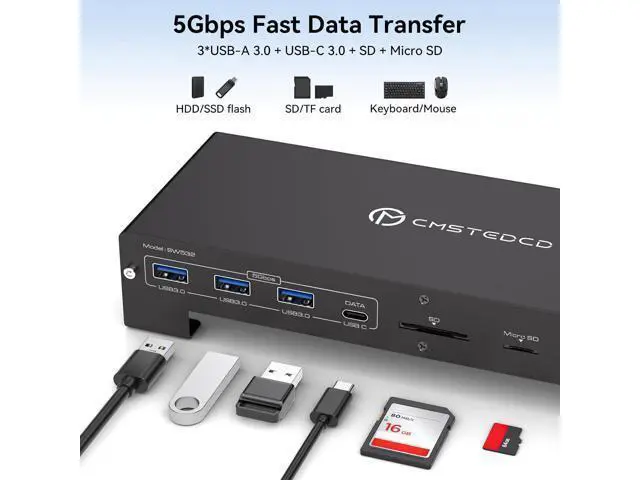
- Powerful KVM Docking Station: This KVM switch not only allows your work laptop and PC to share 3 monitors and 1 set of keyboard mouse, but also share a 15 in 1 Docking Station, including USB 3.0 USB C DatePorts; Displayports; HDMI port; gigabit ethernet port; Micro SD/SD card slot, etc.; supports 60W fast charging and 100W power supply for your laptop.
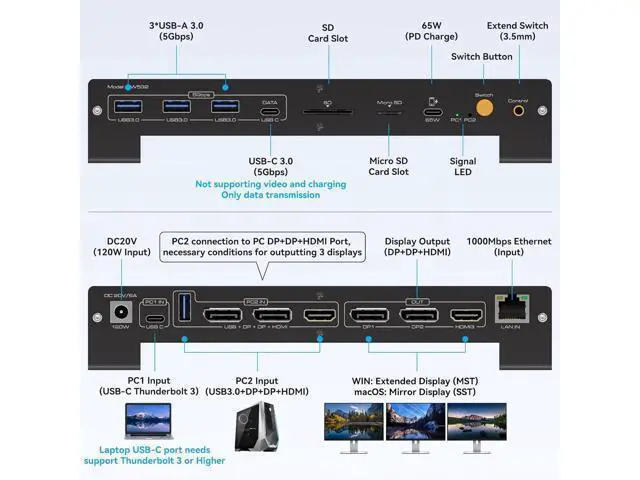
- Please Check Compatibility: The USB C Host Port requires your laptop's USB C port supports the DP Alt Mode feature and Data transmission, or a laptop with Thunderbolt 3/4/5 ports. Incomplete compatibility list: H-P Laptops-EliteBook 700/800, Omen, Elite Dragonfly, Elitebook Ultra series; D-e-ll Laptops-XPS, Latitude, Precision, Pro series; Le-no-vo Laptops-Think-Pad, YOGA, Think-Book, X1 series; A-c-er Laptops-Swift, Concept D, Neo 2023+ series; A-su-s Laptops-ROG, ProArt series. For laptop specific models or compatible models of other brands, please check the second main picture.
- 100W KVM Switches: Keep devices juiced up with 100W PD
+
+
Overview
Specs
Reviews

Any questions? Our AI mode will help you find out quickly.
Try me now
Features: KVM Docking Station for Laptop & DesktopThe KVM switch has a USB C (MST) input for laptops and 2DP + 1HDMI + 1USB A inputs for desktop, and allows hassle-free sharing of 2 DP displays, 1 HDMI display, 1000Mbps network port, USB A/C 3.0 port, SD card slot and 1 85W mobile phone fast charging port. between laptop and desktop. Enable effortless multitasking and maximize your productivity. Desktop PCs must be connected to the "PC2 IN" of the KVM using 2DP+1HDMI+1USB A. Make sure your laptop supports Thunderbolt ports. Triple Display 4K60HzKVM Switch 2 PC 3 Monitor output three displays up to 4K60Hz simultaneously when connected to three monitors.
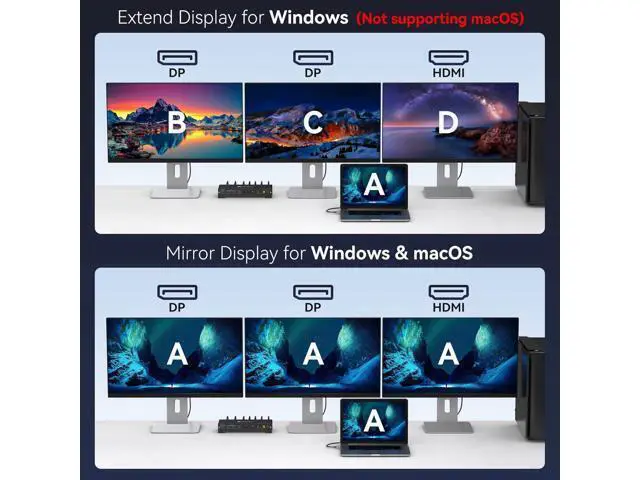
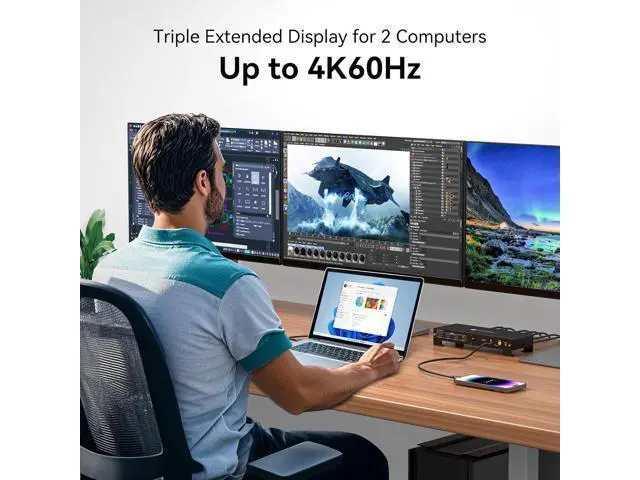
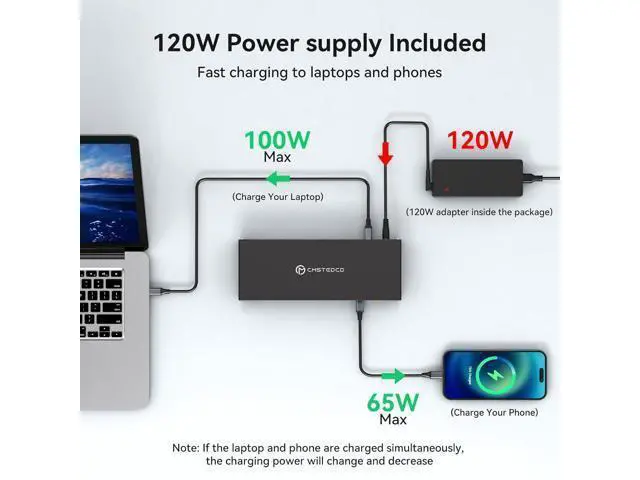
Note: Only laptops with USB-C Thunderbolt 4 ports, desktops with DP 1.4 and HDMI 2.0 ports, and high frame rate cables can output up to three simultaneous 4K60Hz outputs. It is recommended that the input cable is no longer than 2m and the output cable is no longer than 3m. Actual resolution and image repeat rate depend on the performance of the host device's graphics card. 100W Laptop Charging & 85W Charging for Mobile PhonesKVM Switch Triple Display comes with a DC20V 120W power adapter that can charge your laptop during operation, with a maximum power of 100W, so you don't have to worry about running out of power. The KVM also features a mobile phone fast charging port on the front with a power maximum of 85W. When the laptop and mobile phone are charged at the same time, the charging power changes and decreases. 2 Display ModesKVM Docking Station supports both mirrored and extension display modes. In Windows, three monitors can display the same image on three monitors (mirroring) or three monitors can display different images (extension). In macOS, due to the limitation of the system itself (macOS only supports SST), three monitors can only display the same image (mirroring).
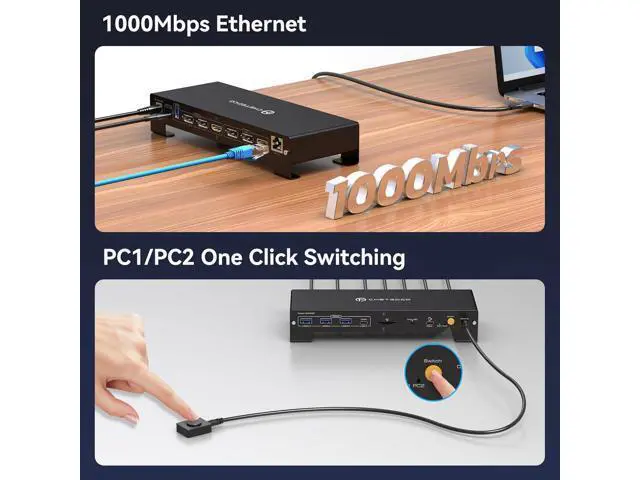
Click "Windows + P" to select the display mode. 2 Switching ModesUSB C KVM Docking Station includes an external controller that allows you to place the KVM outside the workplace and switch between two computers via the external controller, saving workplace space and keeping order on the desktop. You can also use the "Switch" button on the front of the docking station to switch the signal source with just one click.
Note: Switching via keyboard shortcuts (Hotkeys) is not supported. Packing list and quality serviceKVM Switch Desktop Laptop includes DC20V power supply x1, C-C USB cable x1, USB A-A cable x1, extension controller x1, non-slip rubber pad x4, manual x1. If you have any questions about the item or problems in use, please contact us, we have professional technicians to solve your problems.
Note: Only laptops with USB-C Thunderbolt 4 ports, desktops with DP 1.4 and HDMI 2.0 ports, and high frame rate cables can output up to three simultaneous 4K60Hz outputs. It is recommended that the input cable is no longer than 2m and the output cable is no longer than 3m. Actual resolution and image repeat rate depend on the performance of the host device's graphics card. 100W Laptop Charging & 85W Charging for Mobile PhonesKVM Switch Triple Display comes with a DC20V 120W power adapter that can charge your laptop during operation, with a maximum power of 100W, so you don't have to worry about running out of power. The KVM also features a mobile phone fast charging port on the front with a power maximum of 85W. When the laptop and mobile phone are charged at the same time, the charging power changes and decreases. 2 Display ModesKVM Docking Station supports both mirrored and extension display modes. In Windows, three monitors can display the same image on three monitors (mirroring) or three monitors can display different images (extension). In macOS, due to the limitation of the system itself (macOS only supports SST), three monitors can only display the same image (mirroring).
Click "Windows + P" to select the display mode. 2 Switching ModesUSB C KVM Docking Station includes an external controller that allows you to place the KVM outside the workplace and switch between two computers via the external controller, saving workplace space and keeping order on the desktop. You can also use the "Switch" button on the front of the docking station to switch the signal source with just one click.
Note: Switching via keyboard shortcuts (Hotkeys) is not supported. Packing list and quality serviceKVM Switch Desktop Laptop includes DC20V power supply x1, C-C USB cable x1, USB A-A cable x1, extension controller x1, non-slip rubber pad x4, manual x1. If you have any questions about the item or problems in use, please contact us, we have professional technicians to solve your problems.
Warranty & Returns
Warranty, Returns, And Additional Information
Warranty
- Please contact the Seller directly for warranty information. Warranty information may also be found on the Manufacturer's website.
- CONTACT
Return Policies
- Return for refund within: 30 days
- Return for replacement within: non-replaceable
- This item is covered by TechMax Depot Return Policy
Manufacturer Contact Info
- For a directory of all our manufacturers, please click below.
- Manufacturers Directory
LOADING...