

Your Browsing History
- Free 30-day Returns
$267.98
Ships from China.

Meet Your Seller

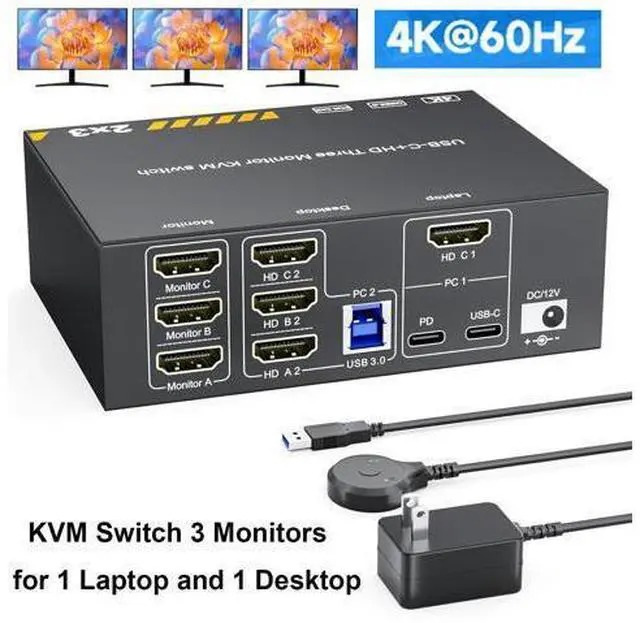


DIXSG KVM Switch for 1 Laptop & 1 Desktop share 3 Monitors 4K@60Hz, USB C HDMI 3 Monitor KVM Switch, Docking Station KVM Switches with 4 USB 3.0 Port, 87W PD Charging, Wired Remote and Power Adapter
Limited time offer, ends 09/27 By TechMax Depot
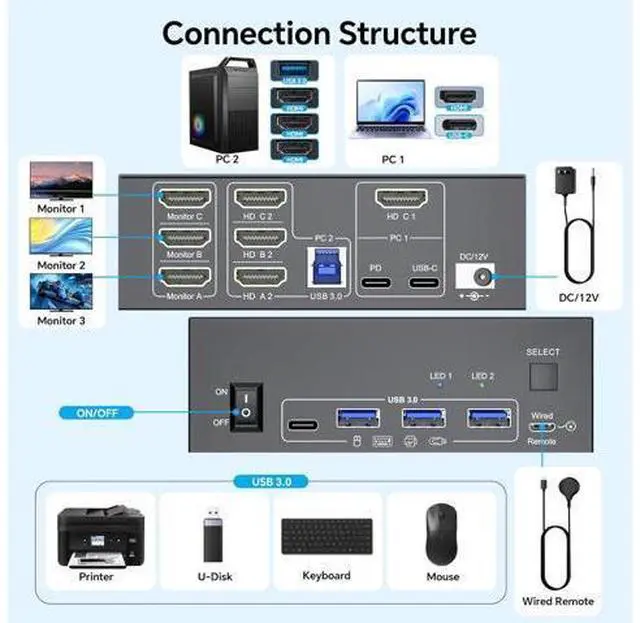
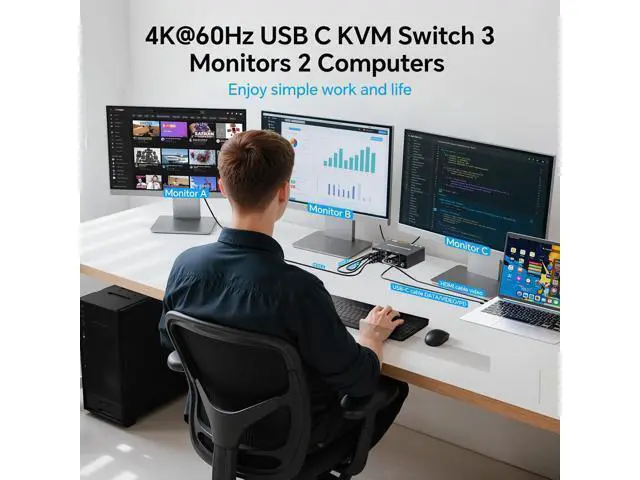
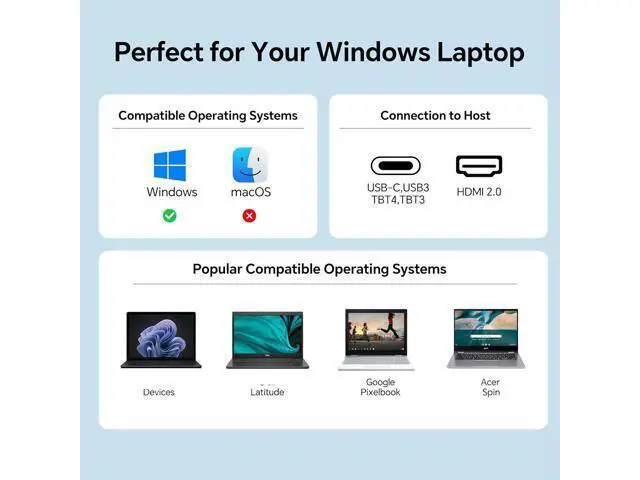
- HDMI & USB C KVM Switch: This KVM switch built with 1x HDMI +1x USB-C (MST) input port for laptop, and 1x integrated HDMI +HDMI+HDMI+ USB input port for desktop. Allows you to effortlessly manage 1 Laptop and 1 Desktop to share 3 monitors and 4 USB devices. (Only works with Windows laptops)
- Ultra HD 4K Visual Effect: HDMI 2.0 and DP 1.4a (USB-C) compliant, KVM Switch supports resolution up to 4K@60Hz and is backward compatible with 2K@120Hz, 2560x1440@120Hz/60Hz, and 1920x1080@144Hz 120Hz ect.
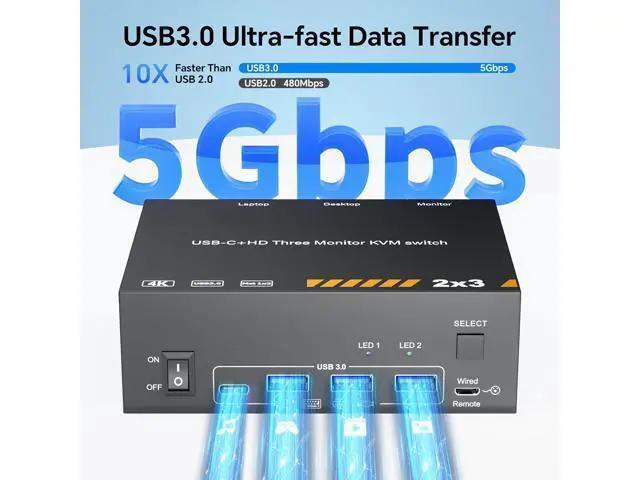
- 5Gbps KVM Switch USB C: MST Thunderbolt KVM Switch with 3 USB A + 1 USB-C ports securely identifies keyboard, mouse, printer and other USB devices. Supports ultra-fast data transfer up to 5Gbps, backward compatible with USB 3.0/2.0/1.1.
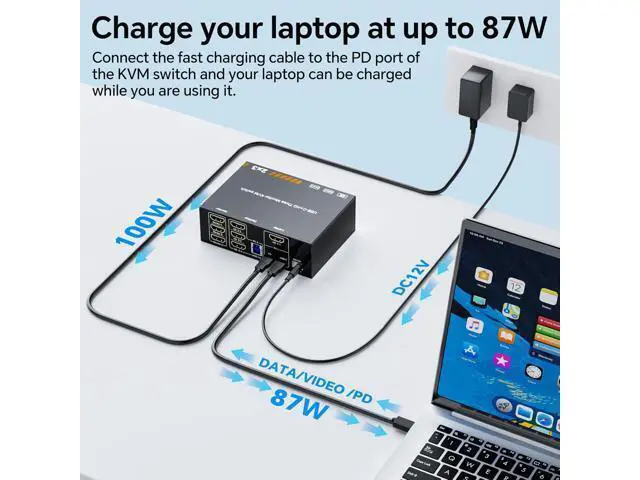
- 87W PD Charging for Laptops: KVM Switch has the function of charging laptops,Please plug the Type-C charging cable of the 110V power supply into the PD port to power the laptop(PD 100W charging protocol); The actual charging power obtained by the laptop is betw
+
+
Overview
Specs
Reviews

Any questions? Our AI mode will help you find out quickly.
Try me now
About this item HDMI and USB C KVM Switch Triple monitorThis KVM switch 3 monitors 2 computers built with 1x HDMI +1x USB-C (MST) input port for laptop, and 1x integrated HDMI +HDMI+HDMI+ USB input port for desktop. Allows you to effortlessly manage 1 Laptop and 1 Desktop to share 3 monitors and 4 USB devices together. (Only works with Windows laptops) Ultra HD 4K Visual EffectHDMI 2.0 and DP 1.4 a (USB-C) compliant, 2 monitors KVM Switch supports resolution up to 4K@60Hz and is backward compatible with 2K@120Hz, 2560x1440@120Hz/60Hz, and 1920x1080@144Hz 120Hz ect.
If all three screens are unusable, please test them one by one: HDMI port, USB C port, and PC1 or PC2. Test them separately and contact customer service for a solution. 5Gbps KVM Switch USB C MST Thunderbolt KVM Switch with 3 USB A + 1 USB-C ports securely identifies keyboard, mouse, printer, scanner and other USB devices. USB C KVM Switch 1x Destop+1x Laptops 3 monitors supports ultra-fast data transfer up to 5Gbps, backward compatible with USB 3.0 / 2.0 / 1.1. Triple monitor KVM switch USB C will not damage USB devices such as hard drives 87W PD Charging for LaptopsMST KVM Switch HDMI USB C has the function of charging laptops, Please plug the Type-C charging cable of the 220V power supply into the PD port to power the laptop (PD 100W charging protocol); The actual charging power obtained by the laptop is between 87W. Great compatibility & 2 switching modesKVM switch 3 monitors driver-free for Windows, Support PC, Laptop, etc.. You can press the button on the panel or use the wired remote (included) to switch the 2 computers. Two color LED indicate the active computer. Packing List USB C HDMI KVM Switch, 1 USB C cable for audio and video signal transmission, 1 USB 3.0 A-B cable, 1 DC12V power adapter, 1 wired controller, instruction manual.
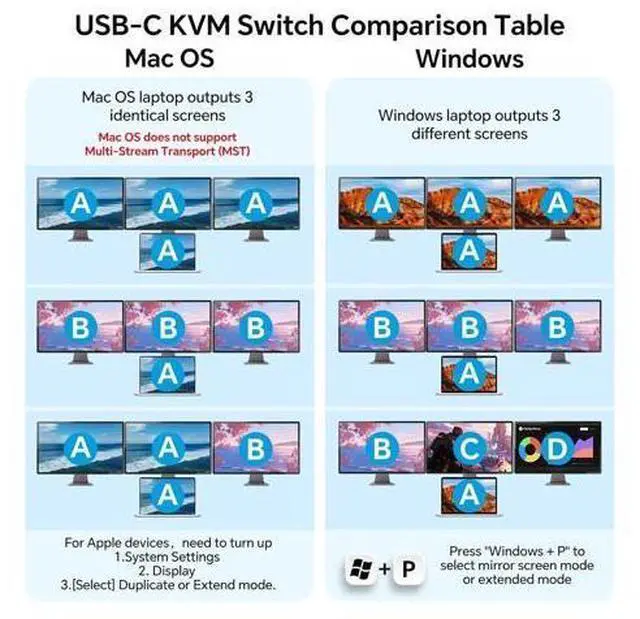
Please purchase 7 additional HDMI cables for need use. MST USB C+HDMI KVMSimply connect 1 HDMI cable +1 Type-C cable between laptop and USB-C KVM switch, and you can display 2 different screens on 3 HDMI monitors (Copy or extend). The USB-C port of the MST USB-C switch 1 in 2 out is fully functional. Make sure your laptop has display expansion features.
NOTE: 1. Support PD 87W to power laptops. Please connect the 220V power supply to the KVM PD port; 2. USB C interface of your device must support Thunderbolt 3 or above standards to use it; 3. Windows can support extended mode ABC with three different screens. Apple Mac computers do not support extended mode, only copy mode. Those who mind should buy with caution; 4. Laptop must have both USB-C +HDMI ports; 5. If you experience screen flickering, a blue screen, or a black screen during use, press the rocker switch and power cycle, try replacing the USB-C cable, or lower the monitor resolution to ensure a smooth image.
If all three screens are unusable, please test them one by one: HDMI port, USB C port, and PC1 or PC2. Test them separately and contact customer service for a solution. 5Gbps KVM Switch USB C MST Thunderbolt KVM Switch with 3 USB A + 1 USB-C ports securely identifies keyboard, mouse, printer, scanner and other USB devices. USB C KVM Switch 1x Destop+1x Laptops 3 monitors supports ultra-fast data transfer up to 5Gbps, backward compatible with USB 3.0 / 2.0 / 1.1. Triple monitor KVM switch USB C will not damage USB devices such as hard drives 87W PD Charging for LaptopsMST KVM Switch HDMI USB C has the function of charging laptops, Please plug the Type-C charging cable of the 220V power supply into the PD port to power the laptop (PD 100W charging protocol); The actual charging power obtained by the laptop is between 87W. Great compatibility & 2 switching modesKVM switch 3 monitors driver-free for Windows, Support PC, Laptop, etc.. You can press the button on the panel or use the wired remote (included) to switch the 2 computers. Two color LED indicate the active computer. Packing List USB C HDMI KVM Switch, 1 USB C cable for audio and video signal transmission, 1 USB 3.0 A-B cable, 1 DC12V power adapter, 1 wired controller, instruction manual.
Please purchase 7 additional HDMI cables for need use. MST USB C+HDMI KVMSimply connect 1 HDMI cable +1 Type-C cable between laptop and USB-C KVM switch, and you can display 2 different screens on 3 HDMI monitors (Copy or extend). The USB-C port of the MST USB-C switch 1 in 2 out is fully functional. Make sure your laptop has display expansion features.
NOTE: 1. Support PD 87W to power laptops. Please connect the 220V power supply to the KVM PD port; 2. USB C interface of your device must support Thunderbolt 3 or above standards to use it; 3. Windows can support extended mode ABC with three different screens. Apple Mac computers do not support extended mode, only copy mode. Those who mind should buy with caution; 4. Laptop must have both USB-C +HDMI ports; 5. If you experience screen flickering, a blue screen, or a black screen during use, press the rocker switch and power cycle, try replacing the USB-C cable, or lower the monitor resolution to ensure a smooth image.
Warranty & Returns
Warranty, Returns, And Additional Information
Warranty
- Please contact the Seller directly for warranty information. Warranty information may also be found on the Manufacturer's website.
- CONTACT
Return Policies
- Return for refund within: 30 days
- Return for replacement within: non-replaceable
- This item is covered by TechMax Depot Return Policy
Manufacturer Contact Info
- For a directory of all our manufacturers, please click below.
- Manufacturers Directory
LOADING...