

Your Browsing History
- Free 30-day Returns
$237.88
Ships from China.

Meet Your Seller

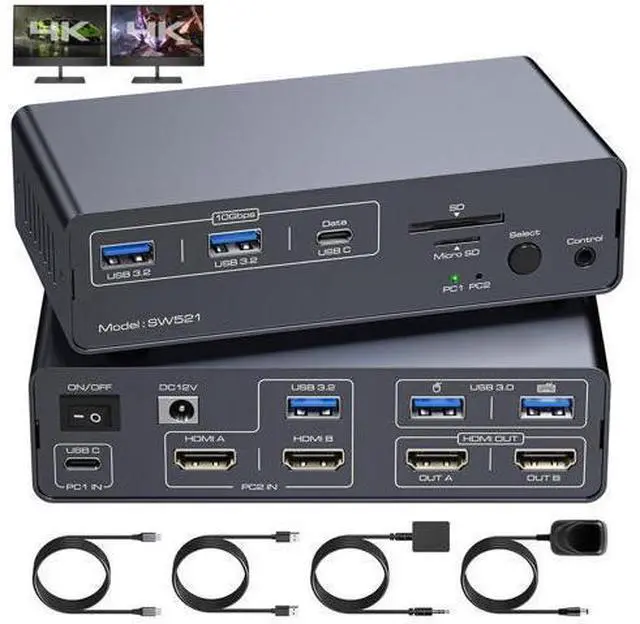


DIXSG KVM Switch Docking Station USB C HDMI KVM Switch for 1 Laptop 1 Computer 2 Monitor HDMI 4K60Hz, EDID, Dual Monitor HDMI KVM Switcher for Laptop and PC Share 2 Monitors, 13-in-1 Dock giyqxHw
Limited time offer, ends 10/13 By TechMax Depot
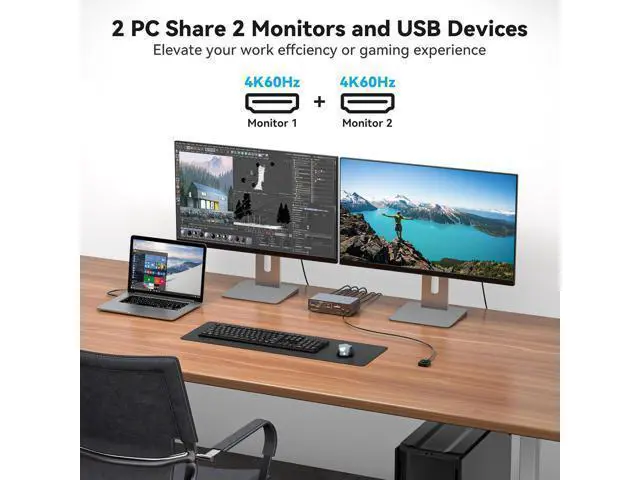
- KVM Switch Between Laptop and Desktop: This KVM Switch supports 1 laptop and 1 PC to share a 13-in-1 docking station;it includes 2 monitors with HDMI ports,mouse,keyboard,USB flash drive,SD card and other devices; Note: 1.Ensure that the C port of the lap
+
+
Overview
Specs
Reviews

Any questions? Our AI mode will help you find out quickly.
Try me now
KVM switch between Laptop and
Desktop: USB C computer and HDMI PC share a set of mouse, keyboard, two monitors and other peripherals. It supports 4K@60Hz resolution for transferring impressive HD video, delivering a beautiful, crisp, clear picture and is backward compatible with 2K@144Hz, 1080P and more.
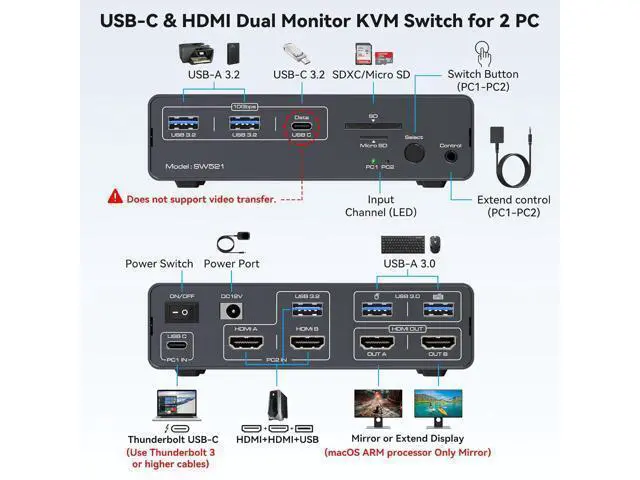
Plug and Play Input: Laptop with USB C port, PC with two HDMI ports and one USB A port, both computers connected to the KVM at the same time.
Output: two monitors connected to the KVM via
HDMI ports Peripherals: mouse and keyboard linked via USB 3.0
Two display modes: Copy
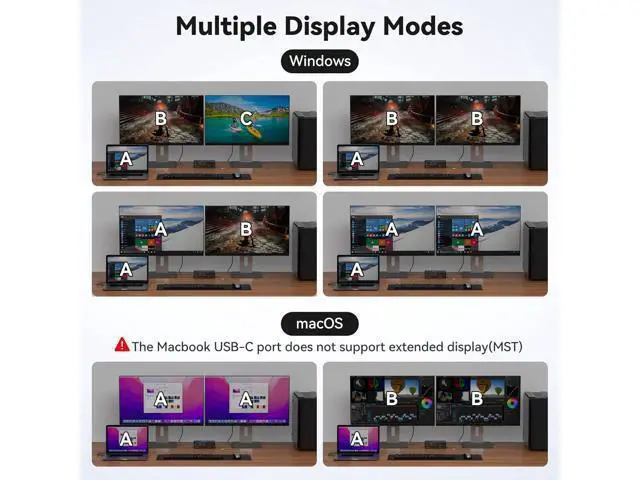
Mode: copies the screen from the main screen to the secondary screen, suitable for presenting your PPT or other works.
Extended Mode: Allows you to move the application window to another screen, providing plenty of workspace for efficient multitasking.
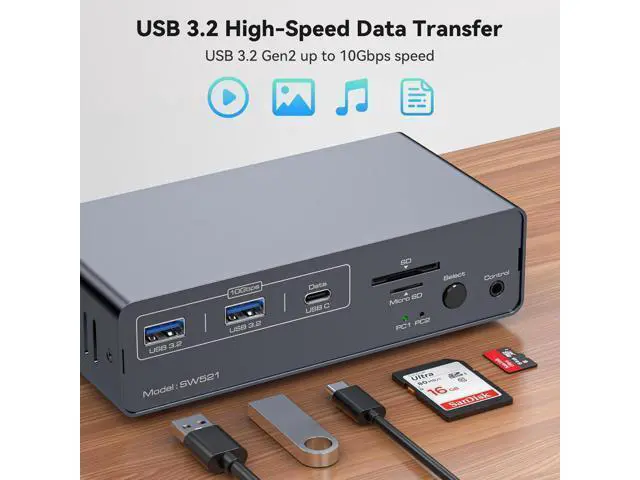
Note: Due to the limitation of Mac OS system, it doesn't support Extended Mode. SD card port and a Micro SD card port Two SD ports are available for you to use to easily copy like photos, documents, videos and various application data to laptops and PCs. USB 3.2 ports Provides two additional USB 3.2 ports with data transfer speeds of up to 10Gbps to simultaneously support removable hard drives, USB flash drives, printers, cameras and more. Well-made Metal shell, anti-drop noise, fashionable and beautiful, the body with anti-friction pads, you can move without worrying about damage to the desktop.
EDID Copy Function: No need to rearrange desktop windows after switching computers.
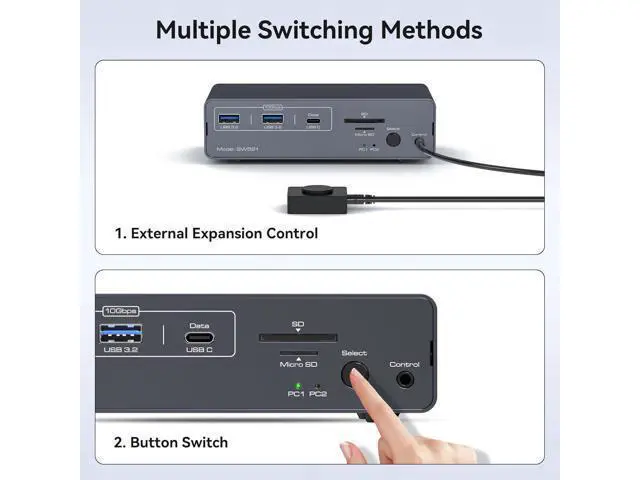
Two switching methods: Body buttons, one-touch switching.
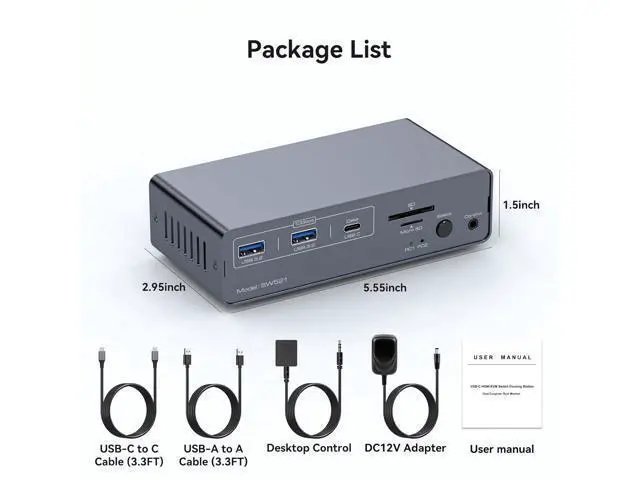
Independent extension switch: you can hide the KVM Switch underneath the desktop and put the extension switch on the desktop to make the desktop more tidy. Package contents 1 x USB C Thunderbolt 3 KVM Switch 1 x 1 meter USB Gen 2 Cable (Type C to Type C) 1 x 1 meter USB 3.0 Cable 1 x 12V Power Adapter 1 x Destop Control Kit 1 x User Manual KVM switch between Laptop and
Desktop: USB C computer and HDMI PC share a set of mouse, keyboard, two monitors and other peripherals. It supports 4K@60Hz resolution for transferring impressive HD video, delivering a beautiful, crisp, clear picture and is backward compatible with 2K@144Hz, 1080P and more.
Plug and Play Input: Laptop with USB C port, PC with two HDMI ports and one USB A port, both computers connected to the KVM at the same time.
Output: two monitors connected to the KVM via
HDMI ports Peripherals: mouse and keyboard linked via USB 3.0
Two display modes: Copy
Mode: copies the screen from the main screen to the secondary screen, suitable for presenting your PPT or other works.
Extended Mode: Allows you to move the application window to another screen, providing plenty of workspace for efficient multitasking.
Note: Due to the limitation of Mac OS system, it doesn't support Extended Mode.
Two switching methods: Body buttons, one-touch switching.
Independent extension switch: you can hide the KVM Switch underneath the desktop and put the extension switch on the desktop to make the desktop more tidy. Package contents 1 x USB C Thunderbolt 3 KVM Switch 1 x 1 meter USB Gen 2 Cable (Type C to Type C) 1 x 1 meter USB 3.0 Cable 1 x 12V Power Adapter 1 x Destop Control Kit 1 x User Manual
Desktop: USB C computer and HDMI PC share a set of mouse, keyboard, two monitors and other peripherals. It supports 4K@60Hz resolution for transferring impressive HD video, delivering a beautiful, crisp, clear picture and is backward compatible with 2K@144Hz, 1080P and more.
Plug and Play Input: Laptop with USB C port, PC with two HDMI ports and one USB A port, both computers connected to the KVM at the same time.
Output: two monitors connected to the KVM via
HDMI ports Peripherals: mouse and keyboard linked via USB 3.0
Two display modes: Copy
Mode: copies the screen from the main screen to the secondary screen, suitable for presenting your PPT or other works.
Extended Mode: Allows you to move the application window to another screen, providing plenty of workspace for efficient multitasking.
Note: Due to the limitation of Mac OS system, it doesn't support Extended Mode. SD card port and a Micro SD card port Two SD ports are available for you to use to easily copy like photos, documents, videos and various application data to laptops and PCs. USB 3.2 ports Provides two additional USB 3.2 ports with data transfer speeds of up to 10Gbps to simultaneously support removable hard drives, USB flash drives, printers, cameras and more. Well-made Metal shell, anti-drop noise, fashionable and beautiful, the body with anti-friction pads, you can move without worrying about damage to the desktop.
EDID Copy Function: No need to rearrange desktop windows after switching computers.
Two switching methods: Body buttons, one-touch switching.
Independent extension switch: you can hide the KVM Switch underneath the desktop and put the extension switch on the desktop to make the desktop more tidy. Package contents 1 x USB C Thunderbolt 3 KVM Switch 1 x 1 meter USB Gen 2 Cable (Type C to Type C) 1 x 1 meter USB 3.0 Cable 1 x 12V Power Adapter 1 x Destop Control Kit 1 x User Manual KVM switch between Laptop and
Desktop: USB C computer and HDMI PC share a set of mouse, keyboard, two monitors and other peripherals. It supports 4K@60Hz resolution for transferring impressive HD video, delivering a beautiful, crisp, clear picture and is backward compatible with 2K@144Hz, 1080P and more.
Plug and Play Input: Laptop with USB C port, PC with two HDMI ports and one USB A port, both computers connected to the KVM at the same time.
Output: two monitors connected to the KVM via
HDMI ports Peripherals: mouse and keyboard linked via USB 3.0
Two display modes: Copy
Mode: copies the screen from the main screen to the secondary screen, suitable for presenting your PPT or other works.
Extended Mode: Allows you to move the application window to another screen, providing plenty of workspace for efficient multitasking.
Note: Due to the limitation of Mac OS system, it doesn't support Extended Mode.
Two switching methods: Body buttons, one-touch switching.
Independent extension switch: you can hide the KVM Switch underneath the desktop and put the extension switch on the desktop to make the desktop more tidy. Package contents 1 x USB C Thunderbolt 3 KVM Switch 1 x 1 meter USB Gen 2 Cable (Type C to Type C) 1 x 1 meter USB 3.0 Cable 1 x 12V Power Adapter 1 x Destop Control Kit 1 x User Manual
Warranty & Returns
Warranty, Returns, And Additional Information
Warranty
- Please contact the Seller directly for warranty information. Warranty information may also be found on the Manufacturer's website.
- CONTACT
Return Policies
- Return for refund within: 30 days
- Return for replacement within: non-replaceable
- This item is covered by TechMax Depot Return Policy
Manufacturer Contact Info
- For a directory of all our manufacturers, please click below.
- Manufacturers Directory
LOADING...