

Your Browsing History
- Free 30-day Returns
$181.55
Ships from China.

Meet Your Seller

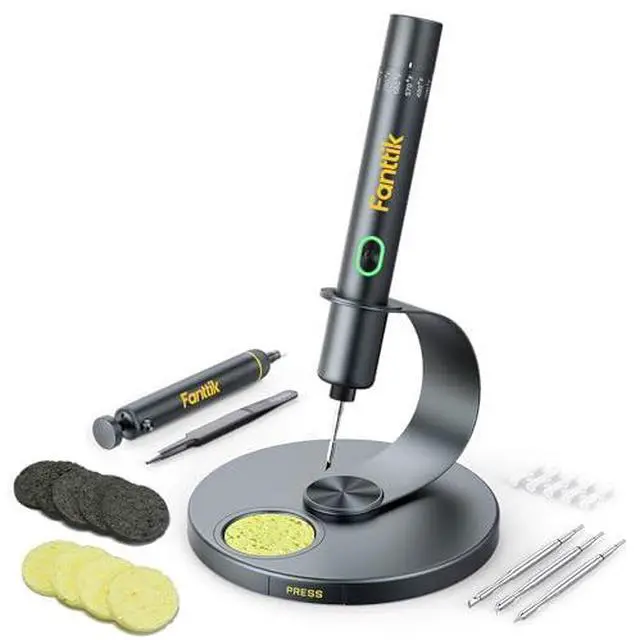

Fanttik T1 Max Soldering Iron Kit, Cordless Soldering Iron, 7 Seconds Fast Heating(390°F-840), Auto Sleep, 4 Precision Soldering Tips(C210), 360° Swivel Stand, Soldering Iron for Precision Repair
Limited time offer, ends 09/27 By GGnix
- Extreme Tinning: Fanttik T1 MAX is equipped with 4pcs tailor-made C210 (C210-I, C210-IS, 2pcs C210-K) rapid heating soldering tips, long service life, and anti-oxidation. Achieve a fast heating in 7 seconds, reduce the waiting time, and improve the efficiency of your repair tasks.
- Compatible DC/AC Modes: With the built-in 2600mAh battery in wireless mode, the maximum DC Output is 12W for up to 60 minutes at 840°F (450°C). Its small size is not bound by space, and maintenance work can be carried out anywhere. In wired mode, the maximum AC Output is 16W. It can be powered by a charger or mobile power supply with a Type-C port.
- Intelligent Gravity Sensing: After stopping working for 30 seconds, the soldering iron will enter sleep mode. T1 MAX will automatically restart to heat up to the temperature you set when picking it up again. NOTE: The red light flashes while heating, and the green light stays on when heating is complete.
- 6 Temperature Levels: The tail knob of the soldering iron
+
+
Overview
Specs
Reviews

Any questions? Our AI mode will help you find out quickly.
Try me now
Product description This is a modal window. The media could not be loaded, either because the server or network failed or because the format is not supported. Special Features LED Light Indication Simple and easy to use design Press and hold the button to activate the soldering iron. Work conditions are indicated by three lights (Red/Green/White). Usage Scenario Please pay attention to safety when using, so as not to be burned by the high temperature of the soldering iron tip What can I do to have a better weld? What temperature should be selected for SMD component welding? What temperature should be selected for plug-in components, flying wires? What temperature should be selected for component disassembly? What is the function of AUTO SLEEP mode?
Warranty & Returns
Warranty, Returns, And Additional Information
Warranty
- Please contact the Seller directly for warranty information. Warranty information may also be found on the Manufacturer's website.
- CONTACT
Return Policies
- Return for refund within: 30 days
- Return for replacement within: 30 days
- This item is covered by GGnix Return Policy
Manufacturer Contact Info
- For a directory of all our manufacturers, please click below.
- Manufacturers Directory
LOADING...