

Your Browsing History
- Free 30-day Returns
$284.08
Ships from China.

Meet Your Seller



4 Port HDMI KVM Switch 4X2 Dual Monitor 4K@60Hz Extended Display USB KVM Switch 4 in 2 out for 4 PC Share Keyboard Mouse Monitor(with US Plug)
- 4 Port HDMI KVM Switch 4X2 Dual Monitor 4K@60Hz Extended Display USB KVM Switch 4 in 2 out for 4 PC Share Keyboard Mouse Monitor(with US Plug)
+
+
Overview
Specs
Reviews

Any questions? Our AI mode will help you find out quickly.
Try me now
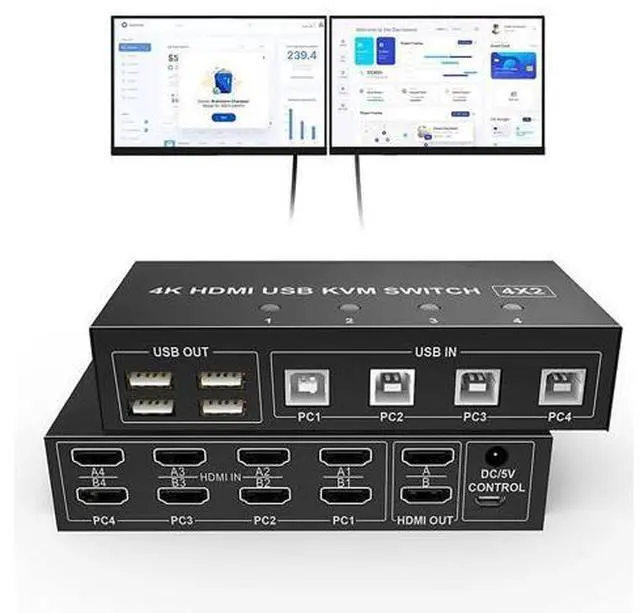
Dual Monitor 4 Port (HDMI + DHDMI ) KVM Switch 4K@60Hz This Dual Monitor KVM Switch HDMI 4 Port help you control 4 PCs share 2 monitors (Extend display mode or copy display mode) by only one set of USB keyboard & mouse.
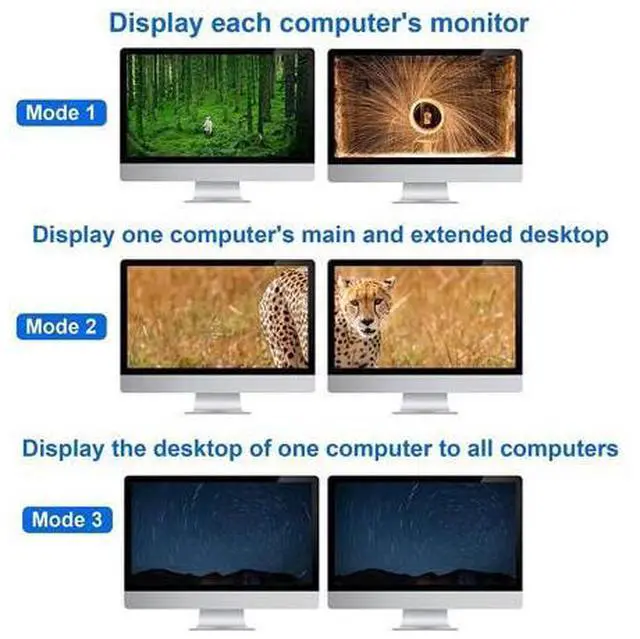
Product details: Dual Monitor KVM Switch HDMI 4 Port The KVM Switch 2 Monitors 4 Computers using only 1 set of keyboard, mouse and 2 monitors to control 2 computers, support display one computer's main and extended desktop. ( For dual monitor setups, it requires every computer support 2 screen or above display functions and must support extended display). Dual Monitor KVM Switch 3 Modes The Dual Monitor KVM Switch HDMI 4 Port with 3 display modes.
Mode 1: Two monitors splicing to display the picture of one host;
Mode 2: Two monitors show the main screen and extended of one host;
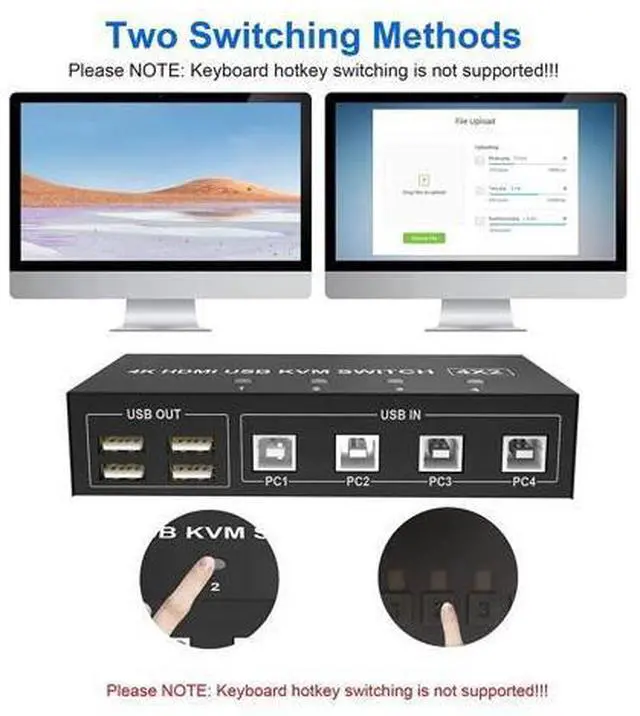
Mode 3: Two monitors respectively show the desktops of two host. 4K@60Hz Resolution The Dual Monitor KVM Switch HDMI 4 Port max resolution up to 4K@60Hz, compatible 3840x2160@30Hz, 1080P, 1080P 3D, 1080I, 720P, 576P, 576I, 480P, 480I. Smart EDID & USB 2.0 The Dual Monitor KVM Switch HDMI 4 Port Extended Display comes with EDID emulators in each input port, keep PCs always having correct display information. 4x USB 2.0, supports Connecting your usb 2.0 port device such as Scanner/USB driver/3D Printer/Monitor Camera/U-disk etc. Remarks!!! 1)To support dual display, your pc's video card must be capable of supporting 2 HDMI out simutaneously. 2)to use the extended and spliced display function, your video card must be capable of doing so. As the dual monitor HDMI KVM Switch display only what was connected to the input. It is a bypass swicth and it can not processing those function by itself. 3)This is a HDMI KVM dual monitor switch, it is not a 4X2 HDMI KVM Matrix. 4)The dual monitor KVM Switch 4 port does not support keyboard hotkey control.
Instead, it supports button and switch wire control.
Product Features: Support extended or duplicated display depending on computer setting. Support max up resolution 4K@60Hz, downward compatible Support HDCP and auto EDID Support controller or buttons switch USB devices that can be connected, such
as: USB mouse, keyboard, U disk, printer, camera, etc. Built-in automatic equalization system, picture position, clear and stable Built-in ESD electrostatic protection circuit, all-round protection system safety
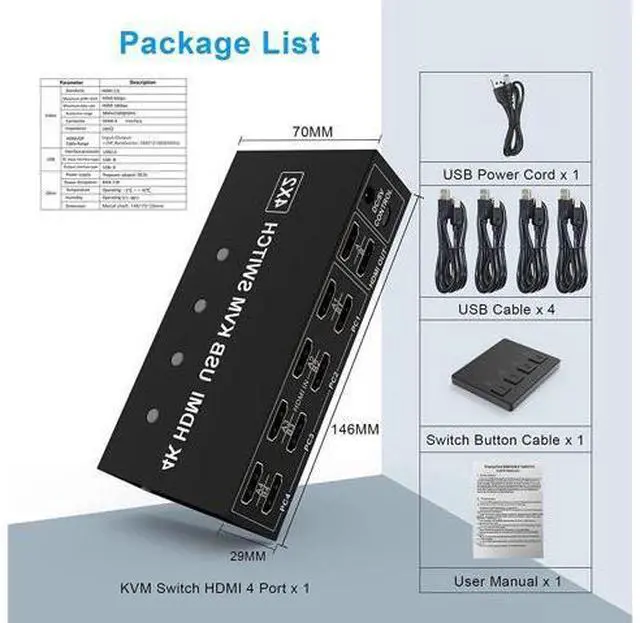
Package List: Dual Monitor KVM Switch HDMI x1 USB Cables x4 USB Power Cord x1 Wired Switching Button x1 User Manual x1 Remarks!: The above features is subject to the capability of your video card.
Installation Step:
1. Turn off all devices and unplug all the cables;
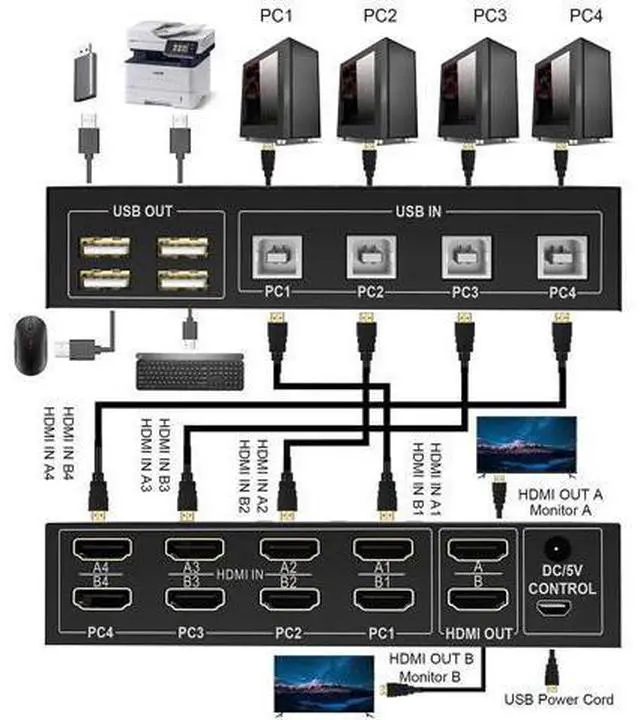
2. Plug HDMI cables and USB cables into KVM switch and your computers/laptops (
HDMI cables not included): Please check the HDMI IN A1 & A2 & A3 & A4, HDMI IN B1 & B2 & B3 & B4 and USB IN1 & IN2 & IN3 & IN4 is corresponding, HDMI OUT A, HDMI OUT B is corresponding, NOT support mixed insertion. HDMI IN A1 + HDMI IN B1 + USB IN1=PC1 HDMI IN A2 + HDMI IN B2 + USB IN2=PC2 HDMI IN A3 + HDMI IN B3 + USB IN3=PC3 HDMI IN A4 + HDMI IN B4 + USB IN4=PC4
3. Plug mouse and keyboard into KVM switch;
4. Plug HDMI cables and USB cables into KVM switch and monitors;
5. Plug power supply into KVM switch;
6. Boot computers/laptops.
Product details: Dual Monitor KVM Switch HDMI 4 Port The KVM Switch 2 Monitors 4 Computers using only 1 set of keyboard, mouse and 2 monitors to control 2 computers, support display one computer's main and extended desktop. ( For dual monitor setups, it requires every computer support 2 screen or above display functions and must support extended display). Dual Monitor KVM Switch 3 Modes The Dual Monitor KVM Switch HDMI 4 Port with 3 display modes.
Mode 1: Two monitors splicing to display the picture of one host;
Mode 2: Two monitors show the main screen and extended of one host;
Mode 3: Two monitors respectively show the desktops of two host. 4K@60Hz Resolution The Dual Monitor KVM Switch HDMI 4 Port max resolution up to 4K@60Hz, compatible 3840x2160@30Hz, 1080P, 1080P 3D, 1080I, 720P, 576P, 576I, 480P, 480I. Smart EDID & USB 2.0 The Dual Monitor KVM Switch HDMI 4 Port Extended Display comes with EDID emulators in each input port, keep PCs always having correct display information. 4x USB 2.0, supports Connecting your usb 2.0 port device such as Scanner/USB driver/3D Printer/Monitor Camera/U-disk etc. Remarks!!! 1)To support dual display, your pc's video card must be capable of supporting 2 HDMI out simutaneously. 2)to use the extended and spliced display function, your video card must be capable of doing so. As the dual monitor HDMI KVM Switch display only what was connected to the input. It is a bypass swicth and it can not processing those function by itself. 3)This is a HDMI KVM dual monitor switch, it is not a 4X2 HDMI KVM Matrix. 4)The dual monitor KVM Switch 4 port does not support keyboard hotkey control.
Instead, it supports button and switch wire control.
Product Features: Support extended or duplicated display depending on computer setting. Support max up resolution 4K@60Hz, downward compatible Support HDCP and auto EDID Support controller or buttons switch USB devices that can be connected, such
as: USB mouse, keyboard, U disk, printer, camera, etc. Built-in automatic equalization system, picture position, clear and stable Built-in ESD electrostatic protection circuit, all-round protection system safety
Package List: Dual Monitor KVM Switch HDMI x1 USB Cables x4 USB Power Cord x1 Wired Switching Button x1 User Manual x1 Remarks!: The above features is subject to the capability of your video card.
Installation Step:
1. Turn off all devices and unplug all the cables;
2. Plug HDMI cables and USB cables into KVM switch and your computers/laptops (
HDMI cables not included): Please check the HDMI IN A1 & A2 & A3 & A4, HDMI IN B1 & B2 & B3 & B4 and USB IN1 & IN2 & IN3 & IN4 is corresponding, HDMI OUT A, HDMI OUT B is corresponding, NOT support mixed insertion. HDMI IN A1 + HDMI IN B1 + USB IN1=PC1 HDMI IN A2 + HDMI IN B2 + USB IN2=PC2 HDMI IN A3 + HDMI IN B3 + USB IN3=PC3 HDMI IN A4 + HDMI IN B4 + USB IN4=PC4
3. Plug mouse and keyboard into KVM switch;
4. Plug HDMI cables and USB cables into KVM switch and monitors;
5. Plug power supply into KVM switch;
6. Boot computers/laptops.
Warranty & Returns
Warranty, Returns, And Additional Information
Warranty
- Please contact the Seller directly for warranty information. Warranty information may also be found on the Manufacturer's website.
- CONTACT
Return Policies
- Return for refund within: 30 days
- Return for replacement within: 30 days
- This item is covered by GGnix Return Policy
Manufacturer Contact Info
- For a directory of all our manufacturers, please click below.
- Manufacturers Directory
LOADING...