


Get a $25 Newegg Promo Gift Card when you spend $250+ between 1/17/26 and 1/19/26. Learn More>
  • $35.99
  • $43.18
  • Save: $7.19 (16%)
  • Free 30-day Returns
  • Price alert
    Sold by Direct from manufacturerKOUKJU Store
    Top Rated
    4.6 (64 seller ratings)

    Shipped by Newegg

    Shop it at NeweggBusiness.

    Meet Your Seller

    USB 3.0 to SATA/IDE Adapter, Bailink External Hard Drive Reader Ultra Recovery Converter Compatible with 2.5/3.5in HDD/SSD DVD Optical Drive

    Limited time offer, ends 01/18 By KOUKJU Store

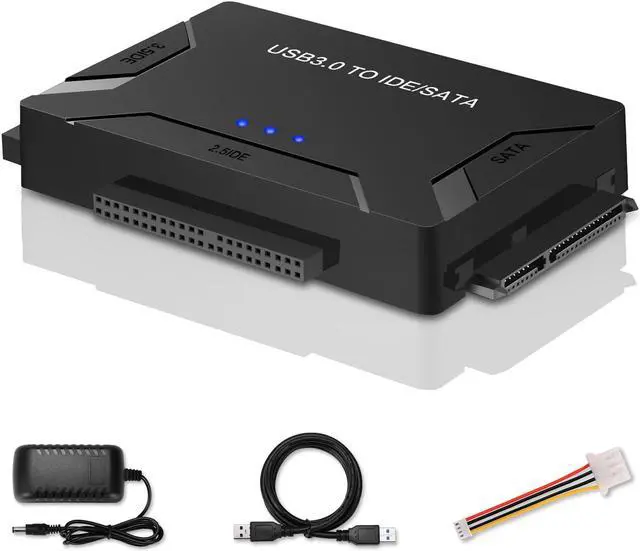
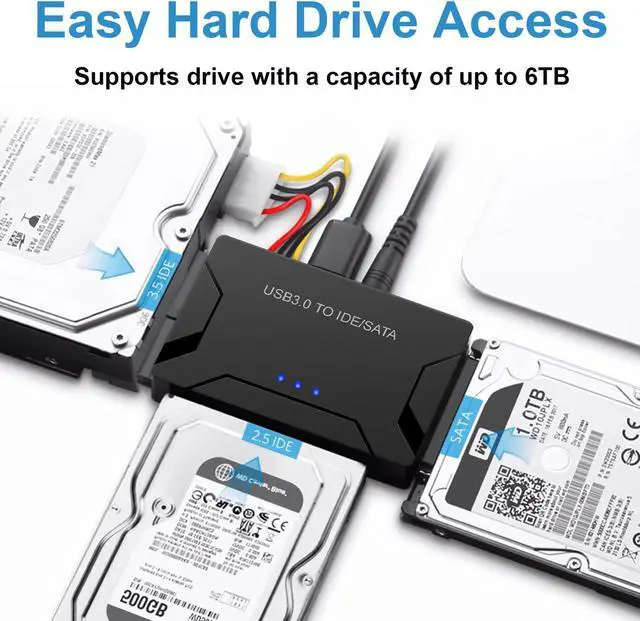
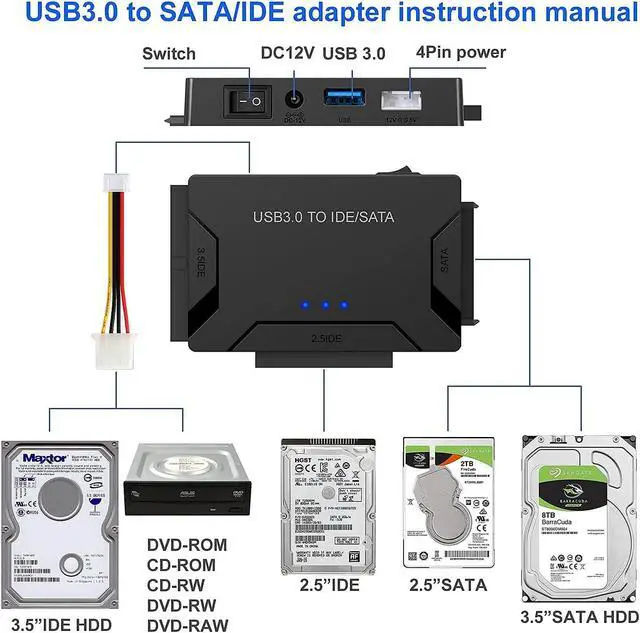
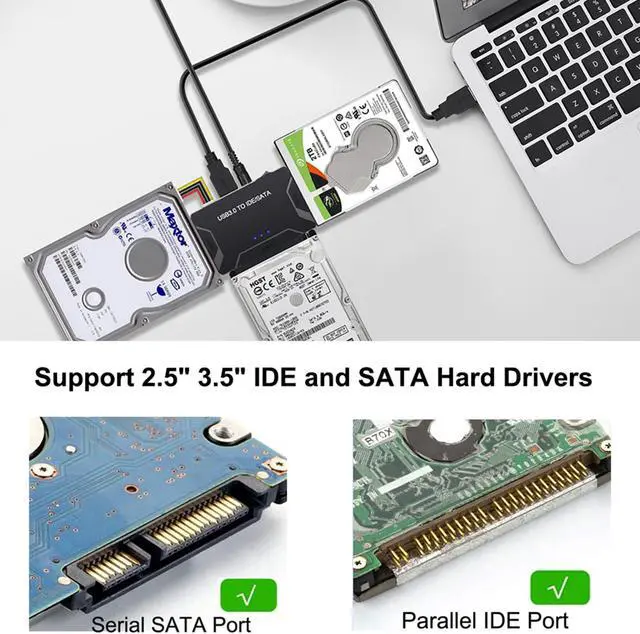
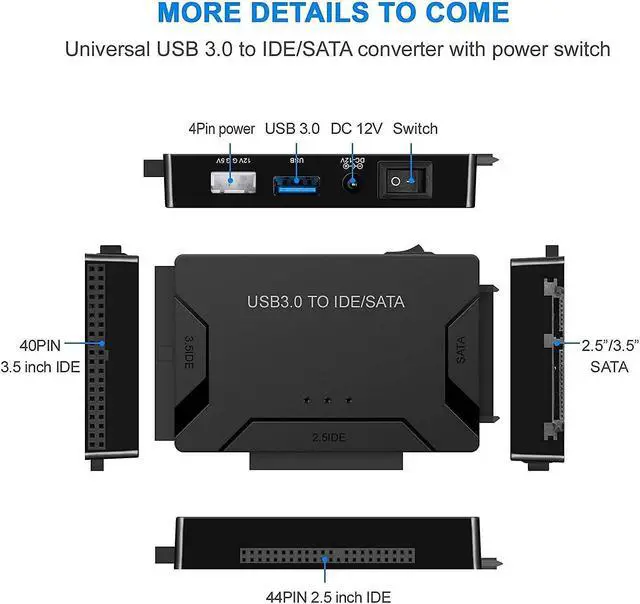
    • QUICKLY ACCESS TO SATA SSD&HDD - Hard drive adapter Support SATA 2.5"/3.5" HDD; 2.5"/3.5" IDE HDD, 5.25 external CD DVD optical drive; is able to retrieve old data from a hard drive with ease, with 2 IDE Connectors (40-pin and 44-pin) plus one SATA III Connector
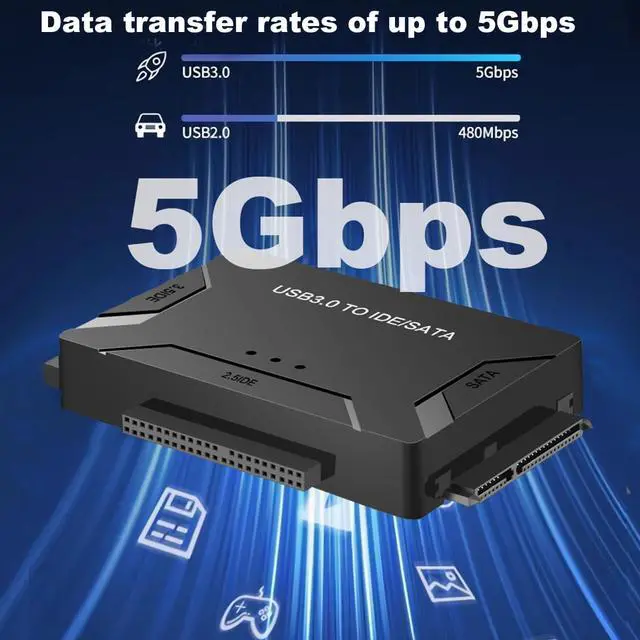
    • SUPERSPEED UP TO 5Gbps with USAP - IDE hard drive reader supports a data transfer rate of up to 5 Gbps and supports UASP. which is 70% Faster than traditional USB 3.0, compatible with USB 2.0 / 1.1
    • Huge 6TB Capacity Supportive - hard drive recovery converter supports a hard drive capacity of Up to 6TB capacity.
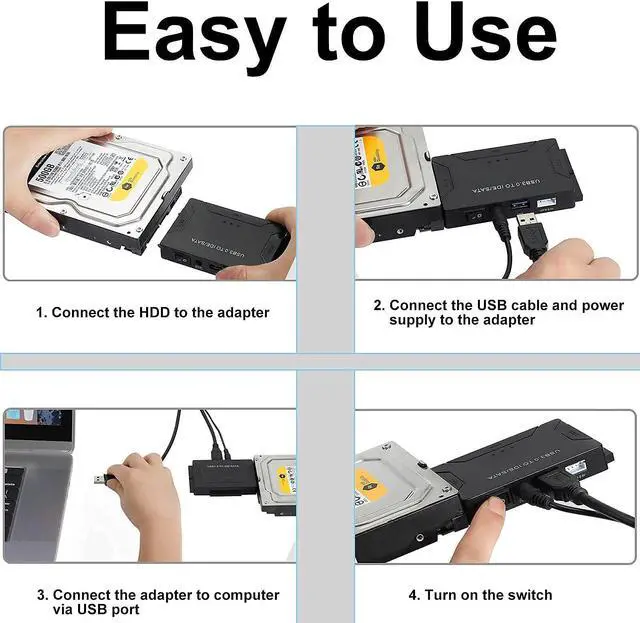
    • PLAY&PALY SIMPLE RECOGNIZED: The hard drive transfer cable lets you easily swap between drives with no need to install the drive inside an enclosure. Its plug-and-play and doesnt require drivers.
    • Additional Functions& Easy to Use - This tool made data recovery a breeze, on/off switch for HDD protection. LED light shows power and activity status. comes with a 12V 2A power supply
    +
    +
    Overview
    Specs
    Reviews (1)
    avatar

    Any questions? Our AI beta will help you find out quickly.

    Bailink 2024 New updated USB 3.0 to SATA/IDE Adapter Dock
    Connects a SATA or IDE (PATA) hard drive to your laptop or computer's USB port for extra storage, quick disk formatting and fast data transfer
    Connects a SATA or IDE hard drive to your laptop or computers USB port for extra storage

    Unlock the potential of your old hard drives with our versatile SATA IDE to USB adapter. This hard drive reader provides seamless connectivity for both SATA and IDE 2.5" or 3.5" hard drives, allowing you to effortlessly access and transfer data from legacy storage devices to your modern computer or laptop. With support for multiple drive types, including IDE, ATA, and SATA, this hard drive adapter offers exceptional compatibility, making it suitable for a wide range of storage solutions. Transfer files at speeds of up to 5Gbps, and enjoy the convenience of plug-and-play functionality without the need for complex installations. The compact, portable design ensures that you can easily carry it with you for on-the-go access to your valuable data. Whether you're upgrading your storage or need to retrieve files from older drives, our SATA IDE to USB converter provides a reliable and efficient solution for all your data transfer needs.

    Get quick access to 2.5 "/3.5" SATA HDD and SSD; 2.5 "/3.5" IDE HDD; DVD-ROM, CD-ROM, CD-RW, DVD-RW, DVD + RW Optical Drive.
    Get quick access to 2.5 "/3.5" SATA HDD and SSD; 2.5 "/3.5" IDE HDD; DVD-ROM, CD-ROM, CD-RW, DVD-RW,

    Plug-and-play operation with no software required for easy, immediate installation

    • Supported Drives: 2.5"/3.5" SATA HDD/SSD; 2.5"/3.5" IDE HDD; DVD-ROM, CD-ROM, CD-RW, DVD-RW, DVD+RW;
    • Compatible Systems: Windows8/7/10/Vista/XP/Mac OS 9/10/Linux;
    • Supports drives with a capacity of up to 6 TB;
    • Support speed up to 5Gbps; Backward compatible with USB 2.0/1.1;
    • On/Off Switch for HDD protection;
    • DC Power Supply 12V 2A included for 3.5" devices ;
    • LED activity indicator, Plug & Play, simple, reliable and stable
    Simple plug-and-play mode makes the office more convenient.
    Simple plug-and-play mode makes the office more convenient.

    Applications

    • Access any SATA IDE 2.5 in. or 3.5 in. SSD/HDD from a USB-enabled laptop or desktop computer, for easy data migration or drive cloning
    • Ideal for technicians who need a quick, easy way to access data on2.5 in. and 3.5 in. solid-state drives and hard drives
    • Back up important data to an external storage device
    • Restore your computer from a backup hard drive
    • Archive media content such as photos and videos to a bare external drive
    For new HDD
    • For new HDD, please go to "Disk Management" to initialize it first, and then your HDD can be recognized.
    • For Mac OS, the format needs to be set to exFat. Please backup all your data before formatting your HDD
    • Note: For 3.5inch IDE HDD, you need to connect the 4 pin power cable
    Easy Set-up

    Just insert your HDD/SSD and connect the whole device to your desktop or laptop. No driver or software is needed! You can get easy access to your precious data in this way.

    Just insert your HDD/SSD and connect the whole device to your desktop or laptop. No driver or softwa
    Are your hard drives new or old, internal or external, not showing up in File Explorer or Disk Management?
    Are your hard drives new or old, internal or external, not showing up in File Explorer or Disk Manag

    Why Is My Hard Drive Not Showing Up in Windows

    • 1. Ensure that the hard drive is properly connected to your computer. Check the cables and connections to make sure they are secure. If it's an external hard drive, try using a different USB port or cable.
    • 2. Power Supply: Make sure that the hard drive is receiving power.
    • 3. Disk Management: Open Disk Management in Windows to see if the drive is detected but not properly initialized or assigned a drive letter.
    • 4. Device Manager: Look for the hard drive under "Disk drives" or "Other devices." If it's listed with a yellow exclamation mark, there may be a driver issue.
    • 5. Driver Issues: Update or reinstall the drivers for the hard drive.
    • 6. BIOS/UEFI Settings: If the hard drive is internal, check your computer's BIOS/UEFI settings to see if the drive is recognized there.
    • 7. Hardware Failure: The hard drive may have failed.
    • 8. Compatibility: Sometimes, certain hard drives may not be compatible with a particular system.
    All in One solution to connect to different type of interface's hard drive

    Supports 2.5" 3.5" IDE & SATA I/II/III, SSDs, Hard Drives, CD/DVD/Blu-ray Drives


    Universal SATA IDE Hard Drive Adapter

    Hard drive adapter Support SATA 2.5"/3.5" HDD; 2.5"/3.5" IDE HDD, 5.25 external CD DVD optical drive; is able to retrieve old data from a hard drive with ease, with 2 IDE Connectors (40-pin and 44-pin) plus one SATA III Connector


    SuperSpeed Performance up to 5Gbps

    IDE hard drive reader supports a data transfer rate of up to 5 Gbps and supports UASP. which is 70% Faster than traditional USB 3.0 and 40% reduction in required processor resources, Backward compatible with USB 2.0 / 1.1


    Huge 6TB Capacity Supportive

    Designed to be lightweight and compact. hard drive recovery converter supports a hard drive capacity of Up to 6TB capacity, Tips: Some IDE hard drive is old, In order for you to use a "single" 3.5" IDE hard drive, you will need to set the jumper to "slave" before turn on the disk


    Broad Compatibility

    You can use IDE drives, standard SATA drives, The USB to IDE SATA adapter compatible with Windows 10/ 8.1/ 8/ 7/Vista/XP, Mac IOS, and LINUX; Plug and play; support hot swap


    Additional Functions& Easy to Use

    This tool made data recovery a breeze, on/off switch for HDD protection. LED light shows power and activity status. comes with a 12V 2A power supply, so you can power larger form-factor SATA or IDE drives, 4PIN Power Cable is designed for 3.5 IDE drive


    Note: 4PIN Power Cable is designed for 3.5 IDE drive, SATA drives are not applicable and unnecessary.


    Q&A

    Q: Why my hard drive is not recognised?

    1. Recommended formatting the hard disk in exFAT format and can be used under Windows, MacOS systems.

    2. Check the disk manager whether the hard disk has been assigned a drive letter, right-click - change the drive name and path - add - add a lette


    Q: For new drive, why cant find it on My chosen the folder for backup. Mode: Original PC. Then, click to start Computer?

    You must do partition (format) for hard disk before using it.


    Q: How do I fix Windows not recognizing my external hard drive?

    #Ensure that youve connected the device to the USB port properly.

    #Use Disk Management to check the Drive.

    #Create a Partition or Assign a new Drive Letter.

    #Troubleshoot Devices and Hardware.

    #Format the Hard Drive.


    Q: How do I get Windows 10 to read my external hard drive?

    Right-click Start, open Disk Management;

    Check if the external hard drive. if it doesnt appear in This PC window, it should appear here as a Removable volume;

    Click drives partition, select Change Drive Letter and Paths, to change the drive letter

    Q: I set my IDE drive's jumper to the master set, but it still doesn't show up on my computer

    Usually, you will have to set the jumper to master, but depending on the specific drive and the specific setting of the computer, you may have to set it to cable select

    Warranty & Returns

    Warranty, Returns, And Additional Information

    Warranty

    • Please contact the Seller directly for warranty information. Warranty information may also be found on the Manufacturer's website.
    • CONTACT

    Return Policies

    Manufacturer Contact Info

    LOADING...