

Your Browsing History


Meet Your Seller

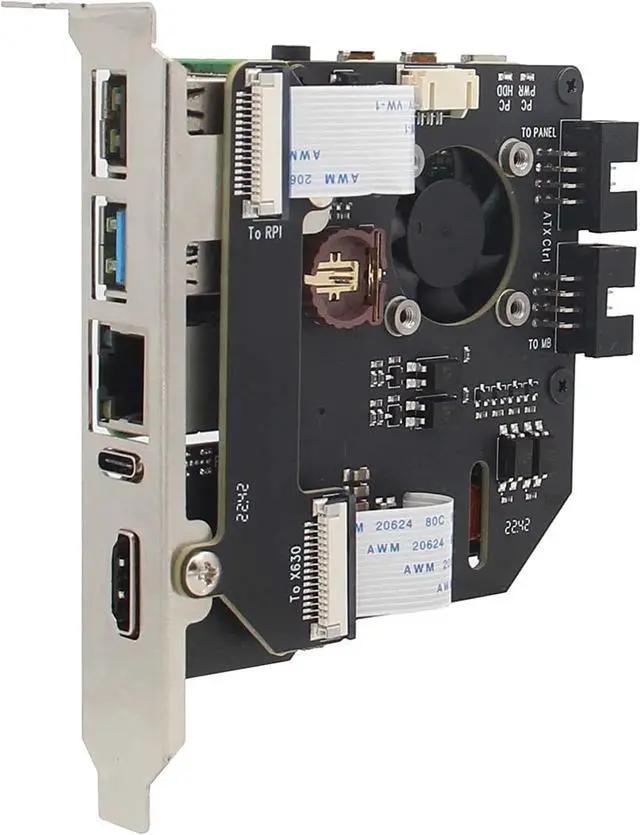
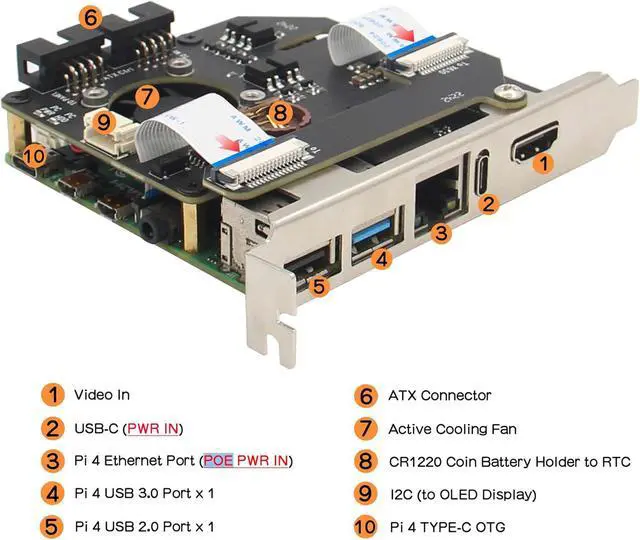
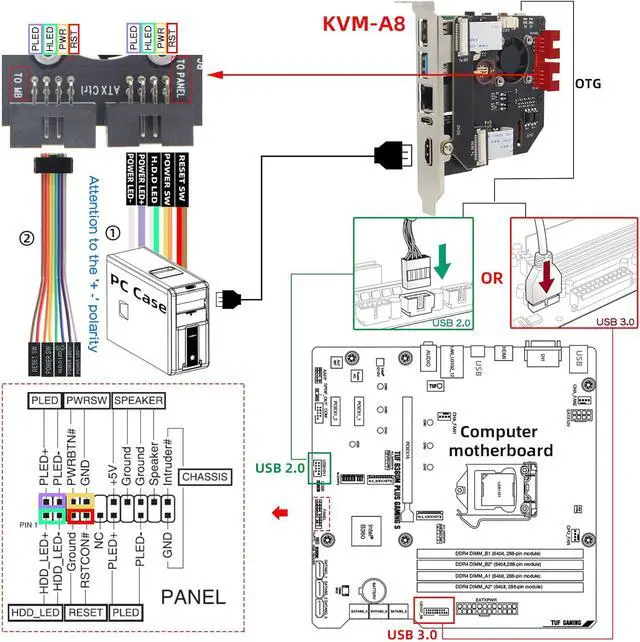
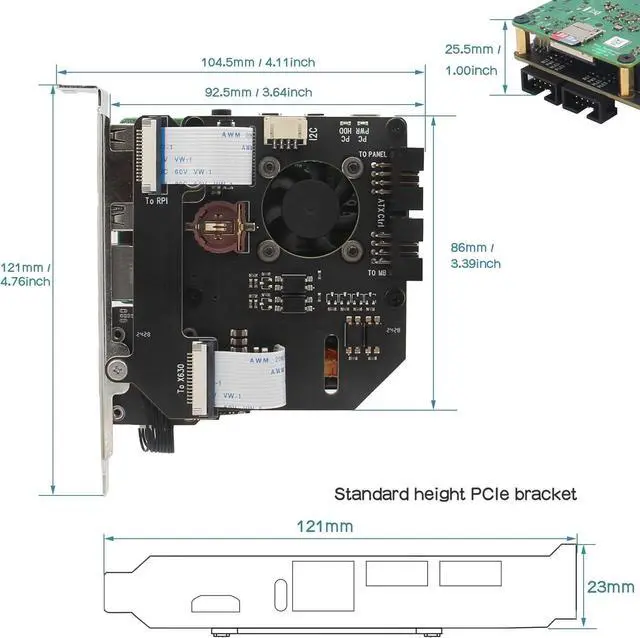
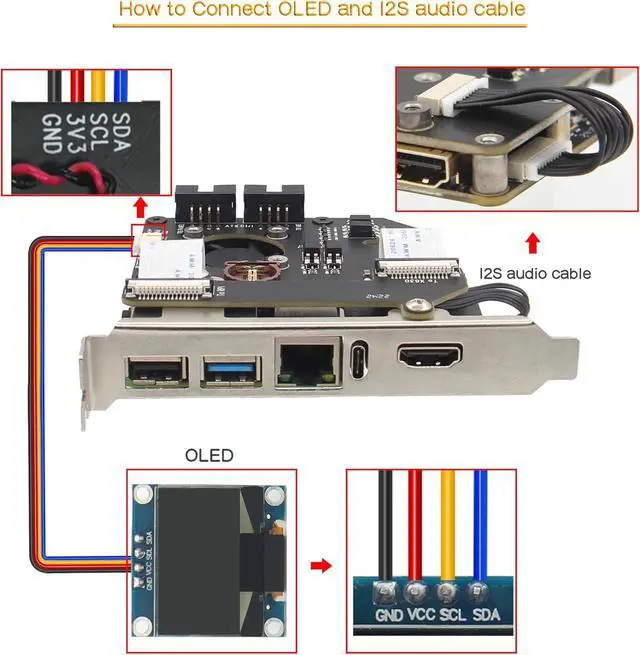
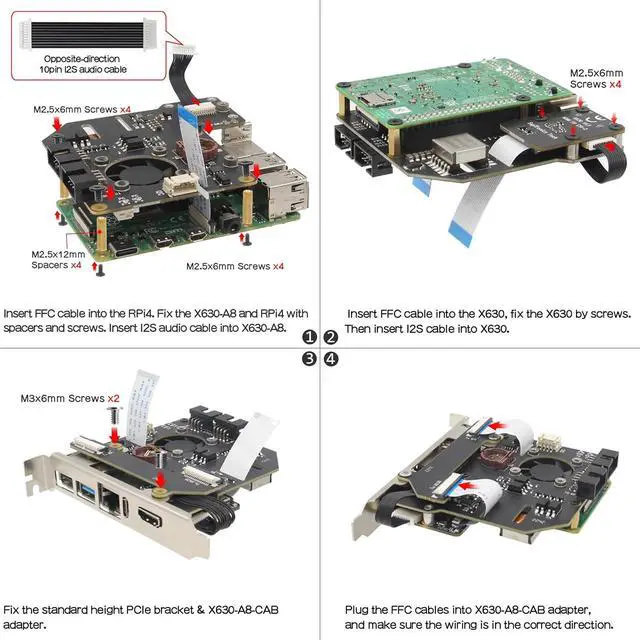


KVM-A8 PCIe Version for 4 Model B KVM Over IP Support KVM V3 PoE ATX HDMI CSI (Unassembled and Not Include 4/SD Card/Power Adapter)
- What is it: This kit allows user to realize a KVM project with Raspberry Pi 4 Model B which can control a computer using a web browser, Model: KVM-A8; Unassembled; for professional users only and is not suitable for novice usersfalseCompatiblity: for use with Raspberry Pi 4 Model B 8GB/4GB/2GB/1GB only (not include Raspberry Pi 4), NOT support Raspberry Pi 3 or Pi 5false
+
+
Overview
Reviews

Any questions? Our AI mode will help you find out quickly.
Try me now
Function: Remotely turn on / turn off / restart your computer; configure configure the UEFI / BIOS; Reinstall the OS using the Virtual CD-ROM or Flash Drive; Remote use your keyboard and mouse; Simulate a keyboard, mouse, and a monitor and presented in a web browser, etcfalseUser
Manual: Google Geekworm WiKi and search KVM-A8 for hardware installation, software configuration guide and FAQfalseHow to
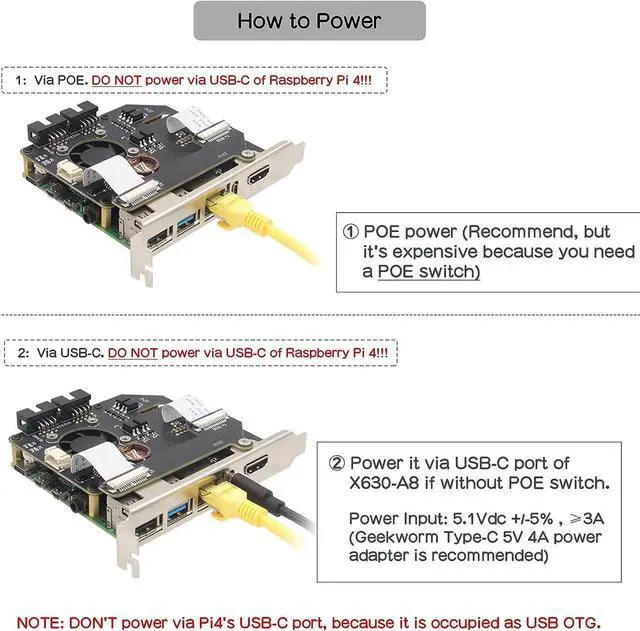
Power: POE Power (Recommend, need a POE switch) or
Power Input: 5.1V dc +/-5%, 3A power via USB-C port of
X630-A8false- What is it: This kit allows user to realize a KVM project with Raspberry Pi 4 Model B which can control a computer using a web browser, Model: KVM-A8; Unassembled; for professional users only and is not suitable for novice users
- Compatiblity: for use with Raspberry Pi 4 Model B 8GB/4GB/2GB/1GB only (not include Raspberry Pi 4), NOT support Raspberry Pi 3 or Pi 5
- Function: Remotely turn on / turn off / restart your computer; configure configure the UEFI / BIOS; Reinstall the OS using the Virtual CD-ROM or Flash Drive; Remote use your keyboard and mouse; Simulate a keyboard, mouse, and a monitor and presented in a web browser, etc
- User Manual: Google Geekworm WiKi and search KVM-A8 for hardware installation, software configuration guide and FAQ
- How to Power: POE Power (Recommend, need a POE switch) or
Power Input: 5.1V dc +/-5%, 3A power via USB-C port of X630-A8
- How to Cool: X630-A8 comes with an onboard active cooling fan to cool down the Raspberry Pi 4
- What Included: 1 x X630-A8 Expansion Board, 1 x X630 HDMI to CSI-2 Module, 1x X630-A8-CAB V 1.1 Camera Adapter board and other accessories, refer to the packing list picture for details
- Extra Needed to Prepare: Raspberry Pi 4, TF card, power adapter (only requires it if you have no POE switc
Manual: Google Geekworm WiKi and search KVM-A8 for hardware installation, software configuration guide and FAQfalseHow to
Power: POE Power (Recommend, need a POE switch) or
Power Input: 5.1V dc +/-5%, 3A power via USB-C port of
X630-A8false- What is it: This kit allows user to realize a KVM project with Raspberry Pi 4 Model B which can control a computer using a web browser, Model: KVM-A8; Unassembled; for professional users only and is not suitable for novice users
- Compatiblity: for use with Raspberry Pi 4 Model B 8GB/4GB/2GB/1GB only (not include Raspberry Pi 4), NOT support Raspberry Pi 3 or Pi 5
- Function: Remotely turn on / turn off / restart your computer; configure configure the UEFI / BIOS; Reinstall the OS using the Virtual CD-ROM or Flash Drive; Remote use your keyboard and mouse; Simulate a keyboard, mouse, and a monitor and presented in a web browser, etc
- User Manual: Google Geekworm WiKi and search KVM-A8 for hardware installation, software configuration guide and FAQ
- How to Power: POE Power (Recommend, need a POE switch) or
Power Input: 5.1V dc +/-5%, 3A power via USB-C port of X630-A8
- How to Cool: X630-A8 comes with an onboard active cooling fan to cool down the Raspberry Pi 4
- What Included: 1 x X630-A8 Expansion Board, 1 x X630 HDMI to CSI-2 Module, 1x X630-A8-CAB V 1.1 Camera Adapter board and other accessories, refer to the packing list picture for details
- Extra Needed to Prepare: Raspberry Pi 4, TF card, power adapter (only requires it if you have no POE switc
Warranty & Returns
Warranty, Returns, And Additional Information
Warranty
- Please contact the Seller directly for warranty information. Warranty information may also be found on the Manufacturer's website.
- CONTACT
Return Policies
- Return for refund within: 30 days
- Return for replacement within: 30 days
- This item is covered by MINGPIN YOUCHUANG E-COMMERCE LIMITED Return Policy
Manufacturer Contact Info
- For a directory of all our manufacturers, please click below.
- Manufacturers Directory
LOADING...