Your Browsing History
- Free 30-day Returns
$122.31
Meet Your Seller
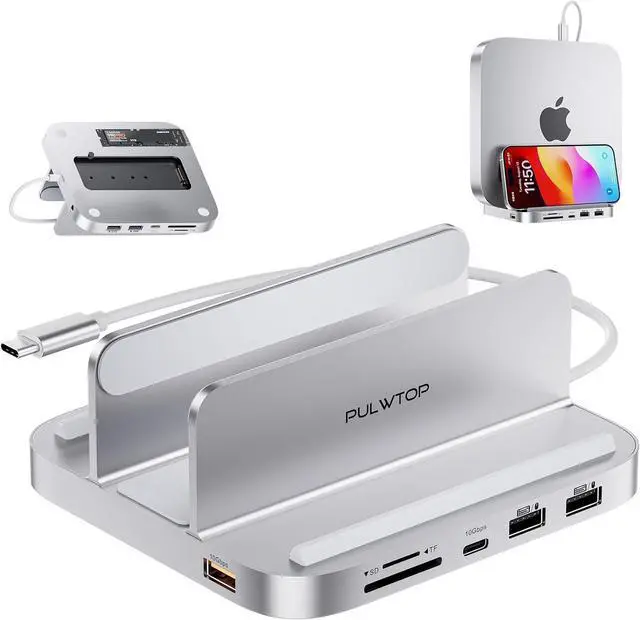
Mac mini Hub M1 M2 with M.2 SSD Enclosure (NOT for M4 2024), 8-in-1 Vertical Mac mini Dock Stand with USB A/C 3.2 10Gbps, 2 x USB A 2.0, SD/TF Slots, 3.5mm Audio Mic Jack
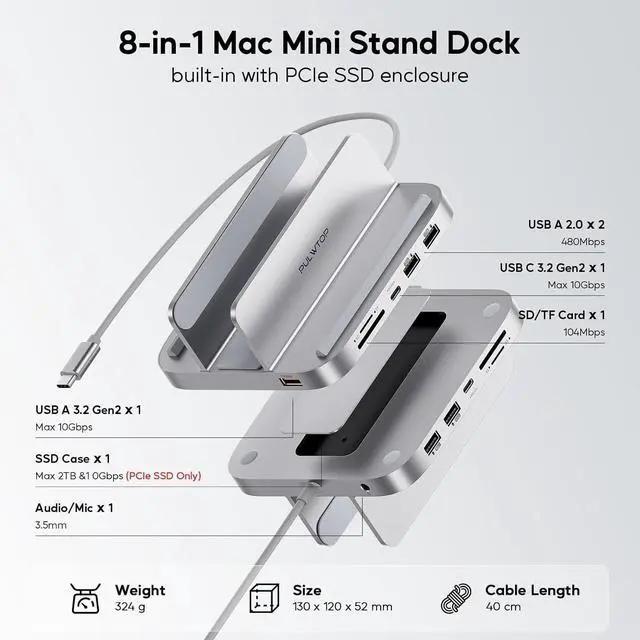
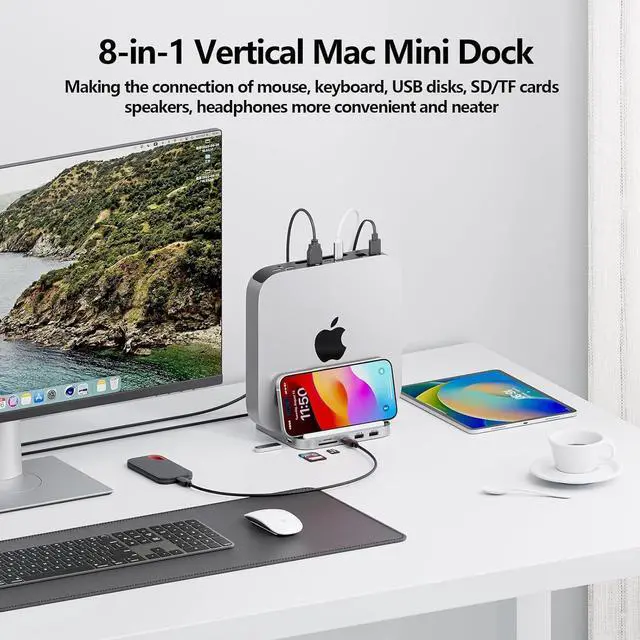
- EXPAND 8 PORTS FOR YOUR MAC MINI - ***DO NOT compatible with Mac Mini M4 2024. The Mac Mini Dock features a 10Gbps USB C data port& USB-A data port, 2 x USB-A 2.0 data ports (480Mbps), Micro/SD Card Readers (104 Mbps), a 3.5mm audio/mic jack, an up to 2TB M.2 SSD slot for convenient access to the essential peripherals and external memory expansion. Equipped with a 40cm non-detachable TPE cable (USB-C Male/up to 10Gbps) to connect and expend your Mac Mini M1/M2. NOTE: 1). ALL ports DO NOT support video and charging; 2). All USB-A ports do not support CD readers, SuperDrive.
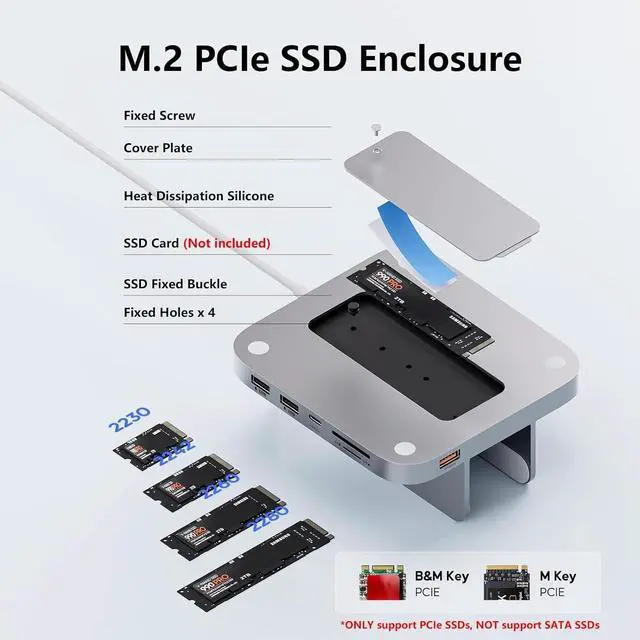
- UP TO 2TB M.2 SSD ENCLOSURE - Our Mac Mini Hub supports up to 10Gbps M.2 PCIe NVMe SSD expansion. The SSD enclosure of the Mac Mini dock is compatible with NVMe protocol (B+M Key/ M Key) SSDs in sizes of 2230/2242/2260/2280 and up to 2TB expansion. *NOTE: 1). SSD NOT Included. 2). DOES NOT support SATA SSDs
+
+
Overview
Reviews
Any questions? Our AI beta will help you find out quickly.
Try me now
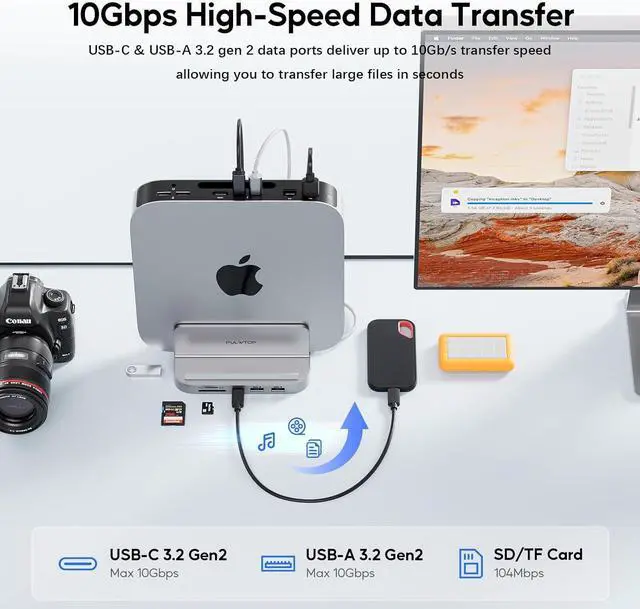
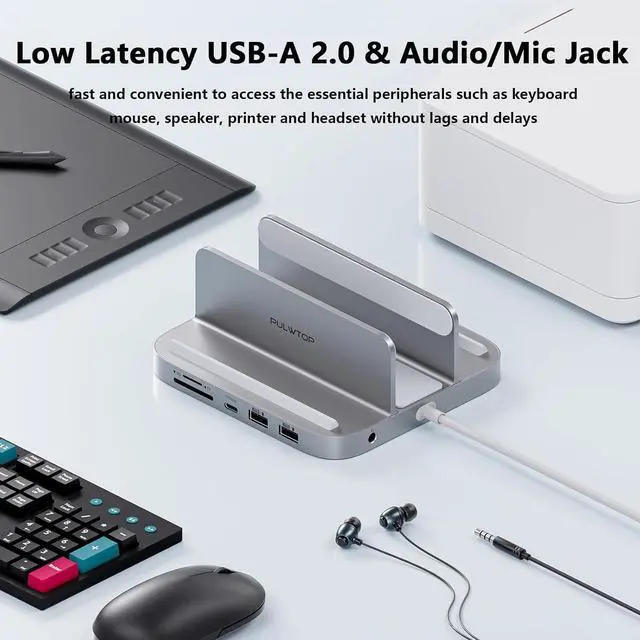
HIGH-SPEED TRANSMISSION - The high-speed USB C& USB-A data ports deliver up to 10Gb/s, allowing you to transfer large files in seconds. 2 x USB-A ports (480Mbps) to provide more connectivity options such as USB flash drives, keyboards, mouse, tablets, printers
and more. *NOTE: ALL USB C/A ports ONLY support data transfer, DO NOT support video and charging.
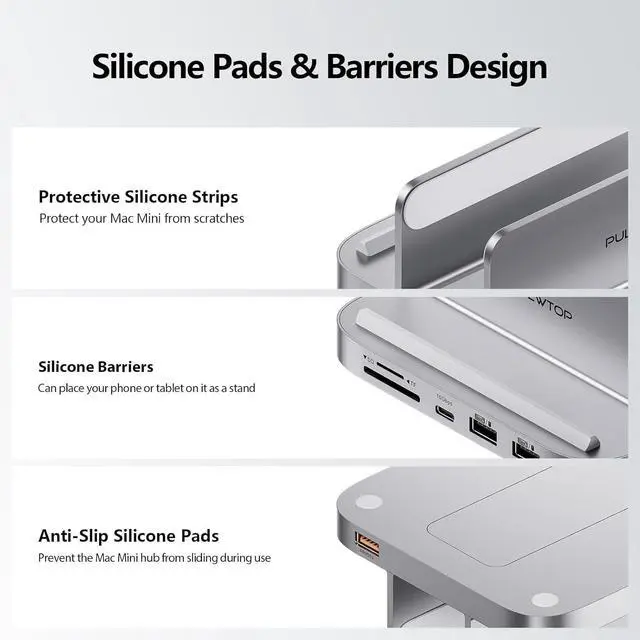
VERTICAL MAC MINI HUB STAND - Both a Mac Mini stand and USB-C Mac Mini hub, vertical stand design allows you to place your Mac Mini horizontally or vertically on the desk, achieving good heat dissipation and keeping your desktop tidy. Silicone barrier strips on both sides also make it as good iPad stands, phone stands.
WIDE COMPATIBILITY: Finished with silver aluminum alloy shell, making the UBC-C hub feel like a natural extension of your Mac Mini. The Mac mini USB hub is compatible with Mac mini 2018 /2020 Mac mini M1/2023 Mac mini M2 or M2 Pro). ***DO NOT compatible with Mac Mini M4 2024
8-in-1 USB-C Stand Hub with M. 2 NVMe SSD Enclosure for Mac Mini M2/M1
How to Install the SSD
Multi-port Mac Mini Hub with M. 2 SSD Enclosure Series USB-C Hub for Mac Mini M1/M2
USB-C Hub for Mac Mini M4/Pro
Compatible Devices
Mainly Designed for 2018 Mac mini/2020 Mac mini M1/2023 Mac mini M2 or M2 Pro
Compatible Devices
Mainly Designed for 2024 Mac Mini M4/ M4 Pro
Compatible Devices
Mainly Designed for 2024 Mac Mini M4/ M4 Pro
Hardware Interface
USB-A 3.2; USB-C 3.2; 2 x USB-A 2.0; 3.5 mm Mic jack; SD/TF; M. 2 SSD enclosure
Hardware Interface
USB-A 3.2; USB-C 3.2; 2 x USB-A 2.0; 3.5 mm Mic jack; SD/TF; M. 2 SSD enclosure
Hardware Interface
HDMI; 3 x USB-A 2.0; 3.5 mm jack; SD/TF; M. 2 SSD Enclosure; USB-C to Host
Cable Length
40cm non-detachable TPE cable
Cable Length
40cm non-detachable TPE cable
Cable Length
Detachable TPE Cable, 20cm USB-C (M) to USB-C (M) cable
Compatible SSDs Type
Support up to 2TB PCIe NVMe M. 2 SSD (2242/2260/2280), NOT support SATA SSD
Compatible SSDs Type
Support up to 4TB PCIe NVMe M. 2 SSD (2242/2260/2280), NOT support SATA SSD
Compatible SSDs Type
Support up to 4TB PCIe NVMe M. 2 SSD (2242/2260/2280), NOT support SATA SSD
Dimension
Approx. 135 x 88 x 59mm
Dimension
Approx. 135 x 88 x 59mm
Dimension
Approx. 125 x 125 x 15mm
SpecificationProduct Name
8 in 1 USB-C Vertical Stand Hub for
Mac Mini (Model: BS212B)
Input
USB-C Male 10Gbps
Output
1 x USB-A 3.2 gen 2 10Gbps; 1 x USB-C 3.2 gen 2 10Gbps; 2 x USB-A 2.0 480Mbps; 1 x 3.5 mm Mic jack; 1 x SD/TF 3.0 104Mbps; 1 x M. 2 SSD enclosure 10Gbps
Material
Aluminum
Dimension
Approx. 135 x 88 x 59mm
Weight
Approx. 350g
Compatible SSDs
Support up to 2TB PCIe NVMe M. 2 SSD (2230/2242/2260/2280) that complies with M key and B+M Key, NOT support SATA SSD
Some Compatible SSD models
980 Pro, 970 EVO; Black SN850, Black SN750, Western; Digital Blue SN550; Acer FA100; Crucial P2; 670P Series; Siliconmotion SM2263XT, etc.
Compatible Devices
Compatible with Mac mini 2018 or later models (2018 Mac mini/2020 Mac mini M1/2023 Mac mini M2 or M2 Pro, NOT compatible with Mac mini M4/M4 pro 2024), or usb as hub for laptops with all-function Type-C port
Cable Length
40cm non-detachable TPE cable
About SSD Format
If your SSD are new, please format your new SSD into "exFat" or "apfs " format.
STEPS: 1) PUT new SSD into the dock; 2) Connect the dock to your device; 3) Click the "Disk Utility"and format
Audio Does't Work?
When use Audio ports of the Mac Mini and the hub at the same time, ONLY pick the first one to work. If you want to customize the sound output port, please go to the "Audio MIDI Setup" and select the target Audio device

and more. *NOTE: ALL USB C/A ports ONLY support data transfer, DO NOT support video and charging.
VERTICAL MAC MINI HUB STAND - Both a Mac Mini stand and USB-C Mac Mini hub, vertical stand design allows you to place your Mac Mini horizontally or vertically on the desk, achieving good heat dissipation and keeping your desktop tidy. Silicone barrier strips on both sides also make it as good iPad stands, phone stands.
WIDE COMPATIBILITY: Finished with silver aluminum alloy shell, making the UBC-C hub feel like a natural extension of your Mac Mini. The Mac mini USB hub is compatible with Mac mini 2018 /2020 Mac mini M1/2023 Mac mini M2 or M2 Pro). ***DO NOT compatible with Mac Mini M4 2024
8-in-1 USB-C Stand Hub with M. 2 NVMe SSD Enclosure for Mac Mini M2/M1
How to Install the SSD
Multi-port Mac Mini Hub with M. 2 SSD Enclosure Series USB-C Hub for Mac Mini M1/M2
USB-C Hub for Mac Mini M4/Pro
Compatible Devices
Mainly Designed for 2018 Mac mini/2020 Mac mini M1/2023 Mac mini M2 or M2 Pro
Compatible Devices
Mainly Designed for 2024 Mac Mini M4/ M4 Pro
Compatible Devices
Mainly Designed for 2024 Mac Mini M4/ M4 Pro
Hardware Interface
USB-A 3.2; USB-C 3.2; 2 x USB-A 2.0; 3.5 mm Mic jack; SD/TF; M. 2 SSD enclosure
Hardware Interface
USB-A 3.2; USB-C 3.2; 2 x USB-A 2.0; 3.5 mm Mic jack; SD/TF; M. 2 SSD enclosure
Hardware Interface
HDMI; 3 x USB-A 2.0; 3.5 mm jack; SD/TF; M. 2 SSD Enclosure; USB-C to Host
Cable Length
40cm non-detachable TPE cable
Cable Length
40cm non-detachable TPE cable
Cable Length
Detachable TPE Cable, 20cm USB-C (M) to USB-C (M) cable
Compatible SSDs Type
Support up to 2TB PCIe NVMe M. 2 SSD (2242/2260/2280), NOT support SATA SSD
Compatible SSDs Type
Support up to 4TB PCIe NVMe M. 2 SSD (2242/2260/2280), NOT support SATA SSD
Compatible SSDs Type
Support up to 4TB PCIe NVMe M. 2 SSD (2242/2260/2280), NOT support SATA SSD
Dimension
Approx. 135 x 88 x 59mm
Dimension
Approx. 135 x 88 x 59mm
Dimension
Approx. 125 x 125 x 15mm
SpecificationProduct Name
8 in 1 USB-C Vertical Stand Hub for
Mac Mini (Model: BS212B)
Input
USB-C Male 10Gbps
Output
1 x USB-A 3.2 gen 2 10Gbps; 1 x USB-C 3.2 gen 2 10Gbps; 2 x USB-A 2.0 480Mbps; 1 x 3.5 mm Mic jack; 1 x SD/TF 3.0 104Mbps; 1 x M. 2 SSD enclosure 10Gbps
Material
Aluminum
Dimension
Approx. 135 x 88 x 59mm
Weight
Approx. 350g
Compatible SSDs
Support up to 2TB PCIe NVMe M. 2 SSD (2230/2242/2260/2280) that complies with M key and B+M Key, NOT support SATA SSD
Some Compatible SSD models
980 Pro, 970 EVO; Black SN850, Black SN750, Western; Digital Blue SN550; Acer FA100; Crucial P2; 670P Series; Siliconmotion SM2263XT, etc.
Compatible Devices
Compatible with Mac mini 2018 or later models (2018 Mac mini/2020 Mac mini M1/2023 Mac mini M2 or M2 Pro, NOT compatible with Mac mini M4/M4 pro 2024), or usb as hub for laptops with all-function Type-C port
Cable Length
40cm non-detachable TPE cable
About SSD Format
If your SSD are new, please format your new SSD into "exFat" or "apfs " format.
STEPS: 1) PUT new SSD into the dock; 2) Connect the dock to your device; 3) Click the "Disk Utility"and format
Audio Does't Work?
When use Audio ports of the Mac Mini and the hub at the same time, ONLY pick the first one to work. If you want to customize the sound output port, please go to the "Audio MIDI Setup" and select the target Audio device
Warranty & Returns
Warranty, Returns, And Additional Information
Warranty
- Please contact the Seller directly for warranty information. Warranty information may also be found on the Manufacturer's website.
- CONTACT
Return Policies
- Return for refund within: 30 days
- Return for replacement within: 30 days
- This item is covered by Group Can Trading Limited Return Policy
Manufacturer Contact Info
- For a directory of all our manufacturers, please click below.
- Manufacturers Directory
LOADING...