

Your Browsing History
- Free 30-day Returns
$103.36

Meet Your Seller



16W Compact Size Fiber Optic Light Box for Starlight Headliner, Twinkle & Music Mode, Control by Bluetooth App/RF Remote Control, Car Plug & Power Adapter, PG Connector & 3 Drill Bits
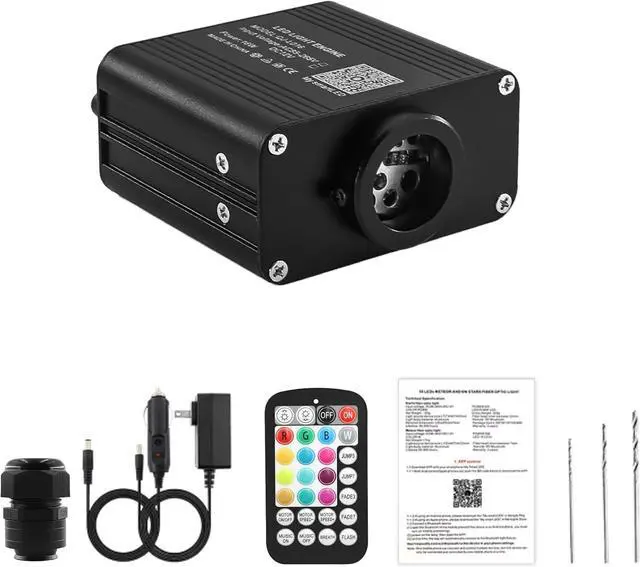
- 16W SMALL SIZE LIGHT BOX KIT: This package includes 1 light box device, 1 RF remote controller, 1 car plug, 1 power adapter, 1 PG connector, 1 manual, 3 drill bits, NOT INCLUDE FIBER STRANDS
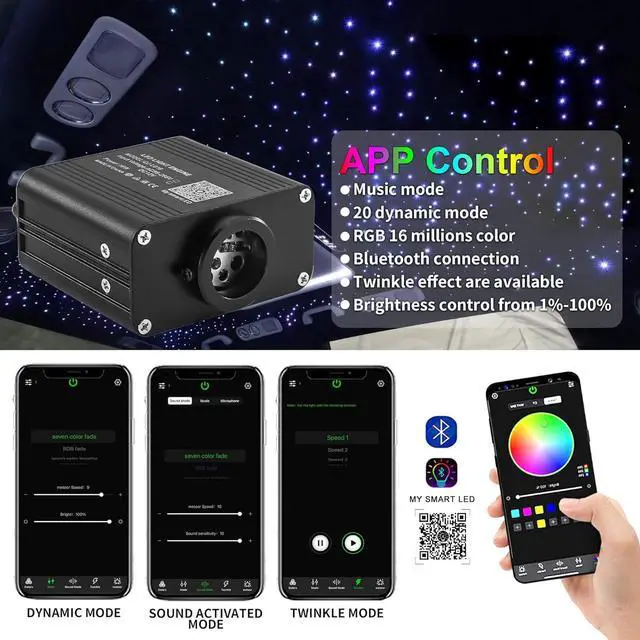
- VIVID TWINKLE EFFECT & MUSIC MODE: Light box has twinkle effect and music mode, The light dances to the music, Create a romantic and twinkle starry sky
- CAR / HOME USE: Fiber optic light source widely use for cars decoration, but also good for indoor use, such as bedroom, home theatre, bar, cinema and so on
+
+
Overview
Reviews

Any questions? Our AI mode will help you find out quickly.
Try me now
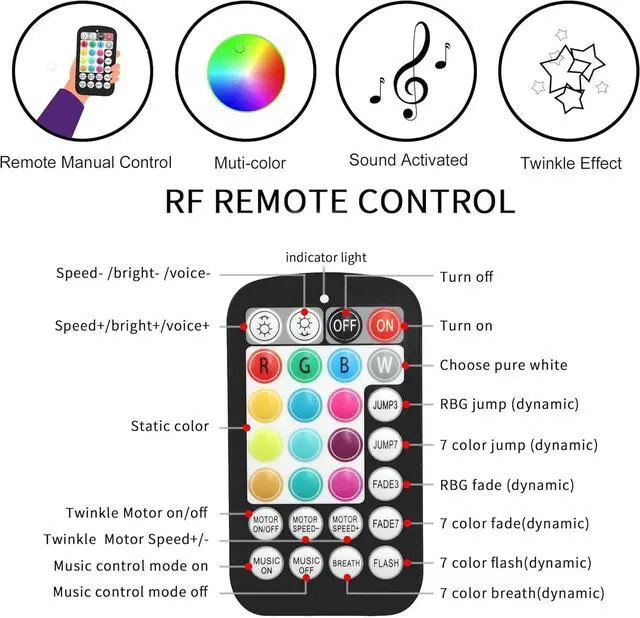
MANY FUNCTIONS & MULTI-COLOR CHANGE: The light engine can be controlled by APP or remote, Both of them have many functions and many color changes
2-YEAR SERVICE: Offering 2-year after-sale service to solve you issue
Package Included:
1x 16W Compact Size Light Engine, 1x PG Connector
1x RF Remote Controller
1x Car Use Plug, 1x Power Adapter, 1x User Manual
3 x Drill Bits (diameter: 0.8 mm( 0.031 in), 1mm( 0.04 in), 1.5 mm( 0.06 in)),
NOTE: If you are use in the car, please use car use plug. The power adapter is for indoor use.
Parameter:
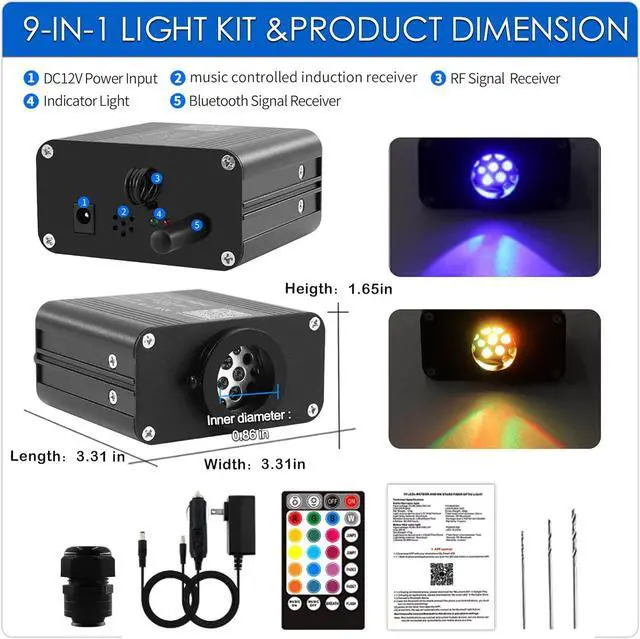
Work Voltage: AC86-265V/DC12V
Power: 16W
LED Chip: RGBW LED
Remote: RF/Bluetooth
Light Body Material: Aluminum
Light Engine Device Size: 3.31 in L × 3.31 in W × 1.65 in H
Light Engine Device: 2-Year Service
Smartphone APP Bluetooth Control:
1. Please download the My smart LED APP (the QR code on the product manual)
2. Connect a
Bluetooth Device:
Open the Bluetooth of the mobile phone and power on the lamp. Then open the APP. At this time, the app will automatically connect to the Bluetooth light fixture.
NOTE: Do NOT manually connect Bluetooth to this device in your phone settings.
2-YEAR SERVICE: Offering 2-year after-sale service to solve you issue
Package Included:
1x 16W Compact Size Light Engine, 1x PG Connector
1x RF Remote Controller
1x Car Use Plug, 1x Power Adapter, 1x User Manual
3 x Drill Bits (diameter: 0.8 mm( 0.031 in), 1mm( 0.04 in), 1.5 mm( 0.06 in)),
NOTE: If you are use in the car, please use car use plug. The power adapter is for indoor use.
Parameter:
Work Voltage: AC86-265V/DC12V
Power: 16W
LED Chip: RGBW LED
Remote: RF/Bluetooth
Light Body Material: Aluminum
Light Engine Device Size: 3.31 in L × 3.31 in W × 1.65 in H
Light Engine Device: 2-Year Service
Smartphone APP Bluetooth Control:
1. Please download the My smart LED APP (the QR code on the product manual)
2. Connect a
Bluetooth Device:
Open the Bluetooth of the mobile phone and power on the lamp. Then open the APP. At this time, the app will automatically connect to the Bluetooth light fixture.
NOTE: Do NOT manually connect Bluetooth to this device in your phone settings.
Warranty & Returns
Warranty, Returns, And Additional Information
Warranty
- Please contact the Seller directly for warranty information. Warranty information may also be found on the Manufacturer's website.
- CONTACT
Return Policies
- Return for refund within: 30 days
- Return for replacement within: 30 days
- This item is covered by Group Can Trading Limited Return Policy
Manufacturer Contact Info
- For a directory of all our manufacturers, please click below.
- Manufacturers Directory
LOADING...