

Your Browsing History
- Free 30-day Returns
$179.99

Meet Your Seller


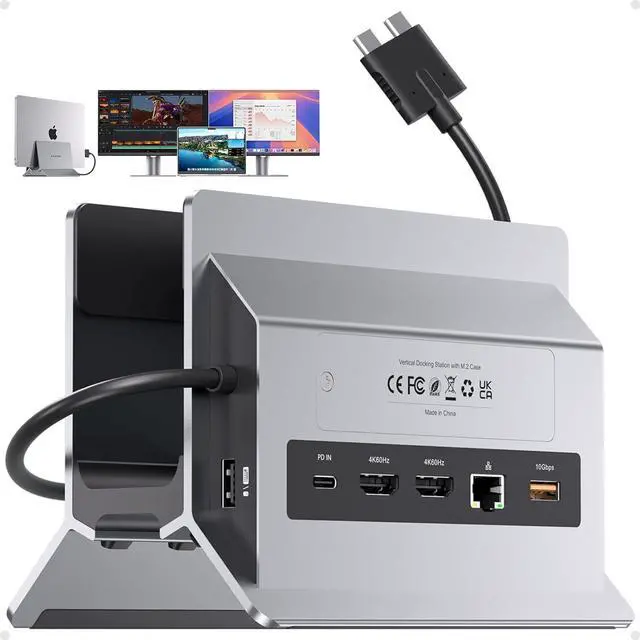






MacBook Docking Station with Vertical Stand - Dual 4K@60Hz Monitor via 2 HDMI, M.2 NVMe SSD Enclosure 4TB, PD 100W, USB A/C 10Gbps, Ethernet, SD/TF for MacBook Pro/Air M4 M5, Home & Office
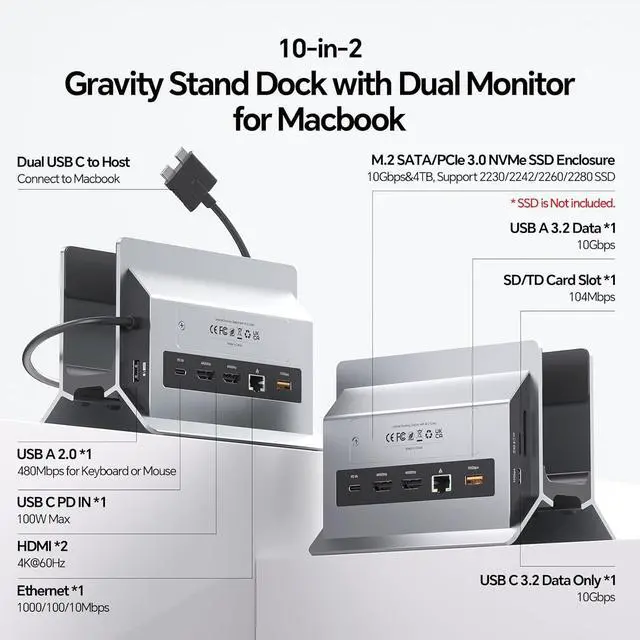
- 10-in-2 Docking Station One Dock Does It All: This MacBook Pro docking station dual monitor combines 10 essential functions in one compact device M.2 NVMe SSD enclosure (10Gbps), vertical laptop stand, dual 4K@60Hz HDMI, 100W PD 3.0 charging, 10Gbps USB-C data, 10Gbps USB-A data, Gigabit Ethernet RJ45, USB 2.0 port, and SD/TF card slot. Eliminates the need for multiple adapters and accessories.
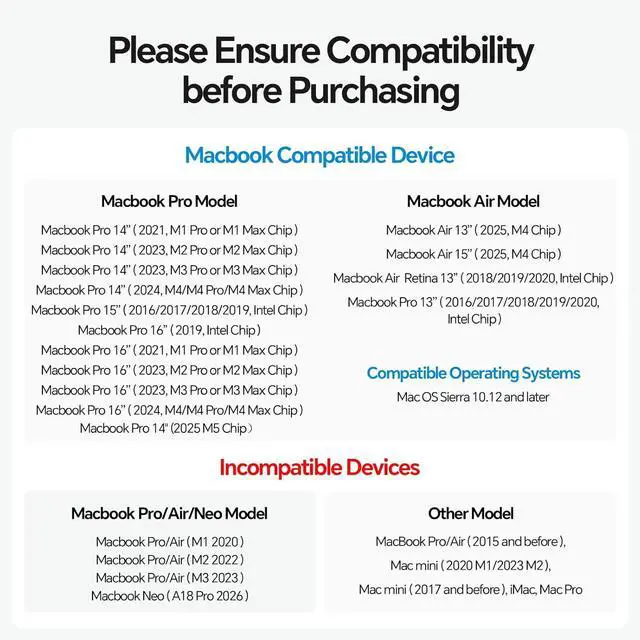
- Designed for Your MacBookConnect 2 external displays via dual HDMI ports for stunning 4K@60Hz visuals; this MacBook dock works seamlessly with your device for home offices, co-working spaces, or dorm setups. Compatibility: Dual display works with Intel-chip MacBook Pro/Air 13"16" (2016-2020) and M1 Pro/Max, M2 Pro/Max, M3 Pro/Max, M4 / M4 Pro/Max chipsM5 / M5 Pro/Max (NOT for M1/M2/M3 base chips, Macbook Neo, Windows, iPad)
+
+
Overview
Reviews

Any questions? Our AI mode will help you find out quickly.
Try me now
Supports 4TB M. 2 SSD ExpansionThe MacBook Air Docking Station Dual Monitor expand your MacBook storage by up to 4TB with built-in M. 2 NVMe SSD slot. Supports 2230/2242/2260/2280 sizes at 10Gbps transfer speed. Perfect for video editors, music producers, or data analysts who need extra fast storage without external drives.
NOTE: 1) SSD is NOT included; 2) NOT support SATA SSDs or SSDs with heat sinks; 3) If your SSD is new, format it to "exFat" or "apfs" format.
Vertical MacBook Stand Declutter Your Desk This usb c docking station dual monitor elevates your MacBook Pro/Air, freeing desk space for dual monitors and keyboard. Its open design allows passive cooling for peak performance during long work sessions. Ideal for home office, dorm, or corporate workspace. How to enable
Clamshell Mode: 1) Set MacBook not to auto sleep; 2) Connect a mouse to wake MacBook anytime; 3) Connect a 65W+ PD adapter to the PD IN port.
Gigabit Ethernet & 10Gbps Data Transfer The Gigabit Ethernet port on this Mac docking station provides stable wired internet for Zoom, gaming, or large file downloads. 10Gbps USB-C/A ports let you transfer 4K videos or backup files in seconds. A dedicated USB 2.0 port keeps your keyboard/mouse lag-free. No more Wi-Fi dropouts or slow transfer speeds.
Clamshell ModeTo use clamshell mode with a laptop docking station: 1) Set MacBook not to auto sleep; 2) Connect a mouse to wake MacBook anytime; 3) Connect a 65W+ PD adapter to the PD IN port.
10-in-1 Vertical MacBook Docking Station Dual Monitor with SSD Expansion
1 Fast Data Transfer
2 PD Charging & Ethernet
3 Detailed Design
4 Size Overview
5 Ports Overview
1 Compatibility
2 Package
Model 10 in 1 Vertical Macbook Docking Station Dual Monitor (BD216D)
Input Dual Type-C 3.2 GEN2 & 10Gbps Max; USB-C PD IN Port (PD100W Max)
Output 2 x HDMI Port(4K@60Hz); 1 x M. 2 NVMe SSD Expansion Slot (up to 10Gbps); 1 x USB-C 3.2 Gen2 Data Port (up to 10Gbps); 1 x USB-A 3.2 Gen1 Data Port (up to 10Gbps); 1 x USB-A 2.0 (480Mbps); 1 x RJ45 wired Gigabit Ethernet (1000/100/10Mbps); 1 x SD/TF 3.0 (up to 104Mbps)
Accessories 1 x Heat Dissipation Silicone; 1 x SSD Fixed Silicone Srews; 1 x Screw Driver; 1 x User Manual
Compatible Devices ONLY extend dual monitors for MacBook Pro 14''(2026 M5/M5 Pro/M5 MaxChip, 2024 M4, M4 Pro or M4 Max, 2023 M3 Pro or M3 Max, 2023 M2 Pro or M2 Max, 2021 M1 Pro or M1 Max); MacBook Pro 16'', (2024 M4, M4 Pro or M4 Max, 2023 M3 Pro or M3 Max, 2023 M2 Pro or M2 Max, 2021 M1 Pro or M1 Max), MacBook Air(13-inch/15-inch, 2025)M4, MacBook Pro 13'' (2020, 2019, 2018, 2017, 2016 Intel) MacBook Pro 16'' (2019, Intel) MacBook Pro 15'' (2019, 2018, 2017, 2016 Intel) MacBook Air (Retina, 13-inch, 2020/2019/2018) Intel
2 HDMI Resolution up to 4K@60Hz
Material Aluminum
Stand Slot Available Laptop Thickness: 1.42 in/36mm
Dimensions 150 x 105 x 115mm
Weight 1.54 lb / 770g
NOTE 1 For the Macbook Neo (A18 Pro 2026), Macbook Pro (2023 14'' M3, 2022 13'' M2, 2020 13''M1) and Macbook Air (13
NOTE: 1) SSD is NOT included; 2) NOT support SATA SSDs or SSDs with heat sinks; 3) If your SSD is new, format it to "exFat" or "apfs" format.
Vertical MacBook Stand Declutter Your Desk This usb c docking station dual monitor elevates your MacBook Pro/Air, freeing desk space for dual monitors and keyboard. Its open design allows passive cooling for peak performance during long work sessions. Ideal for home office, dorm, or corporate workspace. How to enable
Clamshell Mode: 1) Set MacBook not to auto sleep; 2) Connect a mouse to wake MacBook anytime; 3) Connect a 65W+ PD adapter to the PD IN port.
Gigabit Ethernet & 10Gbps Data Transfer The Gigabit Ethernet port on this Mac docking station provides stable wired internet for Zoom, gaming, or large file downloads. 10Gbps USB-C/A ports let you transfer 4K videos or backup files in seconds. A dedicated USB 2.0 port keeps your keyboard/mouse lag-free. No more Wi-Fi dropouts or slow transfer speeds.
Clamshell ModeTo use clamshell mode with a laptop docking station: 1) Set MacBook not to auto sleep; 2) Connect a mouse to wake MacBook anytime; 3) Connect a 65W+ PD adapter to the PD IN port.
10-in-1 Vertical MacBook Docking Station Dual Monitor with SSD Expansion
1 Fast Data Transfer
2 PD Charging & Ethernet
3 Detailed Design
4 Size Overview
5 Ports Overview
1 Compatibility
2 Package
Details
Specifications
Model 10 in 1 Vertical Macbook Docking Station Dual Monitor (BD216D)
Input Dual Type-C 3.2 GEN2 & 10Gbps Max; USB-C PD IN Port (PD100W Max)
Output 2 x HDMI Port(4K@60Hz); 1 x M. 2 NVMe SSD Expansion Slot (up to 10Gbps); 1 x USB-C 3.2 Gen2 Data Port (up to 10Gbps); 1 x USB-A 3.2 Gen1 Data Port (up to 10Gbps); 1 x USB-A 2.0 (480Mbps); 1 x RJ45 wired Gigabit Ethernet (1000/100/10Mbps); 1 x SD/TF 3.0 (up to 104Mbps)
Accessories 1 x Heat Dissipation Silicone; 1 x SSD Fixed Silicone Srews; 1 x Screw Driver; 1 x User Manual
Compatible Devices ONLY extend dual monitors for MacBook Pro 14''(2026 M5/M5 Pro/M5 MaxChip, 2024 M4, M4 Pro or M4 Max, 2023 M3 Pro or M3 Max, 2023 M2 Pro or M2 Max, 2021 M1 Pro or M1 Max); MacBook Pro 16'', (2024 M4, M4 Pro or M4 Max, 2023 M3 Pro or M3 Max, 2023 M2 Pro or M2 Max, 2021 M1 Pro or M1 Max), MacBook Air(13-inch/15-inch, 2025)M4, MacBook Pro 13'' (2020, 2019, 2018, 2017, 2016 Intel) MacBook Pro 16'' (2019, Intel) MacBook Pro 15'' (2019, 2018, 2017, 2016 Intel) MacBook Air (Retina, 13-inch, 2020/2019/2018) Intel
2 HDMI Resolution up to 4K@60Hz
Material Aluminum
Stand Slot Available Laptop Thickness: 1.42 in/36mm
Dimensions 150 x 105 x 115mm
Weight 1.54 lb / 770g
NOTE 1 For the Macbook Neo (A18 Pro 2026), Macbook Pro (2023 14'' M3, 2022 13'' M2, 2020 13''M1) and Macbook Air (13
Warranty & Returns
Warranty, Returns, And Additional Information
Warranty
- Please contact the Seller directly for warranty information. Warranty information may also be found on the Manufacturer's website.
- CONTACT
Return Policies
- Return for refund within: 30 days
- Return for replacement within: 30 days
- This item is covered by Grandwood Tech Limited Return Policy
Manufacturer Contact Info
- For a directory of all our manufacturers, please click below.
- Manufacturers Directory
LOADING...