

Your Browsing History
- Free 30-day Returns
$136.99

Meet Your Seller

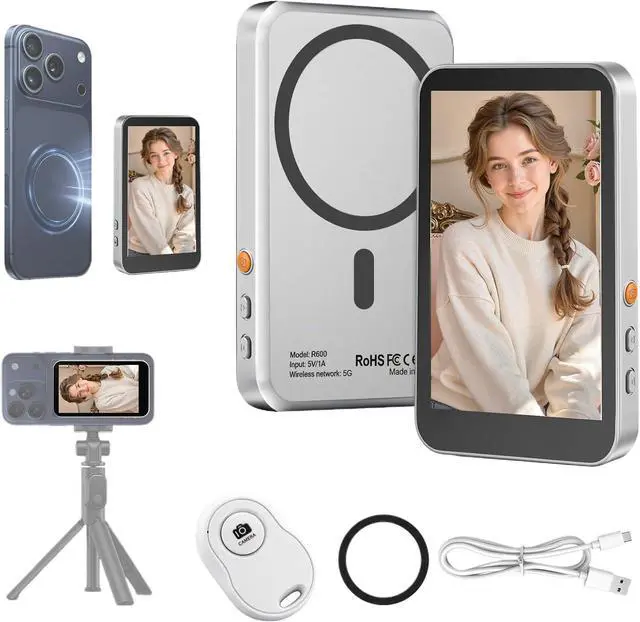


Magnetic Vlog Selfie Monitor Screen for iPhone 17 & Android, 4K Wireless Video Recording with Remote Zoom & Shoot, Content Creator Essentials Back Camera Monitor for vlogging YouTube TikTok
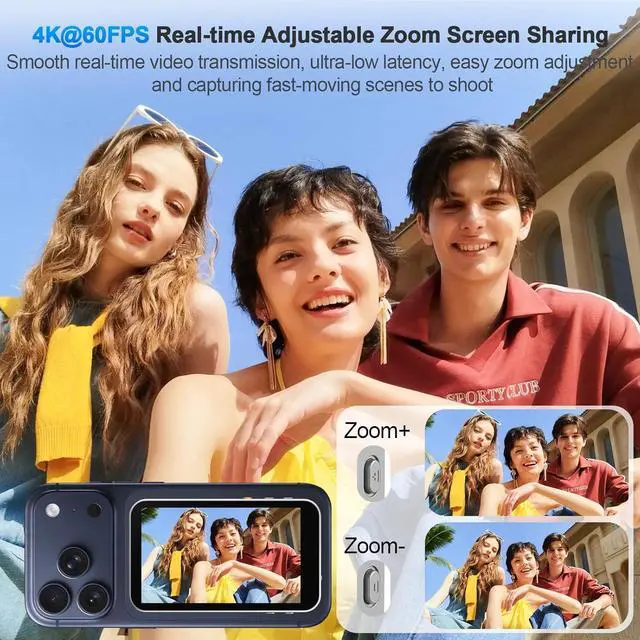
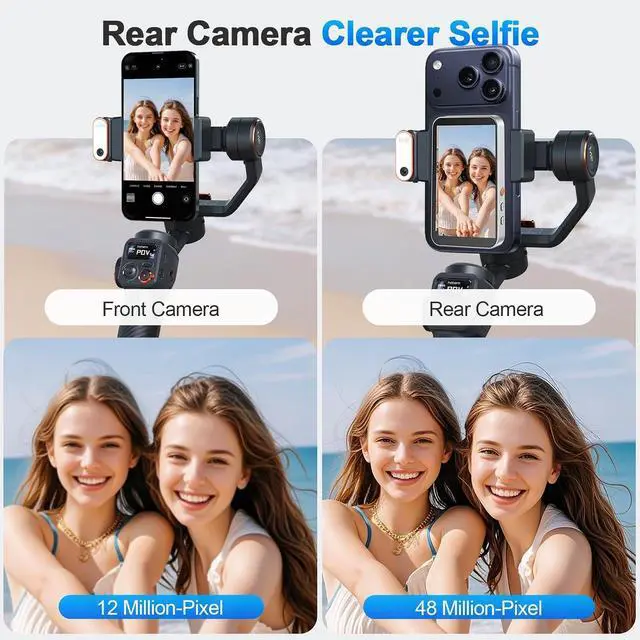
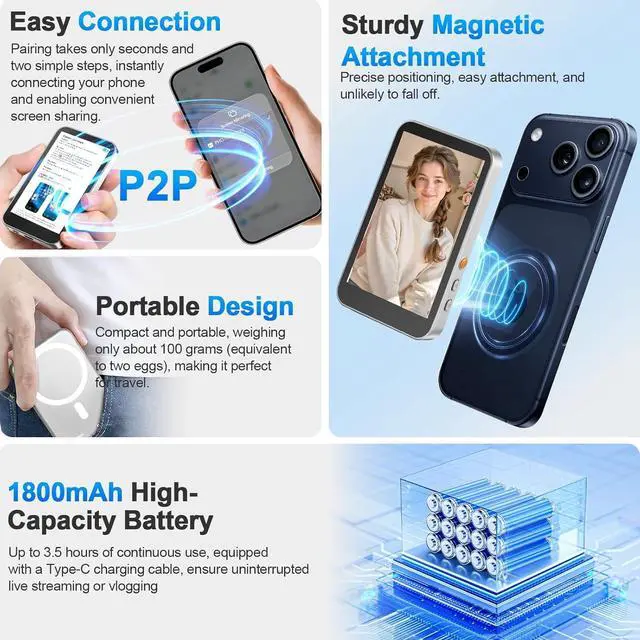
- Real-time Screen Sharing & Back Camera SelfieThis mobile vlog selfie monitor uses direct Peer-to-Peer wirelessly mirrors your phone screen and allows you to use the mobile phone rear camera to easily capture sharp selfies, vlogs, and live videosperfect for independent creators, TikTok, Instagram, YouTube Live, solo travel, or family photos. The screen mirroring up to 4K@60FPS via compatible devices ensures clear and detailed images, making framing, focusing, and adjustments easy, and you can preview your shots in real-time. Say goodbye to blurry images and awkward angles, and elevate your content quality!
- Long Battery life & Type-C ChargingOur back camera selfie monitor has a built-in 1800mAh battery supports up to 3 hours of continuous use. Equipped with a Type-C charging port (5V/1A, cable included) and battery indicator ensure uninterrupted live streaming or vlogging.
+
+
Overview
Reviews

Any questions? Our AI mode will help you find out quickly.
Try me now
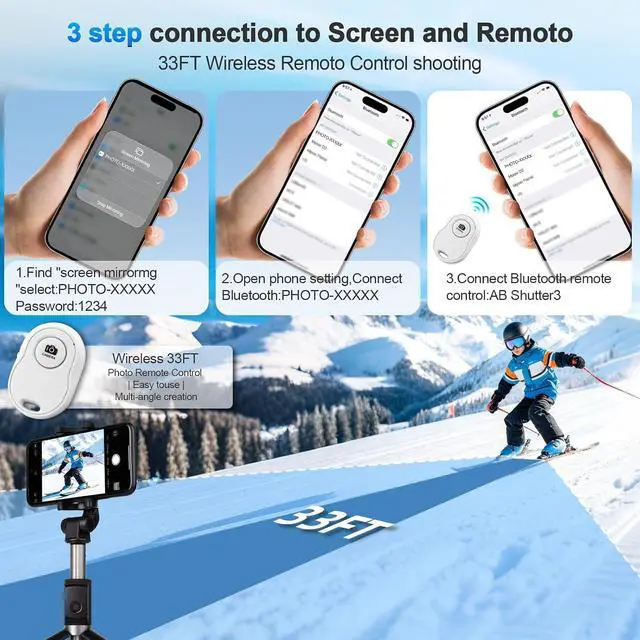
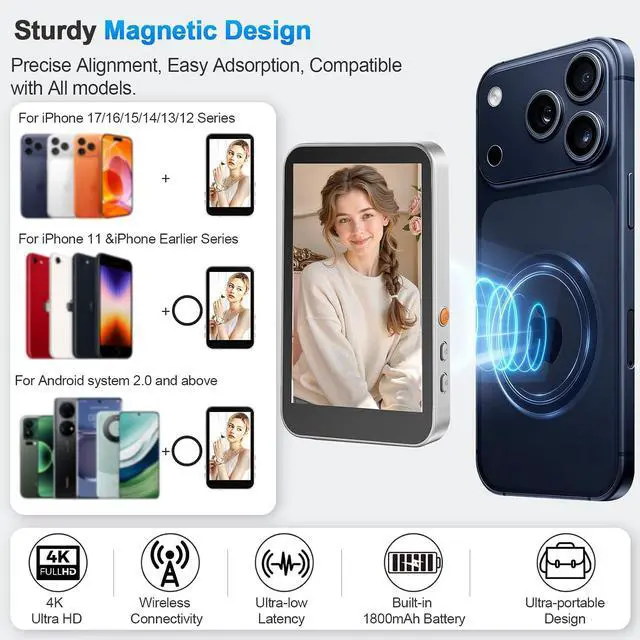
Wireless Remote Control & Magnetic CompatibilityOur magnetic Phone vlog selfie screen is equipped with "AB Shutter3" wireless remote control works up to 33ft away, allows you to get rid of the limitation of shooting distance. Even from a distance, a simple press starts/stops recording snap photos, or adjust settings hands-free. The selfie display screen can be attached to iPhone 12-17 or other metal surfacestripods, fridge doors, gym bars, and more. For other phones, use the adhesive metal plate. (Don't forget to peel off the adhesive backing on the magnetic ring before applying it securely to your device.
)
For MagSafe iPhones: Remove your phone case for stronger grip.
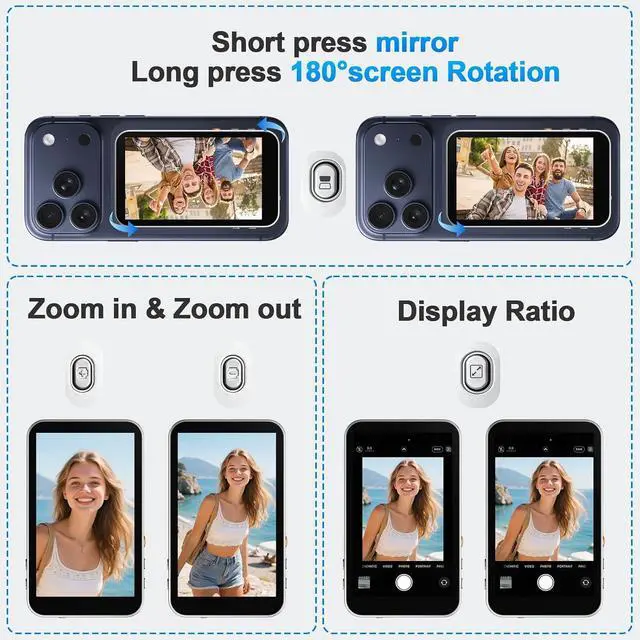
400-Lumen HD screen & Flexible AdjustmentThe 3.97 -inch HD screen with 400 lumens supports one-click full-screen, rotate, mirror, zoom and other shooting functions. Even under strong daylight or outdoor shooting conditions, it ensures your video preview remains clearly visible. It delivers a professional visual experience for content creators who need flexible shooting for live streaming and vlogging.
Lightweight, Portability & CompatibilityThis phone monitor screen features a compact and portable design, measuring only 4.22 * 2.55 * 0.43 inches and weighing just 0.31 pounds, making it easy to carry around and put into a backpack or pocket when you go out. It is compatible with most iPhone and Android devices.
Please Note: This device is not compatible with Google Pixel series phones. If you encounter connection problems, please contact our technical support.
Tips1)This device is just a sharing screen, no sound and no photography function. 2)The iPhone native camera does not support 4K video recording. If you need 4K, you can download Blackmagic Camera for recording. 3)If you want to view the recorded video on your phone immediately, you need to disconnect the screen mirroring connection first. 4)If you experience lag during video recording, try switching from 4K to 1080P/HD for a smoother recording experience. 5)This monitor is not touchscreen Control via buttons or phone.
1 1800mAh Battery
2 How to Use
3 Package List
4 Magnetic Design
How should I resolve latency issues when recording video?
To fix most delay issues, please adjust your phone's video resolution setting: go to your phone camera settings, switch from 4K resolution to 1080P/HD resolution. This will eliminate most latency for smooth recording.
What should I do to enhance the magnetic and ensure the device remains firmly attached to the back of the phone?
1. Remove the protective magnetic film on the product back before use.
2.
For MagSafe iPhones: Remove your phone case for stronger grip.
3.
For non-MagSafe phones: Stick our included magnetic ring to your phone/case first, then attach the device.
How do I enable the zoom function on my phone?
For iPhone users: to use the zoom in/out function, please
enable the setting first: go to Settings Accessibility find and turn on the Zoom feature. After enabling, the zoom control will work properly.
How can I connect it to my Phone?
1. Fully charge your device, then turn it off and restart.
2. Toggle your phones Bluetooth off and on, then re-pair the device.
3. Make sure your phones system is updated to the latest version.
If the problem continues, contact our team for help.
Is it compatible with all devices?
It works with alliPhone models (nduding iPhone 17 and supports iOs, Android, HarmonyOS, Wndows and macOs Not compatble wth Gogle Pxe, AQU
Os sense 9, or Xperia 1 Il.
)
For MagSafe iPhones: Remove your phone case for stronger grip.
400-Lumen HD screen & Flexible AdjustmentThe 3.97 -inch HD screen with 400 lumens supports one-click full-screen, rotate, mirror, zoom and other shooting functions. Even under strong daylight or outdoor shooting conditions, it ensures your video preview remains clearly visible. It delivers a professional visual experience for content creators who need flexible shooting for live streaming and vlogging.
Lightweight, Portability & CompatibilityThis phone monitor screen features a compact and portable design, measuring only 4.22 * 2.55 * 0.43 inches and weighing just 0.31 pounds, making it easy to carry around and put into a backpack or pocket when you go out. It is compatible with most iPhone and Android devices.
Please Note: This device is not compatible with Google Pixel series phones. If you encounter connection problems, please contact our technical support.
Tips1)This device is just a sharing screen, no sound and no photography function. 2)The iPhone native camera does not support 4K video recording. If you need 4K, you can download Blackmagic Camera for recording. 3)If you want to view the recorded video on your phone immediately, you need to disconnect the screen mirroring connection first. 4)If you experience lag during video recording, try switching from 4K to 1080P/HD for a smoother recording experience. 5)This monitor is not touchscreen Control via buttons or phone.
1 1800mAh Battery
2 How to Use
3 Package List
4 Magnetic Design
How should I resolve latency issues when recording video?
To fix most delay issues, please adjust your phone's video resolution setting: go to your phone camera settings, switch from 4K resolution to 1080P/HD resolution. This will eliminate most latency for smooth recording.
What should I do to enhance the magnetic and ensure the device remains firmly attached to the back of the phone?
1. Remove the protective magnetic film on the product back before use.
2.
For MagSafe iPhones: Remove your phone case for stronger grip.
3.
For non-MagSafe phones: Stick our included magnetic ring to your phone/case first, then attach the device.
How do I enable the zoom function on my phone?
For iPhone users: to use the zoom in/out function, please
enable the setting first: go to Settings Accessibility find and turn on the Zoom feature. After enabling, the zoom control will work properly.
How can I connect it to my Phone?
1. Fully charge your device, then turn it off and restart.
2. Toggle your phones Bluetooth off and on, then re-pair the device.
3. Make sure your phones system is updated to the latest version.
If the problem continues, contact our team for help.
Is it compatible with all devices?
It works with alliPhone models (nduding iPhone 17 and supports iOs, Android, HarmonyOS, Wndows and macOs Not compatble wth Gogle Pxe, AQU
Os sense 9, or Xperia 1 Il.
Warranty & Returns
Warranty, Returns, And Additional Information
Warranty
- Please contact the Seller directly for warranty information. Warranty information may also be found on the Manufacturer's website.
- CONTACT
Return Policies
- Return for refund within: 30 days
- Return for replacement within: 30 days
- This item is covered by Grandwood Tech Limited Return Policy
Manufacturer Contact Info
- For a directory of all our manufacturers, please click below.
- Manufacturers Directory
LOADING...