

Your Browsing History
- Free 30-day Returns
$140.99

Meet Your Seller

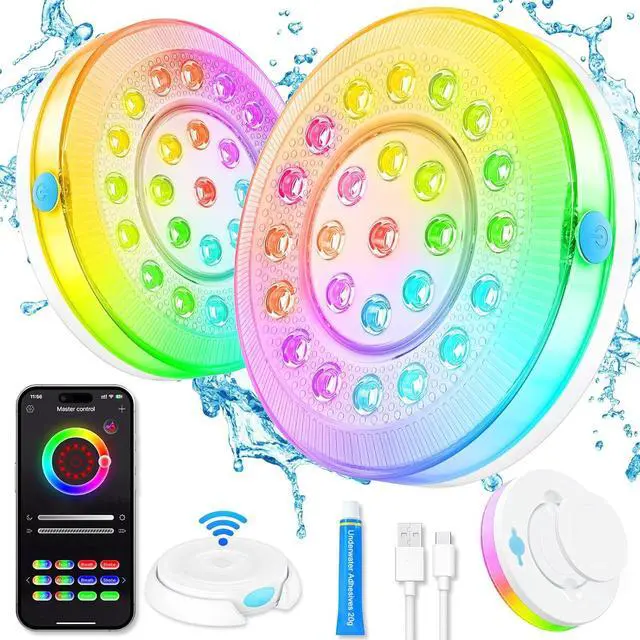


Battery-Operated APP-Controlled Pool Lights for Above-Ground & Inground Pools Waterproof Underwater, 16 Color-Changing, Hot Tub Compatible, Magnet for Pool & Pond
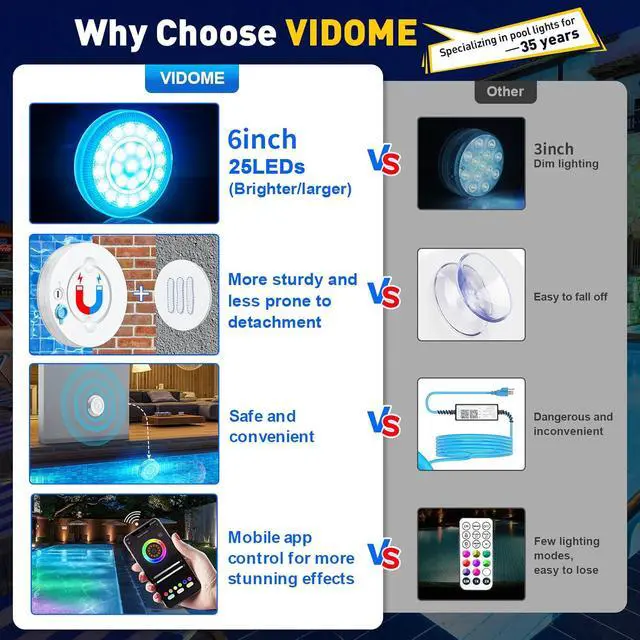
- Wireless and Portable Design: No need to connect to indoor AC power, safe to use, no need to worry about electric shock. No need to store complicated and tangled wires, just take it off and store it away
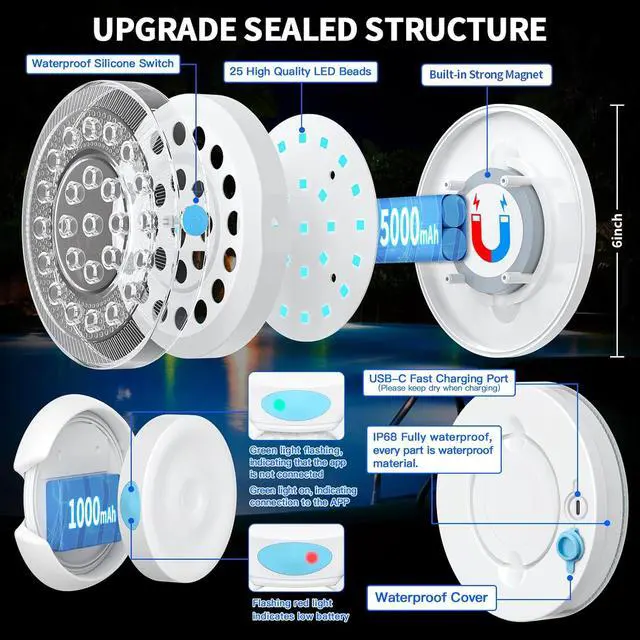
- Rechargeable Battery with High Brightness: Built-in 5000mAh rechargeable battery with 25pcs high quality LED light beads, added cylinder and diamond light guide design inside (light disperses more evenly and transmits light better), fully meets the needs of daily pool lighting and party events. No need to use a power cord to connect to the power source all the time
+
+
Overview
Specs
Reviews

Any questions? Our AI mode will help you find out quickly.
Try me now
Built-in Strong Magnet with
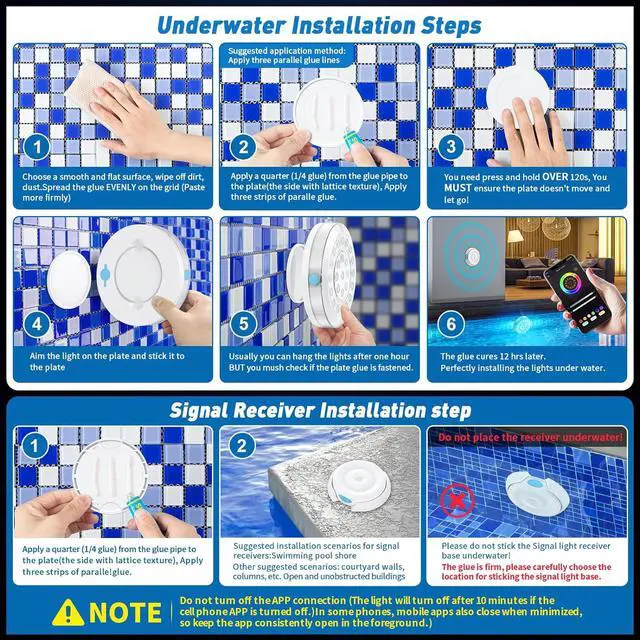
Safety Adhesive: The magnetic pool light can be firmly adsorbed on all steel metal pool walls and surfaces. The submersible led lights comes with the safe adhesive that can be installed underwater, suitable for any surface (e. g. vinyl, tile, marble, wood, waterproof cement, etc. ). No drilling, installation in minutes, and easy self-disassembly. Designed for use with Above-Ground Pools, In-Ground Pools, Ponds fountains and Spas
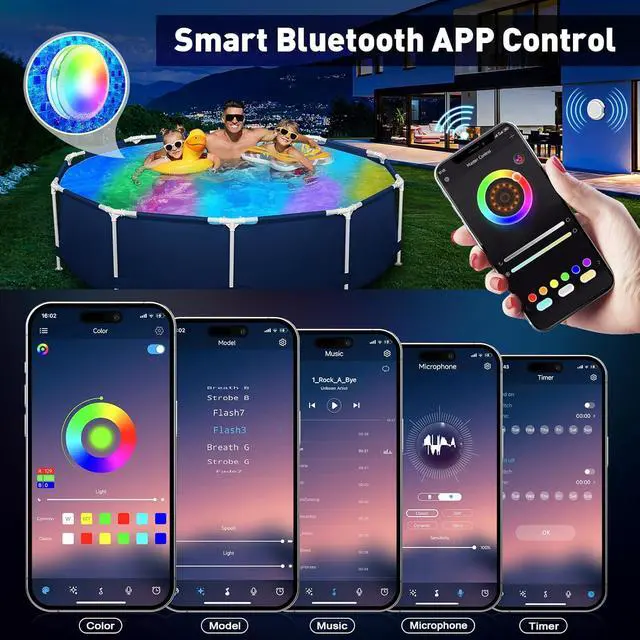
Smart APP Control with Multiple Modes: Scan and download the APP, connect the pool lamp to your phone, and you are ready to go. Classic and Fashion models are available. The outdoor pool lighting kit has infinite custom colors, sync to the beat of your music or voice, set the mood with the dimmer function, or choose your favorite color effects
Durable Construction with IP68 Waterproof Rating: The waterproof led lights for pool uses ultra-durable ABS and high-quality light-transmitting materials, fully filled with epoxy resin inside, which gives it a very high resistance to cracks, heat even extreme weather and no rusting. IP68 waterproof and 10 years lifespan, no worry about maintenance and durability. Waterproof tested in 1000 times underwater 20 meters water pressure test
Timing Function for Automated Control: The underwater cube lights allows scheduling the working time. Even if you're traveling for business or pleasure, your swimming pool lights are just as likely to go on and off at the times you've set. Do not place the receiver underwater. Do not turn off the APP connection (The light will turn off after 10 minutes if the cell phone APP is turned off). The phone should not be too far away from the signal receiver to prevent disconnection
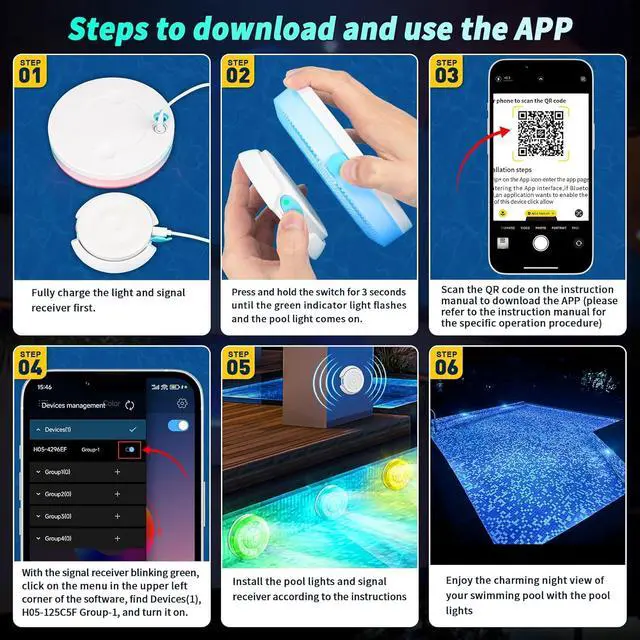
You need to turn on your phone's Bluetooth before you start
1. Press and hold for 3 seconds to turn on the signal receiver; the green light blinks when the signaler is turned on.
2. IOS phones use their own camera to scan the QR code to jump to the download page or search for iStrip+. Android use Google Play to go scan and download the software or search for iStrip+.
3. Allow iStrip+ to use wireless date. (WLAN & Cellular)
4. There are two modes to choose from: Classic / Fashion. We choose the classic mode as an example.
5. With the signal receiver blinking green, click on the menu in the upper left corner of the software, find Devices (1), H05-125C5F Group-1, and turn it on.
6. Wait for the green light of the signal receiver to be always on, which means the connection is successful.
7. Long press the pool light switch for 3 seconds to turn it on (multiple pool lights need to be turned on one by one). Each press of the pool light switches a color, the eighth press switches the pool light to gradient color mode, the ninth press switches to the initial color.
Note:
Don't turn off your cell phone app and signal receiver throughout the whole process. If your phone doesn't support importing music into APP, please try to turn on the microphone mode when your phone is connected to the pool light normally, open other music software on your phone
Safety Adhesive: The magnetic pool light can be firmly adsorbed on all steel metal pool walls and surfaces. The submersible led lights comes with the safe adhesive that can be installed underwater, suitable for any surface (e. g. vinyl, tile, marble, wood, waterproof cement, etc. ). No drilling, installation in minutes, and easy self-disassembly. Designed for use with Above-Ground Pools, In-Ground Pools, Ponds fountains and Spas
Smart APP Control with Multiple Modes: Scan and download the APP, connect the pool lamp to your phone, and you are ready to go. Classic and Fashion models are available. The outdoor pool lighting kit has infinite custom colors, sync to the beat of your music or voice, set the mood with the dimmer function, or choose your favorite color effects
Durable Construction with IP68 Waterproof Rating: The waterproof led lights for pool uses ultra-durable ABS and high-quality light-transmitting materials, fully filled with epoxy resin inside, which gives it a very high resistance to cracks, heat even extreme weather and no rusting. IP68 waterproof and 10 years lifespan, no worry about maintenance and durability. Waterproof tested in 1000 times underwater 20 meters water pressure test
Timing Function for Automated Control: The underwater cube lights allows scheduling the working time. Even if you're traveling for business or pleasure, your swimming pool lights are just as likely to go on and off at the times you've set. Do not place the receiver underwater. Do not turn off the APP connection (The light will turn off after 10 minutes if the cell phone APP is turned off). The phone should not be too far away from the signal receiver to prevent disconnection
You need to turn on your phone's Bluetooth before you start
1. Press and hold for 3 seconds to turn on the signal receiver; the green light blinks when the signaler is turned on.
2. IOS phones use their own camera to scan the QR code to jump to the download page or search for iStrip+. Android use Google Play to go scan and download the software or search for iStrip+.
3. Allow iStrip+ to use wireless date. (WLAN & Cellular)
4. There are two modes to choose from: Classic / Fashion. We choose the classic mode as an example.
5. With the signal receiver blinking green, click on the menu in the upper left corner of the software, find Devices (1), H05-125C5F Group-1, and turn it on.
6. Wait for the green light of the signal receiver to be always on, which means the connection is successful.
7. Long press the pool light switch for 3 seconds to turn it on (multiple pool lights need to be turned on one by one). Each press of the pool light switches a color, the eighth press switches the pool light to gradient color mode, the ninth press switches to the initial color.
Note:
Don't turn off your cell phone app and signal receiver throughout the whole process. If your phone doesn't support importing music into APP, please try to turn on the microphone mode when your phone is connected to the pool light normally, open other music software on your phone
Warranty & Returns
Warranty, Returns, And Additional Information
Warranty
- Please contact the Seller directly for warranty information. Warranty information may also be found on the Manufacturer's website.
- CONTACT
Return Policies
- Return for refund within: 30 days
- Return for replacement within: 30 days
- This item is covered by Grandwood Tech Limited Return Policy
Manufacturer Contact Info
- For a directory of all our manufacturers, please click below.
- Manufacturers Directory
LOADING...