

Your Browsing History


Meet Your Seller

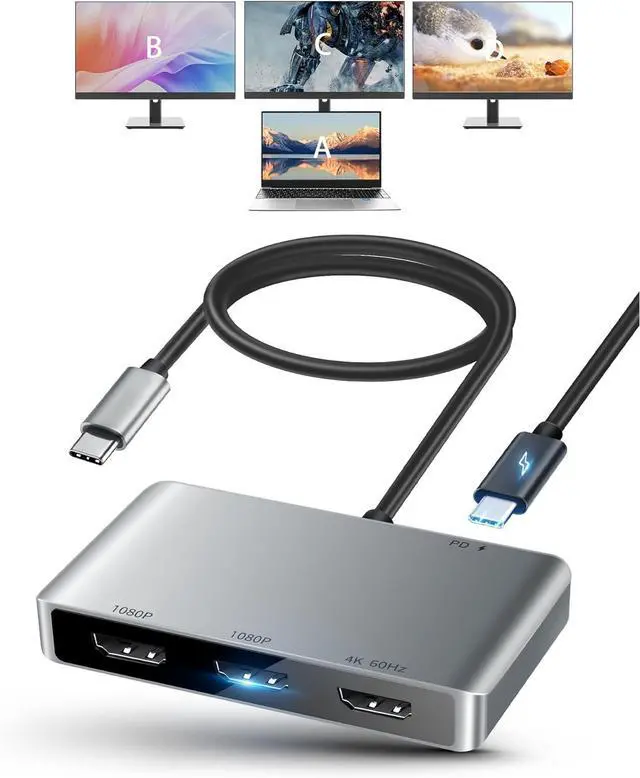



USB C to HDMI Multi Monitor Adapter, HDMI Splitter 1 in 3 Out Extended Display for Triple Monitor with 100W PD Port, Out 1 4K@60Hz, Out 2 and 3 1080p, Display for Windows Mac OS
- Compatibility Notice for Mac: Some newer macOS versions may require an updated driver. Please contact us through the after-sales support information on the product packaging to obtain the latest macOS-compatible driver. (Android systems are not affected.)
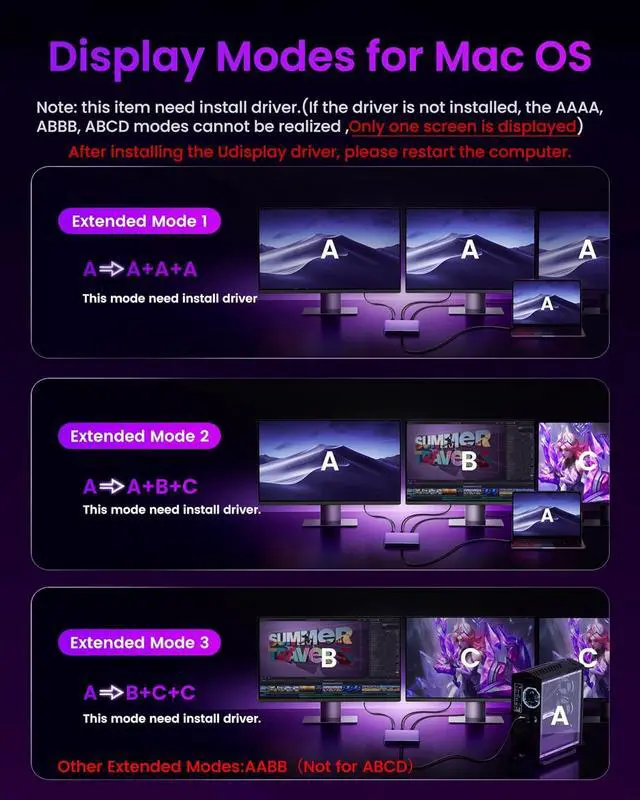
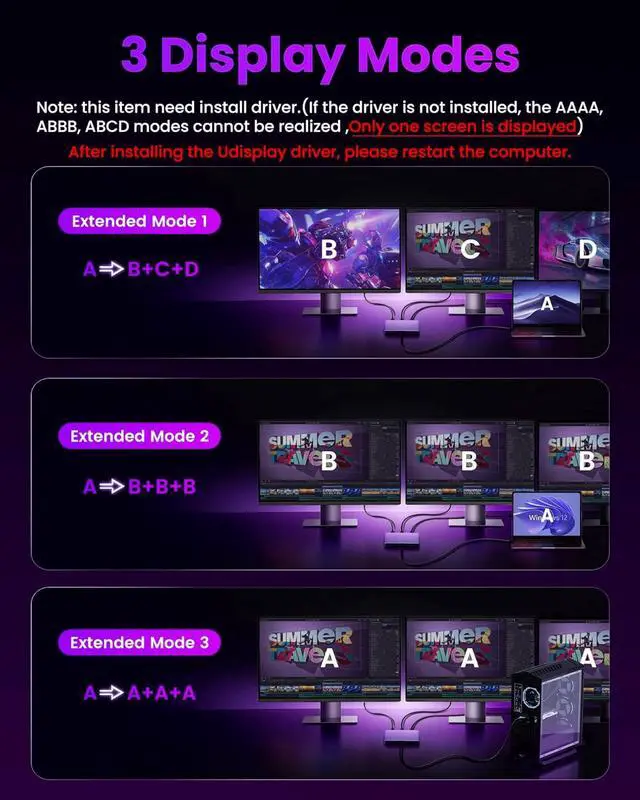
- Extend 4 Different Screen: Type-C to 3 HDMI Splitter for Extended Display 1 in 3 Out support transmit USB C signal to 3 monitors; MST support extend mode and mirror mode on windows or Mac OS system;Helps with multitask work,increase efficiency
- Out 1 4K@60Hz & Out 2/3 1080P: HDMI adapter to 3 monitors with 1x HDMI 4K@60Hz port + 2 x HDMI 1080P@60Hz port, 3 port can work synchronously; Suggest use HDMI 1.4 cable length not exceed 9.8 ft for 1080P, HDMI 2.0 cable not exceed 16.4 ft for 1080P, HDMI 2.0 cable not exceed 9.8 ft for 4K
+
+
Overview
Specs
Reviews

Any questions? Our AI mode will help you find out quickly.
Try me now
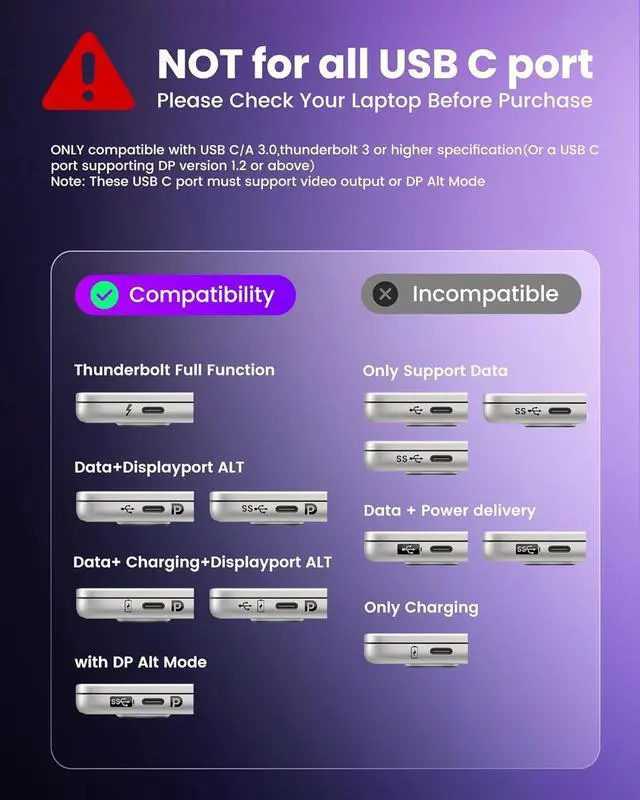
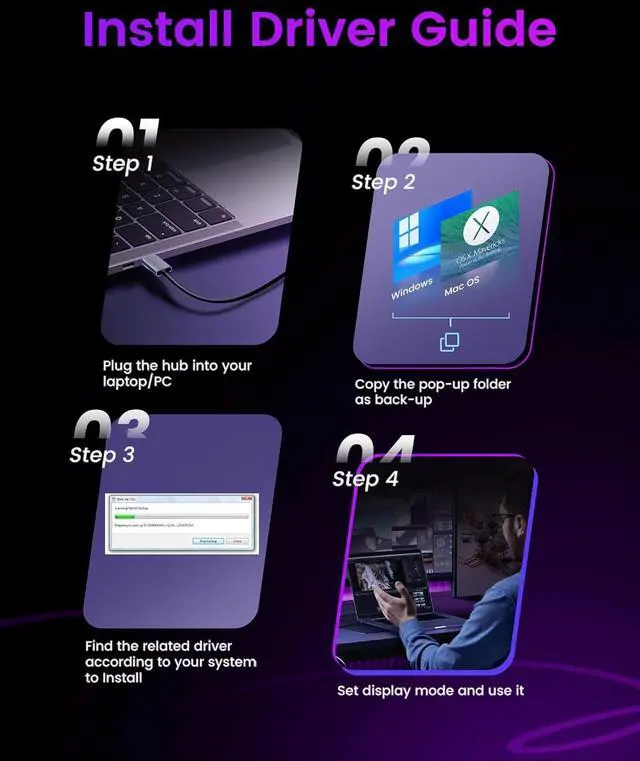
Install Driver Needed: USB 3.0 to HDMI adapter need install driver. Before order it, please make sure your laptop/PC has full function thunderbolt port, or with USB 3.0 port or above version and support DP Alt mode(Or a USB C port supporting DP version 1.2 or above). It require window 10 or Mac OS 12 or higher system version
100W Power Delivery: 4 in 1 USB hub has 1 x 100W PD port, which power your laptop (input 100 W, output 90W) directly by the USB to HDMI adapter, so no need always carry laptop power adapter in business; Solve the issue of occupied port, also make the desktop cleaner
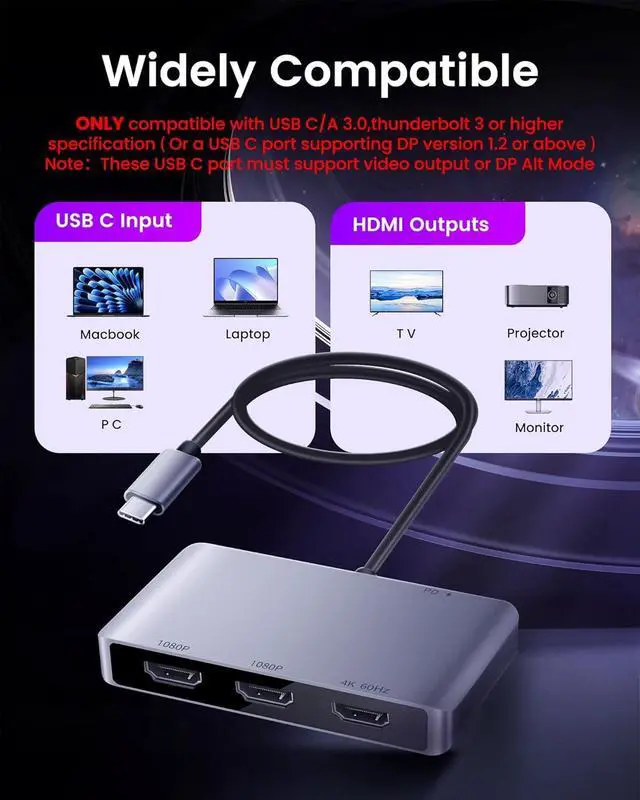
Broad Compatible: HDMI extender is widely compatible with many laptop or PC, like Mac-Book Pro 2016-2023, Mack-Book Air 2018-2023, YOGA920, Think Book15G3ITL 2021, Think PadX1 Carbon GEN92021, MateBook XPro2021, Surface Pro 9 2022, Galaxy Book Flex2020, etc
Note: The driver needs to be installed successfully. (If the driver installation is unsuccessful, the AAAAABBB, ABCD modes cannot be realized., only 1 screen is displayed). If the driver is installed for the first time, the PC/Laptop needs to be restarted after success
1 Connection Diagram
2 Widely Compatible
3 HDMI Cable Needed
1 Install Driver1-3 (Win)
2 Install Driver4-6 (Win)
3 Install Driver 1-3 (Mac)
4 Install Driver 4-7 (Mac)
5 Trouble Shooting Tips
100W Power Delivery: 4 in 1 USB hub has 1 x 100W PD port, which power your laptop (input 100 W, output 90W) directly by the USB to HDMI adapter, so no need always carry laptop power adapter in business; Solve the issue of occupied port, also make the desktop cleaner
Broad Compatible: HDMI extender is widely compatible with many laptop or PC, like Mac-Book Pro 2016-2023, Mack-Book Air 2018-2023, YOGA920, Think Book15G3ITL 2021, Think PadX1 Carbon GEN92021, MateBook XPro2021, Surface Pro 9 2022, Galaxy Book Flex2020, etc
Note: The driver needs to be installed successfully. (If the driver installation is unsuccessful, the AAAAABBB, ABCD modes cannot be realized., only 1 screen is displayed). If the driver is installed for the first time, the PC/Laptop needs to be restarted after success
1 Connection Diagram
2 Widely Compatible
3 HDMI Cable Needed
1 Install Driver1-3 (Win)
2 Install Driver4-6 (Win)
3 Install Driver 1-3 (Mac)
4 Install Driver 4-7 (Mac)
5 Trouble Shooting Tips
Warranty & Returns
Warranty, Returns, And Additional Information
Warranty
- Please contact the Seller directly for warranty information. Warranty information may also be found on the Manufacturer's website.
- CONTACT
Return Policies
- Return for refund within: 30 days
- Return for replacement within: 30 days
- This item is covered by MINGPIN YOUCHUANG E-COMMERCE LIMITED Return Policy
Manufacturer Contact Info
- For a directory of all our manufacturers, please click below.
- Manufacturers Directory
LOADING...