

Your Browsing History

Meet Your Seller



Docking Station Dual Monitor Triple Display for Laptop Dell Hp Lenovo Windows OS, USB C Hub 3 Monitors with 2 HDMI, DisplayPort, 100W PD in, Ethernet, 4 USB 3.0, SD/TF Slot, Audio
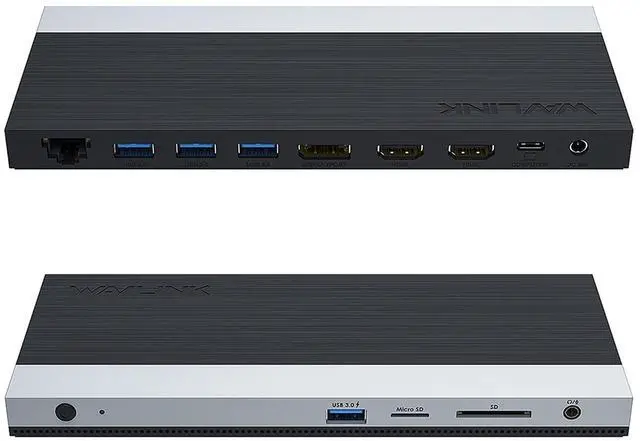
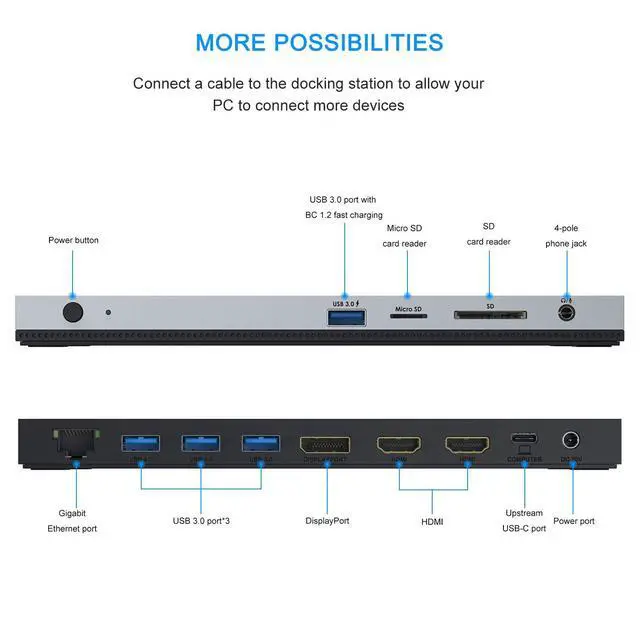
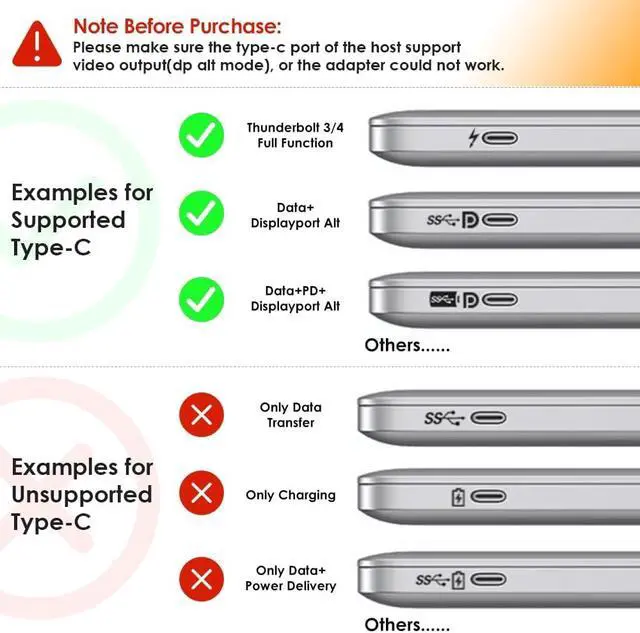
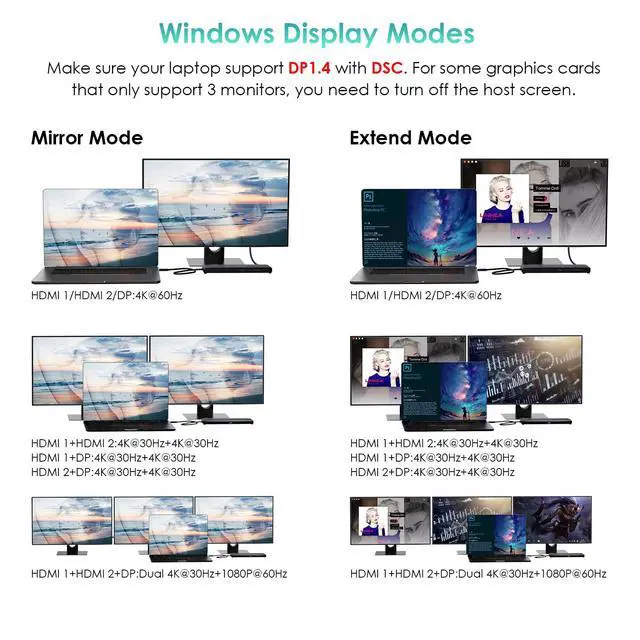
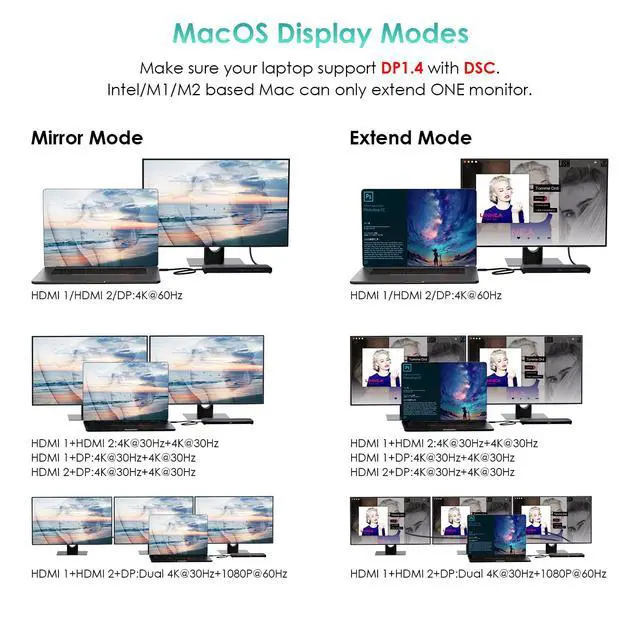
- 13 IN 1 USB C Hub - one USB C cable, convert your USB C port into 13 ports - 2 HDMI, 1 DisplayPort, 3 USB 3.0 Type A, 1 USB 3.0 port with BC 1.2 fast charging, 1 gigabit Ethernet port, 1 SD&TF card reader, 1 phone audio jack. USB C Dual HDMI Adapter for Windows Mac Laptops. NOTE: MST docking station adapter, compatible with USB-C Computers that have USB3.1 Gen2 full specification with data transfer, USB-C Power Delivery and Video Output (DisplayPort Alternate Modes). 4K Ultra HD Triple Display - Dual HDMI and 1 DisplayPort video ports for various needs. The host computer under HBR3 DP1.4 source, a single port video output resolution up to 3840x2160@60Hz, dual displays up to 2560x1440@60Hz, triple displays up to 1920x1080@60Hz. Under HBR3 DP1.2, a single display resolution up to 3840x2160@30Hz or 2560x1440@60Hz, dual display resolution up to 1920*1080@60Hz, triple display up to 1600*900@60Hz. Tips on laptops system - Mirror or extend your screen directly stream UHD video to HDTV, monitors, projectors. Windows system support MST and SST, triple display. Mac OS only support mirror mode and non-mirror mode without triple display. Non-mirror mode means that the two or three external monitors are same but different from laptop. Intel/M1/M2 based Mac only extend one monitor, the external monitors will show the same content. USB C to Dual HDMI DisplayPort mini dock, Plug and Play. 4 USB ports & Ethernet & SD/TF card reader - 3 USB 3.0 ports, synchronize data at speeds up to 5Gbps,
+
+
Overview
Specs
Reviews

Any questions? Our AI mode will help you find out quickly.
Try me now
13 IN 1 USB C Hub - one USB C cable, convert your USB C port into 13 ports - 2 HDMI, 1 DisplayPort, 3 USB 3.0 Type A, 1 USB 3.0 port with BC 1.2 fast charging, 1 gigabit Ethernet port, 1 SD&TF card reader, 1 phone audio jack. USB C Dual HDMI Adapter for Windows Mac Laptops.
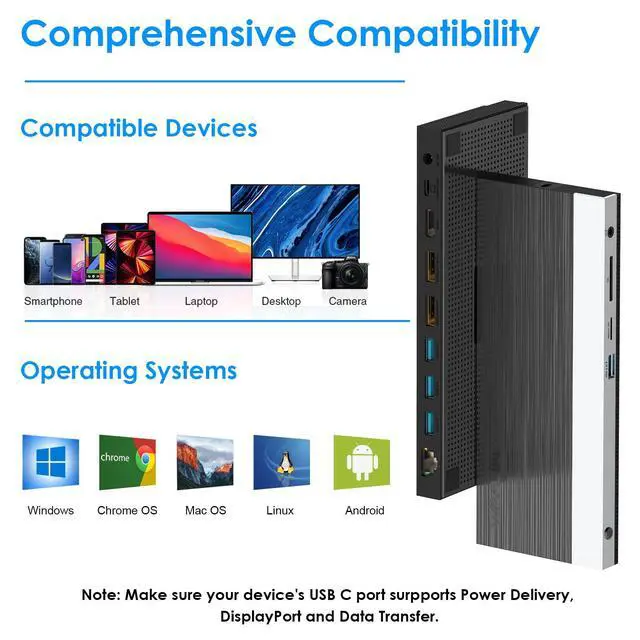
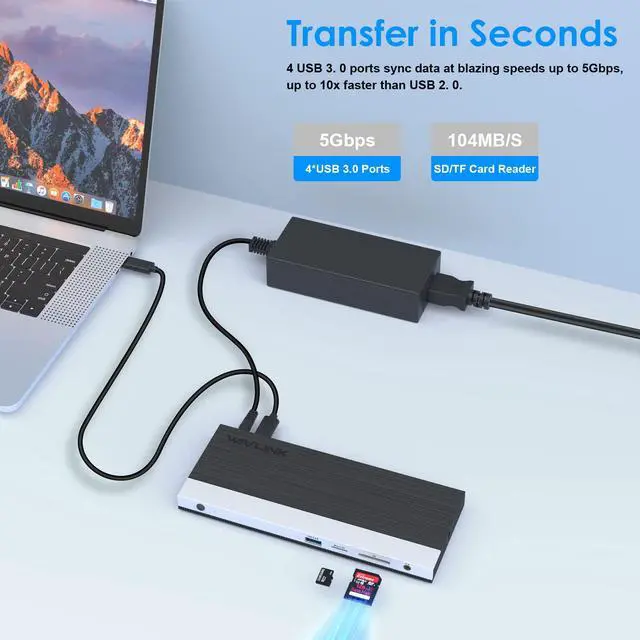
NOTE: MST docking station adapter, compatible with USB-C Computers that have USB 3.1 Gen2 full specification with data transfer, USB-C Power Delivery and Video Output (DisplayPort Alternate Modes). 4K Ultra HD Triple Display - Dual HDMI and 1 DisplayPort video ports for various needs. The host computer under HBR3 DP 1.4 source, a single port video output resolution up to 3840x2160@60Hz, dual displays up to 2560x1440@60Hz, triple displays up to 1920x1080@60Hz. Under HBR3 DP 1.2, a single display resolution up to 3840x2160@30Hz or 2560x1440@60Hz, dual display resolution up to 1920*1080@60Hz, triple display up to 1600*900@60Hz. Tips on laptops system - Mirror or extend your screen directly stream UHD video to HDTV, monitors, projectors. Windows system support MST and SST, triple display. Mac OS only support mirror mode and non-mirror mode without triple display. Non-mirror mode means that the two or three external monitors are same but different from laptop. Intel/M1/M2 based Mac only extend one monitor, the external monitors will show the same content. USB C to Dual HDMI DisplayPort mini dock, Plug and Play. 4 USB ports & Ethernet & SD/TF card reader - 3 USB 3.0 ports, synchronize data at speeds up to 5Gbps, up to 10x faster than USB 2.0, another BC 1.2 fast charging USB 3.0 port not only transfers data but also helps you charge your phone quickly.
1000Mbps Gigabit Ethernet port provides a stable and faster wired network connection for your file transfer. Built in SD and Micro SD slots for easy access to files from universal SD and Micro SD Memory Card up to 2TB. Charge your Laptop - This USB C Hub dock with 100W PD 3.0 pass-through charging port, provides up to 65W power delivery to your laptop, quickly charging your connected devices while displaying or transferring data. A USB C Triple Display Docking Station for daily use, meet your different needs for home/office/outdoor screen expansion
NOTE: MST docking station adapter, compatible with USB-C Computers that have USB 3.1 Gen2 full specification with data transfer, USB-C Power Delivery and Video Output (DisplayPort Alternate Modes). 4K Ultra HD Triple Display - Dual HDMI and 1 DisplayPort video ports for various needs. The host computer under HBR3 DP 1.4 source, a single port video output resolution up to 3840x2160@60Hz, dual displays up to 2560x1440@60Hz, triple displays up to 1920x1080@60Hz. Under HBR3 DP 1.2, a single display resolution up to 3840x2160@30Hz or 2560x1440@60Hz, dual display resolution up to 1920*1080@60Hz, triple display up to 1600*900@60Hz. Tips on laptops system - Mirror or extend your screen directly stream UHD video to HDTV, monitors, projectors. Windows system support MST and SST, triple display. Mac OS only support mirror mode and non-mirror mode without triple display. Non-mirror mode means that the two or three external monitors are same but different from laptop. Intel/M1/M2 based Mac only extend one monitor, the external monitors will show the same content. USB C to Dual HDMI DisplayPort mini dock, Plug and Play. 4 USB ports & Ethernet & SD/TF card reader - 3 USB 3.0 ports, synchronize data at speeds up to 5Gbps, up to 10x faster than USB 2.0, another BC 1.2 fast charging USB 3.0 port not only transfers data but also helps you charge your phone quickly.
1000Mbps Gigabit Ethernet port provides a stable and faster wired network connection for your file transfer. Built in SD and Micro SD slots for easy access to files from universal SD and Micro SD Memory Card up to 2TB. Charge your Laptop - This USB C Hub dock with 100W PD 3.0 pass-through charging port, provides up to 65W power delivery to your laptop, quickly charging your connected devices while displaying or transferring data. A USB C Triple Display Docking Station for daily use, meet your different needs for home/office/outdoor screen expansion
Warranty & Returns
Warranty, Returns, And Additional Information
Warranty
- Please contact the Seller directly for warranty information. Warranty information may also be found on the Manufacturer's website.
- CONTACT
Return Policies
- Return for refund within: 30 days
- Return for replacement within: 30 days
- This item is covered by Pingquan Store Return Policy
Manufacturer Contact Info
- For a directory of all our manufacturers, please click below.
- Manufacturers Directory
LOADING...