

Your Browsing History

Meet Your Seller



3 HDMI Triple USB C Docking Station Dual 4K Display for MacBook M1-M5 & Win Laptop Docking Station Universal USB C Dock with Power Adapter, PD, 10Gbps USBC/A Data,2 USB-A 2.0, Ethernet
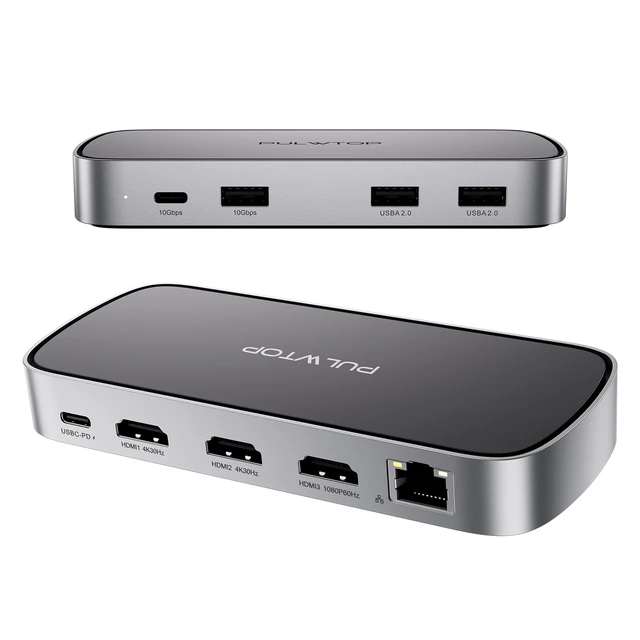
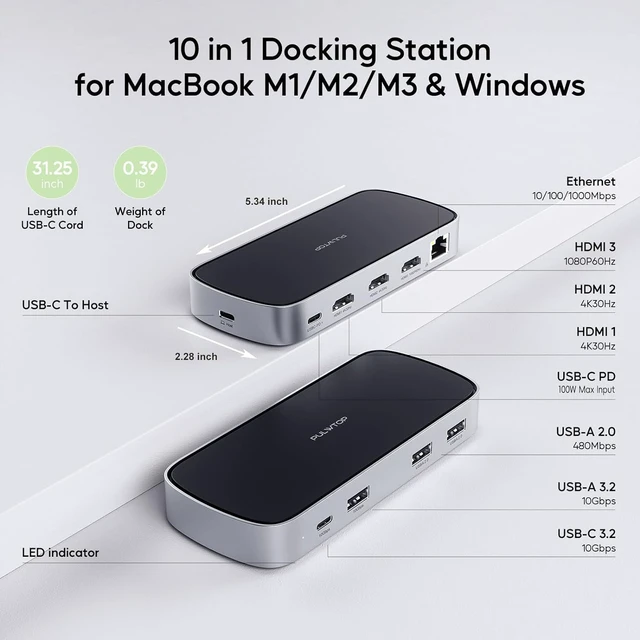
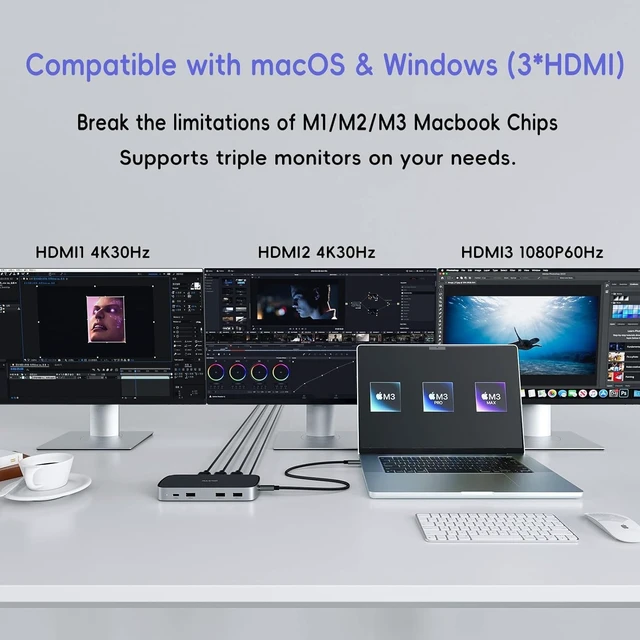
- [Triple Displays for M1/M2/M3 MacBook]: After installing the Siliconmotion driver, the docking station can break the single extended display limitation of M1/M2/M3 MacBook, and is compatible with MacBook Pro/MacBook Air M1 M2 M3 2023 2022 2021 2020 2019 13" 14" 15" 16". It supports extending triple monitors to create your own workspace. [NOTE]: The triple expansion function of the universal docking station can only be used after installing the Siliconmotion driver. [4K Triple Extended Display]: Just install the Siliconmotion driver, and our laptop station can achieve triple monitor display. HDMI1 supports up to 4K@30HZ, HDMI2 supports up to 4K@30Hz, and HDMI3 supports up to 1080P@60Hz. The MacBook docking station's mirror mode and extend mode can be used based on your needs. (Supports both SST & MST) Note: HDMI2 and HDMI3 won't work if the driver isn't installed. [NOTE]: Please find the "SM76X Driver Download" on the Siliconmotion website according to the process SUPPORTDOWNLOAD CENTERDocument (Product Solution to select "Others") and download the SM76x Driver before use. [9 IN 1 Docking Station]: The universal docking station with 65W power adapter (included), 100W USB C-PD, 3 HDMI Ports, 2 USB-A 2.0, 10Gbps USB C and USB-A Data, Ethernet. This laptop dock expands your workstation to vastly improve efficiency while working. [NOTE]: The cable of the included power adapter is only for USB-PD Input charging, not for data transfer. The other included cable is fully functiona
+
+
Overview
Specs
Reviews

Any questions? Our AI mode will help you find out quickly.
Try me now
[Triple Displays for
M1/M2/M3 MacBook]: After installing the Siliconmotion driver, the docking station can break the single extended display limitation of M1/M2/M3 MacBook, and is compatible with MacBook Pro/MacBook Air M1 M2 M3 2023 2022 2021 2020 2019 13" 14" 15" 16". It supports extending triple monitors to create your own workspace.
[NOTE]: The triple expansion function of the universal docking station can only be used after installing the Siliconmotion driver.
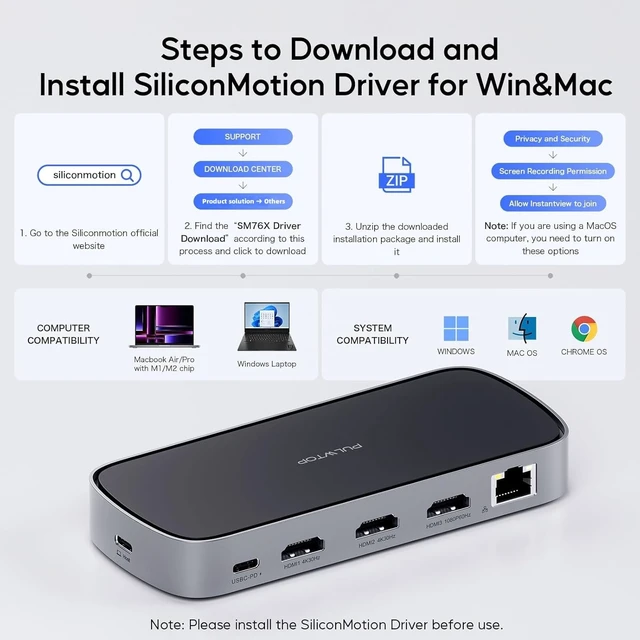
[4K Triple Extended Display]: Just install the Siliconmotion driver, and our laptop station can achieve triple monitor display. HDMI1 supports up to 4K@30HZ, HDMI2 supports up to 4K@30Hz, and HDMI3 supports up to 1080P@60Hz. The MacBook docking station's mirror mode and extend mode can be used based on your needs. (Supports both
SST & MST) Note: HDMI2 and HDMI3 won't work if the driver isn't installed.
[NOTE]: Please find the "SM76X Driver Download" on the Siliconmotion website according to the process SUPPORTDOWNLOAD CENTER
Document (Product Solution to select "Others") and download the SM76x Driver before use. [9 IN 1
Docking Station]: The universal docking station with 65W power adapter (included), 100W USB C-PD, 3 HDMI Ports, 2 USB-A 2.0, 10Gbps USB C and USB-A Data, Ethernet. This laptop dock expands your workstation to vastly improve efficiency while working.
[NOTE]: The cable of the included power adapter is only for USB-PD Input charging, not for data transfer. The other included cable is fully functional and can be used by connecting your laptop to this triple docking station.
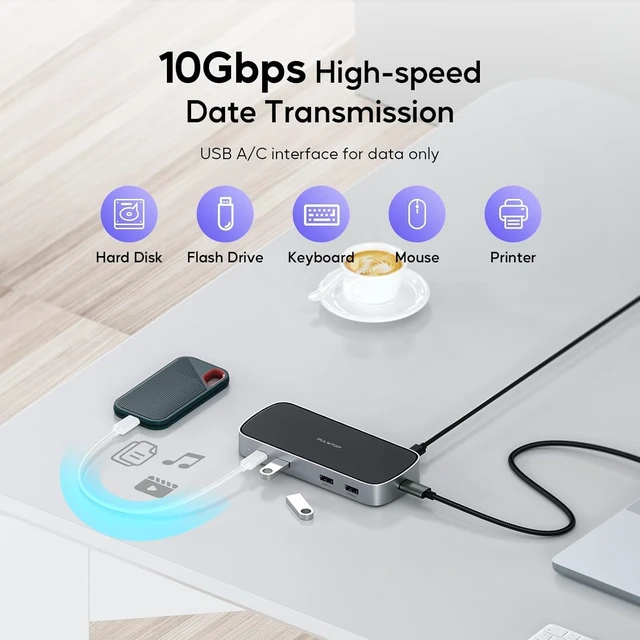
[10G High-Speed Data Transmission]: The USB-C docking station has a 10Gbps USB-C port and a 10G USB-A port, which can transfer videos, pictures or large files in seconds. The docking station also has two 2.0 USB-A ports to provide the most stable connection for your mouse and keyboard.
[NOTE]: Please find the "SM76X Driver Download" on the Siliconmotion website according to the process SUPPORTDOWNLOAD CENTER
Document (Product Solution to select "Others") and download the SM76x Driver before use.
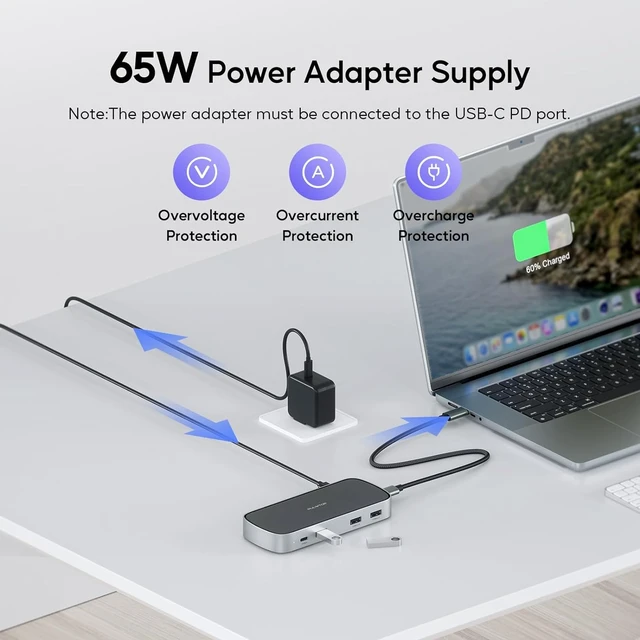
[Included 65W Power Supply]: For a more stable experience, we have matched a 65W adapter in the box; it can offer up to 50W to charge your laptop directly (PS: the adapter with US/UK/EU plug). The laptop docking station supports PD100W max. If you need to use the adapter by yourself, we recommend using an adapter above 60W.
[NOTE]: Please find the "SM76X Driver Download" on the Siliconmotion website according to the process SUPPORTDOWNLOAD CENTER
Document (Product Solution to select "Others") and download the SM76x Driver before use
M1/M2/M3 MacBook]: After installing the Siliconmotion driver, the docking station can break the single extended display limitation of M1/M2/M3 MacBook, and is compatible with MacBook Pro/MacBook Air M1 M2 M3 2023 2022 2021 2020 2019 13" 14" 15" 16". It supports extending triple monitors to create your own workspace.
[NOTE]: The triple expansion function of the universal docking station can only be used after installing the Siliconmotion driver.
[4K Triple Extended Display]: Just install the Siliconmotion driver, and our laptop station can achieve triple monitor display. HDMI1 supports up to 4K@30HZ, HDMI2 supports up to 4K@30Hz, and HDMI3 supports up to 1080P@60Hz. The MacBook docking station's mirror mode and extend mode can be used based on your needs. (Supports both
SST & MST) Note: HDMI2 and HDMI3 won't work if the driver isn't installed.
[NOTE]: Please find the "SM76X Driver Download" on the Siliconmotion website according to the process SUPPORTDOWNLOAD CENTER
Document (Product Solution to select "Others") and download the SM76x Driver before use. [9 IN 1
Docking Station]: The universal docking station with 65W power adapter (included), 100W USB C-PD, 3 HDMI Ports, 2 USB-A 2.0, 10Gbps USB C and USB-A Data, Ethernet. This laptop dock expands your workstation to vastly improve efficiency while working.
[NOTE]: The cable of the included power adapter is only for USB-PD Input charging, not for data transfer. The other included cable is fully functional and can be used by connecting your laptop to this triple docking station.
[10G High-Speed Data Transmission]: The USB-C docking station has a 10Gbps USB-C port and a 10G USB-A port, which can transfer videos, pictures or large files in seconds. The docking station also has two 2.0 USB-A ports to provide the most stable connection for your mouse and keyboard.
[NOTE]: Please find the "SM76X Driver Download" on the Siliconmotion website according to the process SUPPORTDOWNLOAD CENTER
Document (Product Solution to select "Others") and download the SM76x Driver before use.
[Included 65W Power Supply]: For a more stable experience, we have matched a 65W adapter in the box; it can offer up to 50W to charge your laptop directly (PS: the adapter with US/UK/EU plug). The laptop docking station supports PD100W max. If you need to use the adapter by yourself, we recommend using an adapter above 60W.
[NOTE]: Please find the "SM76X Driver Download" on the Siliconmotion website according to the process SUPPORTDOWNLOAD CENTER
Document (Product Solution to select "Others") and download the SM76x Driver before use
Warranty & Returns
Warranty, Returns, And Additional Information
Warranty
- Please contact the Seller directly for warranty information. Warranty information may also be found on the Manufacturer's website.
- CONTACT
Return Policies
- Return for refund within: 30 days
- Return for replacement within: 30 days
- This item is covered by Brightflag Electronics Return Policy
Manufacturer Contact Info
- For a directory of all our manufacturers, please click below.
- Manufacturers Directory
LOADING...