Your Browsing History
Meet Your Seller
Laptop Docking Station Stand with Fan Aluminum Laptop Riser with USB-C Hub 11-IN-1 4K60Hz HDMI 100W PD Charging USB3.0 Ethernet Audio TF/SD, 360° Swivel, for MacBook Pro/Air, iPad Pro & Type-C Laptops
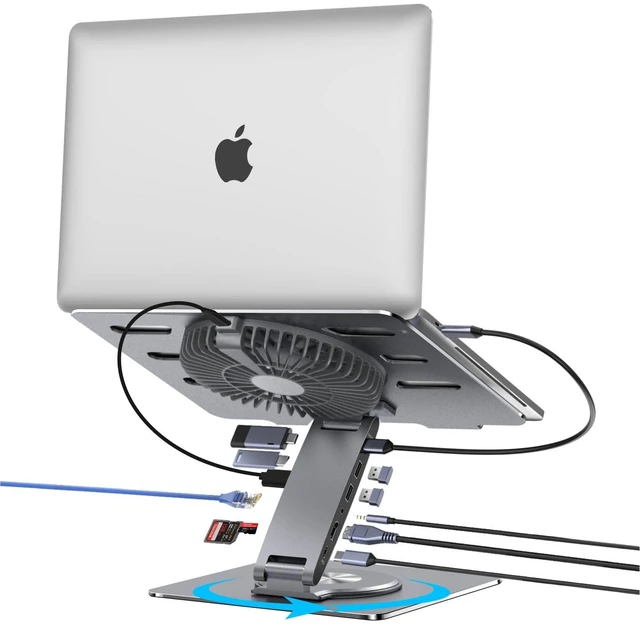
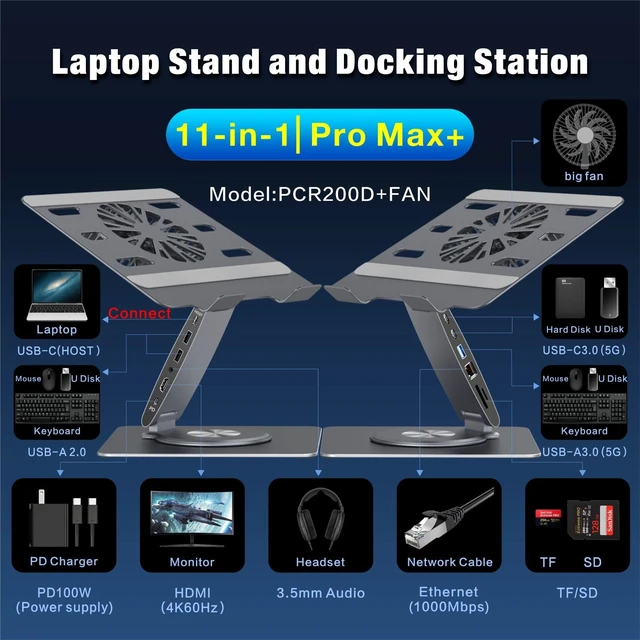
- Is it compatible with my laptop?This cooling laptop stand with docking station is designed for broad operating system compatibility across MacOS, iPadOS, Windows, and Android. Any laptop equipped with a full-function USB-C port and measuring under 15.6 inches is suitable, including MacBook models. Enjoy plug-and-play operation with no drivers needed. Detachable FanThe fan is magnetically attached to the center of the back panel. Voltage: 5V, Current: 0.4A, Power: 2W, Speed: 1800 RPM, Rated for 20,000 hours, Noise: <50dB, Diameter: 18cm. Use the power cable to connect the fan to any USB port on the hub, and use the cable switch to turn the fan on and off. The laptop stand with fan helps keep your laptop cool throughout the day. Package ContentsThe package contains 1x laptop stand integrated with an 11-port USB-C hub, 1x fan, 1x full-function USB-C to USB-C cable for connecting the laptop to the dock, approximately 19.7 inches long, and 1x power cable for connecting the fan to the hub, approximately 19.7 inches long. How high can the laptop holder be elevated?This adjustable laptop riser with fan for desks features dual upper and lower hinges, allowing you to raise the laptop keyboard up to 5.5 inches or lower it to desktop level. The height range is suitable for ergonomic desk use, enabling you to position the laptop at eye level for comfortable viewing. You can adjust the laptop to eye level, tilt it upward, or tilt it downward. Is it easy to use the docking statio
+
+
Overview
Specs
Reviews
Any questions? Our AI mode will help you find out quickly.
Try me now
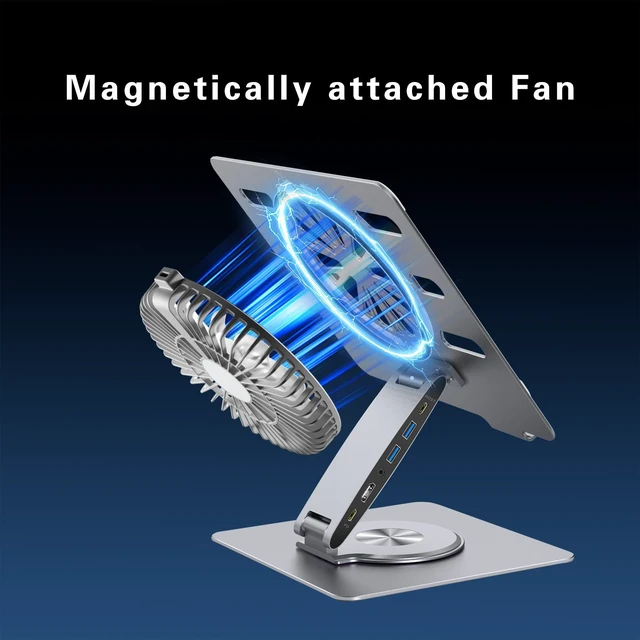
Is it compatible with my laptop? This cooling laptop stand with docking station is designed for broad operating system compatibility across MacOS, iPadOS, Windows, and Android. Any laptop equipped with a full-function USB-C port and measuring under 15.6 inches is suitable, including MacBook models. Enjoy plug-and-play operation with no drivers needed. Detachable FanThe fan is magnetically attached to the center of the back panel.
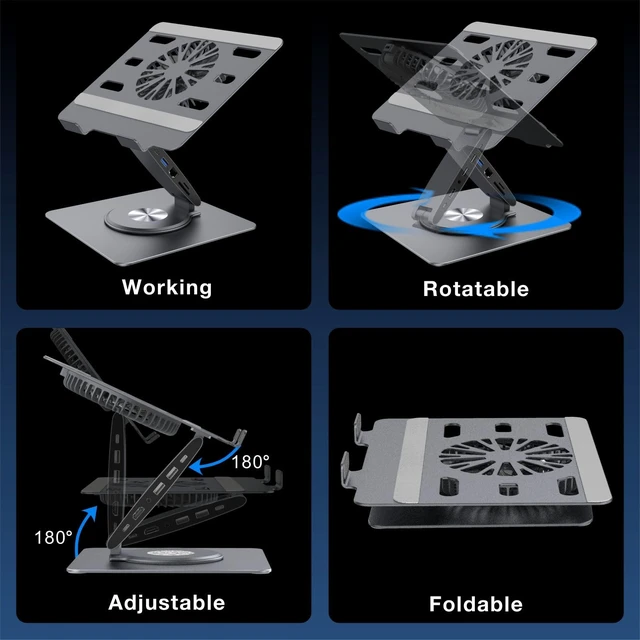
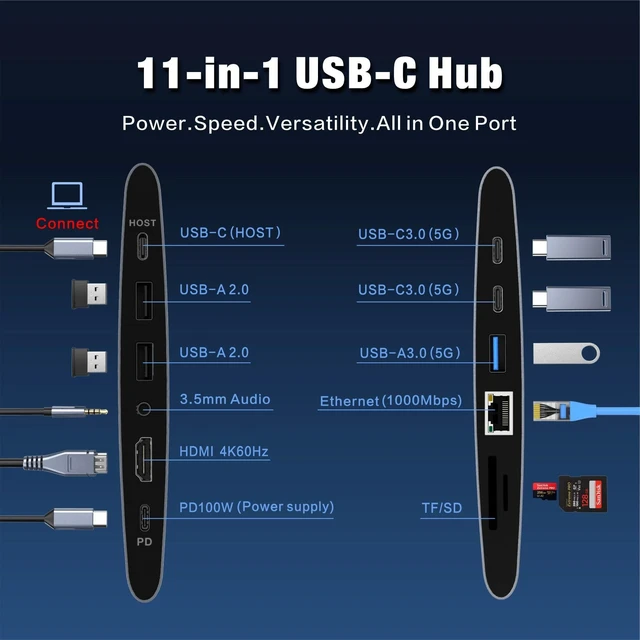
Voltage: 5V, Current: 0.4A, Power: 2W, Speed: 1800 RPM, Rated for 20, 000 hours, Noise: <50dB, Diameter: 18cm. Use the power cable to connect the fan to any USB port on the hub, and use the cable switch to turn the fan on and off. The laptop stand with fan helps keep your laptop cool throughout the day. Package ContentsThe package contains 1x laptop stand integrated with an 11-port USB-C hub, 1x fan, 1x full-function USB-C to USB-C cable for connecting the laptop to the dock, approximately 19.7 inches long, and 1x power cable for connecting the fan to the hub, approximately 19.7 inches long. How high can the laptop holder be elevated? This adjustable laptop riser with fan for desks features dual upper and lower hinges, allowing you to raise the laptop keyboard up to 5.5 inches or lower it to desktop level. The height range is suitable for ergonomic desk use, enabling you to position the laptop at eye level for comfortable viewing. You can adjust the laptop to eye level, tilt it upward, or tilt it downward. Is it easy to use the docking station for a laptop? Yes, it is simple to operate.
Use the cable to connect your laptops full-function USB-C port to the HOST port on the stand, and all docking ports will activate and work at the same time. Is it easy to adjust the laptop stand? This stand requires no tools for adjustment and can be manually set to any height or angle. Both the upper and lower joints rotate up to 180 degrees. Gently pull or push the joints to adjust them. Will it sag over time? This MacBook-compatible stand with docking station is designed for lasting stability and resists sagging over time. Its aluminum-alloy construction and damping hinge mechanism support durability and long-term performance

Voltage: 5V, Current: 0.4A, Power: 2W, Speed: 1800 RPM, Rated for 20, 000 hours, Noise: <50dB, Diameter: 18cm. Use the power cable to connect the fan to any USB port on the hub, and use the cable switch to turn the fan on and off. The laptop stand with fan helps keep your laptop cool throughout the day. Package ContentsThe package contains 1x laptop stand integrated with an 11-port USB-C hub, 1x fan, 1x full-function USB-C to USB-C cable for connecting the laptop to the dock, approximately 19.7 inches long, and 1x power cable for connecting the fan to the hub, approximately 19.7 inches long. How high can the laptop holder be elevated? This adjustable laptop riser with fan for desks features dual upper and lower hinges, allowing you to raise the laptop keyboard up to 5.5 inches or lower it to desktop level. The height range is suitable for ergonomic desk use, enabling you to position the laptop at eye level for comfortable viewing. You can adjust the laptop to eye level, tilt it upward, or tilt it downward. Is it easy to use the docking station for a laptop? Yes, it is simple to operate.
Use the cable to connect your laptops full-function USB-C port to the HOST port on the stand, and all docking ports will activate and work at the same time. Is it easy to adjust the laptop stand? This stand requires no tools for adjustment and can be manually set to any height or angle. Both the upper and lower joints rotate up to 180 degrees. Gently pull or push the joints to adjust them. Will it sag over time? This MacBook-compatible stand with docking station is designed for lasting stability and resists sagging over time. Its aluminum-alloy construction and damping hinge mechanism support durability and long-term performance
Warranty & Returns
Warranty, Returns, And Additional Information
Warranty
- Please contact the Seller directly for warranty information. Warranty information may also be found on the Manufacturer's website.
- CONTACT
Return Policies
- Return for refund within: 30 days
- Return for replacement within: 30 days
- This item is covered by Anunirny Return Policy
Manufacturer Contact Info
- For a directory of all our manufacturers, please click below.
- Manufacturers Directory
LOADING...