Your Browsing History
Meet Your Seller
Docking Station Dual Monitor for Dell/HP/Lenovo/Mac Laptop, USB C Laptop Docking Station Dual Monitor, Dual HDMI Adapter for 2 Monitors, 8 in 1 USB C Hub Multiport Adapter with HDMI/USB/PD/SD/TF
Limited time offer, ends 10/13 By Anunirny
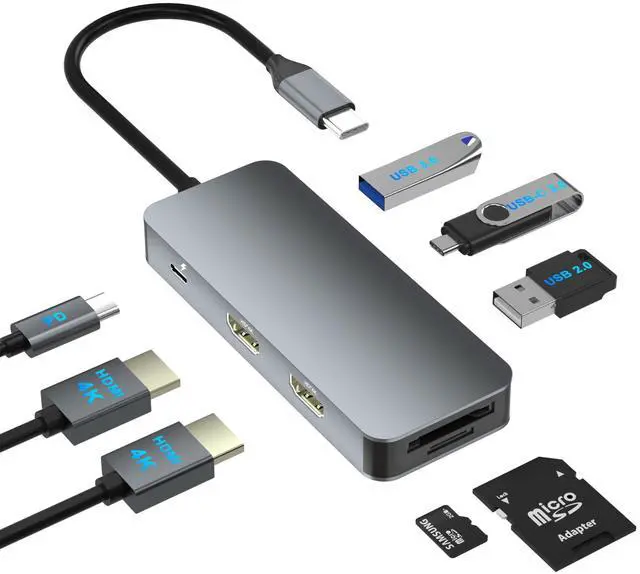
- 8 IN 1 Laptop Docking Station: Laptop Docking Station converts your USB C Windows Laptops one Type C/Thunderbolt 3 port into 8 Ports: 2 x 4K@30Hz HDMI, 1 x USB 3.0, 1 x USB 2.0, 1 x USB C data, SD/TF card reader, 100W PD. Please note: not for all usb-c port laptops. Make sure your laptop or PC supports video output (Thunderbolt 3/Thunderbolt 4) or DP Alt Mode, which decides whether the HDMI port works or not. Laptop Docking Station Dual Monitor: The USB C Dual HDMI adapter with 2 4K HDMI ports allows your USB C laptops to extend 2 different monitors, no need for any drivers or software, just plug and play. Support both SST and MST mode. 2 HDMI ports can be used simultaneously, resolution up to 4K@30hz. Notice: MacOS ONLY supports SST (Mirror Mode: display the SAME image) due to the MacOS limitation. Windows supports MST (Extend Mode) and SST (Mirror Mode). Fast Data Transfer and SD/TF Card Reader: 3 * USB ports (1 * USB A 3.0 & 1 * USB A 2.0 & 1 * USB C data) high speed data transfer (5Gbps for USB 3.0, 480Mbps for USB 2.0). We recommend you connect mouse and keyboard to USB2.0. SD/TF Card reader can only work alone, writing/reading speed 20MB/S, which can access files for Type-C devices, quickly view your photos or videos, good for Photographer or Designer or Video editor, etc. Note: The USB C data port is only for data transfer, it won't support power delivery and extending a monitor. 100W PD Powerful Charging: Type-C PD port supports PD 3.0 protocol to quickly ch
+
+
Overview
Specs
Reviews
Any questions? Our AI mode will help you find out quickly.
Try me now
8 IN 1
Laptop Docking Station: Laptop Docking Station converts your USB C Windows Laptops one Type C/Thunderbolt 3 port into 8
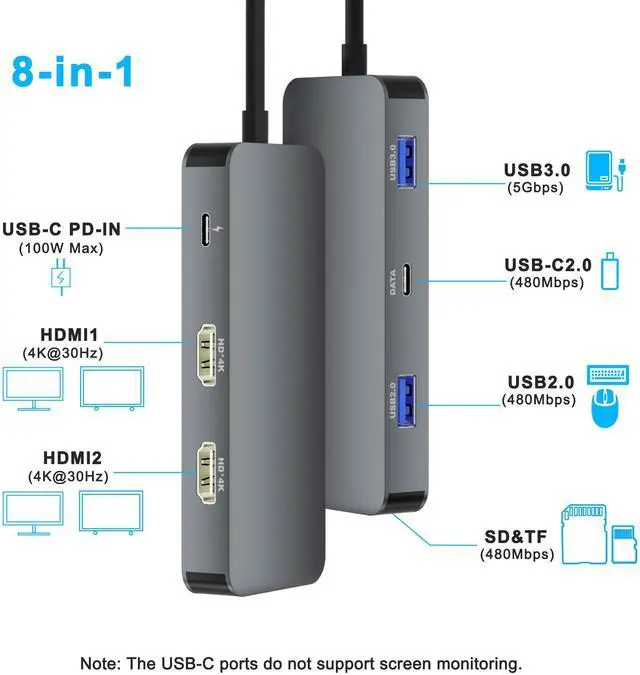
Ports: 2 x 4K@30Hz HDMI, 1 x USB 3.0, 1 x USB 2.0, 1 x USB C data, SD/TF card reader, 100W PD.
Please note: not for all usb-c port laptops. Make sure your laptop or PC supports video output (Thunderbolt 3/Thunderbolt 4) or DP Alt Mode, which decides whether the HDMI port works or not.
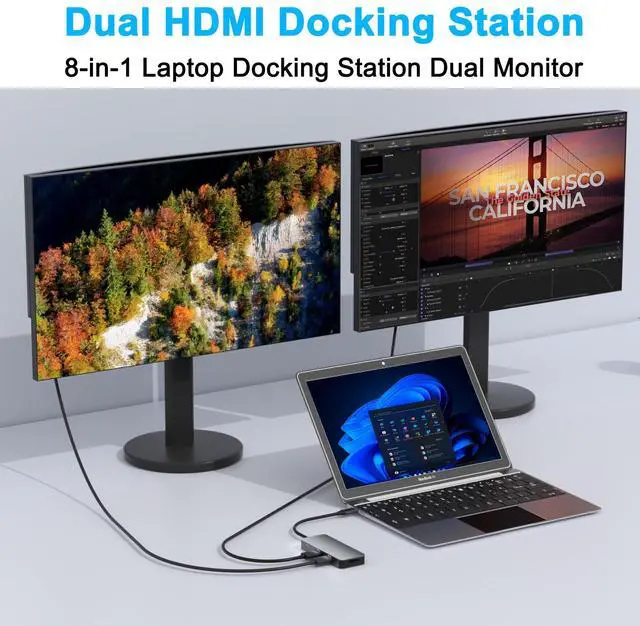
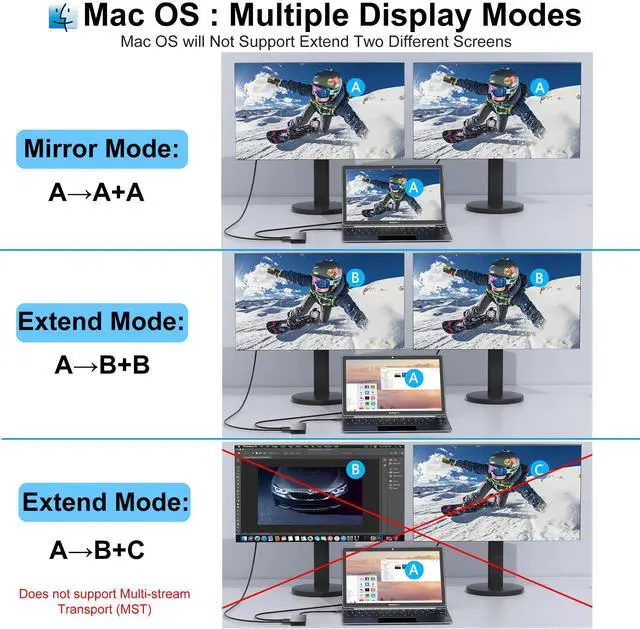
Laptop Docking Station Dual Monitor: The USB C Dual HDMI adapter with 2 4K HDMI ports allows your USB C laptops to extend 2 different monitors, no need for any drivers or software, just plug and play. Support both SST and MST mode. 2 HDMI ports can be used simultaneously, resolution up to 4K@30hz.
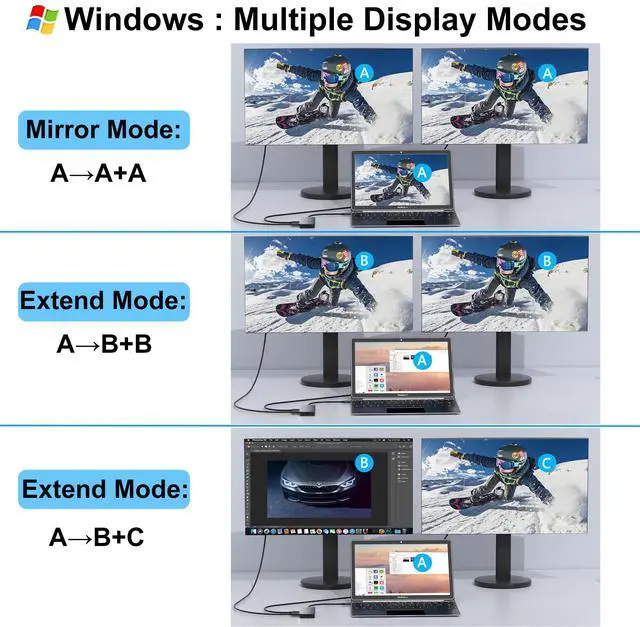
Notice: MacOS ONLY supports SST (Mirror
Mode: display the SAME image) due to the MacOS limitation. Windows supports MST (Extend Mode) and SST (Mirror Mode). Fast Data Transfer and
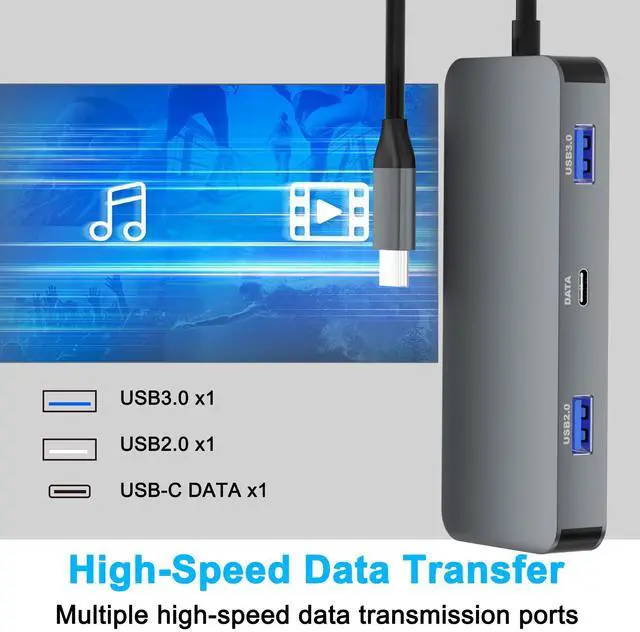
SD/TF Card Reader: 3 * USB ports (1 * USB A 3.0 & 1 * USB A 2.0 & 1 * USB C data) high speed data transfer (5Gbps for USB 3.0, 480Mbps for USB 2.0 ). We recommend you connect mouse and keyboard to USB 2.0. SD/TF Card reader can only work alone, writing/reading speed 20MB/S, which can access files for Type-C devices, quickly view your photos or videos, good for Photographer or Designer or Video editor, etc.
Note: The USB C data port is only for data transfer, it won't support power delivery and extending a monitor.
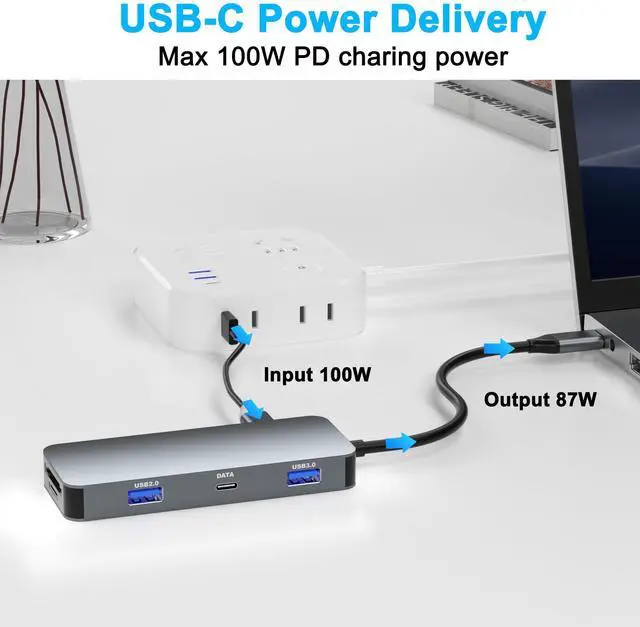
100W PD Powerful Charging: Type-C PD port supports PD 3.0 protocol to quickly charge your device up to 85W of power (the hub consumes 15W power).
Tip: This PD Type-C port does not support data transfer. PD charging doesn't work for laptop own a AC adapter. Charger and power cord not included.
Universal Compatible: This USB C dock dongle hub multiport adapter compatible with Macbook air, Macbook pro, iMac, iPad Air, Dell, HP, Huawei, Lenovo and other laptops or pc with thunderbolt3/4/USB Type-C (with video output function)

Laptop Docking Station: Laptop Docking Station converts your USB C Windows Laptops one Type C/Thunderbolt 3 port into 8
Ports: 2 x 4K@30Hz HDMI, 1 x USB 3.0, 1 x USB 2.0, 1 x USB C data, SD/TF card reader, 100W PD.
Please note: not for all usb-c port laptops. Make sure your laptop or PC supports video output (Thunderbolt 3/Thunderbolt 4) or DP Alt Mode, which decides whether the HDMI port works or not.
Laptop Docking Station Dual Monitor: The USB C Dual HDMI adapter with 2 4K HDMI ports allows your USB C laptops to extend 2 different monitors, no need for any drivers or software, just plug and play. Support both SST and MST mode. 2 HDMI ports can be used simultaneously, resolution up to 4K@30hz.
Notice: MacOS ONLY supports SST (Mirror
Mode: display the SAME image) due to the MacOS limitation. Windows supports MST (Extend Mode) and SST (Mirror Mode). Fast Data Transfer and
SD/TF Card Reader: 3 * USB ports (1 * USB A 3.0 & 1 * USB A 2.0 & 1 * USB C data) high speed data transfer (5Gbps for USB 3.0, 480Mbps for USB 2.0 ). We recommend you connect mouse and keyboard to USB 2.0. SD/TF Card reader can only work alone, writing/reading speed 20MB/S, which can access files for Type-C devices, quickly view your photos or videos, good for Photographer or Designer or Video editor, etc.
Note: The USB C data port is only for data transfer, it won't support power delivery and extending a monitor.
100W PD Powerful Charging: Type-C PD port supports PD 3.0 protocol to quickly charge your device up to 85W of power (the hub consumes 15W power).
Tip: This PD Type-C port does not support data transfer. PD charging doesn't work for laptop own a AC adapter. Charger and power cord not included.
Universal Compatible: This USB C dock dongle hub multiport adapter compatible with Macbook air, Macbook pro, iMac, iPad Air, Dell, HP, Huawei, Lenovo and other laptops or pc with thunderbolt3/4/USB Type-C (with video output function)
Warranty & Returns
Warranty, Returns, And Additional Information
Warranty
- Please contact the Seller directly for warranty information. Warranty information may also be found on the Manufacturer's website.
- CONTACT
Return Policies
- Return for refund within: 30 days
- Return for replacement within: 30 days
- This item is covered by Anunirny Return Policy
Manufacturer Contact Info
- For a directory of all our manufacturers, please click below.
- Manufacturers Directory
LOADING...