Your Browsing History
Meet Your Seller
13-in-1 USB C Docking Station Triple 4K for Laptop Windows Laptop Dock, Triple 4K Display, 100W Charging, 4 USB 3.0, 2 HDMI, DP, Gigabit Ethernet, SD/TF, Audio. Thunderbolt 3/4
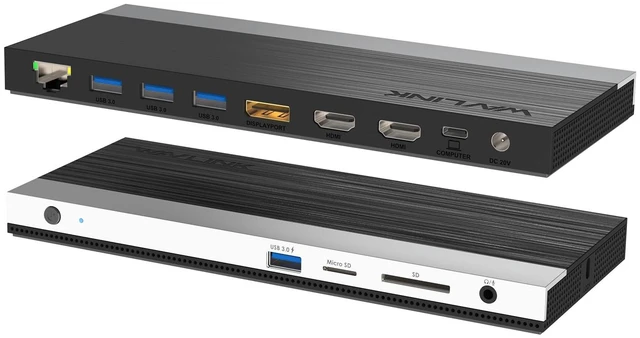
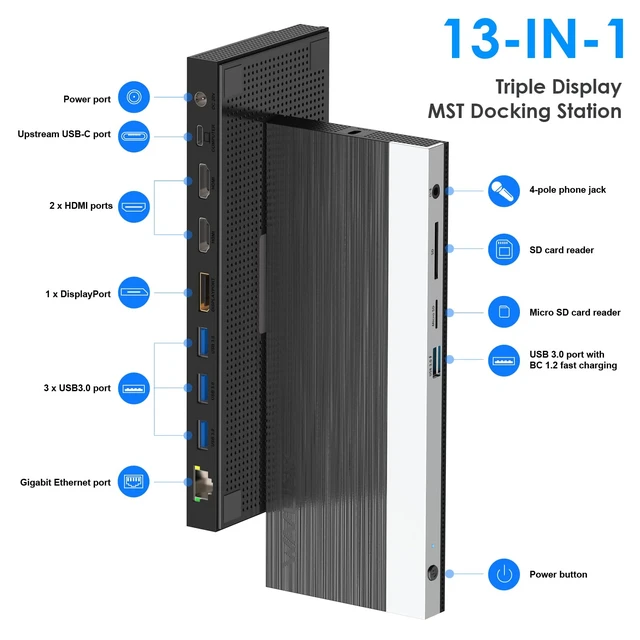
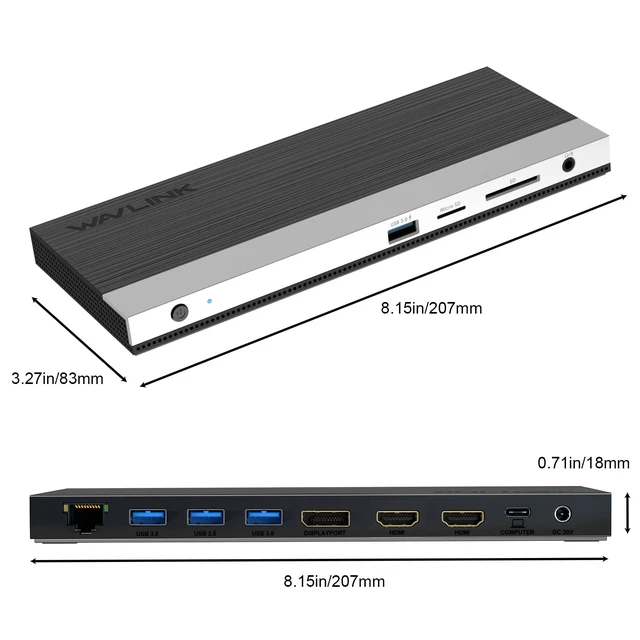
- 13-in-1 Docking Station Check USB-C Port First: This dock requires a full-featured USB-C or Thunderbolt 3/4 port that supports Data, Video Output (DP Alt Mode), and Power Delivery (PD) simultaneously. Using a USB-C to USB-A adapter will disable video and charging. Ports included: 2 HDMI 2.0, 1 DisplayPort 1.4, 3 USB 3.0, 1 BC1.2 fast charging port, Gigabit Ethernet, SD and Micro SD (simultaneous read), and 3.5mm audio jack. Connect all your peripherals through a single USB-C cable. Compatible with Dell, HP, Lenovo, Surface, and other USB-C laptops. 4K Triple Display Know Your DP Version: DP1.4 Source: Single to 4K at 60Hz, Dual to 2K at 60Hz, Triple to 1080P at 60Hz. DP1.2 Source: Single to 4K at 30Hz or 2K at 60Hz, Dual to 1080P at 60Hz, Triple to 1600 by 900 at 60Hz. Your laptop's GPU must support at least 4 displays via DP Alt Mode, including the laptop's own screen, for triple monitor setup. Check your laptop specifications before purchase. Windows vs Mac What You Need to Know: Windows supports Mirror and Extend modes with 3 independent external screens. Mac OS supports Mirror and Non-Mirror modes only. All 3 external monitors show the same content. Intel, M1, M2, and M3 based Mac can only extend ONE monitor. Mac does not support triple independent display with this MST dock. Plug and Play, no driver required for Windows or Mac OS. 5Gbps USB, SD/TF and Gigabit Ethernet: 3 USB 3.0 ports transfer data at up to 5Gbps, 10 times faster than USB 2.0. BC1.2 port supports
+
+
Overview
Specs
Reviews
Any questions? Our AI mode will help you find out quickly.
Try me now
13-in-1 Docking Station Check USB-C Port First: This dock requires a full-featured USB-C or Thunderbolt 3/4 port that supports Data, Video Output (DP Alt Mode), and Power Delivery (PD) simultaneously. Using a USB-C to USB-A adapter will disable video and charging.
Ports included: 2 HDMI 2.0, 1 DisplayPort 1.4, 3 USB 3.0, 1 BC 1.2 fast charging port, Gigabit Ethernet, SD and Micro SD (simultaneous read), and 3.5 mm audio jack. Connect all your peripherals through a single USB-C cable. Compatible with Dell, HP, Lenovo, Surface, and other USB-C laptops. 4K Triple Display Know Your DP Version: DP 1.4
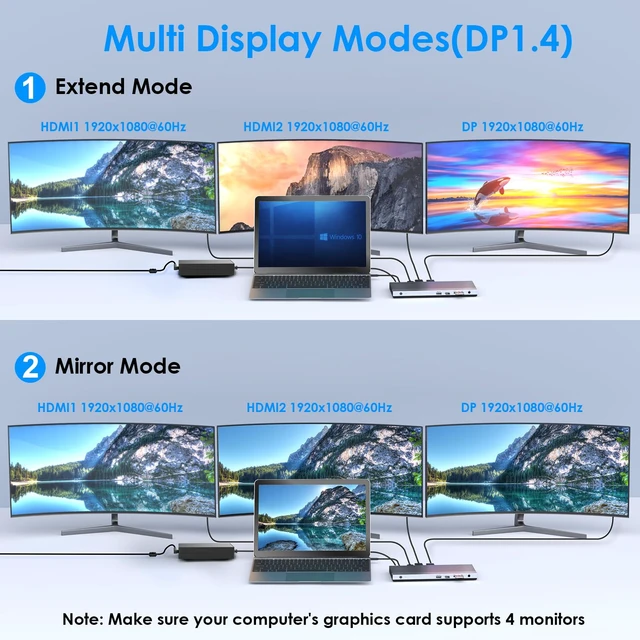
Source: Single to 4K at 60Hz, Dual to 2K at 60Hz, Triple to 1080P at 60Hz.
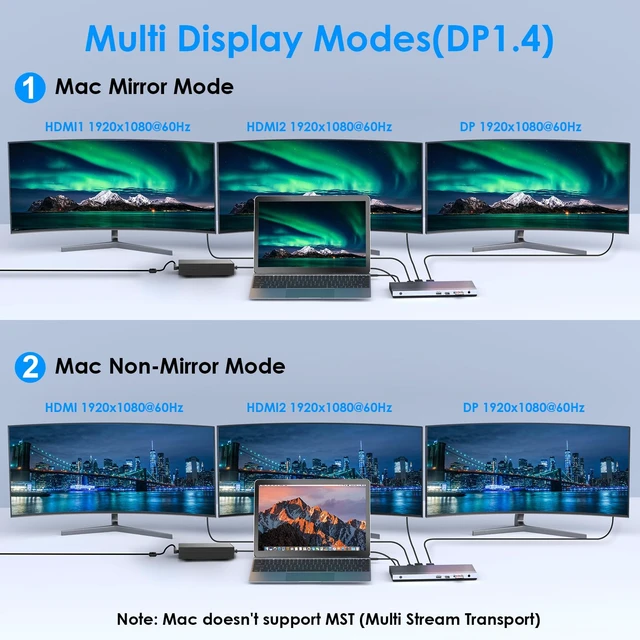
DP 1.2 Source: Single to 4K at 30Hz or 2K at 60Hz, Dual to 1080P at 60Hz, Triple to 1600 by 900 at 60Hz. Your laptop's GPU must support at least 4 displays via DP Alt Mode, including the laptop's own screen, for triple monitor setup. Check your laptop specifications before purchase. Windows vs Mac What You Need to
Know: Windows supports Mirror and Extend modes with 3 independent external screens. Mac OS supports Mirror and Non-Mirror modes only. All 3 external monitors show the same content. Intel, M1, M2, and M3 based Mac can only extend ONE monitor. Mac does not support triple independent display with this MST dock. Plug and Play, no driver required for Windows or Mac OS. 5Gbps USB, SD/TF and
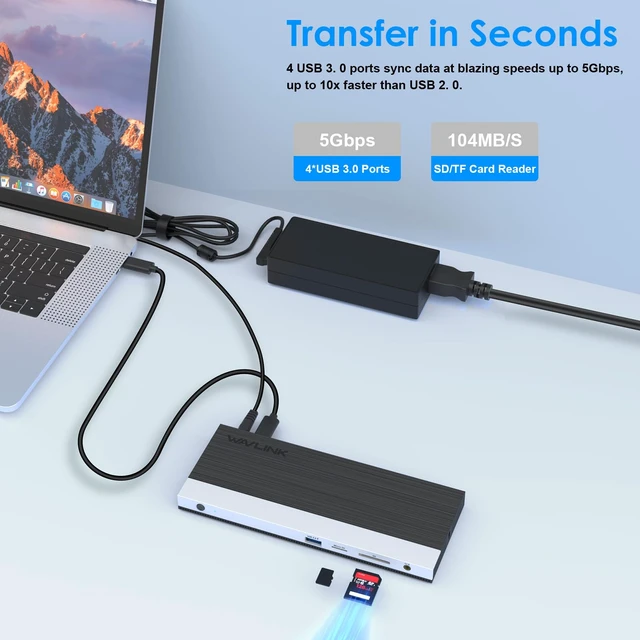
Gigabit Ethernet: 3 USB 3.0 ports transfer data at up to 5Gbps, 10 times faster than USB 2.0. BC 1.2 port supports both fast charging and data transfer. Built-in SD and Micro SD slots work simultaneously at up to 104MB/s, supporting cards up to 2TB. Gigabit Ethernet at 1000/100/10Mbps provides stable wired network for lag-free streaming and fast downloads. 100W PD Charging with 130W
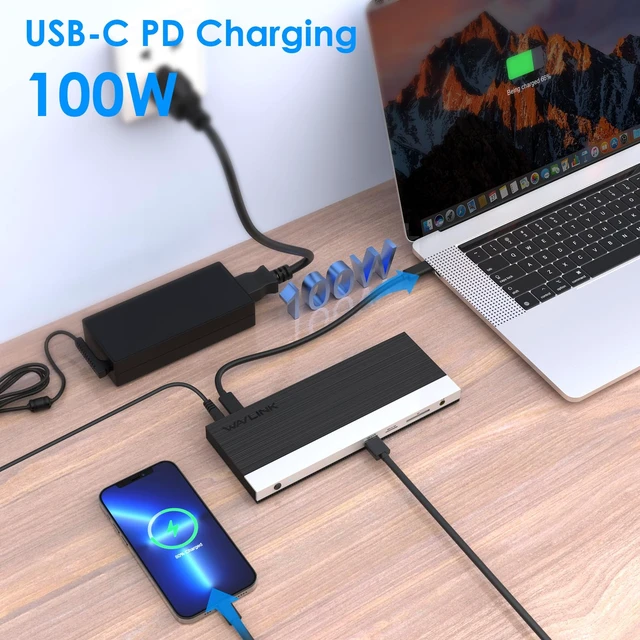
Adapter Included: With the included 130W power adapter, this docking station delivers up to 100W power delivery (PD 3.0 ) to charge your laptop while running displays and data transfer simultaneously. BC 1.2 fast charging port also charges your phone or tablet. Your laptop's USB-C port must support Power Delivery protocol for charging function to work

Ports included: 2 HDMI 2.0, 1 DisplayPort 1.4, 3 USB 3.0, 1 BC 1.2 fast charging port, Gigabit Ethernet, SD and Micro SD (simultaneous read), and 3.5 mm audio jack. Connect all your peripherals through a single USB-C cable. Compatible with Dell, HP, Lenovo, Surface, and other USB-C laptops. 4K Triple Display Know Your DP Version: DP 1.4
Source: Single to 4K at 60Hz, Dual to 2K at 60Hz, Triple to 1080P at 60Hz.
DP 1.2 Source: Single to 4K at 30Hz or 2K at 60Hz, Dual to 1080P at 60Hz, Triple to 1600 by 900 at 60Hz. Your laptop's GPU must support at least 4 displays via DP Alt Mode, including the laptop's own screen, for triple monitor setup. Check your laptop specifications before purchase. Windows vs Mac What You Need to
Know: Windows supports Mirror and Extend modes with 3 independent external screens. Mac OS supports Mirror and Non-Mirror modes only. All 3 external monitors show the same content. Intel, M1, M2, and M3 based Mac can only extend ONE monitor. Mac does not support triple independent display with this MST dock. Plug and Play, no driver required for Windows or Mac OS. 5Gbps USB, SD/TF and
Gigabit Ethernet: 3 USB 3.0 ports transfer data at up to 5Gbps, 10 times faster than USB 2.0. BC 1.2 port supports both fast charging and data transfer. Built-in SD and Micro SD slots work simultaneously at up to 104MB/s, supporting cards up to 2TB. Gigabit Ethernet at 1000/100/10Mbps provides stable wired network for lag-free streaming and fast downloads. 100W PD Charging with 130W
Adapter Included: With the included 130W power adapter, this docking station delivers up to 100W power delivery (PD 3.0 ) to charge your laptop while running displays and data transfer simultaneously. BC 1.2 fast charging port also charges your phone or tablet. Your laptop's USB-C port must support Power Delivery protocol for charging function to work
Warranty & Returns
Warranty, Returns, And Additional Information
Warranty
- Please contact the Seller directly for warranty information. Warranty information may also be found on the Manufacturer's website.
- CONTACT
Return Policies
- Return for refund within: 30 days
- Return for replacement within: 30 days
- This item is covered by Vast Sun Tech Return Policy
Manufacturer Contact Info
- For a directory of all our manufacturers, please click below.
- Manufacturers Directory
LOADING...