Your Browsing History
Meet Your Seller
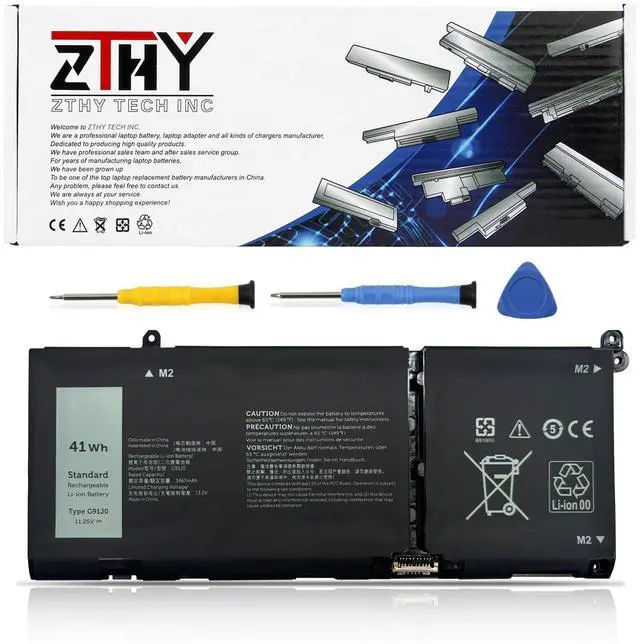
41Wh G91J0 Battery Replacement for Dell Inspiron 3510 3511 3515 3521 3525 3530 3535 5320 5310 5330 5410 5435 5415 5418 5515 5430 5435 7415 7420 2-in-1 Latitude 3320 3330 3420 3520 Vostro 3435 3-Cell
- Specification: Battery type: Li-ion. Color: Black. Voltage: 11.25V. Capacity: 41Wh/3-Cell. Replace Part Number: 0WV3K8, 0VKYJX, 0MVK11, 0XDY9K, G91J0, 0PG8YJ, 0927N5, 0FH3K2, 0MGCM5. Compatible Laptop Models: Replacement for Dell Latitude 3320, 3330, 3420, 3520; Dell Vostro 15 3510, 3511, 3515, 3520, 3525; Dell Vostro 13 5310, 5320; Dell Vostro 14 3420, 3425, 5410, 5415; Dell Vostro 15 5510, 5515 Series; and Dell Vostro 5620, 5625 Series. There are 3 battery options for the above laptops: 41Wh-G91J0, 54Wh-V6W33, and 64Wh-TN70C. Choose the battery that matches the original battery in your laptop. Compatible Laptop Models: Replacement for Dell Inspiron 15 3510, 3511, 3515, 3520, 3525, 3530, 3535; Dell Inspiron 13 5310, 5320, 5330; Dell Inspiron 14 5410, 5415, 5418, 5420, 5425, 5430, 5435; Dell Inspiron 14 Plus 7420; Dell Inspiron 15 5510, 5515, 5518; Dell Inspiron 16 5625, 5630, 5635; Dell Inspiron 14 5410 2-in-1; Dell Inspiron 14 7415 2-in-1; Dell Inspiron 14 7420 2-in-1; Dell Inspiron 14 7425 2-in-1; Dell Inspiron 14 7430 2-in-1; Dell Inspiron 14 7435 2-in-1; and Dell Inspiron 16 7620 2-in-1 Series. There are 3 battery options for the above laptops: 41Wh-G91J0, 54Wh-V6W33, and 64Wh-TN70C. Choose the battery that matches the original battery in your laptop. If the new battery is not recognized during initial installation, reinstall it and check that the interface is fully connected. Discharge the new battery to 10-20% (not 0%), then charge and cycle it 3-4 times to activate
+
+
Overview
Specs
Reviews
Any questions? Our AI mode will help you find out quickly.
Try me now
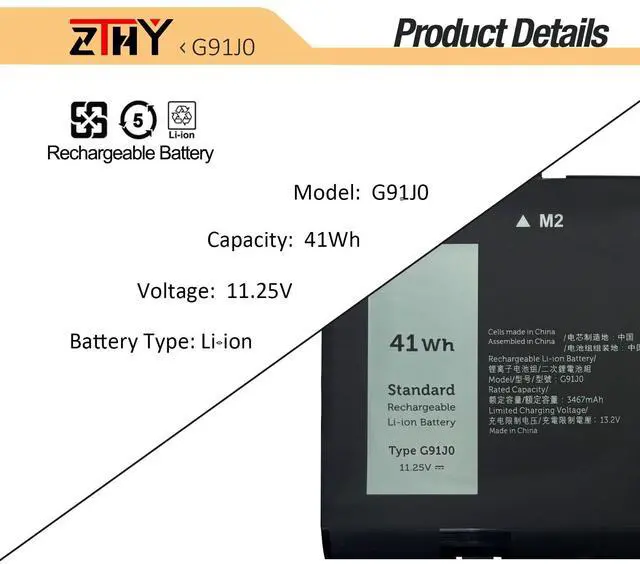
Specification: Battery
type: Li-ion.
Color: Black.
Voltage: 11.25V.
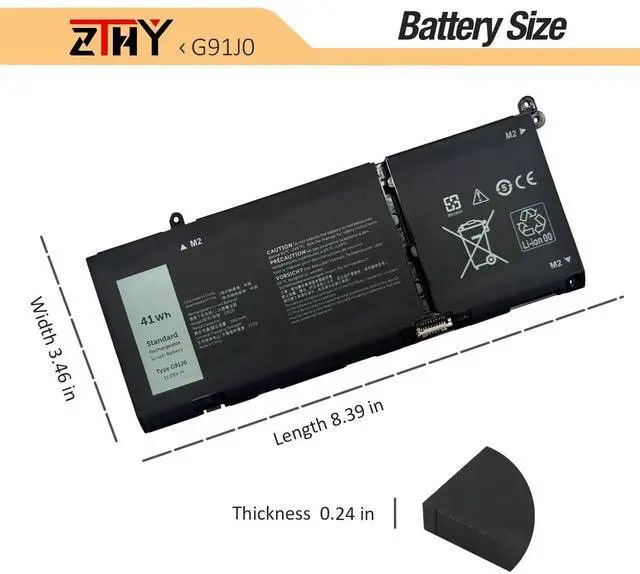
Capacity: 41Wh/3-Cell.
Replace Part Number: 0WV3K8, 0VKYJX, 0MVK11, 0XDY9K, G91J0, 0PG8YJ, 0927N5, 0FH3K2, 0MGCM5.
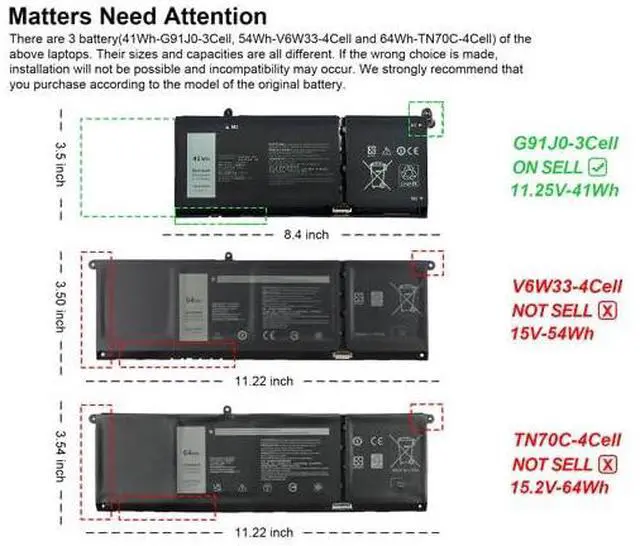
Compatible Laptop Models: Replacement for Dell Latitude 3320, 3330, 3420, 3520; Dell Vostro 15 3510, 3511, 3515, 3520, 3525; Dell Vostro 13 5310, 5320; Dell Vostro 14 3420, 3425, 5410, 5415; Dell Vostro 15 5510, 5515 Series; and Dell Vostro 5620, 5625 Series. There are 3 battery options for the above laptops: 41Wh-G91J0, 54Wh-V6W33, and 64Wh-TN70C. Choose the battery that matches the original battery in your laptop.
Compatible Laptop Models: Replacement for Dell Inspiron 15 3510, 3511, 3515, 3520, 3525, 3530, 3535; Dell Inspiron 13 5310, 5320, 5330; Dell Inspiron 14 5410, 5415, 5418, 5420, 5425, 5430, 5435; Dell Inspiron 14 Plus 7420; Dell Inspiron 15 5510, 5515, 5518; Dell Inspiron 16 5625, 5630, 5635; Dell Inspiron 14 5410 2-in-1; Dell Inspiron 14 7415 2-in-1; Dell Inspiron 14 7420 2-in-1; Dell Inspiron 14 7425 2-in-1; Dell Inspiron 14 7430 2-in-1; Dell Inspiron 14 7435 2-in-1; and Dell Inspiron 16 7620 2-in-1 Series. There are 3 battery options for the above laptops: 41Wh-G91J0, 54Wh-V6W33, and 64Wh-TN70C. Choose the battery that matches the original battery in your laptop. If the new battery is not recognized during initial installation, reinstall it and check that the interface is fully connected. Discharge the new battery to 10-20% (not 0%), then charge and cycle it 3-4 times to activate the new battery

type: Li-ion.
Color: Black.
Voltage: 11.25V.
Capacity: 41Wh/3-Cell.
Replace Part Number: 0WV3K8, 0VKYJX, 0MVK11, 0XDY9K, G91J0, 0PG8YJ, 0927N5, 0FH3K2, 0MGCM5.
Compatible Laptop Models: Replacement for Dell Latitude 3320, 3330, 3420, 3520; Dell Vostro 15 3510, 3511, 3515, 3520, 3525; Dell Vostro 13 5310, 5320; Dell Vostro 14 3420, 3425, 5410, 5415; Dell Vostro 15 5510, 5515 Series; and Dell Vostro 5620, 5625 Series. There are 3 battery options for the above laptops: 41Wh-G91J0, 54Wh-V6W33, and 64Wh-TN70C. Choose the battery that matches the original battery in your laptop.
Compatible Laptop Models: Replacement for Dell Inspiron 15 3510, 3511, 3515, 3520, 3525, 3530, 3535; Dell Inspiron 13 5310, 5320, 5330; Dell Inspiron 14 5410, 5415, 5418, 5420, 5425, 5430, 5435; Dell Inspiron 14 Plus 7420; Dell Inspiron 15 5510, 5515, 5518; Dell Inspiron 16 5625, 5630, 5635; Dell Inspiron 14 5410 2-in-1; Dell Inspiron 14 7415 2-in-1; Dell Inspiron 14 7420 2-in-1; Dell Inspiron 14 7425 2-in-1; Dell Inspiron 14 7430 2-in-1; Dell Inspiron 14 7435 2-in-1; and Dell Inspiron 16 7620 2-in-1 Series. There are 3 battery options for the above laptops: 41Wh-G91J0, 54Wh-V6W33, and 64Wh-TN70C. Choose the battery that matches the original battery in your laptop. If the new battery is not recognized during initial installation, reinstall it and check that the interface is fully connected. Discharge the new battery to 10-20% (not 0%), then charge and cycle it 3-4 times to activate the new battery
Warranty & Returns
Warranty, Returns, And Additional Information
Warranty
- Please contact the Seller directly for warranty information. Warranty information may also be found on the Manufacturer's website.
- CONTACT
Return Policies
- Return for refund within: 30 days
- Return for replacement within: 30 days
- This item is covered by EpicTransTrade Return Policy
Manufacturer Contact Info
- For a directory of all our manufacturers, please click below.
- Manufacturers Directory
LOADING...