Your Browsing History
- Free 30-day Returns
$200.00
Ships from Taiwan.
Meet Your Seller
Visit Innocard Store
FOLLOW
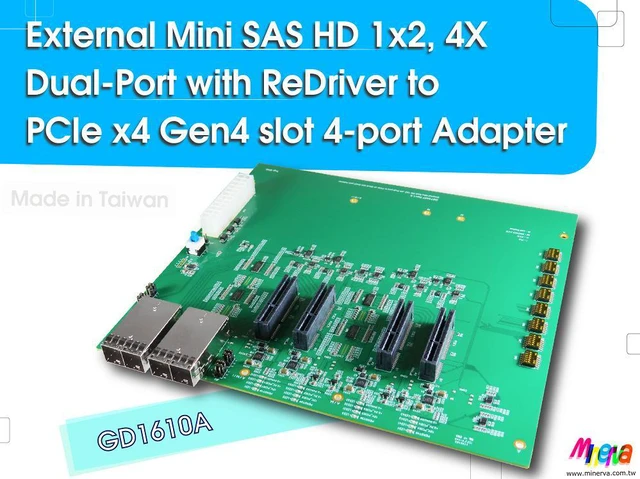
External Mini SAS HD 1x2, 4X Dual-Port with ReDriverto PCIe x4 Gen4 slot 4-port Adapter
- www.minerva.com.tw
- Designed / Made in Taiwan
+
+
Overview
Specs
Reviews
Any questions? Our AI mode will help you find out quickly.
Try me now
GD1610A
Features:
* SFF-8674 1x2, 4X dual port to PCIe 4.0 quad ports signals extension
* Built-in ATX 24-pin Power supply connector
* +5VSB Input with Bidirectional TVS
* Manul Switch ON or Jumper Short for ATX 24-pin Power supply ON
* Built-in SFF-8674 1x2, 4X (External MiniSAS HD) with 30u( 0.76 um) min Au mating area plating x2 pcs
* Built-in PCIe 4.0 x4 Slot with 15 u( 0.38 um) min Au mating area plating x4 pcs
* PCIe quad port x4 Slot Built-in separate +12V, + 3.3V, 3.3VAUX Power Controller
* +12V, 5.5A Hot Swap
* + 3.3V, 5A Load Switch
* 3.3VAUX, 500mA Load Switch
* Built-in PCIe 4.0 Redriver to drive PCIe signals reach.
* Built-in SMBus Hot Swappable 2-Wire Bus Buffer for separate port
* Built-in PCIe PERST# Bus Buffer and manul switch for separate port
* Built-in PCIe WAKE# Bidirectional Translator Bus Buffer for separate port
* Built-in PCIe CLKREQ# Bidirectional Translator Bus Buffer for separate port
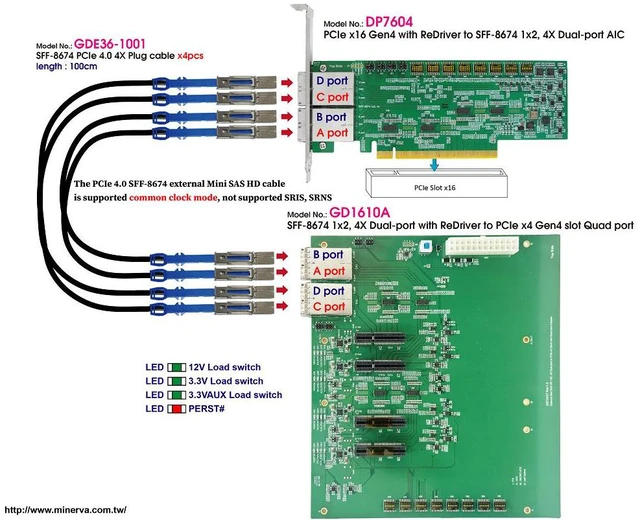
* LED1 Red On to OFF indicates PCIE1 PERST# Normal (Function intentionally inverted)
* LED11 Green On indicates PCIE1 +12V power ready
* LED12 Green On indicates PCIE1 + 3.3V power ready
* LED13 Green On indicates PCIE1 3.3VAUX power ready
* LED2 Red On to OFF indicates PCIE2 PERST# Normal (Function intentionally inverted)
* LED21 Green On indicates PCIE2 +12V power ready
* LED22 Green On indicates PCIE2 + 3.3V power ready
* LED23 Green On indicates PCIE2 3.3VAUX power ready
* LED3 Red On to OFF indicates PCIE3 PERST# Normal (Function intentionally inverted)
* LED31 Green On indicates PCIE3 +12V power ready
* LED32 Green On indicates PCIE3 + 3.3V power ready
* LED33 Green On indicates PCIE3 3.3VAUX power ready
* LED4 Red On to OFF indicates PCIE4 PERST# Normal (Function intentionally inverted)
* LED41 Green On indicates PCIE4 +12V power ready
* LED42 Green On indicates PCIE4 + 3.3V power ready
* LED43 Green On indicates PCIE3 3.3VAUX power ready
* Support PCI Express Base Specification Rev 4.0
* Compliant with PCIe_CEM_SPEC_R4_V1_0_08072019_NCB
* Compliant with SFF-TA-8614 R 3.4. 4_CB
* Compliant with SFF-9402 Rev 1.1
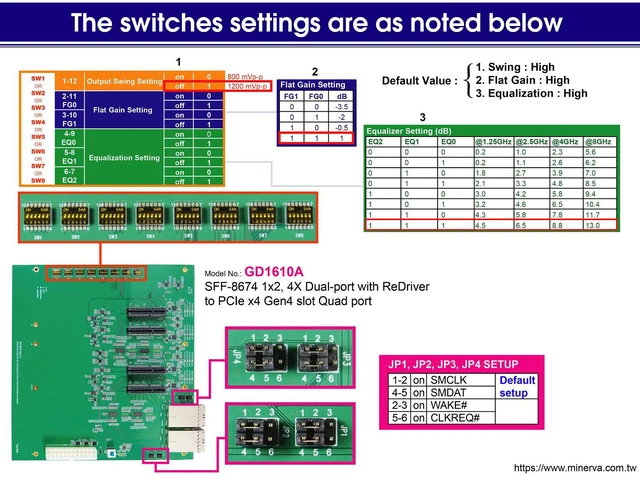
JP1, JP2, JP3, JP4
Switch setup be below:
1-2 on for SMCLK
2-3 on for WAKE#
4-5 on for SMDAT
5-6 on for CLKREQ#
Default:
1-2 on
4-5 on
The switch settings of GD1610A are as belows:

Features:
* SFF-8674 1x2, 4X dual port to PCIe 4.0 quad ports signals extension
* Built-in ATX 24-pin Power supply connector
* +5VSB Input with Bidirectional TVS
* Manul Switch ON or Jumper Short for ATX 24-pin Power supply ON
* Built-in SFF-8674 1x2, 4X (External MiniSAS HD) with 30u( 0.76 um) min Au mating area plating x2 pcs
* Built-in PCIe 4.0 x4 Slot with 15 u( 0.38 um) min Au mating area plating x4 pcs
* PCIe quad port x4 Slot Built-in separate +12V, + 3.3V, 3.3VAUX Power Controller
* +12V, 5.5A Hot Swap
* + 3.3V, 5A Load Switch
* 3.3VAUX, 500mA Load Switch
* Built-in PCIe 4.0 Redriver to drive PCIe signals reach.
* Built-in SMBus Hot Swappable 2-Wire Bus Buffer for separate port
* Built-in PCIe PERST# Bus Buffer and manul switch for separate port
* Built-in PCIe WAKE# Bidirectional Translator Bus Buffer for separate port
* Built-in PCIe CLKREQ# Bidirectional Translator Bus Buffer for separate port
* LED1 Red On to OFF indicates PCIE1 PERST# Normal (Function intentionally inverted)
* LED11 Green On indicates PCIE1 +12V power ready
* LED12 Green On indicates PCIE1 + 3.3V power ready
* LED13 Green On indicates PCIE1 3.3VAUX power ready
* LED2 Red On to OFF indicates PCIE2 PERST# Normal (Function intentionally inverted)
* LED21 Green On indicates PCIE2 +12V power ready
* LED22 Green On indicates PCIE2 + 3.3V power ready
* LED23 Green On indicates PCIE2 3.3VAUX power ready
* LED3 Red On to OFF indicates PCIE3 PERST# Normal (Function intentionally inverted)
* LED31 Green On indicates PCIE3 +12V power ready
* LED32 Green On indicates PCIE3 + 3.3V power ready
* LED33 Green On indicates PCIE3 3.3VAUX power ready
* LED4 Red On to OFF indicates PCIE4 PERST# Normal (Function intentionally inverted)
* LED41 Green On indicates PCIE4 +12V power ready
* LED42 Green On indicates PCIE4 + 3.3V power ready
* LED43 Green On indicates PCIE3 3.3VAUX power ready
Specifications
:* Support PCI Express Base Specification Rev 4.0
* Compliant with PCIe_CEM_SPEC_R4_V1_0_08072019_NCB
* Compliant with SFF-TA-8614 R 3.4. 4_CB
* Compliant with SFF-9402 Rev 1.1
JP1, JP2, JP3, JP4
Switch setup be below:
1-2 on for SMCLK
2-3 on for WAKE#
4-5 on for SMDAT
5-6 on for CLKREQ#
Default:
1-2 on
4-5 on
The switch settings of GD1610A are as belows:
Warranty & Returns
Warranty, Returns, And Additional Information
Warranty
- Please contact the Seller directly for warranty information. Warranty information may also be found on the Manufacturer's website.
- CONTACT
Return Policies
- Return for refund within: 30 days
- Return for replacement within: 30 days
- This item is covered by Innocard Return Policy
Manufacturer Contact Info
- For a directory of all our manufacturers, please click below.
- Manufacturers Directory
LOADING...