Get a $25 Newegg Promo Gift Card when you spend $250+ between 1/17/26 and 1/19/26. Learn More>
  • $35.00
  • Free 30-day Returns
  • Volume Discounts Available
    • $34.30 ea.
    • $33.80 ea.
    Ships from Hong Kong.
    Price alert
    Shop it at NeweggBusiness.

    Meet Your Seller

    KVM Switch DisplayPort - 2 Port DP KVM Switch, Two Computers One Monitor Switch to Share Mouse,Keyboard,Printer, USB 2.0 Device and Ultra HD Monitor, Support 4K @60Hz, 2 DP and 2 USB Cable Included

    Limited time offer, ends 01/18 By Goldendisk

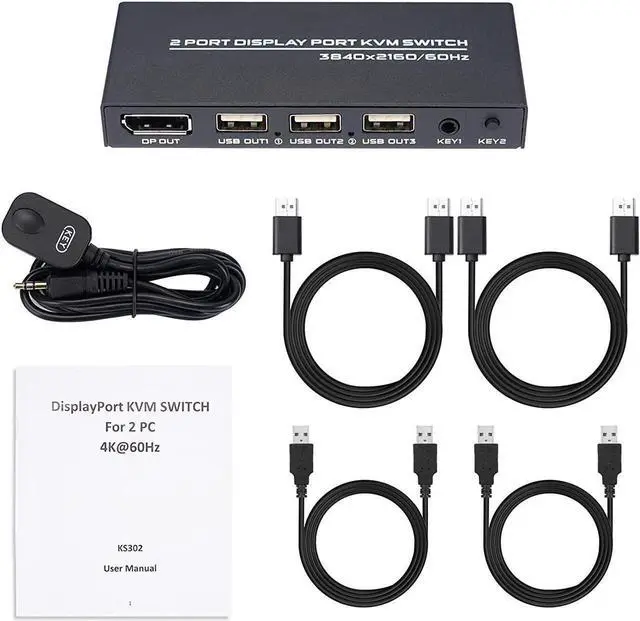
    • 2 Port DisplayPort KVM Switch: The DP KVM Switch supports resolution up to 4k@60Hz, allows you to operate 2 computer with a set of mouse, keyboard, U disk, printer, headset, game machines, card reader or other USB 2.0 devices.
    • 2 Switching Modes: Switch 2 PCs by button key on the switch panel or the remote controller included in the package. Perfect for home, office, business conference or multimedia teaching. (This device does not support keyboard hotkey switching.)
    • Ultra HD 4K Visual Enjoyment: Max support high-quality video with 4096×2160@60Hz resolution, and backward compatible with 3840x2160@60hz, 1080P, 1080P 3D, 1080I, 720P, 576P, 576I, 480P, 480I.
    +
    +
    Overview
    Specs
    Reviews
    avatar

    Any questions? Our AI beta will help you find out quickly.

    The KVM Switch Connects Two Computers to a Single Keyboard, Mouse and Monitor, it is ideal for working at home.

    You can share a single USB keyboard, USB mouse and DP monitor with both systems, saving space on your desk and using your prefered display, keyboard and mouse with both computers.

    Features:

    Two Ways to Toggle Between Systems
    By Switch Button and Desktop Controller on this kvm with displayport, easily toggle between two computers.

    2 Display Ports
    The DP USB KVM Switch Selector for dual Computers Share same set of Keyboard, Mouse, Printer, thumb drive, game machines and HD 4k@60Hz Monitor.

    Components Included
    Plug and play, 2 DP cable and 2 USB cable are in the package, what you need to do is just connect it between the dp kvm switch and your computers/laptops and enjoy your work and life getting easier and simpler.

    LED Indicator
    The LED Indicator light shows whether the kvm switch cables is connected correctly and which PC is working.

    Compact Size
    This displayport kvm switch is compact and delicate.

    --Q&A --
    1)The USB device cannot be used.
    The product is high-definition DP KVM device with USB HUB extension function. The computer will automatically load USB driver when it is used for the first time.
    During this process, please do not switch computers to prevent the USB driver from falling to load. The device is ready for use after the driver is loaded.
    If the installation fails, shut down the computer, disconnect the KVM connection, and reinstall.

    2)The mouse and keyboard cannot be used.
    1. Plug and unplug the mouse and keyboard again.
    2. Remove all the connection wires at both ends of the switcher and reconnect after complete power failure.

    Warranty & Returns

    Warranty, Returns, And Additional Information

    Warranty

    • Please contact the Seller directly for warranty information. Warranty information may also be found on the Manufacturer's website.
    • CONTACT

    Return Policies

    • Return for refund within: 30 days
    • Return for replacement within: 30 days
    • This item is covered by Goldendisk Return Policy

    Manufacturer Contact Info

    LOADING...