- Free 30-day Returns
Meet Your Seller
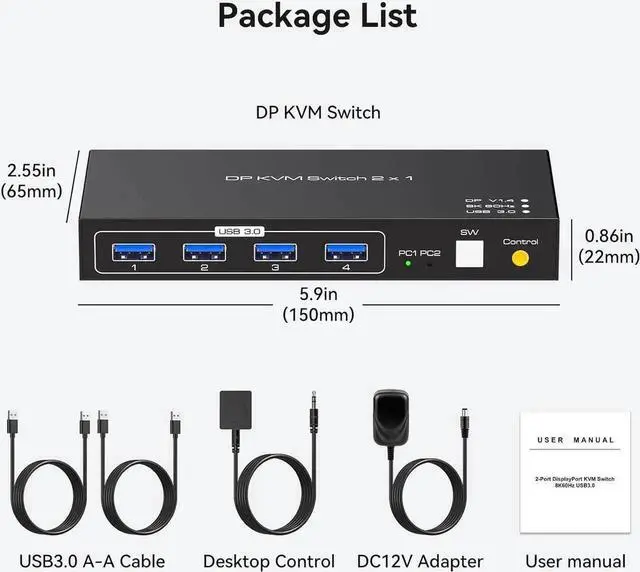
2 Ports Displayport KVM Switch 2 Computers 1 Monitor, USB 3.0 DP1.4 KVM Switcher 2 in 1 Out for 2 computers share 4 USB 3.0 Devices Support 8k@60hz 4k@120hz, with desktop controller and power adapter
- [KVM Switch Displayport] KVM Switcher supports 2 computers 1 monitor, shares 4 devices with USB port, can connect keyboard, mouse, printer and so on. Just click the button to switch, Make the desktop cleaner and tidier.
- [Ultra HD 8K] Supports up to Ultra HD 8K@60Hz and is backward compatible with4K@120Hz 1080P@240Hz. If you want to use the 4K 120Hz high refresh rate resolution, make sure your computer and monitor support 4K 120Hz to ensure proper transmission.
- [USB 3.0 High-Speed Transfer] Has 4 USB 3.0 ports with a maximum transfer speed of up to 5Gbps and supports USB devices such as keyboards, mice, USB flash drives, printers etc. and is backward compatible with 2.0/1.1.
- [Two Switching Methods] 1: Equipped with a switch button, press the button to switch. 2: Use the wired controller to extend the desktop switching, just click the quick switching gently.
- [Compatible with Windows, Vista/XP, MacOs, Linux and other computer systems, no need to install any drivers, plug and play.
Any questions? Our AI beta will help you find out quickly.
[KVM Switch Displayport] KVM Switcher supports 2 computers 1 monitor, shares 4 devices with USB port, can connect keyboard, mouse, printer and so on. Just click the button to switch, Make the desktop cleaner and tidier.
[Ultra HD 8K] Supports up to Ultra HD 8K@60Hz and is backward compatible with4K@120Hz 1080P@240Hz. If you want to use the 4K 120Hz high refresh rate resolution, make sure your computer and monitor support 4K 120Hz to ensure proper transmission.
[USB 3.0 High-Speed Transfer] Has 4 USB 3.0 ports with a maximum transfer speed of up to 5Gbps and supports USB devices such as keyboards, mice, USB flash drives, printers etc. and is backward compatible with 2.0 / 1.1.
[Two Switching Methods] 1: Equipped with a switch button, press the button to switch. 2: Use the wired controller to extend the desktop switching, just click the quick switching gently.
[Compatible with Windows, Vista/XP, MacOs, Linux and other computer systems, no need to install any drivers, plug and play.
Warranty & Returns
Warranty, Returns, And Additional Information
Warranty
- Please contact the Seller directly for warranty information. Warranty information may also be found on the Manufacturer's website.
- CONTACT
Return Policies
- Return for refund within: 30 days
- Return for replacement within: 30 days
- This item is covered by HUADO Return Policy
Manufacturer Contact Info
- For a directory of all our manufacturers, please click below.
- Manufacturers Directory