- Free 30-day Returns
Meet Your Seller
KVM Switch Docking Station 4K@120Hz USB C Displayport KVM Switch 2 Monitors 2 Computers Displayport Dual Monitor KVM-Switches for Laptop and Desktop Share 13-in-1 Dock, with Wired Remote
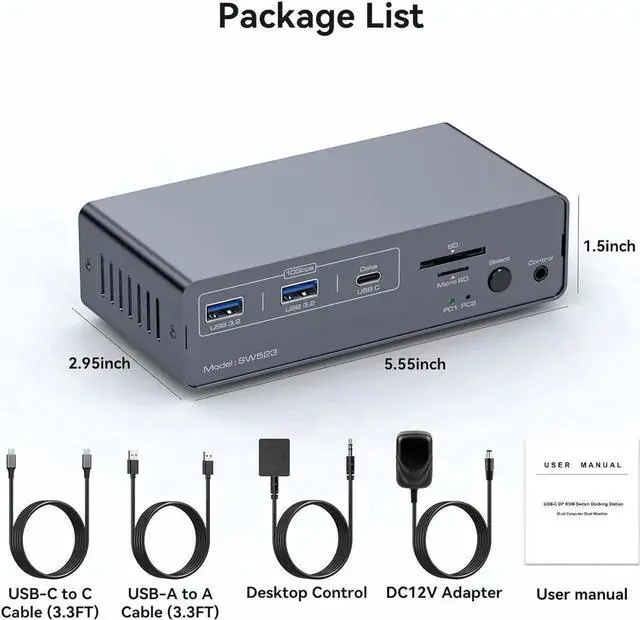
- Dual Monitor KVM Docking Station: The docking station allows USB C laptops and desktop PC to share a 13-in-1 multi-port docking station; you can share 2 monitors, a mouse, and a keyboard and switch seamlessly between your work laptops and personal computers.
- Dual Mode Docking Station: Supports dual monitor resolutions up to 4K120Hz for a stunning visual experience with sharp, clear and vibrant colors. Supports dual-screen docking mode and dual-screen mirroring mode.
- 13-in-1 Multi-Function: The combination of multifunctional ports of the KVM simplifies complex tasks to a great extent.USB 3.0 ports for mouse and keyboard;10Gbps USB3.2 and USB-C data transfer ports on the front panel for more high-speed usb devices;The SD and Micro SD card slot provide faster data transfer methods.
- Two Switching Modes: Switch by pressing the select button on the docking station; switch by using the desktop expansion button, which allows you to place the docking station under the desktop.
Any questions? Our AI beta will help you find out quickly.
Dual Monitor KVM Docking Station: The docking station allows USB C laptops and desktop PC to share a 13-in-1 multi-port docking station; you can share 2 monitors, a mouse, and a keyboard and switch seamlessly between your work laptops and personal computers.
Dual Mode Docking Station: Supports dual monitor resolutions up to 4K120Hz for a stunning visual experience with sharp, clear and vibrant colors. Supports dual-screen docking mode and dual-screen mirroring mode.
13-in-1 Multi-Function: The combination of multifunctional ports of the KVM simplifies complex tasks to a great extent. USB 3.0 ports for mouse and keyboard; 10Gbps USB 3.2 and USB-C data transfer ports on the front panel for more high-speed usb devices; The SD and Micro SD card slot provide faster data transfer methods.
Two Switching Modes: Switch by pressing the select button on the docking station; switch by using the desktop expansion button, which allows you to place the docking station under the desktop.
Warranty & Returns
Warranty, Returns, And Additional Information
Warranty
- Please contact the Seller directly for warranty information. Warranty information may also be found on the Manufacturer's website.
- CONTACT
Return Policies
- Return for refund within: 30 days
- Return for replacement within: 30 days
- This item is covered by HUADO Return Policy
Manufacturer Contact Info
- For a directory of all our manufacturers, please click below.
- Manufacturers Directory