- Free 30-day Returns
Meet Your Seller
8K@60Hz HDMI+2 Displayport KVM Switch 3 Monitors 2 Computers 4K@120Hz USB 3.0 2 DP + HDMI KVM Swtiches Triple Monitor for 2 PC Share 1 Set of Keyboard Mouse Printer Hard Disk Etc Support Extended Mode
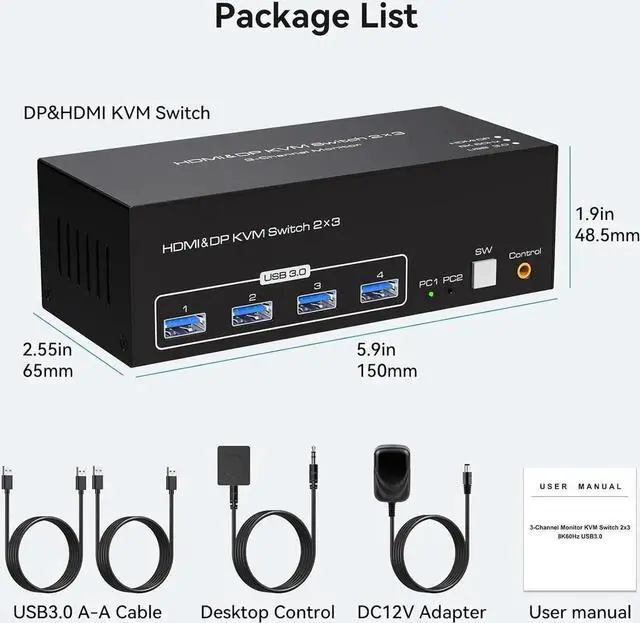
- [KVM Switch 3 Monitors 2 Computers] KVM Switch 3 Monitors allow 2 computers to share 1 HDMI + 2 DP monitors and 4 USB 3.0 ports, such as mouse, keyboard, printer, etc. And connect three displays in extend or duplicate display mode. Extended Mode: PC host in output 3 different images on 3 monitors. Copy Mode: Computer host outputs 3 identical images on 3 monitors.
- [HDMI 2.1+DP 1.4] Display port and HDMI KVM's resolution up to 8K 60Hz & 4K 120Hz. Immerse yourself in the world of crystal-clear images and videos that will leave you in awe.
- [USB 3.0 KVM Switch] with 4 USB 3.0 ports. The transmission speed up to 5Gbps, and the data transmission is much higher than USB 2.0.(Note:USB 3.0 is backward compatible with USB 2.0 1.1 etc)
- [Two Switching Options]Option 1: Using the wired extension button, you can place the KVM outside the work area, making your desktop cleaner and tidier. Option 2: Just press the white "SW" button next to the indicator light to achieve one-click switching.
Any questions? Our AI beta will help you find out quickly.
[KVM Switch 3 Monitors 2 Computers] KVM Switch 3 Monitors allow 2 computers to share 1 HDMI + 2 DP monitors and 4 USB 3.0 ports, such as mouse, keyboard, printer, etc. And connect three displays in extend or duplicate display mode.
Extended Mode: PC host in output 3 different images on 3 monitors.
Copy Mode: Computer host outputs 3 identical images on 3 monitors.
[HDMI 2.1 +DP 1.4 ] Display port and HDMI KVM's resolution up to 8K 60Hz & 4K 120Hz. Immerse yourself in the world of crystal-clear images and videos that will leave you in awe.
[USB 3.0 KVM Switch] with 4 USB 3.0 ports. The transmission speed up to 5Gbps, and the data transmission is much higher than
USB 2.0. (Note: USB 3.0 is backward compatible with USB 2.0 1.1 etc)
[Two Switching Options]Option 1: Using the wired extension button, you can place the KVM outside the work area, making your desktop cleaner and tidier.
Option 2: Just press the white "SW" button next to the indicator light to achieve one-click switching.
Warranty & Returns
Warranty, Returns, And Additional Information
Warranty
- Please contact the Seller directly for warranty information. Warranty information may also be found on the Manufacturer's website.
- CONTACT
Return Policies
- Return for refund within: 30 days
- Return for replacement within: 30 days
- This item is covered by HUADO Return Policy
Manufacturer Contact Info
- For a directory of all our manufacturers, please click below.
- Manufacturers Directory