Your Browsing History
Meet Your Seller
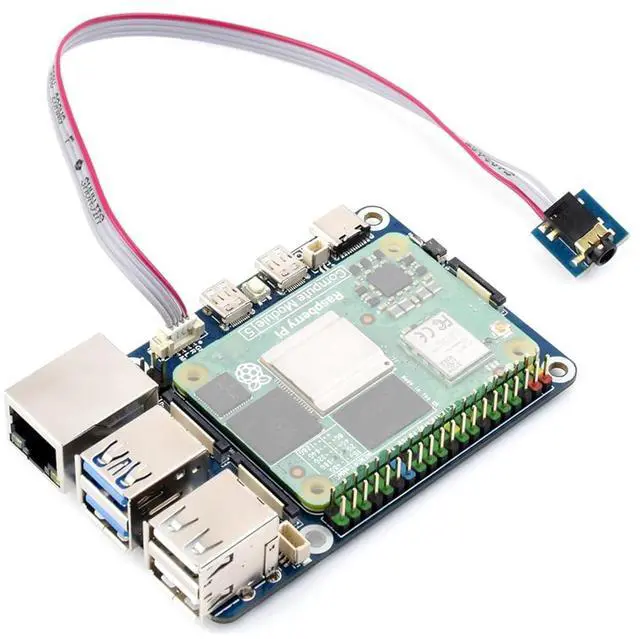
CM5 to Pi 5 Adapter Board Compatible with Compute Module 5, Adding CM5 as Pi 5 Alternative, Onboard USB, Dual MIPI, HDMI, Ethernet, PoE 4PIN, Audio Header,etc, Support Connecting to Microphone
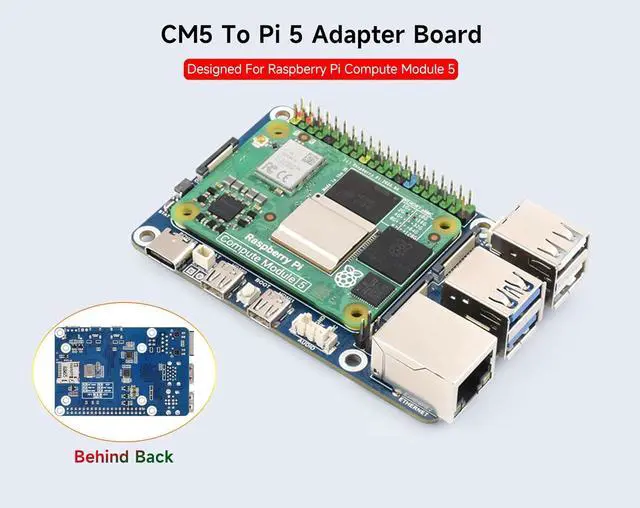
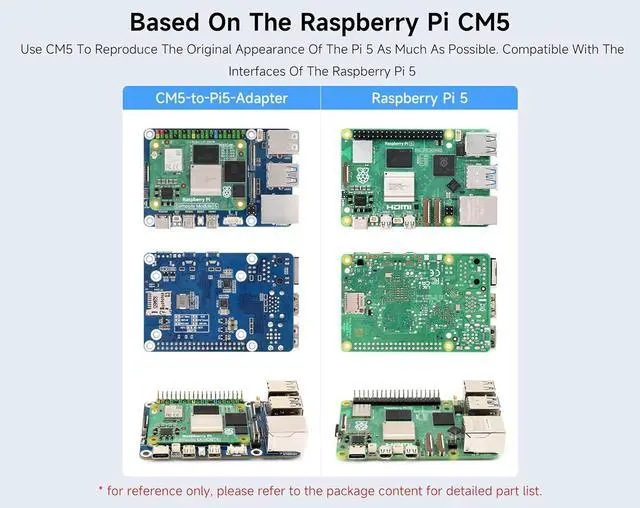
- CM5 To Pi 5 Adapter Board, Using Compute Module 5 to reproduce the original appearance of the Pi 5 as much as possible. Compatible with Raspberry Pi 5(the interfaces of the Pi5).
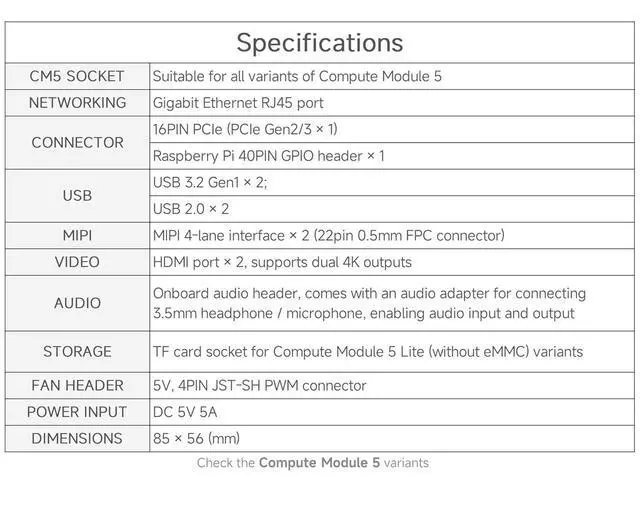
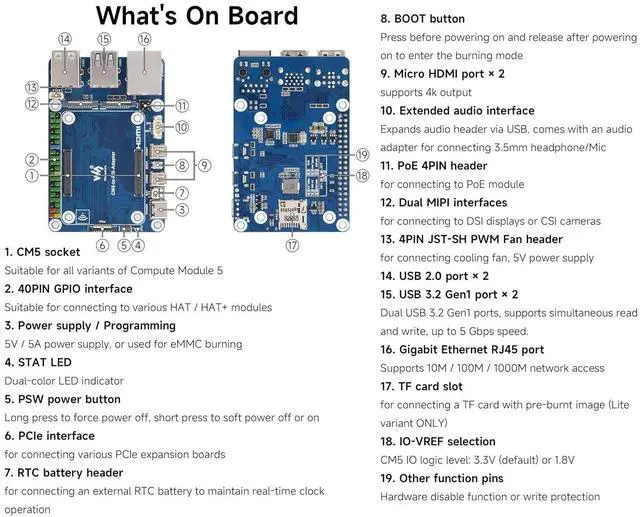
- Onboard Rich Interfaces: 1) 40PIN GPIO interface, suitable for connecting to various HAT / HAT+ modules. 2) PCIe interface, for connecting various PCIe expansion boards. 3) Micro HDMI port x 2, supports 4k output. 4) PoE 4PIN header, for connecting to PoE module.
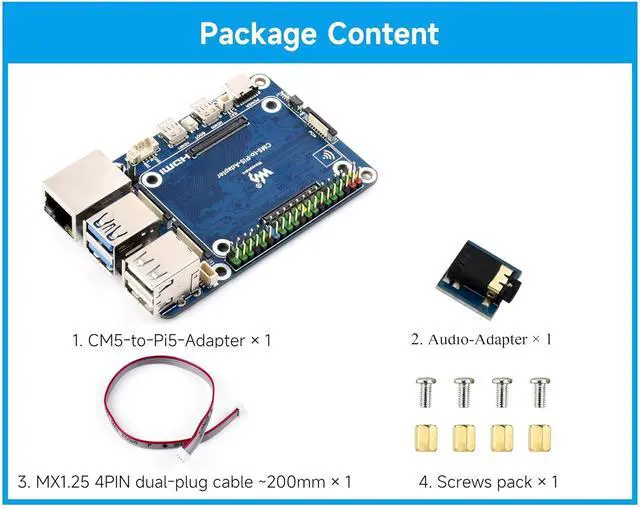
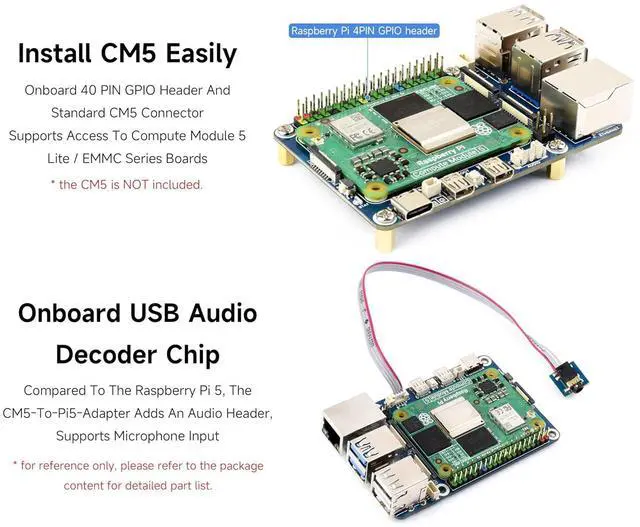
- Onboard Rich Interfaces: 5) USB 2.0 port x 2, USB 3.2 Gen1 port x 2, Dual USB 3.2 Gen1 ports, supports simultaneous read and write, up to 5 Gbps speed. 6) Gigabit Ethernet RJ45 port,Supports 10M / 100M / 1000M network access. 7) Onboard USB Audio Decoder Chip. Compared to the RPi 5, the CM5-to-Pi5-Adapter adds an audio header, supports microphone input.
- Precautions: 1) Do not plug or unplug any device other than USB and HDMI when the device is powered on. 2) Type C can be used as a USB SLAVE interface to flash images. 3) Onboard default 2 USB 3.2 Gen1 port. 4) Supports 4 screens to display different contents, adds MIPI DSI driver, regardless of whether a screen is connected, the system will default to connect, the screen will display in split-screen mode (related to the system version).
- Precautions: 5) The onboard BOOT button, you can press the BOOT button before powering on, and connect to the computer through Type C to let the device enter the flashing mode. 6) Do not connect other devices when using Type C for flashing. Insufficient powe

+
+
Overview
Specs
Reviews
Any questions? Our AI mode will help you find out quickly.
Try me now
CM5 To Pi 5 Adapter Board, Using Compute Module 5 to reproduce the original appearance of the Pi 5 as much as possible. Compatible with Raspberry Pi 5 (the interfaces of the Pi5).
Onboard Rich Interfaces: 1) 40PIN GPIO interface, suitable for connecting to various HAT / HAT+ modules. 2) PCIe interface, for connecting various PCIe expansion boards. 3) Micro HDMI port x 2, supports 4k output. 4) PoE 4PIN header, for connecting to PoE module.
Onboard Rich Interfaces: 5) USB 2.0 port x 2, USB 3.2 Gen1 port x 2, Dual USB 3.2 Gen1 ports, supports simultaneous read and write, up to 5 Gbps speed. 6) Gigabit Ethernet RJ45 port, Supports 10M / 100M / 1000M network access. 7) Onboard USB Audio Decoder Chip. Compared to the RPi 5, the CM5-to-Pi5-Adapter adds an audio header, supports microphone input.
Precautions: 1) Do not plug or unplug any device other than USB and HDMI when the device is powered on. 2) Type C can be used as a USB SLAVE interface to flash images. 3) Onboard default 2 USB 3.2 Gen1 port. 4) Supports 4 screens to display different contents, adds MIPI DSI driver, regardless of whether a screen is connected, the system will default to connect, the screen will display in split-screen mode (related to the system version).
Precautions: 5) The onboard BOOT button, you can press the BOOT button before powering on, and connect to the computer through Type C to let the device enter the flashing mode. 6) Do not connect other devices when using Type C for flashing. Insufficient powe
Onboard Rich Interfaces: 1) 40PIN GPIO interface, suitable for connecting to various HAT / HAT+ modules. 2) PCIe interface, for connecting various PCIe expansion boards. 3) Micro HDMI port x 2, supports 4k output. 4) PoE 4PIN header, for connecting to PoE module.
Onboard Rich Interfaces: 5) USB 2.0 port x 2, USB 3.2 Gen1 port x 2, Dual USB 3.2 Gen1 ports, supports simultaneous read and write, up to 5 Gbps speed. 6) Gigabit Ethernet RJ45 port, Supports 10M / 100M / 1000M network access. 7) Onboard USB Audio Decoder Chip. Compared to the RPi 5, the CM5-to-Pi5-Adapter adds an audio header, supports microphone input.
Precautions: 1) Do not plug or unplug any device other than USB and HDMI when the device is powered on. 2) Type C can be used as a USB SLAVE interface to flash images. 3) Onboard default 2 USB 3.2 Gen1 port. 4) Supports 4 screens to display different contents, adds MIPI DSI driver, regardless of whether a screen is connected, the system will default to connect, the screen will display in split-screen mode (related to the system version).
Precautions: 5) The onboard BOOT button, you can press the BOOT button before powering on, and connect to the computer through Type C to let the device enter the flashing mode. 6) Do not connect other devices when using Type C for flashing. Insufficient powe
Warranty & Returns
Warranty, Returns, And Additional Information
Warranty
- Please contact the Seller directly for warranty information. Warranty information may also be found on the Manufacturer's website.
- CONTACT
Return Policies
- Return for refund within: 45 days
- Return for replacement within: 30 days
- This item is covered by TechDen Return Policy
Manufacturer Contact Info
- For a directory of all our manufacturers, please click below.
- Manufacturers Directory
LOADING...