

Your Browsing History

Meet Your Seller

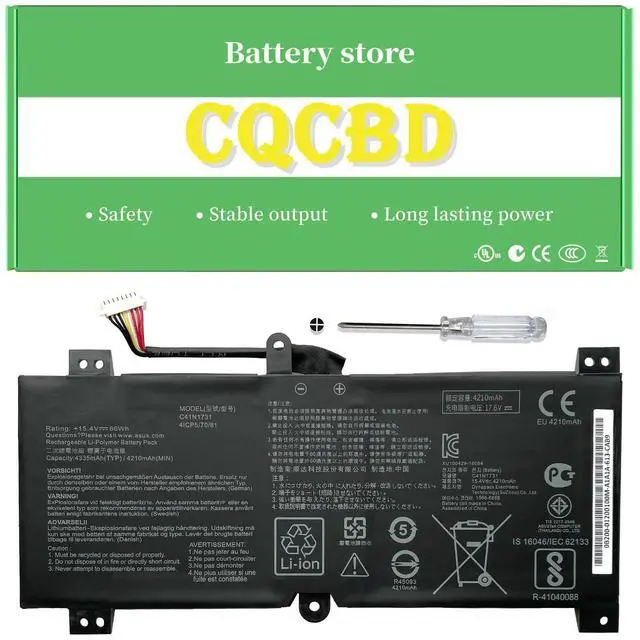





CQCBD (Type-C C41N1731 0B200-02940000 for Asus ROG Strix Scar II GL504 GL504GW GL504GS GL504GM GL504GV G515 G515GV G515GW G715GV G715GW GL504GW-DS74 Series
- Please note that this model is available in three different shapes. Be sure to verify your original battery before making a purchase. Compatible Part Number: C41N1731, C41PNC5 Fits For: Asus Rog Strix GL504GM, GL504GS Series How to install a new battery 1. Remove the old battery, carefully place the new battery into the battery compartment, secure the screws, and then attach the wires of the new battery. 2. If you have any questions regarding the installation, you can look up the installation process for your laptop/tablet model on YouTube. This approach may be helpful. For Optimal Use 1. When you receive the new battery, discharge it to 5% (not 0%) for the first use, then charge and repeat the cycle 3-4 times to activate the new battery. It is important to perform a full discharge and recharge every other month to maintain battery performance. 2. Avoid keeping the adapter connected for extended periods while the battery is in use. This could harm the battery. Prevent physical shocks, disassembly, crushing, or puncturing. Do not incinerate or submerge the battery in water
+
+
Overview
Specs
Reviews

Any questions? Our AI mode will help you find out quickly.
Try me now
Please note that this model is available in three different shapes. Be sure to verify your original battery before making a purchase.
Compatible Part Number: C41N1731, C41PNC5
Fits For: Asus Rog Strix GL504GM, GL504GS Series How to install a new battery 1. Remove the old battery, carefully place the new battery into the battery compartment, secure the screws, and then attach the wires of the new battery. 2. If you have any questions regarding the installation, you can look up the installation process for your laptop/tablet model on YouTube. This approach may be helpful. For Optimal Use 1. When you receive the new battery, discharge it to 5% (not 0%) for the first use, then charge and repeat the cycle 3-4 times to activate the new battery. It is important to perform a full discharge and recharge every other month to maintain battery performance. 2. Avoid keeping the adapter connected for extended periods while the battery is in use. This could harm the battery. Prevent physical shocks, disassembly, crushing, or puncturing. Do not incinerate or submerge the battery in water
Compatible Part Number: C41N1731, C41PNC5
Fits For: Asus Rog Strix GL504GM, GL504GS Series How to install a new battery 1. Remove the old battery, carefully place the new battery into the battery compartment, secure the screws, and then attach the wires of the new battery. 2. If you have any questions regarding the installation, you can look up the installation process for your laptop/tablet model on YouTube. This approach may be helpful. For Optimal Use 1. When you receive the new battery, discharge it to 5% (not 0%) for the first use, then charge and repeat the cycle 3-4 times to activate the new battery. It is important to perform a full discharge and recharge every other month to maintain battery performance. 2. Avoid keeping the adapter connected for extended periods while the battery is in use. This could harm the battery. Prevent physical shocks, disassembly, crushing, or puncturing. Do not incinerate or submerge the battery in water
Warranty & Returns
Warranty, Returns, And Additional Information
Warranty
- Please contact the Seller directly for warranty information. Warranty information may also be found on the Manufacturer's website.
- CONTACT
Return Policies
- Return for refund within: 30 days
- Return for replacement within: 30 days
- This item is covered by Brightflag Electronics Return Policy
Manufacturer Contact Info
- For a directory of all our manufacturers, please click below.
- Manufacturers Directory
LOADING...