• $53.99
  • Free 30-day Returns
  • Price alert
    Shop it at NeweggBusiness.

    Meet Your Seller

    USB Cassette Player, Portable Walkman Stereo Tape to MP3 Converter, Audio Music Recorder to MP3 Digital File Converter with Earphones, No PC Required, Black, BR607

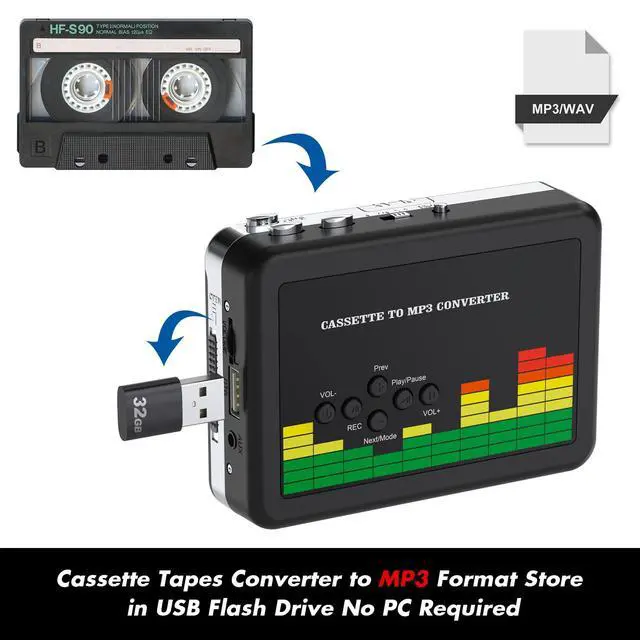
    • Plug and Play Insert the USB flash drive into the cassette player interface, convert the music from the tape to MP3 files and save to the USB flash drive, no PC required. Simple operation, save your precious time.The converter comes with a volume control button, you can adjust the volume during recording, playback.
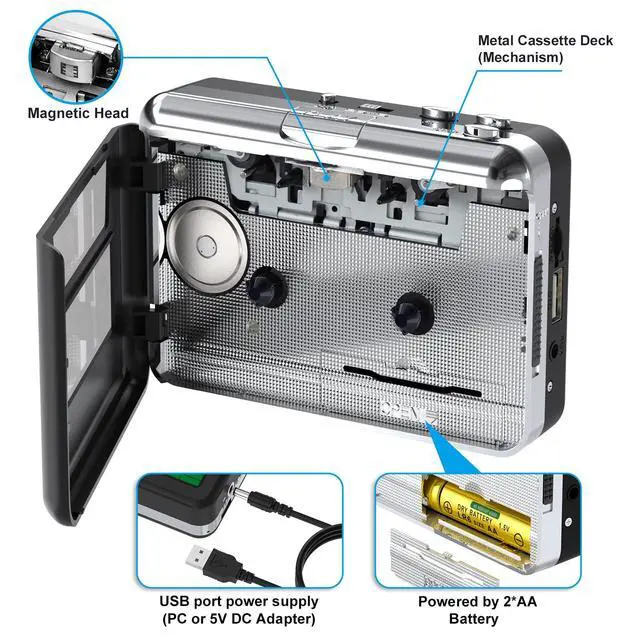
    • USB Cassette CaptureCassette Player helps effortlessly convert old tapes to MP3 files with playback function. It works with the USB drive (FAT32 format, up to 128G), which have better performance and prevent the recorded files from skipping during playback.Powered by USB port or 2X AA batteries.
    • Auto Reverse Function Cassette to MP3 converter, automatically switch to the other side of the tape for analogy or recording, without manual operation.Audio sample rate: 32KHz, Audio channel: L/R, Bit rate: 128 Kbps. High-quality audio output allows you to listen on earphones, or other speaker systems.
    • Auto & Manual ModeAutomatically or manually partition each song. With the auto mode, this cassette to MP3 converter will save each song into a separate MP3 file ; Default on manual mode, switch to auto mode with the button. Easy operation, make you have a satisfied listening enjoyment.
    +
    +
    Overview
    Specs
    Reviews
    avatar

    Any questions? Our AI beta will help you find out quickly.

    The portable cassette tape player can be converted into MP3 digital files without using a PC, using a USB flash drive to convert MP3 format with one click and save it directly to a USB flash drive. You just put the tape in and play, press the record button and wait. After all songs are played, it automatically saves the audio on the tape side as an mp3 file on a USB flash drive. There will be separate files for song tapes. It has automatically split songs. Then you just have to turn the tape back and do the same thing and record the song on the other side to your USB stick.

    Warranty & Returns

    Warranty, Returns, And Additional Information

    Warranty

    • Please contact the Seller directly for warranty information. Warranty information may also be found on the Manufacturer's website.
    • CONTACT

    Return Policies

    Manufacturer Contact Info

    LOADING...