

Your Browsing History

- Free 30-day Returns
$29.99
Ships from China.



Meet Your Seller


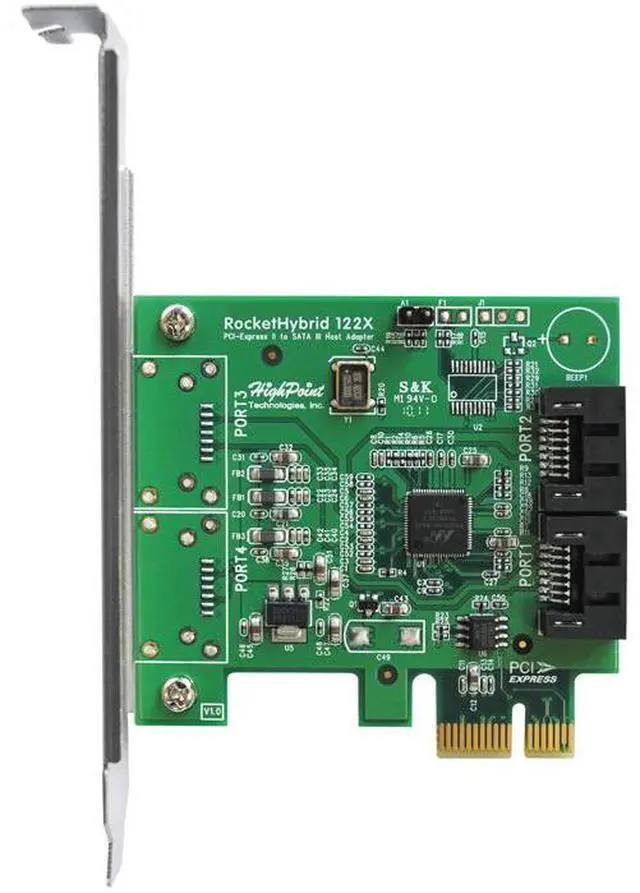

Highpoint rockethybrid 1220, PCI-EXPRESS 2.0 dual-port SATA 6Gb/s Host Adapter
- 6Gb/s PCI-Express 2.0 HBA's that deliver SSD Caching solutions to any PCI-Express Platform
- HighPoint SSD Caching HBA's combine any SSD and HDD of any capacity into a single storage drive
+
+
Overview
Specs
Reviews

Any questions? Our AI mode will help you find out quickly.
Try me now
Automatic File Acceleration
Like conventional SSD Caching solutions, HighPoint SSD Caching HBA's provide a fully automatic caching mode. The HBA will monitor file access, and intelligently transfer this "Hot Data" to the SSD for improved performance. System performance is optimized in the background - the experience is fluid and transparent; the system does not require downtime and can be used as needed.
Manual, Fully-Customizable System Acceleration
HighPoint SSD Caching HBA's were designed with the Enthusiast in mind. If you so choose, the HighPoint will move you to the driver's seat, providing full-manual, "Stick-Shift" control over your system's performance. Select which files or Applications to accelerate, at any time, for immediate results. Fine-Tune your PC experience with the easy to use Windows-style interface; you are free to accelerate and decelerate files, folders and Applications at will.
HighPoint's SSD Caching HBA's: The Versatile, SSD Caching Solution
HighPoint's SSD Caching HBA's support a wide-range of storage configurations to address the needs of Gamers, Media Professionals, and PC Enthusiasts.
Internal (RocketHybrid 1220) Configurations
Data Redundancy (Safe Mode) - protects your data against device failure
Optimal Speed and Capacity (Capacity Mode)
Primary and Secondary Storage Applications - ideal for the boot, application, or storage drives.
Automatic - "Hot file" allocation or Full Manual "Stick-shift" Control over the system's file and application acceleration
Fully Windows Compatible - AHCI plug and play
Ideal, external secondary storage for Windows BootCamp configurations on Mac Pro Systems.
PCI-Express 2.0 x, SATA 6GB/s - fully backwards compatible with PCI-Express 1.0 and SATA 3Gb/s devices
Like conventional SSD Caching solutions, HighPoint SSD Caching HBA's provide a fully automatic caching mode. The HBA will monitor file access, and intelligently transfer this "Hot Data" to the SSD for improved performance. System performance is optimized in the background - the experience is fluid and transparent; the system does not require downtime and can be used as needed.
Manual, Fully-Customizable System Acceleration
HighPoint SSD Caching HBA's were designed with the Enthusiast in mind. If you so choose, the HighPoint will move you to the driver's seat, providing full-manual, "Stick-Shift" control over your system's performance. Select which files or Applications to accelerate, at any time, for immediate results. Fine-Tune your PC experience with the easy to use Windows-style interface; you are free to accelerate and decelerate files, folders and Applications at will.
HighPoint's SSD Caching HBA's: The Versatile, SSD Caching Solution
HighPoint's SSD Caching HBA's support a wide-range of storage configurations to address the needs of Gamers, Media Professionals, and PC Enthusiasts.
Internal (RocketHybrid 1220) Configurations
Data Redundancy (Safe Mode) - protects your data against device failure
Optimal Speed and Capacity (Capacity Mode)
Primary and Secondary Storage Applications - ideal for the boot, application, or storage drives.
Automatic - "Hot file" allocation or Full Manual "Stick-shift" Control over the system's file and application acceleration
Fully Windows Compatible - AHCI plug and play
Ideal, external secondary storage for Windows BootCamp configurations on Mac Pro Systems.
PCI-Express 2.0 x, SATA 6GB/s - fully backwards compatible with PCI-Express 1.0 and SATA 3Gb/s devices
Warranty & Returns
Warranty, Returns, And Additional Information
Warranty
- Please contact the Seller directly for warranty information. Warranty information may also be found on the Manufacturer's website.
- Read full details
- CONTACT
Return Policies
- Return for refund within: 30 days
- Return for replacement within: 30 days
- This item is covered by Superior Quality Return Policy
Manufacturer Contact Info
- For a directory of all our manufacturers, please click below.
- Manufacturers Directory
LOADING...