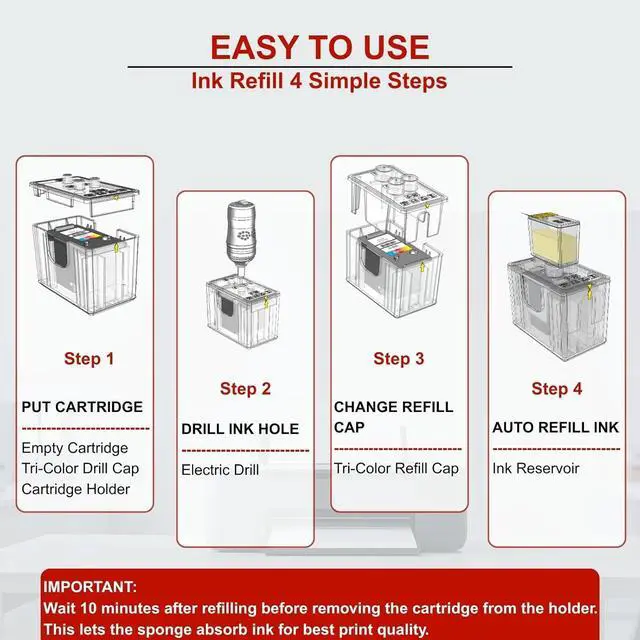
1Easy to Use2Wide Application3Green Choice After refilling the ink, the computer/printer still shows no ink?
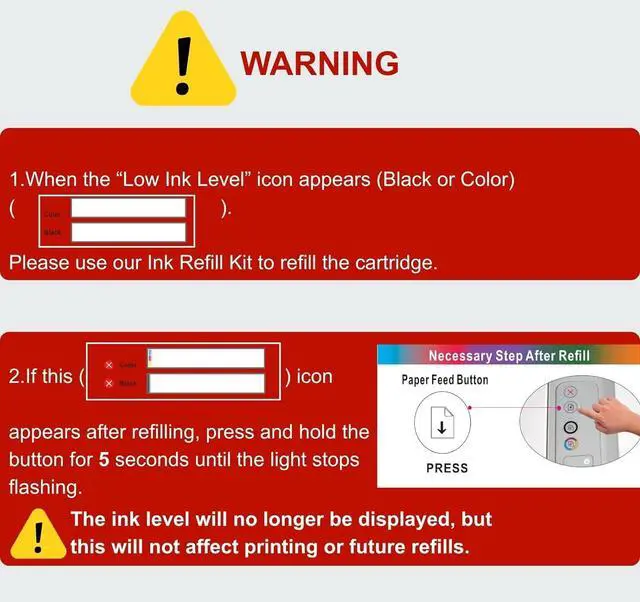
1.Refill when Low Ink Level appears. Ink level wont display after refill, but printing is not affected.
2.Hold the "Paper Feed" button for 5 seconds until printer reset.
Why is there no ink after refilling?
Please wait 10 min after refilling before removing the cartridge from the holder. This allows the ink to saturate the sponge and ensures optimal print quality.
When refilling the ink cartridge according to the instructions, the ink isn't flowing down. What's the reason?
1.Make sure the air vent tape is removed and the vent is clear.
2.The cartridge may still have ink and not need refilling yet.
3.If ink doesnt flow, pull the needle cap out 12 cm, wait for ink to flow, then reinsert.
Does it come with a syringe? Does it need a syringe?
No syringe needed! Our auto-refill kit makes ink refilling fast, clean, and hassle-freeno mess, no squeezing. Just simple, smooth refills. Watch our step-by-step video to see how easy it is.
285XL 286XL ink refill kit operation video How do I know when to refill the ink?
After refilling the ink, the computer/printer still shows no ink?
Why is there no ink after refilling?
When refilling the ink cartridge according to the instructions, the ink isn't flowing down. What's the reason?
Does it come with a syringe? Does it need a syringe?