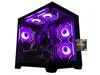
AOACE Gaming PC AMD Ryzen 7 5700X [8-Core 4.6GHz], RTX 5060 8GB GDDR7, DLSS 4, VR Ready, WiFi 6E, 32GB DDR4, 1TB PCIe4 NVMe, 6 ARGB, Win11 Home
  •  
  • $1,249.99 –
  • Save: 34%
  • $69.99
  • Free 30-day Returns
  • Sold by Direct from manufacturerVIVO
    Top Rated
    4.7 (2,010 seller ratings)

    Shipped by Direct from manufacturerVIVO

    Price alert
    Shop it at NeweggBusiness.

    Meet Your Seller

    VIVO Quad Free Standing Monitor Desk Stand Mount Adjustable, 4 Screens up to 30"

    • Fits 13" to 30" Screens: Quad monitor freestanding mount holds 4 screens 13" to 30" and 17.6 lbs (each) with 75x75mm or 100x100mm VESA holes. Detachable cable clips are provided on the arms and center pole to keep your cords clean and organized
    • Articulation and Height Adjustment: Adjustable arms offer +80° to -90° tilt, 180° swivel, 360° rotation, and height adjustment along the center pole. Monitors can be placed in portrait or landscape orientation
    • Heavy Duty Base: Measures 15.25" x 11" providing solid stability while monitors are held within its center of gravity. The bottom of the base features padding to protect your desk from scratches
    • Easy Assembly and Installation: Mounting your monitors is a simple process with detachable VESA bracket plates. We provide the hardware and instructions for assembly
    • Best Practices: Please do not pull monitors too far forward or backward unless the stand is bolted down, as this will cause stability issues
    +
    +
    Overview
    Specs
    Reviews (6)
    See all Q & A

    Any questions? Ask CelesteSM will help you find out quickly.

    Quad monitor free-standing mount (model STAND-V004F) made of high-grade steel and aluminum from VIVO. Every joint is able to be tightened, so you can adjust exactly how fluid/stationary you want everything to be. Special features include the ability for each individual VESA plate to be adjusted up and down by 1" so your monitors will be perfectly aligned (see pictures and video for more information). We also made mounting your monitors easy with detachable VESA plates that screw into your monitor and then slide back onto the frame of the stand.

    Compatibility:

    • This has standard VESA 75x75mm and 100x100mm mounting holes
    • Supports up to 17.6 lbs per monitor
    • Fits most LCD monitors 13" to 30"

    Key Measurements:

    • From the desk to the top of the center post is 35.5"
    • The distance between the square brackets that the LCDs mount to is 30" when fully extended, and that is center on center

    Features:

    • Tilt: +80 to -90 degree
    • Swivel: 180 degree
    • Rotate: 360 degree
    • Height adjustable
    • Integrated cable management system
    • Monitor can be installed either in portrait or landscape shape
    • Fully adjustable arms

    Warranty & Returns

    Warranty, Returns, And Additional Information

    Warranty

    • Please contact the Seller directly for warranty information. Warranty information may also be found on the Manufacturer's website.
    • CONTACT

    Return Policies

    • Return for refund within: 30 days
    • Return for replacement within: 30 days
    • This item is covered by VIVO Return Policy

    Manufacturer Contact Info

    LOADING...

    The VIVO Quad Free Standing Monitor Desk Stand is an adjustable desk mount for four 13–30-inch monitors weighing up to 17.6 lb each, suited to workstation users who need a multi-screen setup with portrait or landscape positioning.

    Recommended For

    • People who regularly work across four screens—such as keeping documents, research, communication, and active work visible at the same time—can use the stand to arrange a dedicated multi-monitor workstation.
    • Users whose desk cannot take a clamp or who prefer not to attach a mount to the desk can choose this freestanding base for a four-monitor setup.
    • People arranging a mix of portrait and landscape displays can use the adjustable arms and screen rotation to tailor the four-screen layout to their workflow.
    • Users setting up a stationary home or office workstation can use the stand’s height and angle adjustments to align multiple monitors and route their cables along the mount.

    Real-World Use Scenarios

    • For a remote-work desk, keep a main work app and communications visible while using other screens for separate tasks; this can reduce the need to repeatedly switch windows. A community example uses separate displays for work apps and personal browsing.
    • For day trading, dedicate screens to different live views—such as charts, order flow, and news—so the information can stay visible at once. Traders also note that four screens are a personal workflow choice, not a requirement for trading.
    • For a home office shared between work and personal computers, assign different displays to each system or switch their roles during the day; the four-screen layout can keep more than one set of apps in view. The stand organizes the screens, but the computers and graphics hardware must support the intended display setup.
    • For a desk where documents, email, or long web pages are used alongside a main application, turn one compatible monitor to portrait orientation. This gives that content a taller viewing area while leaving the other screens available in landscape.
    • For a compact workstation that needs four displays without clamping a mount to the desk edge, use the freestanding base to group the monitors in one setup. Leave the screens positioned over the base’s footprint; pulling them far forward or backward can reduce stability.