

Your Browsing History
- Free 30-day Returns
$109.49
Ships from Hong Kong.

Meet Your Seller


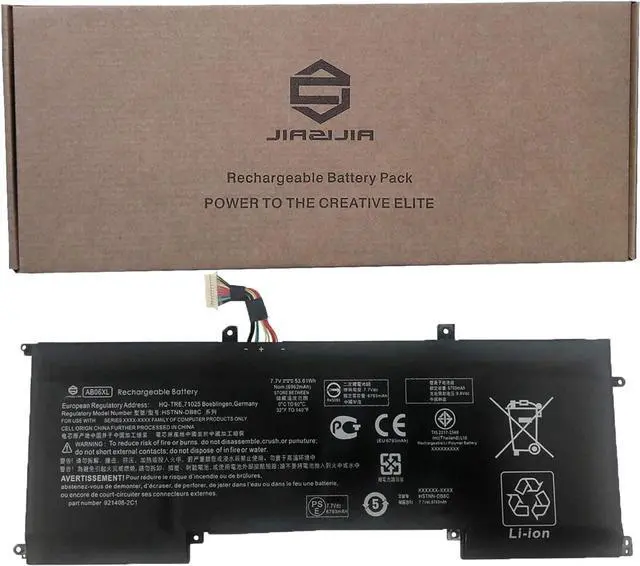
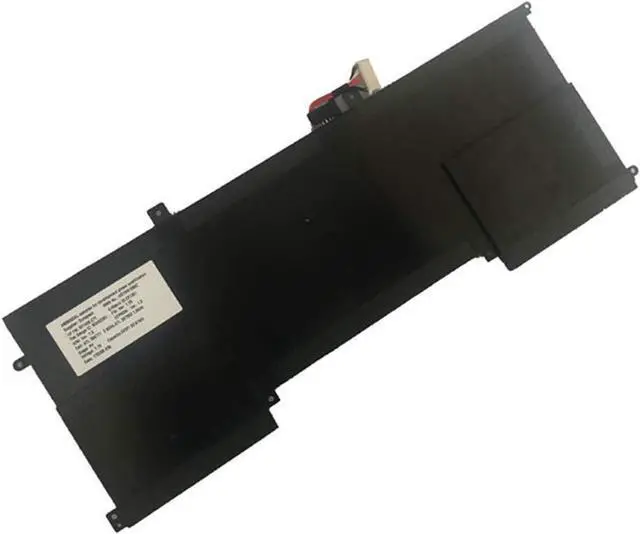


JIAZIJIA AB06XL Laptop Battery Replacement for Hp Envy 13-AD019TU 13-AD020TU 13-AD021TU 13-AD022TU 13-AD023TU 13-AD024TU 13-AD025TU 13-AD026TU 13-AD027TU Series HSTNN-DB8C 921408-2C1 7.7V 53.61Wh
- Model: AB06XL // Voltage: 7.7V // Capacity: 53.61Wh 6962mAh // Color: Black // Type: Plug & Play Li-ion Battery.
- Replacement for Part Number: AB06XL HSTNN-DB8C 921408-2C1.
- Compatible Models: Fit for Hp Envy 13-AD019TU 13-AD020TU 13-AD021TU 13-AD022TU 13-AD023TU 13-AD024TU 13-AD025TU 13-AD026TU 13-AD027TU 13-AD028TU 13-AD106TU 13-AD107TU 13-AD108TU 13-AD109TU 13-AD110TU 13-AD111TU 13-AD112TU 13-AD113TU Series.
- Note 1: In order to find the right model, please open the back case of your laptop and check the model number of your original battery.
- Note 2: Before installing the replacement battery, please read the manual carefully.
+
+
Overview
Reviews

Any questions? Our AI mode will help you find out quickly.
Try me now
<1>.Type: Plug & Play Rechargeable Li-ion Battery
<2>.Model: AB06XL
<3>.Voltage: 7.7V
<4>.Capatity: 53.61Wh 6962mAh
<5>.Interface:Refer to the picture! Please check it!
<6>.Color:Black
<7>.Warranty: 1 year warranty , 30 days' money back guarantee !
<8>.Replacement for Part Number:
AB06XL HSTNN-DB8C 921408-2C1
<9>.Compatible Models (use "Ctrl+F to find your model quickly")
Fit for Hp Envy 13-AD019TU 13-AD020TU 13-AD021TU 13-AD022TU 13-AD023TU 13-AD024TU 13-AD025TU 13-AD026TU 13-AD027TU 13-AD028TU 13-AD106TU 13-AD107TU 13-AD108TU 13-AD109TU 13-AD110TU 13-AD111TU 13-AD112TU 13-AD113TU Series
Not all the compatible laptop models have been listed, please open the back case of your laptop and choose the right battery model according to your laptop's origibal battery.
<10>.Package included:
1X AB06XL Battery
<11>.Note:
1.Before placing your order, we highly suggest you to open the back case of your latptop and check out the exact part number of your laptop's original battery.
2.Discharge the new battery use to 5%(not to 0%) and then charge to 95%, and cycle 3-4 times.
3.Do not disassemble, crush or puncture. Do not dispose of in fire or water.
4.If you remove battery for a long time, charge more than 80% at least one time within one months.
5.Don't connect adapter for a long time while using the battery. It may damage the battery.
6.When using the battery, care should be taken to prevent exposure and moisture.
<2>.Model: AB06XL
<3>.Voltage: 7.7V
<4>.Capatity: 53.61Wh 6962mAh
<5>.Interface:Refer to the picture! Please check it!
<6>.Color:Black
<7>.Warranty: 1 year warranty , 30 days' money back guarantee !
<8>.Replacement for Part Number:
AB06XL HSTNN-DB8C 921408-2C1
<9>.Compatible Models (use "Ctrl+F to find your model quickly")
Fit for Hp Envy 13-AD019TU 13-AD020TU 13-AD021TU 13-AD022TU 13-AD023TU 13-AD024TU 13-AD025TU 13-AD026TU 13-AD027TU 13-AD028TU 13-AD106TU 13-AD107TU 13-AD108TU 13-AD109TU 13-AD110TU 13-AD111TU 13-AD112TU 13-AD113TU Series
Not all the compatible laptop models have been listed, please open the back case of your laptop and choose the right battery model according to your laptop's origibal battery.
<10>.Package included:
1X AB06XL Battery
<11>.Note:
1.Before placing your order, we highly suggest you to open the back case of your latptop and check out the exact part number of your laptop's original battery.
2.Discharge the new battery use to 5%(not to 0%) and then charge to 95%, and cycle 3-4 times.
3.Do not disassemble, crush or puncture. Do not dispose of in fire or water.
4.If you remove battery for a long time, charge more than 80% at least one time within one months.
5.Don't connect adapter for a long time while using the battery. It may damage the battery.
6.When using the battery, care should be taken to prevent exposure and moisture.
Warranty & Returns
Warranty, Returns, And Additional Information
Warranty
- Please contact the Seller directly for warranty information. Warranty information may also be found on the Manufacturer's website.
- CONTACT
Return Policies
- Return for refund within: 30 days
- Return for replacement within: 30 days
- This item is covered by haoyuzeshang Return Policy
Manufacturer Contact Info
- For a directory of all our manufacturers, please click below.
- Manufacturers Directory
LOADING...