

Your Browsing History


Meet Your Seller


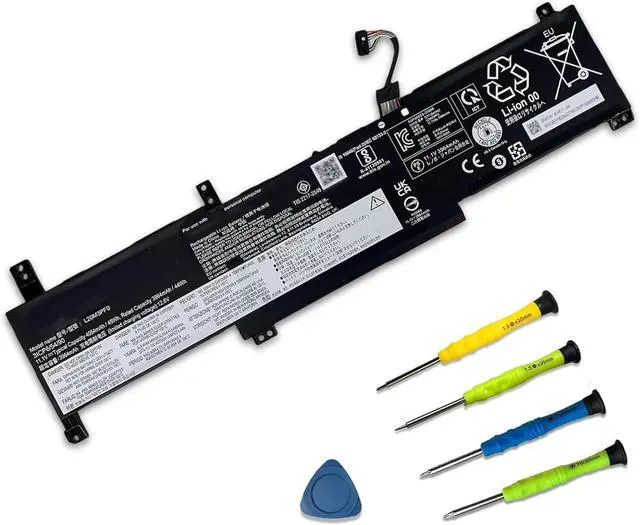
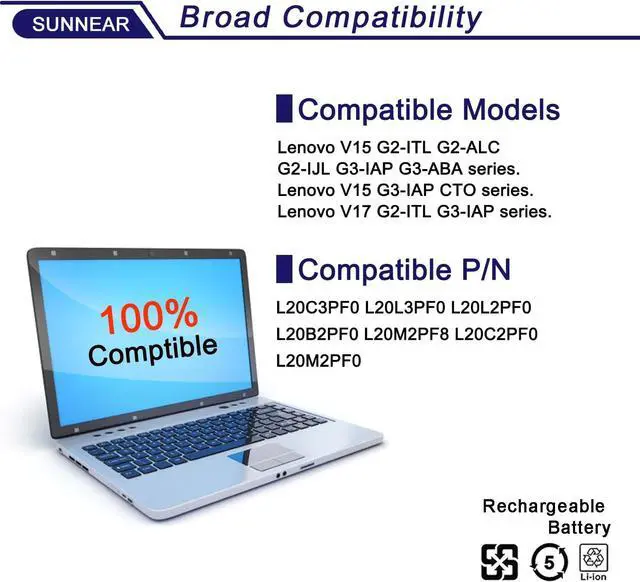
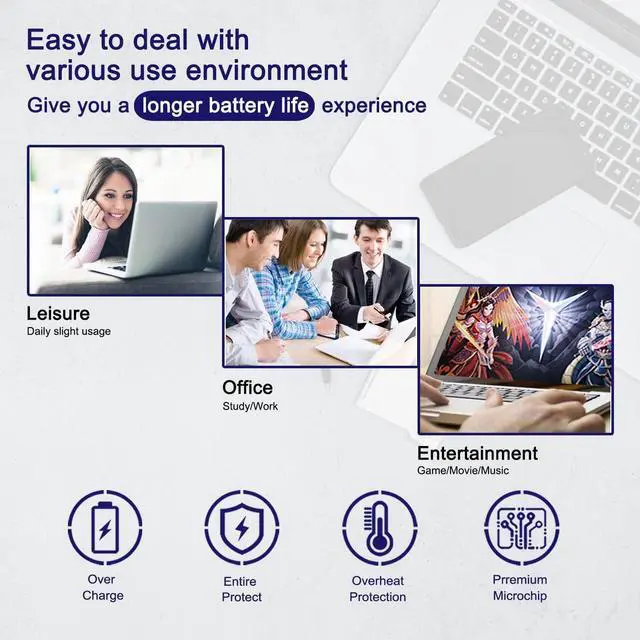


L20M3PF0 Laptop Battery Replace for Lenovo IdeaPad 3-14ITL6 3-15ITL6 3-17ITL6 / S14 V14 V15 V17 G2-ITL G3-IAP / K14 Series L20C3PF0 L20L3PF0
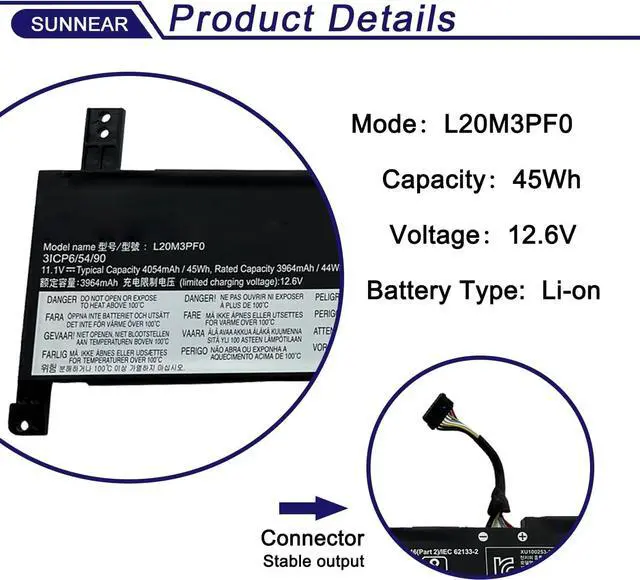
- SpecificationsModel: L20M3PF0 Voltage: 11.1V Capacity: 45Wh/4054mAh Battery type: Li-ion. Also comes with installation tools.
- Compatible Laptop/Notebook ModelsFor Lenovo IdeaPad 3-14ITL6 3-14ADA6 3-14ALC6 3-14IAU7 3-14ABA7 3-15ITL6 3-15ADA6 3-15ALC6 3-15IAU7 3-15ABA7 3-17ITL6 3-17ADA6 3-17ALC6 3-17IAU7 series.Lenovo V14 G2-ITL G2-ALC G2-IJL G3-IAP G3-ABA G4-ABP G4-IRU G4-IAH series.Lenovo V15 G2-ITL G2-ALC G2-IJL G3-IAP G3-ABA G3-IAP CTO G4-ABP G4-IRU G4-IAH series.Lenovo V17 G2-ITL G3-IAP G4-IRU series.Lenovo S14 G2-ITL G3-IAP series
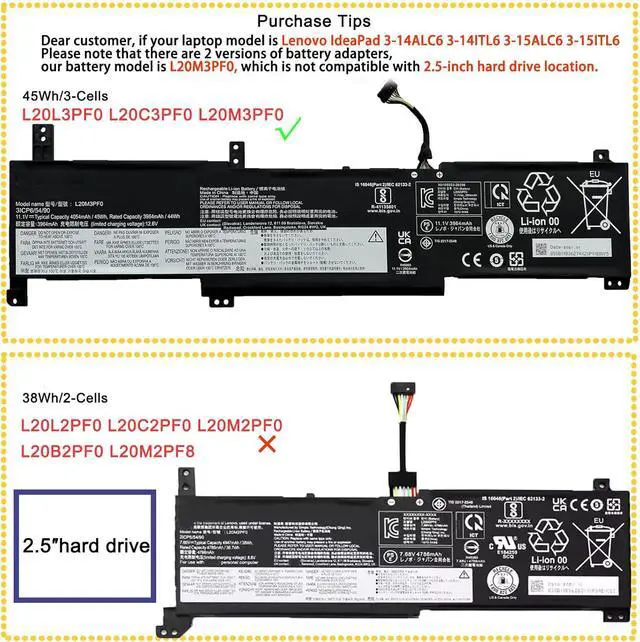
- Compatible Part NumberL20M3PF0 L20C3PF0 L20L3PF0 5B11B36279 5B11B36275 5B11B36283 SB11B36274 SB11B36277. NOT fit for L20L2PF0 L20C2PF0 L20M2PF0 L20B2PF0 L20M2PF8 38Wh/2-Cells.
- Purchasing Note: Due to the complexity of laptop battery models, you may not be able to accurately determine the model you need to purchase,Please open the back cover of the laptop to confirm the original battery model number
- TipsIf the new battery is not recog

+
+
Overview
Specs
Reviews

Any questions? Our AI beta will help you find out quickly.
Try me now
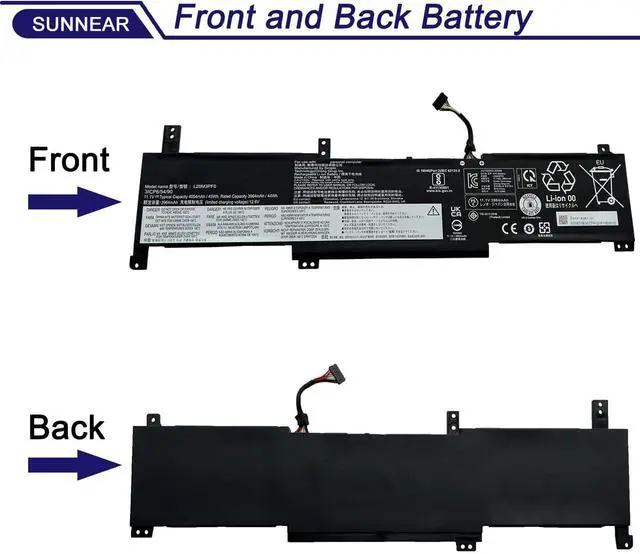
Please open your laptop case, check and confirm your original battery model and appearance, compared with our battery image, make sure that's what you need. Especially the location of the connector and the cable length (long or short).
Models:L20M3PF0
Voltage:11.1V
Capacity:45Wh/4050mAh
Battery Condition:Brand New
Compatible Part Number: L20M3PF0 L20C3PF0 L20L3PF0 5B11B36279 5B11B36275 5B11B36283 SB11B36274 SB11B36277
Please note that: NOT fit for L20L2PF0 L20C2PF0 L20M2PF0 L20B2PF0 L20M2PF8 38Wh/2-Cells.
Lenovo IdeaPad 3 Series: IdeaPad 3 ITL6; IdeaPad 3 ADA6; IdeaPad 3 ALC6; IdeaPad 3 IAU7; IdeaPad 3 ABA7
Lenovo V Series (V14 / V15 / V17)
Lenovo S SeriesS G2 ITLS G3 IAP
Specific models may be quickly searched and located using the Ctrl + F keyboard shortcut.
Lenovo IdeaPad 3 Series
Lenovo ideapad 3-14ITL6 Laptop 82H7 ; Lenovo IdeaPad 3-14ADA6 Laptop 82KQ
Lenovo ideapad 3-15ITL6 Laptop 82H8 ; Lenovo IdeaPad 3-15ADA6 Laptop 82KR
Lenovo IdeaPad 3-17ITL6 Laptop 82H9 ; Lenovo IdeaPad 3-17ADA6 Laptop 82KS
Lenovo IdeaPad 3-14ALC6 Laptop 82KT ; Lenovo IdeaPad 3 14IAU7 Laptop 82RJ
Lenovo IdeaPad 3-15ALC6 Laptop 82KU ; Lenovo IdeaPad 3 15IAU7 Laptop 82RK, 82T7
Lenovo IdeaPad 3-17ALC6 Laptop 82KV ; Lenovo IdeaPad 3 17IAU7 Laptop 82RL
Lenovo IdeaPad 3 14ABA7 Laptop 82RM
Lenovo IdeaPad 3 15ABA7 Laptop 82RN
Lenovo V Series (V14 / V15 / V17)
Lenovo V14 G2-ITL Laptop 82KA ; Lenovo V14 G2-ALC Laptop 82KC
Lenovo V15 G2-ITL Laptop 82KB ; Lenovo V15 G2-ALC Laptop 82KD
Lenovo V17 G2-ITL Laptop 82NX
Lenovo V G2 IJL Series
Lenovo V14 G2 IJL 82QX ; Lenovo V15 G2 IJL Laptop 82QY
Lenovo V G3 IAP / ABA Series
Lenovo V14 G3 IAP Laptop 82TS ; Lenovo V14 G3 ABA Laptop 82TU
Lenovo V15 G3 IAP Laptop 82TT ; Lenovo V15 G3 ABA Laptop 82TV
Lenovo V17 G3 IAP Laptop 82U1
Lenovo V15 G3 IAP CTO 83C4
Lenovo V G4 ABP IRU IAHSeries
Lenovo V14 G4 ABP 82YX, 83FG ; Lenovo V14 G4 IRU 83A0
Lenovo V15 G4 ABP 82YY, 83CR ; Lenovo V15 G4 IRU 83A1, 83CC
Lenovo V17 G4 IRU 83A2
Lenovo V14 G4 IAH 83FR
Lenovo V15 G4 IAH 83FS
Lenovo S G2 ITL G3 IAP Series
Lenovo S14 G2 ITL 82MU ; Lenovo S14 G3 IAP 82TW
1. When you get the new battery, run it down to 5% (not 0%), then power it up to 95%, and repeat this cycle 3-4 times to wake up the new battery.
2. The important point is to carry out a full run-down and power-up cycle every other month to extend the battery life.
3. When using the battery, do not keep it connected to the adapter for a long time, as this may damage the battery.
4. Avoid subjecting the battery to manual impact, disassembly, crushing, or puncturing. Do not dispose of the battery in fire or water.
Brand new from manufacturer. Tested with strict quality control standards
up to 600 reusable power cycles
Grade A cells ensure High capacity and smart chip ensure low power consumption
CE / FCC / RoHS certified for safety and stability
Could be caused by battery loose. Please remove the battery and try to install more than once.
May be due to conductive material damaged which the laptop motherboard and battery anode and cathode contact position, you can try to confirm it with your original battery.
Check whether the battery drive is in normal condition, if not, download the corresponding driver software to update.
Take out the battery and press the power button for about 15 seconds to consume the internal residual power (Do not connect the power cord), and then reinstall the battery. You can try several times.
Please read before purchasing Battery Specification: Replacement for Battery Maintenance Methods for Optimal Use Why should l choose SUNNEAR battery? Troubleshooting Methods
Models:L20M3PF0
Voltage:11.1V
Capacity:45Wh/4050mAh
Battery Condition:Brand New
Compatible Part Number: L20M3PF0 L20C3PF0 L20L3PF0 5B11B36279 5B11B36275 5B11B36283 SB11B36274 SB11B36277
Please note that: NOT fit for L20L2PF0 L20C2PF0 L20M2PF0 L20B2PF0 L20M2PF8 38Wh/2-Cells.
Lenovo IdeaPad 3 Series: IdeaPad 3 ITL6; IdeaPad 3 ADA6; IdeaPad 3 ALC6; IdeaPad 3 IAU7; IdeaPad 3 ABA7
Lenovo V Series (V14 / V15 / V17)
Lenovo S SeriesS G2 ITLS G3 IAP
Specific models may be quickly searched and located using the Ctrl + F keyboard shortcut.
Lenovo IdeaPad 3 Series
Lenovo ideapad 3-14ITL6 Laptop 82H7 ; Lenovo IdeaPad 3-14ADA6 Laptop 82KQ
Lenovo ideapad 3-15ITL6 Laptop 82H8 ; Lenovo IdeaPad 3-15ADA6 Laptop 82KR
Lenovo IdeaPad 3-17ITL6 Laptop 82H9 ; Lenovo IdeaPad 3-17ADA6 Laptop 82KS
Lenovo IdeaPad 3-14ALC6 Laptop 82KT ; Lenovo IdeaPad 3 14IAU7 Laptop 82RJ
Lenovo IdeaPad 3-15ALC6 Laptop 82KU ; Lenovo IdeaPad 3 15IAU7 Laptop 82RK, 82T7
Lenovo IdeaPad 3-17ALC6 Laptop 82KV ; Lenovo IdeaPad 3 17IAU7 Laptop 82RL
Lenovo IdeaPad 3 14ABA7 Laptop 82RM
Lenovo IdeaPad 3 15ABA7 Laptop 82RN
Lenovo V Series (V14 / V15 / V17)
Lenovo V14 G2-ITL Laptop 82KA ; Lenovo V14 G2-ALC Laptop 82KC
Lenovo V15 G2-ITL Laptop 82KB ; Lenovo V15 G2-ALC Laptop 82KD
Lenovo V17 G2-ITL Laptop 82NX
Lenovo V G2 IJL Series
Lenovo V14 G2 IJL 82QX ; Lenovo V15 G2 IJL Laptop 82QY
Lenovo V G3 IAP / ABA Series
Lenovo V14 G3 IAP Laptop 82TS ; Lenovo V14 G3 ABA Laptop 82TU
Lenovo V15 G3 IAP Laptop 82TT ; Lenovo V15 G3 ABA Laptop 82TV
Lenovo V17 G3 IAP Laptop 82U1
Lenovo V15 G3 IAP CTO 83C4
Lenovo V G4 ABP IRU IAHSeries
Lenovo V14 G4 ABP 82YX, 83FG ; Lenovo V14 G4 IRU 83A0
Lenovo V15 G4 ABP 82YY, 83CR ; Lenovo V15 G4 IRU 83A1, 83CC
Lenovo V17 G4 IRU 83A2
Lenovo V14 G4 IAH 83FR
Lenovo V15 G4 IAH 83FS
Lenovo S G2 ITL G3 IAP Series
Lenovo S14 G2 ITL 82MU ; Lenovo S14 G3 IAP 82TW
1. When you get the new battery, run it down to 5% (not 0%), then power it up to 95%, and repeat this cycle 3-4 times to wake up the new battery.
2. The important point is to carry out a full run-down and power-up cycle every other month to extend the battery life.
3. When using the battery, do not keep it connected to the adapter for a long time, as this may damage the battery.
4. Avoid subjecting the battery to manual impact, disassembly, crushing, or puncturing. Do not dispose of the battery in fire or water.
Brand new from manufacturer. Tested with strict quality control standards
up to 600 reusable power cycles
Grade A cells ensure High capacity and smart chip ensure low power consumption
CE / FCC / RoHS certified for safety and stability
Could be caused by battery loose. Please remove the battery and try to install more than once.
May be due to conductive material damaged which the laptop motherboard and battery anode and cathode contact position, you can try to confirm it with your original battery.
Check whether the battery drive is in normal condition, if not, download the corresponding driver software to update.
Take out the battery and press the power button for about 15 seconds to consume the internal residual power (Do not connect the power cord), and then reinstall the battery. You can try several times.
Please read before purchasing Battery Specification: Replacement for Battery Maintenance Methods for Optimal Use Why should l choose SUNNEAR battery? Troubleshooting Methods
Warranty & Returns
Warranty, Returns, And Additional Information
Warranty
- Please contact the Seller directly for warranty information. Warranty information may also be found on the Manufacturer's website.
- CONTACT
Return Policies
- Return for refund within: 45 days
- Return for replacement within: 45 days
- This item is covered by Xalvion E-Commerce Limited Return Policy
Manufacturer Contact Info
- For a directory of all our manufacturers, please click below.
- Manufacturers Directory
LOADING...