

Your Browsing History


Meet Your Seller

Sponsored Products
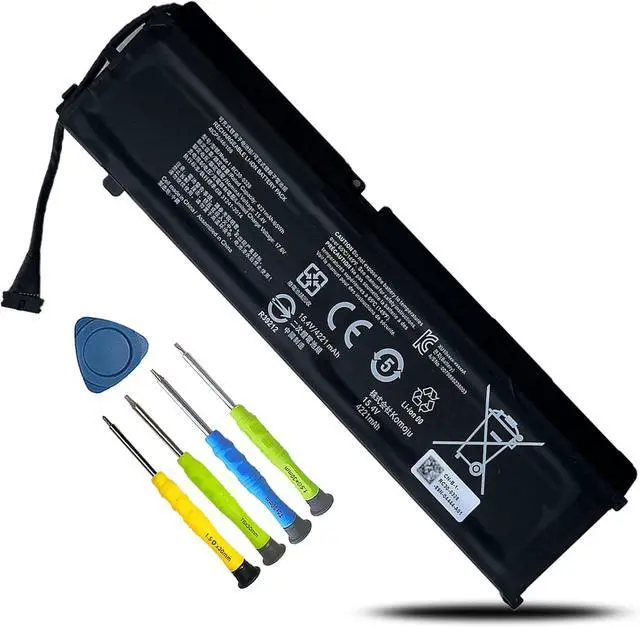
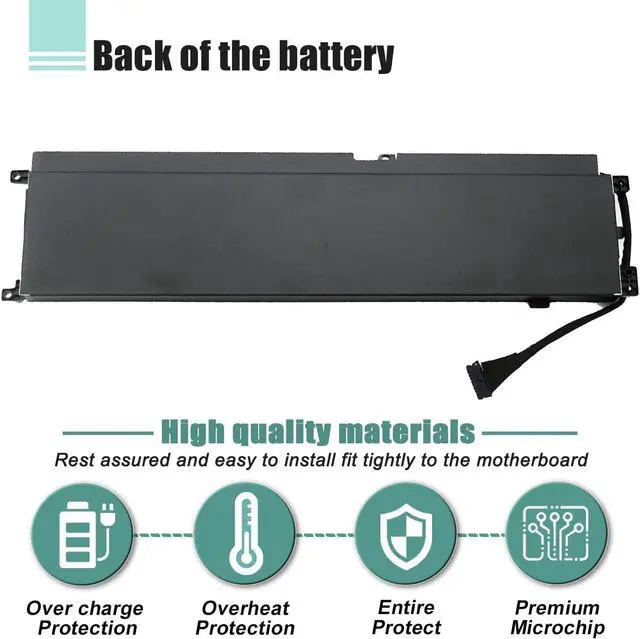



RC30-0328 Laptop Battery Replacement for Razer Blade 15 Base 2020 2021 RZ09-0328 RZ09-0328X RZ09-03286 RZ09-03287 RZ09-03289 RZ09-03287E22 RZ09-0369 RZ09-0369X RZ09-0410 RZ09-0410BE22 4-Cell
- Customer First24 x 7 email support. For assistance with the RC30-0328 battery, please visit our product detail page OR please contact us by email at any time, our professional technical team is standing by to provide you with assistance and service.
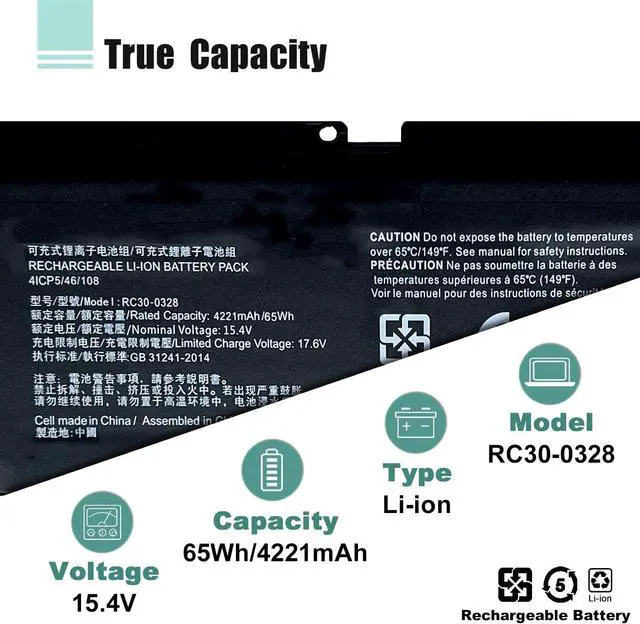
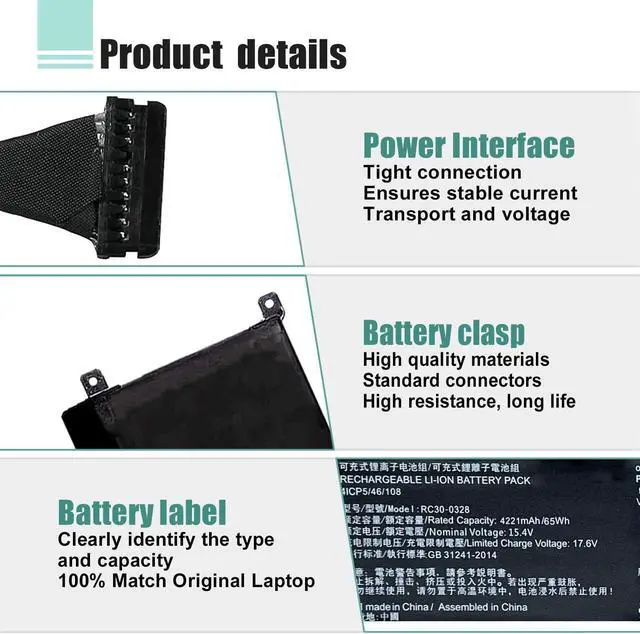
- SpecificationsModel: RC30-0328 Rechargeable Battery, Voltage: 15.4V, Capacity: 65Wh/4221mAh,Type: Li-ion Battery. Package include: 1* RC30-0328 battery 1 set matching installation tools.1*Instructions for RC30-0328 Battery. All our products up to 500 recharge cycles over the life of the battery.
- Replacement for Part NumberReplacement for RC30-0328 4ICP5/46/108.
- Compatible with ModelsFor Razer Blade 15 Base 2020 RZ09-0328 Core i7-10750H RTX 2060 RTX 2070 Max-Q Series Notebook; Razer Blade 15 Base Edition 2021 i7-10750H RTX 3060 Series Notebook.
- Security & ReliabilityBOWEIRUI RC30-0328 laptop battery is highly compatible with the original RC30-0328 Battery and meets CE/FCC/ROHS/UL certified standards.Strict guidelines for compa
+
+
Overview
Specs
Reviews

Any questions? Our AI beta will help you find out quickly.
Try me now
We are a professional laptop/tablet battery provider, dedicated to providing different types of high-quality batteries for our customers to bring their laptops back to life again. Thanks for your choice and trust, Enjoy your shopping!
Method 1: Use System Information to find your laptop model
Step 1: Press "Windows + R" to open the Run window.
Step 2: Type "msinfo32" in the empty box and click OK to open System Information.
Step 3: Keep in the "System Summary" section and you will find the "System Model " item in the right pane.
Method 2: Open the back cover of the laptop and confirm the battery type and capacity, as well as the model of the laptop.
Step 1: Turn off the laptop and unplug the power cord (to prevent electric shock)
Step 2: Remove the back panel with a screwdriver. (Please proceed with care to avoid damage to the laptop's components.)
Step 3: Disconnect the cable connected to the battery and remove it. After that, you can check the specifications of your battery.
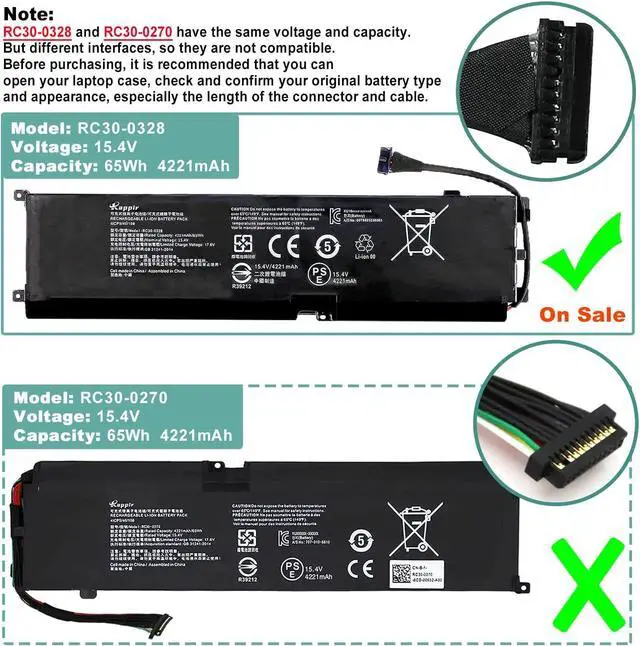
Please open your laptop case, check and confirm your original battery model and appearance, compared with our battery image, and make sure that's what you need.
Especially the location of the connector and the cable length (long or short).
Package Included:
1 X RC30-0328 Battery
4+1 Installation tools
1 X Instruction manual
Model Name: RC30-0328
Battery Type: Li-ion
Battery Voltage: 15.4V
Battery Capacity: 65Wh 4221mAh
Condition: 100% New from Manufacturer, Grade A Cell
Replacement for Part Number:
RC30-0328
4ICP5/46/108
1. Razer Blade 15 Base 2020 Series:
Model No. RZ09-0328 RZ09-0328X RZ09-03286 RZ09-03287 RZ09-03289 RZ09-03287E22 RZ09-03287E22-R3B1 RZ09-03287E22-R3U1 RZ09-03287E22-R341
2.Razer Blade 15 Base 2021 Series:
Model No. RZ09-0369 RZ09-0369X
Model No. RZ09-0410 RZ09-0410X RZ09-0410BE22-R3U1 RZ09-0410BEA2-R3U1
3.Razer Blade 15 Early 2020 Base Core i7-10750H RTX 2070 Max-Q Series.
4.Razer Blade 15 Base 2020 i7-10750H RTX 2060 Max-Q Series.
5.Razer Blade 15 Base Edition 2021 i7-10750H RTX 3060 Series.
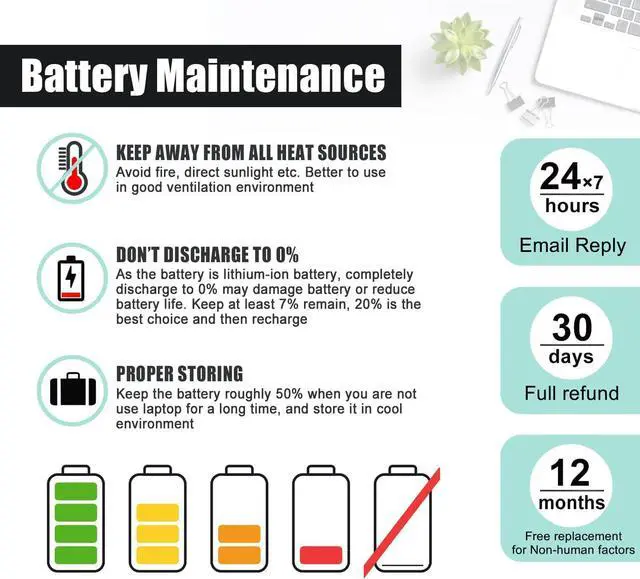
When you get the new battery, discharge the battery to 5% (not 0%), then charge to 95%, cycle 3-4 times to wake up the new battery.
The important point is to perform a full discharge and charge every other month to extend the battery life.
Do not connect adapter for a long time while using the battery. It may damage the battery.
Avoid artificial shocks, disassembly, crush or puncture. Do not dispose of it in fire or water.
Could be caused by a battery loose. Please remove the battery and try to install it more than once.
This may be due to conductive material damage which the laptop motherboard and battery anode and cathode contact position, you can try to confirm it with your original battery.
Check whether the battery drive is in normal condition, if not, download the corresponding driver software to update.
Take out the battery and press the power button for about 15 seconds to consume the internal residual power (Do not connect the power cord), and then reinstall the battery. You can try several times.
The battery capacity is designed to meet the OEMs specifications, be stable and last long, provide stronger power for your laptop, and not falsely labeled battery capacity.
Problems you may encounter when installing a new battery
Q: Battery cannot be identified by your laptop or it doesnt seem to work. That may be caused by different situations.
Welcome to BOWEIRUI How to choose the correct battery? RC30-0328 Battery for Razer Blade 15 Base 2020 2021 Series Laptop Battery Specification Compatible Models (Use "Ctrl+F to find your model quickly) Battery Maintenance Methods for Optimal Use Troubleshooting Methods True Capacity
Method 1: Use System Information to find your laptop model
Step 1: Press "Windows + R" to open the Run window.
Step 2: Type "msinfo32" in the empty box and click OK to open System Information.
Step 3: Keep in the "System Summary" section and you will find the "System Model " item in the right pane.
Method 2: Open the back cover of the laptop and confirm the battery type and capacity, as well as the model of the laptop.
Step 1: Turn off the laptop and unplug the power cord (to prevent electric shock)
Step 2: Remove the back panel with a screwdriver. (Please proceed with care to avoid damage to the laptop's components.)
Step 3: Disconnect the cable connected to the battery and remove it. After that, you can check the specifications of your battery.
Please open your laptop case, check and confirm your original battery model and appearance, compared with our battery image, and make sure that's what you need.
Especially the location of the connector and the cable length (long or short).
Package Included:
1 X RC30-0328 Battery
4+1 Installation tools
1 X Instruction manual
Model Name: RC30-0328
Battery Type: Li-ion
Battery Voltage: 15.4V
Battery Capacity: 65Wh 4221mAh
Condition: 100% New from Manufacturer, Grade A Cell
Replacement for Part Number:
RC30-0328
4ICP5/46/108
1. Razer Blade 15 Base 2020 Series:
Model No. RZ09-0328 RZ09-0328X RZ09-03286 RZ09-03287 RZ09-03289 RZ09-03287E22 RZ09-03287E22-R3B1 RZ09-03287E22-R3U1 RZ09-03287E22-R341
2.Razer Blade 15 Base 2021 Series:
Model No. RZ09-0369 RZ09-0369X
Model No. RZ09-0410 RZ09-0410X RZ09-0410BE22-R3U1 RZ09-0410BEA2-R3U1
3.Razer Blade 15 Early 2020 Base Core i7-10750H RTX 2070 Max-Q Series.
4.Razer Blade 15 Base 2020 i7-10750H RTX 2060 Max-Q Series.
5.Razer Blade 15 Base Edition 2021 i7-10750H RTX 3060 Series.
When you get the new battery, discharge the battery to 5% (not 0%), then charge to 95%, cycle 3-4 times to wake up the new battery.
The important point is to perform a full discharge and charge every other month to extend the battery life.
Do not connect adapter for a long time while using the battery. It may damage the battery.
Avoid artificial shocks, disassembly, crush or puncture. Do not dispose of it in fire or water.
Could be caused by a battery loose. Please remove the battery and try to install it more than once.
This may be due to conductive material damage which the laptop motherboard and battery anode and cathode contact position, you can try to confirm it with your original battery.
Check whether the battery drive is in normal condition, if not, download the corresponding driver software to update.
Take out the battery and press the power button for about 15 seconds to consume the internal residual power (Do not connect the power cord), and then reinstall the battery. You can try several times.
The battery capacity is designed to meet the OEMs specifications, be stable and last long, provide stronger power for your laptop, and not falsely labeled battery capacity.
Problems you may encounter when installing a new battery
Q: Battery cannot be identified by your laptop or it doesnt seem to work. That may be caused by different situations.
Welcome to BOWEIRUI How to choose the correct battery? RC30-0328 Battery for Razer Blade 15 Base 2020 2021 Series Laptop Battery Specification Compatible Models (Use "Ctrl+F to find your model quickly) Battery Maintenance Methods for Optimal Use Troubleshooting Methods True Capacity
Warranty & Returns
Warranty, Returns, And Additional Information
Warranty
- Please contact the Seller directly for warranty information. Warranty information may also be found on the Manufacturer's website.
- CONTACT
Return Policies
- Return for refund within: 45 days
- Return for replacement within: 45 days
- This item is covered by Xalvion E-Commerce Limited Return Policy
Manufacturer Contact Info
- For a directory of all our manufacturers, please click below.
- Manufacturers Directory
LOADING...