• $95.44
  • Free 30-day Returns
  • Price alert
    Shop it at NeweggBusiness.

    Meet Your Seller

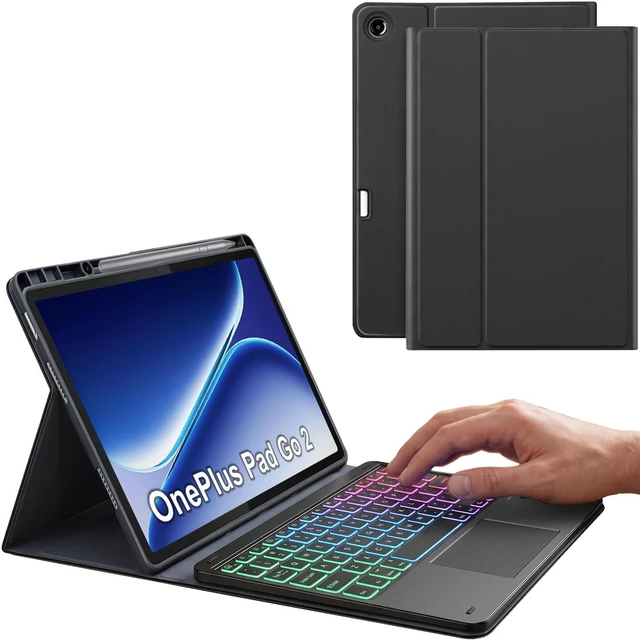
    Nanhent Touchpad Keyboard Case for OnePlus Pad Go 2 Tablet 12.1 Inch 2025, 7 Color Rainbow Backlit Detachable Bluetooth Trackpad Keyboard Folio Smart Cover with Pen Holder

    • Perfect CompatibilityDesigned exclusively for OnePlus Pad Go 2 Tablet 12.1 Inch 2025. Not compatible with any other devices. Please kindly check the model number before purchase.(Note: Pencil NOT included)
    • Precise Hole Position, Honeycomb DesignThe mold case is made based on the real tablet, and the precise cutouts can make full use of all functions, and provide perfect protection and convenience for daily use. The soft TPU inner shell adopts a honeycomb design, which is beneficial to the heat dissipation of the tablet and improves the performance of the tablet.
    • Rainbow BacklightSuitable for OnePlus Pad Go 2 RGB rainbow backlight keyboard, 7 adjustable backlight colors, breathing light backlight mode can be automatically switched. The backlight keyboard can be used in the dark, providing a comfortable typing experience.
    • Touchpad Keyboard + Multi TouchThe keyboard has a trackpad that supports multi-finger gesture functions. A single finger can slide to move the cursor,click to select a target,etc.Use two fingers to slide to switch pages,open/reduce images,etc.Use three fingers to slide down to take a screenshot,slide up to return to the main interface,etc
    +
    +
    Overview
    Specs
    Reviews

    Any questions? Ask CelesteSM will help you find out quickly.

    Compatibility

    Exclusively designed for 12.1 inch OnePlus Pad Go 2 tablet. NOT for other OnePlus tablet model.

    How to connect the keyboard with the tablet?

    1. Dial ON/OFF button on right direction for opening keyboard, press "FN+C" for into wireless matching condition.(After connecting, press "FN+C" again to disconnect Bluetooth.)

    2. Open Bluetooth on device, search keyboard name: [Keyboard] for matching device to keyboard.

    3. Click the "Keyboard" to connect, finish.

    4. Press "Fn+Q" to switch to the corresponding Android input system.

    How to adjusts the colour of the backlight?

    1.Click "Bulb" Key to adjust the brightness of the backlight.

    2.Click "Fn+Bulb" to switch between 7 color schemes.

    Specification:

    Charging voltage: 5V

    Bluetooth version: Bluetooth 5.0

    Transmission distance: up to 10 m

    Capacity of battery: 450 mAH

    Charging time: 2-3 hours

    Working time: 90 hours without backlight

    Working time: 10 hours with backlight

    Standby time: 180 days

    What's in the box?

    Tablet Case * 1

    Rainbow Backlight Touchpad Keyboard * 1

    USB-C Charging Cable * 1

    Product Manual * 1

    Warranty & Returns

    Warranty, Returns, And Additional Information

    Warranty

    • Please contact the Seller directly for warranty information. Warranty information may also be found on the Manufacturer's website.
    • CONTACT

    Return Policies

    • Return for refund within: 30 days
    • Return for replacement within: 30 days
    • This item is covered by Artbloont Return Policy

    Manufacturer Contact Info

    LOADING...