



• $29.00
  • $39.99
  • Save: $10.99 (27%)
  • Free 30-day Returns
  • Sold by Direct from manufacturerGLOTRENDS
    Top Rated
    4.6 (213 seller ratings)

    Shipped by Newegg

    Price alert
    Shop it at NeweggBusiness.

    Meet Your Seller

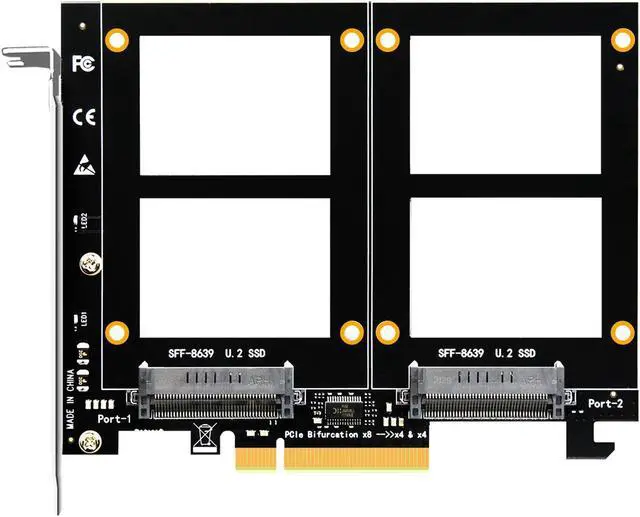
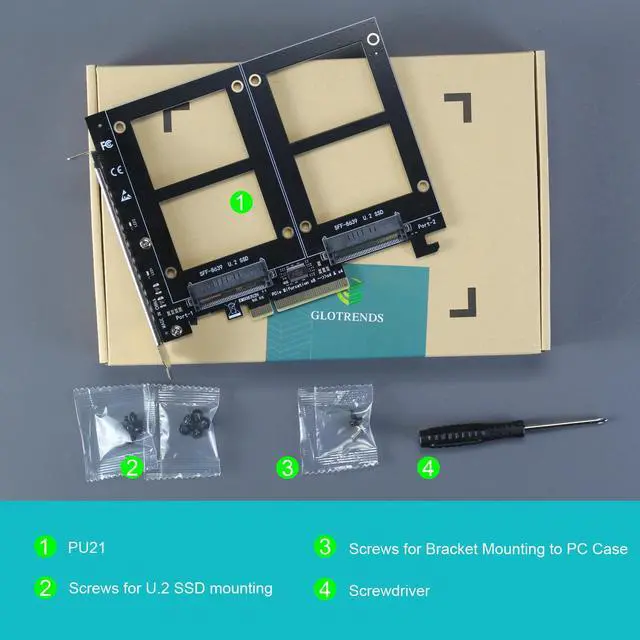
    GLOTRENDS PU21 Dual U.2 to PCIe X8 4.0 Adapter, Support 2 x U.2 SSD, Without PCIe Splitter Function (PCIe Bifurcation Motherboard is Required)

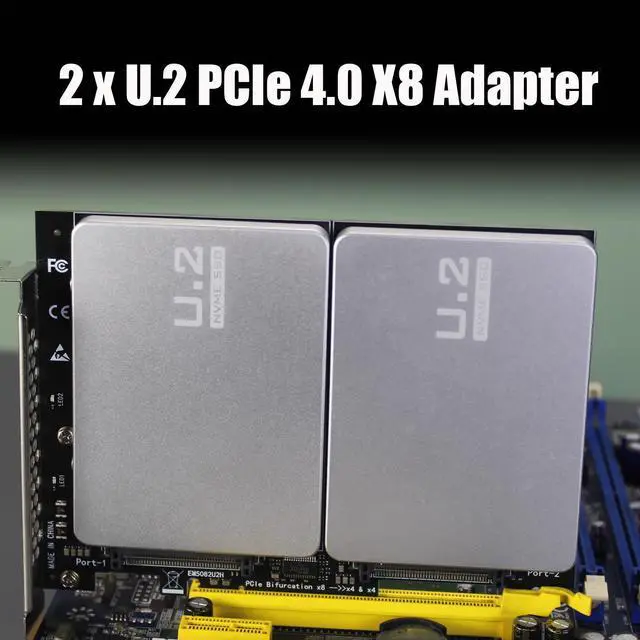
    • By installing 2 x U.2 SSDs on this PCIe 4.0 X8 adapter, your computer will be able to access 2 x U.2 SSDs at the same time
    • Support Soft RAID in Intel/AMD platform, not support Mac Pro 5.1 (Note: To set up Intel's RAID-on-CPU (VROC), you need to purchase your license)
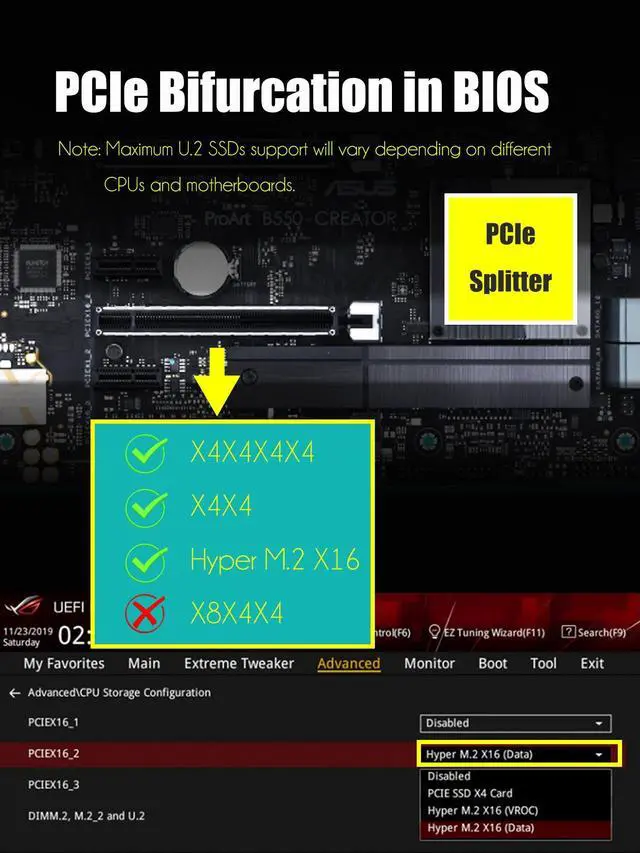
    • Set the PCIe Bifurcation mode of the corresponding PCIe slot in the BIOS, support X4X4X4X4 or X4X4X8 or Hyper M.2 X16 mode (Note: Can not support X8X4X4 mode)
    • Because this adapter does not support PCIe Bifurcation, it requires a motherboard that supports PCIe Bifurcation.
    • To reach PCIe 4.0 X4 (64Gbps) full speed, the CPU and motherboard PCIe slot and PCIe M.2 SSD should all be PCIe 4.0 features (Note: PCIe 4.0 is not supported on Intel CPUs below 11th generation)
    • Support OS Booting: Reinstall the OS, and set up BIOS/UEFI boot from this U.2 SSD
    • Plug-and-play in Windows 11/10/8/Linux/Mac OS (Note: Not support Windows 7). The new U.2 SSD needs to be initialized and formatted before it can be recognized by the computer host.
    +
    +
    Overview
    Specs
    Reviews (2)
    avatar

    Any questions? Our AI beta will help you find out quickly.

    Model: PU21

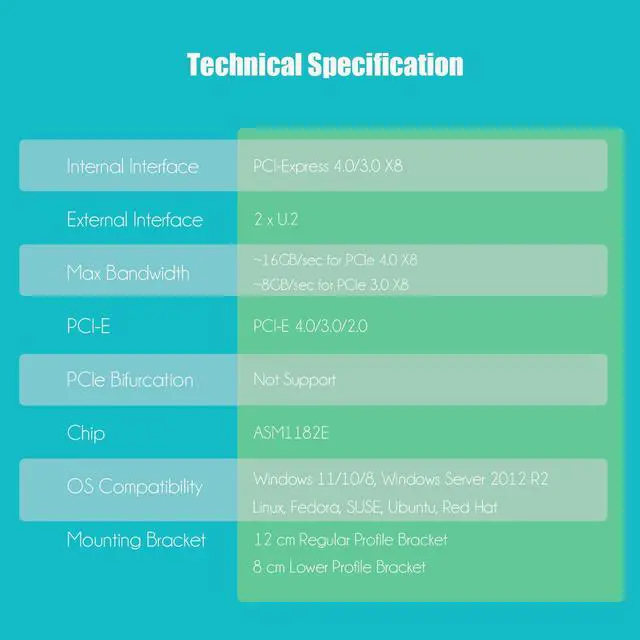
    Interface to PC

    PCI-Express 4.0 X8 (128GBbps at max)

    Interface to SSD

    2 x U.2

    OS Compatibility

    Windows and Linux (Note: not support windows 7)

    PCIe Bifurcation

    Not support, so it requires a motherboard that supports PCIe Bifurcation

    Hardware Platform

    Intel and AMD motherboard with PCIe Bifurcation (Note: not support Mac Pro)

    CPU Requirements

    Intel 11th Gen or Ryzen 5000 Series and above

    RAID Setup

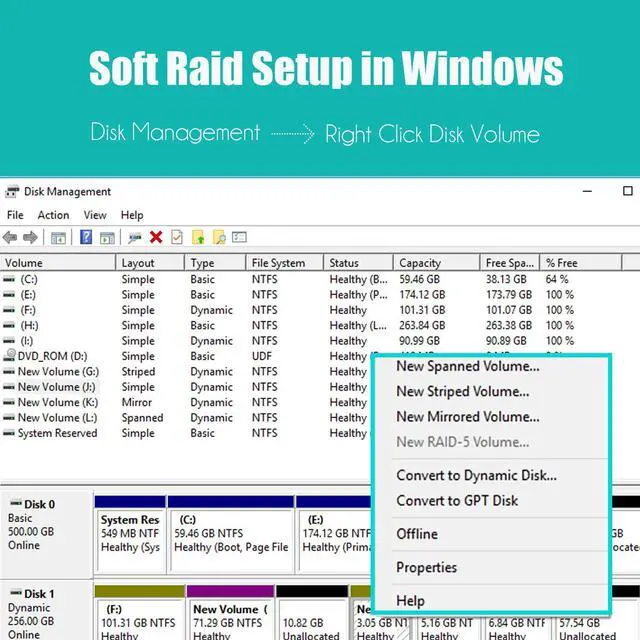
    Software RAID setup via Windows Disk Management or Linux mdadm Utility

    Installation

    Regular-profile bracket

    Dual U.2 to PCIe 4.0 X8
    Dual U.2 to PCIe 4.0 X8
    Dual U.2 to PCIe 4.0 X8
    Dual U.2 to PCIe 4.0 X8
    Dual U.2 to PCIe 4.0 X8
    Dual U.2 to PCIe 4.0 X8
    PCIe Bifurcation in ASUS BIOS

    Enable Hyper M.2 <---> Advanced\Onboard Devices Configuration

    Dual U.2 to PCIe 4.0 X8
    PCIe Bifurcation in MSI or others BIOS

    Configure PCIe x4+x4 or x4+x4x4+x4

    Dual U.2 to PCIe 4.0 X8
    RAID Setup in Window 10/11
    Software RAID for U.2 SSD
    1. When you locate 2 separate U.2 SSDs in Windows 10/11 Disk Management
    2. Right-click the disk volume you want to set up as a soft RAID
    3. A pop-up window will appear; click the desired option (Spanned/Striped/Mirrored)
    Products
    Internal Interface PCI-Express 4.0 X4 PCI-Express 4.0 X4 PCI-Express 4.0 X8 PCI-Express 4.0 X16 PCI-Express 4.0 X8 PCI-Express 4.0 X16
    External Interface U.2 U.3 2 x U.2 4 x U.2 2 x M.2 4 x M.2
    Dual U. 2
    PCIe Adapter: add 2 x U. 2 SSD onto a single PCIe X8 host adapter, so you can access 2 x U. 2 SSD individually, or set up soft RAID in Windows/Linux/3rd party software.
    U. 2 RAID for
    Intel/AMD Platform: Support U. 2 SSD RAID-on-CPU (VROC) in the Intel Platform, but you need to purchase an Intel VROC license by yourself. Support U. 2 RAID in AMD Platform. Not compatible with Mac Pro 5.1
    Note: Without the PCIe splitter function in this host adapter, so motherboard must support PCIe Bifurcation. Otherwise, only one U. 2 SSD will be recognized. If you are not sure PCIe Bifurcation of your motherboard, please consult the motherboard manufacturer or contact us via an Amazon message
    Please set the PCIe splitter in BIOS/UEFI into X4X4X4X4 or X4X4X8 or Hyper M. 2 X16 mode.
    Note: X8X4X4 mode will not work.
    Please make sure BIOS/UEFI supports native NVMe and OS boot from the PCIe lane, then this PU21 supports OS boot from U. 2 SSD or U. 2 RAID.
    Compatible with PCIe 4.0 / 3.0 / 2.0, and install into PCI-Express X8/X16 lane. To reach PCIe 4.0 speed, make sure your CPU and motherboard and U. 2 SSDs are all PCIe 4.0 enabled. To reach PCIe X8 full bandwidth, setup 2 x U. 2 SSD into RAID 0 mode.
    U. 2
    SSD Compatibility: Intel SSD D7-P5510 Series, D7-P5500 Series, D7-P5600 Series, Optane SSD 905P Series, Optane SSD DC P4801X Series, Optane SSD DC P4800X Series, D5-P4326 Series, D5-P4420 Series, D5-P4320 Series. Samsung PM9A3. WD Gold Enterprise Class NVMe SSD. Micron 7300 PRO Series.

    Warranty & Returns

    Warranty, Returns, And Additional Information

    Warranty

    • Please contact the Seller directly for warranty information. Warranty information may also be found on the Manufacturer's website.
    • CONTACT

    Return Policies

    • Return for refund within: 30 days
    • Return for replacement within: 30 days
    • This item is covered by GLOTRENDS Return Policy

    Manufacturer Contact Info

    LOADING...