



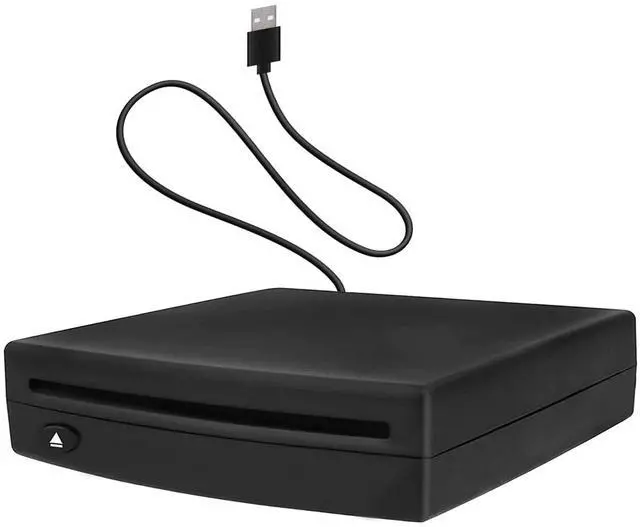




External USB Vehicle CD Player

USB Integrated Add-on CD Player(Android Navigation requires a USB port to use a CD player)
This easy-install USB Car CD Player is a quality solution enabling you to enjoy your Music CDs through your vehicle’s factory radio system or car Android navigation.You will be able to listen to music and audiobooks in the car as you like,making people relaxed and happy, instantly reducing the feeling of fatigue.
NOTE:For USB Connect, need to make sure your car radio supports playing WAV audio files.(Your car radio must be able to play WAV music files in order to use this external USB CD player. Otherwise, your car radio will not be able to play CD disc music.)
USB Car CD Player Widely Compatible

Widely Application
- This portable car CD player is suitable for most car models, this device is the ideal way to play CD music in the car.
- Not only suitable for car Android navigation system, but also compatible with Windows system desktop computers, laptops and Android smart TVs.(TVs and cars need to support the ability to read USB flash drives before they can use this device to play CD.The device using the optical drive must have a player capable of supporting the format of the disc being played.)
- Compatible Formats: WMA or. WAV, but not MP3. Play your favorite music CD's and listen to them through your vehicle's factory radio and sound system; Some audiobooks are in MP3 format and will not play on this CD Player.
Fault and detection:
1.If the CD cannot be read, it means the vehicle host is not compatible with WAV music format. In this situation, you need additional audio conversion box(not included) to use AUX input or FM transmitter to transmit the audio sound to your car stereo system.(need another purchase)
2.. How to test the CD player. Use the USB cable to connect it with computer or laptop to see if it can read CD well. If it works normally, the product is in good condition.
3.If some CDs can be played, the quality of the product is fine. Maybe your car does not support the music file formats WAV, cda, so some of them cannot be used. The music skip should be caused by scratches on the disc, and when the song cannot be read, it will automatically skip to the next one. This is normal. If you change to a new CD, this situation will not occur.
4.If you have no problem to play WAV format CD music when connecting the player on your computer, but cannot play it when connecting it to your car, please pay attention to whether your CD file format is correct or not, whether you select USB mode to play it or not, whether the product USB connector is connected to an extension cable or the charging connector of your car, please connect it to the USB data port of your car. If it does not work properly, the product is not compatible with the car model.
USB Car CD Player Easy to Use

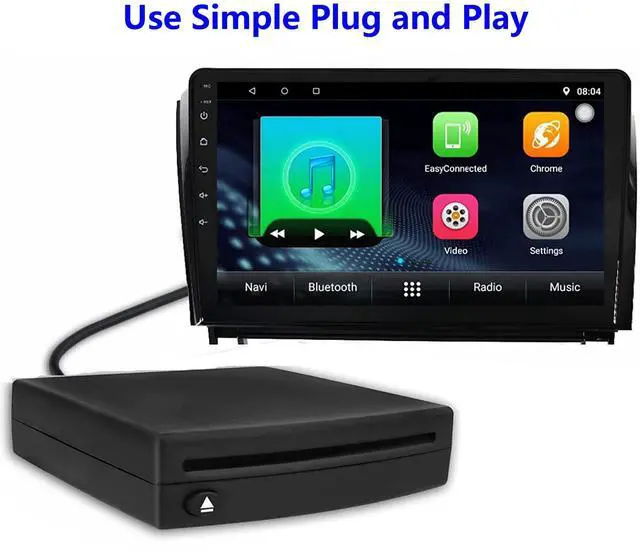
Plug and Play
No additional driver and power supply are required, just insert the CD player into the USB interface of the car Android navigation host, select USB data entry mode on Car mode,the CD player will automatically recognize it and data will be displayed on your screen.
Installation:
The unit has a single cable installation. The CD player can be mounted both vertical or horizontal - under the car seat or under the dash or in any other accessible location, but not upside down or past the zero-degree vertical angle.
Just plug in the connecting cable into your vehicle's USB port on your factory radio and make sure to let the unit finish indexing for 10-20 seconds per CD to complete install and avoid set-up issues.
How to Use:
- 1.The original vehicle central control navigation without DVD / CD function only supports CD disc:
1.1 Link the optical drive USB cable to the car USB interface, so that you can put the CD disc into the optical drive disc port position and the optical drive automatically absorbs the disc and reads the disc music.
1.2 Then find the music playing icon in the central control display system, and click USB on the music playing interface to see the music list. And you can choose song on it. Also supports wheel learning operation.
- 2.Upgraded Android screen host can support CD:
2.1 Link the optical drive USB cable with the car USB interface, (If no audio data is detected, please use another USB port.)
2.2 Put the CD disc into the drive port position and the optical drive automatically absorbs the disc and reads the disc music.
2.3 Then find the music playing icon in the central control display system, and click USB on the music playing interface to see the music list. And you can choose song on it. Also supports wheel learning operation.
- 3.For other devices:
3.1 As long as it has USB interface and support WAV format, the CD Player can work well.
3.2 Including smart TV, TV set-top box, laptop desktop computer(without recording function) tablet computer, outdoor audio,home power amplifier and so on.

High Quality USB Car CD Player
- Power cable embedded design, so you will never forget to lose the cable of the Portable CD Player for car.
- CD Player for Car USB Transfer-Standard USB connector, simple to plug in and easy to connect.
- There is an eject button, so you don't have to worry about the disc getting stuck.
- Electronic Shock Resistance, Strong Error Correction--Vehicle-specific movement, the fuselage is placed horizontally/vertically/inclined, and the bumps of the car will not affect the reading of the disc.
- The car cd player has a beautiful appearance.High quality shell.
Compact Size Easy to Install

This portable external car CD Player suitable for car Android multimedia large screen navigation and USB interface. Just insert the CD player into the USB interface of the car Android navigation host, and the CD player will automatically identify and display the data on your screen.
Plug in the USB interface to use, no external power supply required. Small in size, it can be placed in the glove box or fixed in other locations.(Please note Unit can be mounted either vertical or horizontal, but not upside down or past the zero-degree vertical)
NOTES:
- 1.It does not support playback of Blu-ray and vinyl records. If you want to connect to other devices for playback, it only supports navigation above Android 4.4.
- 2.For Android Navigation on some models you have to go into the menu to get and select the USB port to recognize the CD player and play music.
- 3.Make sure you are attempting the initial installation and connection WITHOUT the USB extensions (This is crucial)
- 4.How to detect the performance of the disc drive, you can connect the disc drive to the USB port of the PC computer and put it on the disc. If you can read the contents of the disc, the disc drive will perform normally.

Product Specification
Product Name:USB Car Player
Voltage / Current: DC5V Min 800mA-1A
Net Weight:About 505g
Operating temperature:-10 ? ~ + 70 ?
Android Version: For Android Version 4.0 or more
Player Disc Format: CD,WMA,WAV
Disc adaptability: 12CM Disc
External interface : USB 2.0 Disc access mode: suction-type
Placement angle: Place horizontally/left up/dish mouth up
Package Include
- 1x CD Player for car
- 1x User Manual
- 1x Double sided sticker
External USB Vehicle CD Player
USB Integrated Add-on CD Player(Android Navigation requires a USB port to use a CD player)
This easy-install USB Car CD Player is a quality solution enabling you to enjoy your Music CDs through your vehicle’s factory radio system or car Android navigation.You will be able to listen to music and audiobooks in the car as you like,making people relaxed and happy, instantly reducing the feeling of fatigue.
NOTE:For USB Connect, need to make sure your car radio supports playing WAV audio files.(Your car radio must be able to play WAV music files in order to use this external USB CD player. Otherwise, your car radio will not be able to play CD disc music.)
USB Car CD Player Widely Compatible
Widely Application
- This portable car CD player is suitable for most car models, this device is the ideal way to play CD music in the car.
- Not only suitable for car Android navigation system, but also compatible with Windows system desktop computers, laptops and Android smart TVs.(TVs and cars need to support the ability to read USB flash drives before they can use this device to play CD.The device using the optical drive must have a player capable of supporting the format of the disc being played.)
- Compatible Formats: WMA or. WAV, but not MP3. Play your favorite music CD's and listen to them through your vehicle's factory radio and sound system; Some audiobooks are in MP3 format and will not play on this CD Player.
Fault and detection:
1.If the CD cannot be read, it means the vehicle host is not compatible with WAV music format. In this situation, you need additional audio conversion box(not included) to use AUX input or FM transmitter to transmit the audio sound to your car stereo system.(need another purchase)
2.. How to test the CD player. Use the USB cable to connect it with computer or laptop to see if it can read CD well. If it works normally, the product is in good condition.
3.If some CDs can be played, the quality of the product is fine. Maybe your car does not support the music file formats WAV, cda, so some of them cannot be used. The music skip should be caused by scratches on the disc, and when the song cannot be read, it will automatically skip to the next one. This is normal. If you change to a new CD, this situation will not occur.
4.If you have no problem to play WAV format CD music when connecting the player on your computer, but cannot play it when connecting it to your car, please pay attention to whether your CD file format is correct or not, whether you select USB mode to play it or not, whether the product USB connector is connected to an extension cable or the charging connector of your car, please connect it to the USB data port of your car. If it does not work properly, the product is not compatible with the car model.
USB Car CD Player Easy to Use
Plug and Play
No additional driver and power supply are required, just insert the CD player into the USB interface of the car Android navigation host, select USB data entry mode on Car mode,the CD player will automatically recognize it and data will be displayed on your screen.
Installation:
The unit has a single cable installation. The CD player can be mounted both vertical or horizontal - under the car seat or under the dash or in any other accessible location, but not upside down or past the zero-degree vertical angle.
Just plug in the connecting cable into your vehicle's USB port on your factory radio and make sure to let the unit finish indexing for 10-20 seconds per CD to complete install and avoid set-up issues.
How to Use:
- 1.The original vehicle central control navigation without DVD / CD function only supports CD disc:
1.1 Link the optical drive USB cable to the car USB interface, so that you can put the CD disc into the optical drive disc port position and the optical drive automatically absorbs the disc and reads the disc music.
1.2 Then find the music playing icon in the central control display system, and click USB on the music playing interface to see the music list. And you can choose song on it. Also supports wheel learning operation.
- 2.Upgraded Android screen host can support CD:
2.1 Link the optical drive USB cable with the car USB interface, (If no audio data is detected, please use another USB port.)
2.2 Put the CD disc into the drive port position and the optical drive automatically absorbs the disc and reads the disc music.
2.3 Then find the music playing icon in the central control display system, and click USB on the music playing interface to see the music list. And you can choose song on it. Also supports wheel learning operation.
- 3.For other devices:
3.1 As long as it has USB interface and support WAV format, the CD Player can work well.
3.2 Including smart TV, TV set-top box, laptop desktop computer(without recording function) tablet computer, outdoor audio,home power amplifier and so on.
High Quality USB Car CD Player
- Power cable embedded design, so you will never forget to lose the cable of the Portable CD Player for car.
- CD Player for Car USB Transfer-Standard USB connector, simple to plug in and easy to connect.
- There is an eject button, so you don't have to worry about the disc getting stuck.
- Electronic Shock Resistance, Strong Error Correction--Vehicle-specific movement, the fuselage is placed horizontally/vertically/inclined, and the bumps of the car will not affect the reading of the disc.
- The car cd player has a beautiful appearance.High quality shell.
Compact Size Easy to Install
This portable external car CD Player suitable for car Android multimedia large screen navigation and USB interface. Just insert the CD player into the USB interface of the car Android navigation host, and the CD player will automatically identify and display the data on your screen.
Plug in the USB interface to use, no external power supply required. Small in size, it can be placed in the glove box or fixed in other locations.(Please note Unit can be mounted either vertical or horizontal, but not upside down or past the zero-degree vertical)
NOTES:
- 1.It does not support playback of Blu-ray and vinyl records. If you want to connect to other devices for playback, it only supports navigation above Android 4.4.
- 2.For Android Navigation on some models you have to go into the menu to get and select the USB port to recognize the CD player and play music.
- 3.Make sure you are attempting the initial installation and connection WITHOUT the USB extensions (This is crucial)
- 4.How to detect the performance of the disc drive, you can connect the disc drive to the USB port of the PC computer and put it on the disc. If you can read the contents of the disc, the disc drive will perform normally.
Product Specification
Product Name:USB Car Player
Voltage / Current: DC5V Min 800mA-1A
Net Weight:About 505g
Operating temperature:-10 ? ~ + 70 ?
Android Version: For Android Version 4.0 or more
Player Disc Format: CD,WMA,WAV
Disc adaptability: 12CM Disc
External interface : USB 2.0 Disc access mode: suction-type
Placement angle: Place horizontally/left up/dish mouth up
Package Include
- 1x CD Player for car
- 1x User Manual
- 1x Double sided sticker