






About OAUW Brand
As a professional manufacturer and seller of external Car CD player,focuses on providing people with high-quality products that facilitate life. We attach importance to user experience, we have produced products that are popular with people.
You can use OAUW USB Car CD Player on your Android Car Navigation, Android Smart TVs, Windows and Mac OS desktop, laptop, PCS.to play High quality CDs music.

OAUW CD Player for Car
Comfortable Driving, Music with you, Enjoy the feast of Music
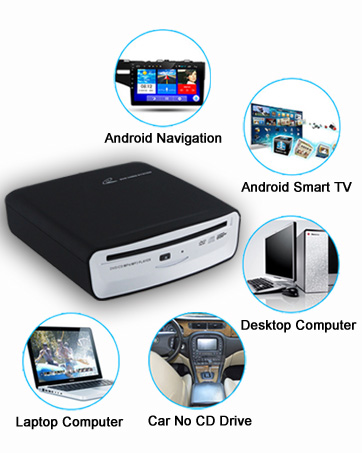
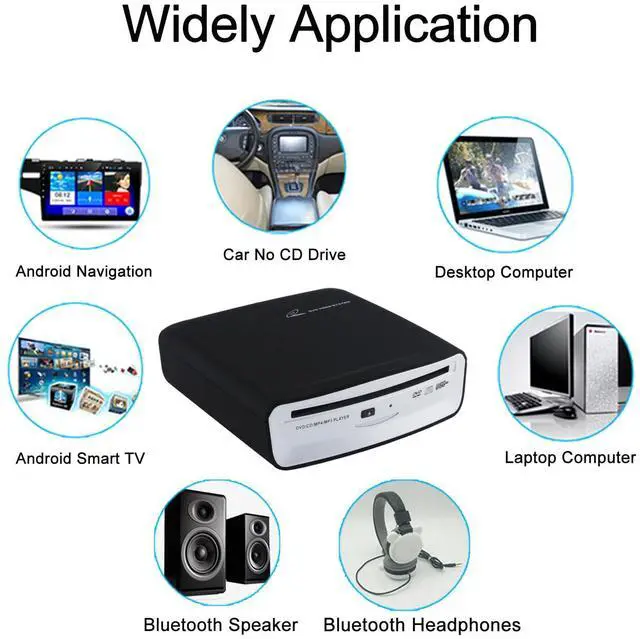
Widely Compatibility
Android Car Navigation, Android Smart TVs, Windows and Mac OS desktop, laptop, PCS.


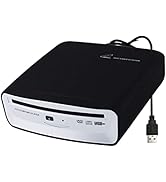
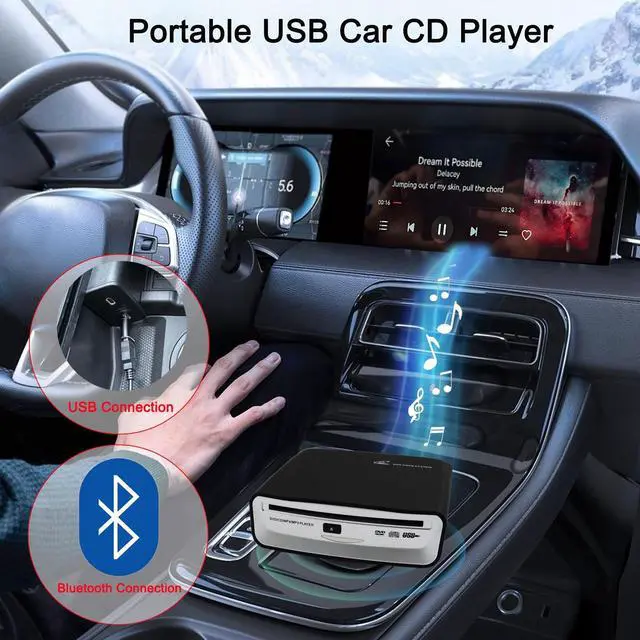
Portable CD Player for Car


Upgrade CD DVD Player with Bluetooth Decoder for Cars(Compatible with Android and Non-Android Car Stereo Including Factory/Stock Radio)

Upgrade the Car CD DVD Player Premium Sound Quality, Shock-Proof, Non-Slip, the Car When Driving Bumpy Does Not Affect the Listen to Music
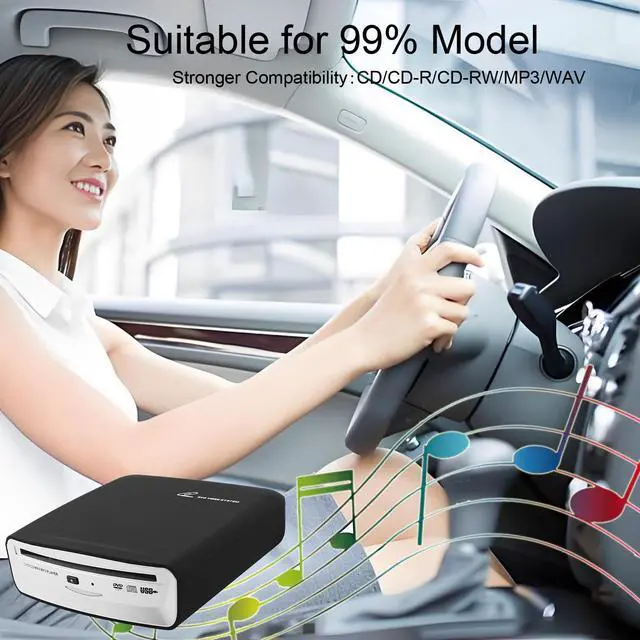
This portable CD player is suitable for most car models, this device is the ideal way to play CD music in the car.
Not only suitable for car Android navigation system, but also compatible with non-Android car radios,laptop, desktop, Android smart TV, Mac,speakers and headphones with Bluetooth functionality.
- For cars with Android car radio
- For cars with Non-Android radio (compatible with system Linux, Wince, etc.)
- For new cars with factory car radio
- For cars with USB input (make sure car radio supports playing WAV audio files when using this function)
- For cars with Bluetooth input (Has Bluetooth search function) -- For cars which don't support playing WAV audio files, audio from the CD player can be transferred to the car radio via Bluetooth input.Compatible with cars that have Bluetooth search function.
- For Laptop
- For Computer
- For Desktop
NOTE:Not supported blue ray CDS.
Suitable for CD format: DVD-ROM, DVD±R, DVD±RW, CD-ROM, CD-R,CD-RW
If you have any questions, the VikTck team will be at your service within 24 hours.
Connect via USB or Bluetooth, and it is Fully Compatible with 99% of the Car Models on the Market in Recent Years

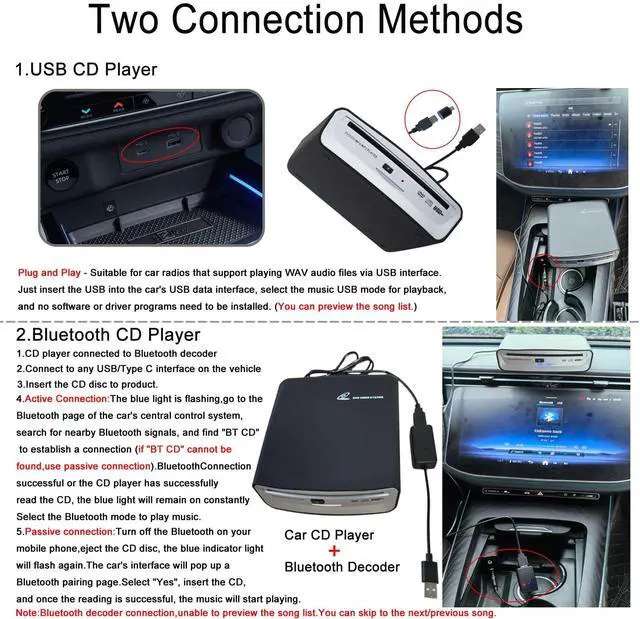
Two Connection Methods and Step Precautions
USB-A/Type-C Connection
For cars support WAV
1..Plug the CD player into the USB data port of your car radio.
2.Insert the CD disc.
3.Go to Media. Change source to USB ( Just need to Select USB ).
4.Then all the tracks with WAV format will be displayed on the screen of your car stereo after you plug the CD/DVD player into your car stereo via the USB port.
5.You can select one of the tracks to start playing music.
Bluetooth Connection (Active Connection)
1. First connection,Connect the product to the Bluetooth decoder and insert it into the car's USB power port.
2.Insert the CD disc to product.
3. When the blue light on the decoder starts to flash, go to the Bluetooth page of the car's central control system, search for nearby Bluetooth signals, and find "BT CD" to establish a connection(if "BT CD" cannot be found, use passive connection).Bluetooth Connection successful or the CD player has successfully read the CD, the blue light will remain on constantly.Select the Bluetooth mode to play music.
4.Once again, connect the playback via Bluetooth. The vehicle's system has Bluetooth memory.Wait for the CD to be successfully read.The decoder's blue light will remain on constantly. Then, select the "BT CD" Bluetooth mode in the music settings and start playing.
5.In the Bluetooth mode, the music list on the CD will not be displayed.You can control the music by using the previous/next button.
Bluetooth Connection (Passive Connection)
1.First connection,Connect the product to the Bluetooth decoder and insert it into the car's USB power supply port.
2.Insert the CD disc to product.
3.Turn off nearby Bluetooth signals such as (Mobile phone Bluetooth, etc.).
4.When the CD player successfully reads the CD disc, the blue light will change from flashing to constantly on.
5.Eject the CD disc.The blue light on the decoder will start flashing.The Bluetooth pairing will automatically appear on the car's central control panel.Select "Yes", and the blue light on the decoder will remain on constantly.Then insert the CD you want to read again,and wait for 8 to 12 seconds for the CD to be successfully read. Once that's done,you will be able to hear the music on the CD.
6.In the Bluetooth mode, the music list on the CD will not be displayed.You can control the music by using the previous/next button.Reconnect,there will be a vehicle-mounted Bluetooth connection record, making the connection process more convenient.
USB/Bluetooth Car CD Player Widely Compatible

Widely Compatible
Not only suitable for car Android navigation system,but also compatible with non-Android car radios,laptop, desktop, Android smart TV, Mac,speakers and headphones with Bluetooth functionality.
Faults and Detection:
1.USB connection,if the CD discs can not be read,the vehicle host is not compatible with WAV music format.At this point, you can connect the internal components of the product the (Bluetooth decoder) and use Bluetooth to transfer the CD audio content to the vehicle's infotainment system, allowing you to play CD music.
2.How to detect the performance of the disc player, you can connect the USB interface of the desktop computer or laptop computer, put into the disc.If you can read the disc content, the perfoamance of the disc machine normal.
3.If some CDs can be played, the quality of the product is fine.Maybe your car does not support the music file formats WAV, cda, so some of them cannot be used,please use it together with the decoder, which can solve this problem.The music skip/there is a hissing sound in the audio quality,should be caused by scratches on the disc, and when the song cannot be read, it will automatically skip to the next one.This is normal.If you change to a new CD, this situation will not occur.
4.If you have no problem to play WAV format CD music when connecting the player on your computer, but cannot play it when connecting it to your car, please pay attention to whether your CD file format is correct or not, whether you select USB mode to play it or not, whether the product USB connector is connected to an extension cable or the charging connector of your car, please connect it to the USB data port of your car.If it does not work properly, please use it together with the Bluetooth decoder, which can solve this problem.
Note: To connect the vehicle-mounted device via USB, the system of the vehicle must support Android 4.4 or above.

Matters need attention
1. Because the reverse release of this product will reduce the reading and anti-vibration ability, the reverse release is prohibited in the disc state.
2. Because the product is assembled and adjusted by professional methods, it cannot be disassembled and adjusted at will.
3. Do not use it beyond the rated conditions of various electrical parts.
4. In order to ensure the normal operation of this product, the voltage of the power supply pin of this product is required to be between 4.75V~5.25V and rated at 5V.
5. When there is a disc already available in this product, do not forcibly insert the second disc.
6. Do not expose this product to a collision or fall.

Package Include
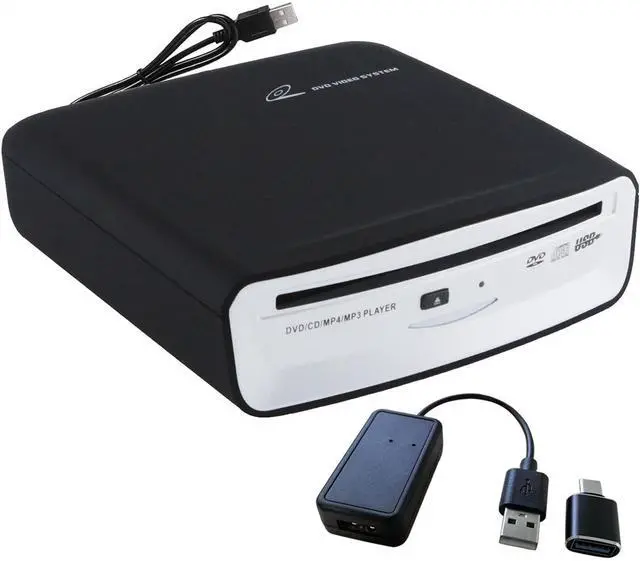
- 1x CD Player for car
- 1 x Bluetooth Decoder
- 1 x Instructions
- 1 x 3M Stickers
Product Specification
Product Name:USB Car Player with Bluetooth Decoder
Voltage / Current: DC5V Min1A
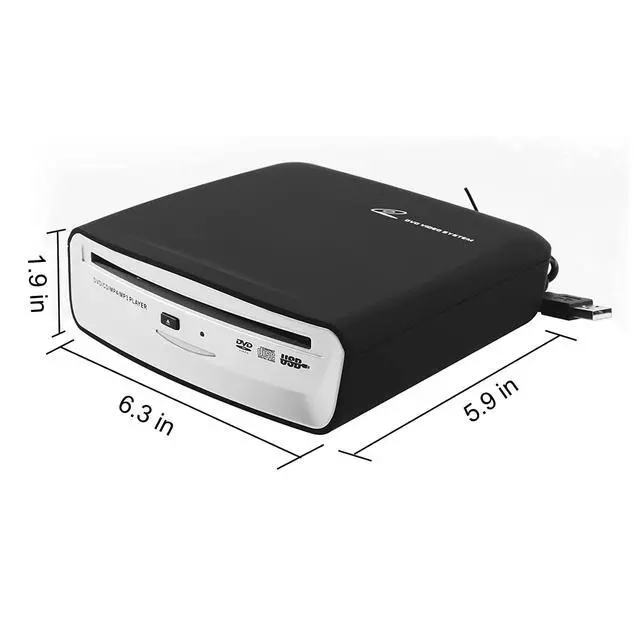
Weight:About 700g
Operating Temperature:-10 ? ~ + 70 ?
Android Version: For Android Version 4.0 or more
Player Disc Format: DVD-ROM, DVD±R, DVD±RW, CD-ROM, CD-R,CD-RW
Disc adaptability: 12CM Disc
External interface: USB 2.0 Disc access mode: suction-type
Placement angle: Place horizontally/left up/dish mouth up
Upgrade CD DVD Player with Bluetooth Decoder for Cars(Compatible with Android and Non-Android Car Stereo Including Factory/Stock Radio)
Upgrade the Car CD DVD Player Premium Sound Quality, Shock-Proof, Non-Slip, the Car When Driving Bumpy Does Not Affect the Listen to Music
This portable CD player is suitable for most car models, this device is the ideal way to play CD music in the car.
Not only suitable for car Android navigation system, but also compatible with non-Android car radios,laptop, desktop, Android smart TV, Mac,speakers and headphones with Bluetooth functionality.
- For cars with Android car radio
- For cars with Non-Android radio (compatible with system Linux, Wince, etc.)
- For new cars with factory car radio
- For cars with USB input (make sure car radio supports playing WAV audio files when using this function)
- For cars with Bluetooth input (Has Bluetooth search function) -- For cars which don't support playing WAV audio files, audio from the CD player can be transferred to the car radio via Bluetooth input.Compatible with cars that have Bluetooth search function.
- For Laptop
- For Computer
- For Desktop
NOTE:Not supported blue ray CDS.
Suitable for CD format: DVD-ROM, DVD±R, DVD±RW, CD-ROM, CD-R,CD-RW
If you have any questions, the VikTck team will be at your service within 24 hours.
Connect via USB or Bluetooth, and it is Fully Compatible with 99% of the Car Models on the Market in Recent Years
Two Connection Methods and Step Precautions
USB-A/Type-C Connection
For cars support WAV
1..Plug the CD player into the USB data port of your car radio.
2.Insert the CD disc.
3.Go to Media. Change source to USB ( Just need to Select USB ).
4.Then all the tracks with WAV format will be displayed on the screen of your car stereo after you plug the CD/DVD player into your car stereo via the USB port.
5.You can select one of the tracks to start playing music.
Bluetooth Connection (Active Connection)
1. First connection,Connect the product to the Bluetooth decoder and insert it into the car's USB power port.
2.Insert the CD disc to product.
3. When the blue light on the decoder starts to flash, go to the Bluetooth page of the car's central control system, search for nearby Bluetooth signals, and find "BT CD" to establish a connection(if "BT CD" cannot be found, use passive connection).Bluetooth Connection successful or the CD player has successfully read the CD, the blue light will remain on constantly.Select the Bluetooth mode to play music.
4.Once again, connect the playback via Bluetooth. The vehicle's system has Bluetooth memory.Wait for the CD to be successfully read.The decoder's blue light will remain on constantly. Then, select the "BT CD" Bluetooth mode in the music settings and start playing.
5.In the Bluetooth mode, the music list on the CD will not be displayed.You can control the music by using the previous/next button.
Bluetooth Connection (Passive Connection)
1.First connection,Connect the product to the Bluetooth decoder and insert it into the car's USB power supply port.
2.Insert the CD disc to product.
3.Turn off nearby Bluetooth signals such as (Mobile phone Bluetooth, etc.).
4.When the CD player successfully reads the CD disc, the blue light will change from flashing to constantly on.
5.Eject the CD disc.The blue light on the decoder will start flashing.The Bluetooth pairing will automatically appear on the car's central control panel.Select "Yes", and the blue light on the decoder will remain on constantly.Then insert the CD you want to read again,and wait for 8 to 12 seconds for the CD to be successfully read. Once that's done,you will be able to hear the music on the CD.
6.In the Bluetooth mode, the music list on the CD will not be displayed.You can control the music by using the previous/next button.Reconnect,there will be a vehicle-mounted Bluetooth connection record, making the connection process more convenient.
USB/Bluetooth Car CD Player Widely Compatible
Widely Compatible
Not only suitable for car Android navigation system,but also compatible with non-Android car radios,laptop, desktop, Android smart TV, Mac,speakers and headphones with Bluetooth functionality.
Faults and Detection:
1.USB connection,if the CD discs can not be read,the vehicle host is not compatible with WAV music format.At this point, you can connect the internal components of the product the (Bluetooth decoder) and use Bluetooth to transfer the CD audio content to the vehicle's infotainment system, allowing you to play CD music.
2.How to detect the performance of the disc player, you can connect the USB interface of the desktop computer or laptop computer, put into the disc.If you can read the disc content, the perfoamance of the disc machine normal.
3.If some CDs can be played, the quality of the product is fine.Maybe your car does not support the music file formats WAV, cda, so some of them cannot be used,please use it together with the decoder, which can solve this problem.The music skip/there is a hissing sound in the audio quality,should be caused by scratches on the disc, and when the song cannot be read, it will automatically skip to the next one.This is normal.If you change to a new CD, this situation will not occur.
4.If you have no problem to play WAV format CD music when connecting the player on your computer, but cannot play it when connecting it to your car, please pay attention to whether your CD file format is correct or not, whether you select USB mode to play it or not, whether the product USB connector is connected to an extension cable or the charging connector of your car, please connect it to the USB data port of your car.If it does not work properly, please use it together with the Bluetooth decoder, which can solve this problem.
Note: To connect the vehicle-mounted device via USB, the system of the vehicle must support Android 4.4 or above.
Matters need attention
1. Because the reverse release of this product will reduce the reading and anti-vibration ability, the reverse release is prohibited in the disc state.
2. Because the product is assembled and adjusted by professional methods, it cannot be disassembled and adjusted at will.
3. Do not use it beyond the rated conditions of various electrical parts.
4. In order to ensure the normal operation of this product, the voltage of the power supply pin of this product is required to be between 4.75V~5.25V and rated at 5V.
5. When there is a disc already available in this product, do not forcibly insert the second disc.
6. Do not expose this product to a collision or fall.
Package Include
- 1x CD Player for car
- 1 x Bluetooth Decoder
- 1 x Instructions
- 1 x 3M Stickers
Product Specification
Product Name:USB Car Player with Bluetooth Decoder
Voltage / Current: DC5V Min1A
Weight:About 700g
Operating Temperature:-10 ? ~ + 70 ?
Android Version: For Android Version 4.0 or more
Player Disc Format: DVD-ROM, DVD±R, DVD±RW, CD-ROM, CD-R,CD-RW
Disc adaptability: 12CM Disc
External interface: USB 2.0 Disc access mode: suction-type
Placement angle: Place horizontally/left up/dish mouth up
About OAUW Brand
As a professional manufacturer and seller of external Car CD player,focuses on providing people with high-quality products that facilitate life. We attach importance to user experience, we have produced products that are popular with people.
You can use OAUW USB Car CD Player on your Android Car Navigation, Android Smart TVs, Windows and Mac OS desktop, laptop, PCS.to play High quality CDs music.
OAUW CD Player for Car
Comfortable Driving, Music with you, Enjoy the feast of Music
Widely Compatibility
Android Car Navigation, Android Smart TVs, Windows and Mac OS desktop, laptop, PCS.
Portable CD Player for Car