



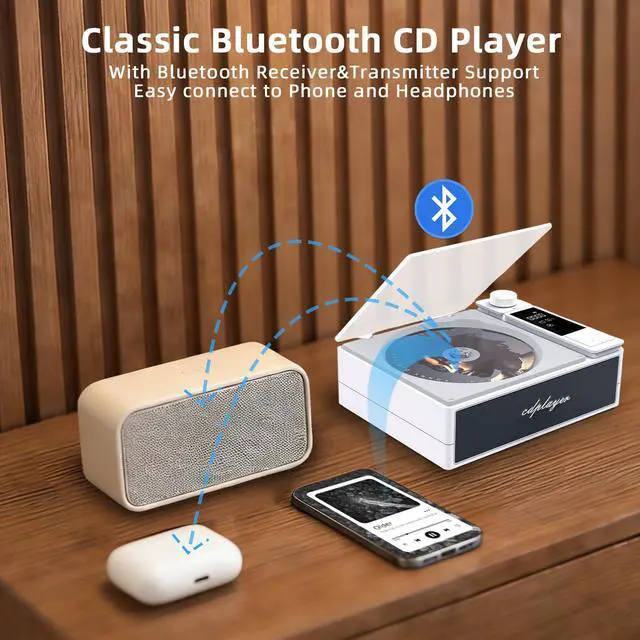


BT Transmit Mode (Only works with CD Mode) ( Disconnect headphones from your phone first).
1.Ensure your headhone/speaker in pairing mode 2. The devices will connect automaticlly (takes about 10s for the first time pairing) 3.Connetction is confirmed when the when Bluetooth icon stay still and stop moving.
Battery life and charging time.
About 4 hours of battery life, fully charged in 3-4 hours.
How to use Bluetooth Receive Mode?
Turn on Bluetooth in your phone, and search for and select "CD Player" to pair. when successful pairing,you can enjoy the music from CD player. PLEASE NOTE: only one device matched at a time.
NOTES:1. When all the songs on the CD have been played, the playback will pause and you need to restart it to continue.
2. In the loop mode, the playback will resume from the beginning when all the songs on the CD have been played. The loop mode can only be used through the remote control.

Some Problem and Solution, help you using Portable Bluetooth CD Player easily!


BT Transmit Mode (Only works with CD Mode) ( Disconnect headphones from your phone first).
1.Ensure your headhone/speaker in pairing mode 2. The devices will connect automaticlly (takes about 10s for the first time pairing) 3.Connetction is confirmed when the when Bluetooth icon stay still and stop moving.
Battery life and charging time.
About 4 hours of battery life, fully charged in 3-4 hours.
How to use Bluetooth Receive Mode?
Turn on Bluetooth in your phone, and search for and select "CD Player" to pair. when successful pairing,you can enjoy the music from CD player. PLEASE NOTE: only one device matched at a time.
NOTES:1. When all the songs on the CD have been played, the playback will pause and you need to restart it to continue.
2. In the loop mode, the playback will resume from the beginning when all the songs on the CD have been played. The loop mode can only be used through the remote control.